
Drop menu issues

Quote from smartmedia on October 18, 2023, 8:12 pmHi..
I have multiple issues with dropmenu.
First i will explain what i am trying to do.
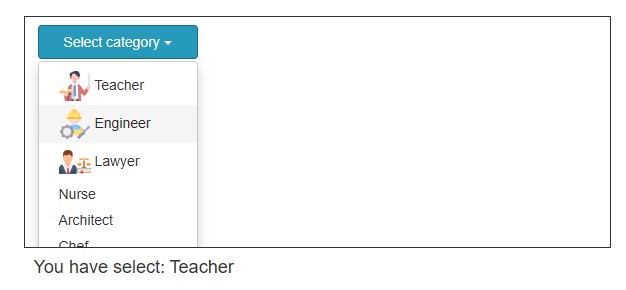
I want to have a combobox with options and images toghether, since this is not possible, Instead i desiced to use a DropMenu that accept html code.Issues
1) When the DropMenu is inside on a Container with specific dimentions the option list is not fully shown.
2) DropMenu is not accept any NeoWeb classes like neo-middle-right or neo-top-left and so on.
3) I can't change the font size, color, line-height and so on, of the option list of DropMenu.Also i need to set the height of the option list to a specific dimension and show scroll bar.
Hi..
First i will explain what i am trying to do.
I want to have a combobox with options and images toghether, since this is not possible, Instead i desiced to use a DropMenu that accept html code.
Issues
1) When the DropMenu is inside on a Container with specific dimentions the option list is not fully shown.
2) DropMenu is not accept any NeoWeb classes like neo-middle-right or neo-top-left and so on.
3) I can't change the font size, color, line-height and so on, of the option list of DropMenu.
Also i need to set the height of the option list to a specific dimension and show scroll bar.

Quote from Gaev on October 19, 2023, 4:43 am@smartmedia
1) When the DropMenu is inside on a Container with specific dimentions the option list is not fully shown.
Does this work for you ?
Container1 >>> Style >>> overflow-y = auto3) I can't change the font size, color, line-height and so on, of the option list of DropMenu.
Try this ...
Dropdown1 >>> Edit "items" property >>>

<img src='teacher.png'></img> <b>Teacher</b>|Teacher
<img src='engineer.png'></img> <span style="font-size:30px">Engineer</span>|Engineer
etc. etc.
1) When the DropMenu is inside on a Container with specific dimentions the option list is not fully shown.
Does this work for you ?
Container1 >>> Style >>> overflow-y = auto
3) I can't change the font size, color, line-height and so on, of the option list of DropMenu.
Try this ...
Dropdown1 >>> Edit "items" property >>>

<img src='teacher.png'></img> <b>Teacher</b>|Teacher
<img src='engineer.png'></img> <span style="font-size:30px">Engineer</span>|Engineer
etc. etc.
Quote from smartmedia on October 19, 2023, 7:21 amHi @gaev,
thanks for your response, setting the container to overflow just shows a scroll bar on the container and i need to scrool down to see all list items, i want the scrollbar to be in the list of dropmenu, and the list to overcome the barrier of the container.
I suppose i am not asking something difficult, all modern comboboxes and list boxes have such cababilities. Here all to the time we try to find workarounds for something in order to work. This is really furstrating some thimes. But thanks for your help, is always valuable.
Hi @gaev,
thanks for your response, setting the container to overflow just shows a scroll bar on the container and i need to scrool down to see all list items, i want the scrollbar to be in the list of dropmenu, and the list to overcome the barrier of the container.
I suppose i am not asking something difficult, all modern comboboxes and list boxes have such cababilities. Here all to the time we try to find workarounds for something in order to work. This is really furstrating some thimes. But thanks for your help, is always valuable.

Quote from luishp on October 19, 2023, 11:29 am@smartmedia please check the attached sample app (yours modified)
1) When the DropMenu is inside on a Container with specific dimentions the option list is not fully shown.
Be sure to set de Container properties overflow-x and overflow-y to visible.
DropMenu is not accept any NeoWeb classes like neo-middle-right or neo-top-left and so on.
Put it inside a Container (with overflow visible) and apply those classes to the Container instead (see sample app)
I can't change the font size, color, line-height and so on, of the option list of DropMenu.
Note that the DropDown object is a complex object composed by many HTML tags (you can easily inspect the code using the mouse right button in the browser)
So, to change the colors or limit the height you will need some custom CSS (Project > Properties > Styles):.dropdown-menu{ max-height:300px; overflow:auto; } .dropdown-menu a{ color:red!important; }I hope it helps.
@smartmedia please check the attached sample app (yours modified)
1) When the DropMenu is inside on a Container with specific dimentions the option list is not fully shown.
Be sure to set de Container properties overflow-x and overflow-y to visible.
DropMenu is not accept any NeoWeb classes like neo-middle-right or neo-top-left and so on.
Put it inside a Container (with overflow visible) and apply those classes to the Container instead (see sample app)
I can't change the font size, color, line-height and so on, of the option list of DropMenu.
Note that the DropDown object is a complex object composed by many HTML tags (you can easily inspect the code using the mouse right button in the browser)
So, to change the colors or limit the height you will need some custom CSS (Project > Properties > Styles):
.dropdown-menu{
  max-height:300px;
  overflow:auto;
}
.dropdown-menu a{
  color:red!important;
}
I hope it helps.
Uploaded files:Quote from smartmedia on October 20, 2023, 11:23 amHi @luishp
Thanks for your help, i did fix it with your instruction, also found in w3school the relative css classes. For some reason the class .dropdown-content is not working. I saw also that changing the font-size on .dropdown-menu a it changes the font size on top menu elements of the site, so i guess they use the same class.
Your help is always valuable.
Hi @luishp
Thanks for your help, i did fix it with your instruction, also found in w3school the relative css classes. For some reason the class .dropdown-content is not working. I saw also that changing the font-size on .dropdown-menu a it changes the font size on top menu elements of the site, so i guess they use the same class.
Your help is always valuable.
Uploaded files: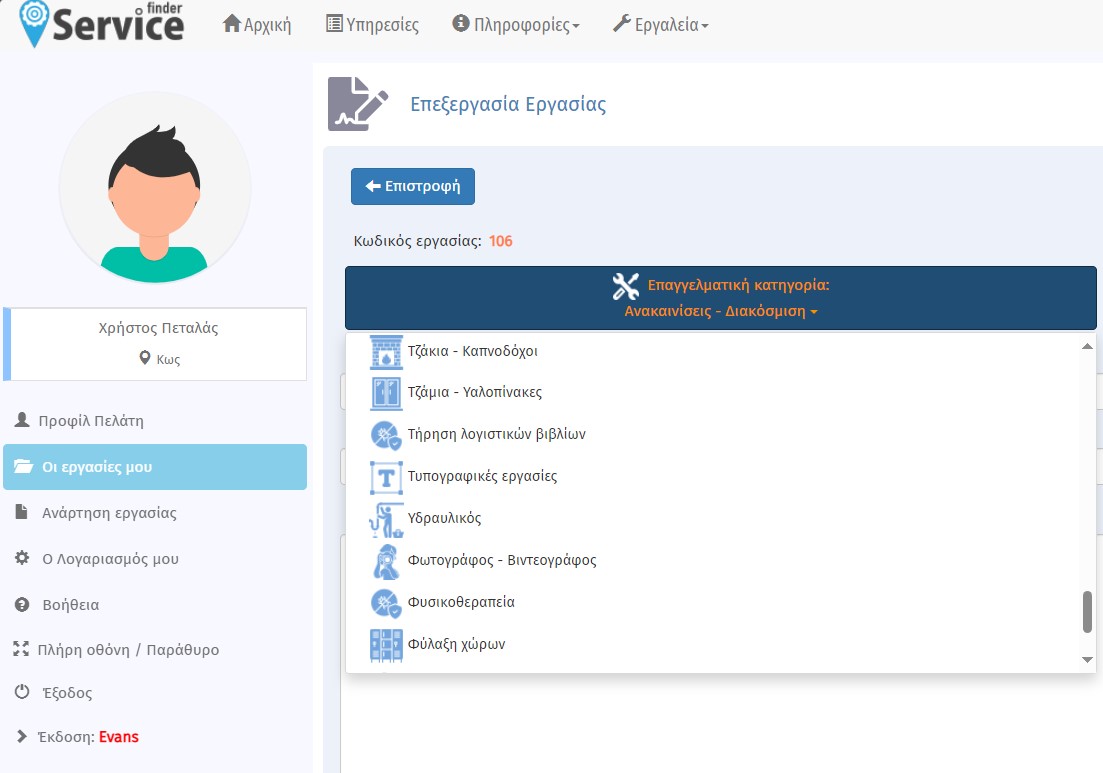
Quote from luishp on October 21, 2023, 1:11 pm@smartmedia the CSS class .dropdown-content is not used in DropDown object.
I saw also that changing the font-size on .dropdown-menu a it changes the font size on top menu elements of the site, so i guess they use the same class.
Just use a more restrictive CSS selector:
#Dropdown1 .dropdown-menu{
  max-height:300px;
  overflow:auto;
}
#Dropdown1 .dropdown-menu a{
  color:red!important;
}
This way it will only affect to an object whose name is "Dropdown1".
Regards.
@smartmedia the CSS class .dropdown-content is not used in DropDown object.
I saw also that changing the font-size on .dropdown-menu a it changes the font size on top menu elements of the site, so i guess they use the same class.
Just use a more restrictive CSS selector:
#Dropdown1 .dropdown-menu{
  max-height:300px;
  overflow:auto;
}
#Dropdown1 .dropdown-menu a{
  color:red!important;
}
This way it will only affect to an object whose name is "Dropdown1".
Regards.