Send Email from VisualNEO Web

Quote from rcohen on May 6, 2020, 2:43 pmI looked on the forum for this, as well as the help file and can no mention of how to send email. I'm sure I'm missing it, but .. can someone direct me to information regarding the process of email from our apps?
Thanks
I looked on the forum for this, as well as the help file and can no mention of how to send email. I'm sure I'm missing it, but .. can someone direct me to information regarding the process of email from our apps?
Thanks

Quote from CDY@44 on May 6, 2020, 2:59 pmTake a look at the YOUTUBE channel of Visualneo web ("How to Code a Database App - PART 4_ Delete records from the database"...at about 3 minutes.)
https://www.youtube.com/watch?v=gAynliYxLSs
Hope this helps !
Denis
Take a look at the YOUTUBE channel of Visualneo web ("How to Code a Database App - PART 4_ Delete records from the database"...at about 3 minutes.)
https://www.youtube.com/watch?v=gAynliYxLSs
Hope this helps !
Denis

Quote from luishp on May 6, 2020, 4:49 pm@rcohen ending an email is a server side functionality, unless you just want a simple link to open the local email application. In the last case just right click a Container object and add this HTML code:<a href="mailto:name@domain.com">Click here to send us an email!</a>It is possible to send the data submited from a VisualNEO Web form object to an email address using PHP on a web server.
Just copy this code into a plain text editor and save it as "senddata.php" (change first the email addressses), then upload it to your webserver:<?php //Header required when app and php are of different origins header("Access-Control-Allow-Origin: *"); $message=""; if($_SERVER["REQUEST_METHOD"] === "POST"){ foreach($_POST as $key => $value){ $message .= "".htmlspecialchars($key).": ".htmlspecialchars($value)."\r\n"; } $to = "somebody@example.com"; $subject = "My subject"; $headers = "From: webmaster@example.com" . "\r\n" . "CC: somebodyelse@example.com"; mail($to,$subject,$message,$headers); echo "EMAIL SUCCESSFULLY SEND"; }else{ $result = "INVALID DATA"; echo $result; } ?>Then add a Form object with some TextInputs and/or a TextArea objects and a Form Submit object to send the Form. In the Form "action" property type the full URL to your PHP script. For example:
https://yourdomain.com/myscripts/senddata.phpI hope it helps.
Regards.
<a href="mailto:name@domain.com">Click here to send us an email!</a>
Just copy this code into a plain text editor and save it as "senddata.php" (change first the email addressses), then upload it to your webserver:
<?php
//Header required when app and php are of different origins
header("Access-Control-Allow-Origin: *");
$message="";
if($_SERVER["REQUEST_METHOD"] === "POST"){
     foreach($_POST as $key => $value){
          $message .= "".htmlspecialchars($key).": ".htmlspecialchars($value)."\r\n";
     }
     $to = "somebody@example.com";
     $subject = "My subject";
     $headers = "From: webmaster@example.com" . "\r\n" . "CC: somebodyelse@example.com";
     mail($to,$subject,$message,$headers);
     echo "EMAIL SUCCESSFULLY SEND";
}else{
     $result = "INVALID DATA";
     echo $result;
}
?>
Then add a Form object with some TextInputs and/or a TextArea objects and a Form Submit object to send the Form. In the Form "action" property type the full URL to your PHP script. For example:
https://yourdomain.com/myscripts/senddata.php
I hope it helps.
Regards.
Quote from rcohen on May 6, 2020, 5:05 pmAhhhh.... [click] ;-)
I got it.
When directing this to forms that do not belong to us, is the return from said page always land in [DATA] ?
Thank you
Ahhhh.... [click] ;-)
I got it.
When directing this to forms that do not belong to us, is the return from said page always land in [DATA] ?
Thank you
Quote from luishp on May 6, 2020, 6:07 pmWhen directing this to forms that do not belong to us, is the return from said page always land in [DATA] ?
Sorry, I don't understand your question. About understanding how to work with Forms please take a look at the included sample app "FormSubmit".
Best regards.
When directing this to forms that do not belong to us, is the return from said page always land in [DATA] ?
Sorry, I don't understand your question. About understanding how to work with Forms please take a look at the included sample app "FormSubmit".
Best regards.
Quote from CDY@44 on January 5, 2021, 6:38 pmHi Luis,
About the "submit script" in PHP.
Let's imagine I have a variable ( in VisualNeo Web ) : [email], how can I use the value of this variable in the "submit script" instead of "somebody@example.com".
How to pass a VisualNeoWeb [variable] to a Php $to=variable ? If it is possible....
Best regards,
Hi Luis,
About the "submit script" in PHP.
Let's imagine I have a variable ( in VisualNeo Web ) : [email], how can I use the value of this variable in the "submit script" instead of "somebody@example.com".
How to pass a VisualNeoWeb [variable] to a Php $to=variable ? If it is possible....
Best regards,
Quote from luishp on January 5, 2021, 8:21 pm@cdy44-2 yes it's possible, you can send the information in a form InputText field. Just be sure to give it a "property-name" value under the Properties panel. If you use property-name: targetEmail then replace this line in the .php file:
$to = "somebody@example.com";With this one:
$to = $_POST['targetEmail'];And done :)
Anyway I have succesfully sent emails without using server side code using SMTP2go.
The API can be called directly form JavaScript and allows up to 1000 emails sent a month for free:BeginJS var url = "https://api.smtp2go.com/v3/email/send"; $.ajax({ url: url, method: 'POST', headers: { 'Content-Type': "application/json" }, data: JSON.stringify({ 'api_key': "PUT HERE YOUR API KEY", 'sender': "Your Name <your.name@yourdomain.com>", 'to': [ "Target Name <target.name@hisdomain.com>" ], 'subject': "Your subject", 'html_body': "Your email content in html format" }), }).done(function(result) { console.log(result); }).fail(function(err) { throw err; }); EndJSIt takes some time to configure the SMTP2GO account, but once it's ready works very good.
All emails from visualneo.com (including those sent from this forum) are sent by SMTP2GO service. When sendind a lot of emails a day it's quite more reliable than the hosting default service.Regards.
@cdy44-2 yes it's possible, you can send the information in a form InputText field. Just be sure to give it a "property-name" value under the Properties panel. If you use property-name: targetEmail then replace this line in the .php file:
$to = "somebody@example.com";
With this one:
$to = $_POST['targetEmail'];
And done :)
Anyway I have succesfully sent emails without using server side code using SMTP2go.
The API can be called directly form JavaScript and allows up to 1000 emails sent a month for free:
BeginJS
var url = "https://api.smtp2go.com/v3/email/send";
$.ajax({
  url: url,
  method: 'POST',
  headers: {
    'Content-Type': "application/json"
  },
  data: JSON.stringify({
    'api_key': "PUT HERE YOUR API KEY",
    'sender': "Your Name <your.name@yourdomain.com>",
    'to': [
      "Target Name <target.name@hisdomain.com>"
    ],
    'subject': "Your subject",
    'html_body': "Your email content in html format"
  }),
}).done(function(result) {
  console.log(result);
}).fail(function(err) {
  throw err;
});
EndJS
It takes some time to configure the SMTP2GO account, but once it's ready works very good.
All emails from visualneo.com (including those sent from this forum) are sent by SMTP2GO service. When sendind a lot of emails a day it's quite more reliable than the hosting default service.
Regards.

Quote from Juancasev on April 29, 2022, 9:27 pmHola,
Tengo una pregunta básica pero pertenece a este hilo (que me parece muy importante).
He realizado una aplicación que envía un formulario según el sistema propuesto a un PHP y se envía correctamente.
He conseguido modificar desde VisualNeo web las variables $to y $message sin problemas.
No puedo hacerlo con $headers, pero parecen tener un formato distinto. Parecen como 3 cadenas de texto separadas. ¿Se puede?
Por otro lado queria saber si es posible enviar un correo en HTML, como una plantilla o algo asi.
Muchas gracias.
Hola,
Tengo una pregunta básica pero pertenece a este hilo (que me parece muy importante).
He realizado una aplicación que envía un formulario según el sistema propuesto a un PHP y se envía correctamente.
He conseguido modificar desde VisualNeo web las variables $to y $message sin problemas.
No puedo hacerlo con $headers, pero parecen tener un formato distinto. Parecen como 3 cadenas de texto separadas. ¿Se puede?
Por otro lado queria saber si es posible enviar un correo en HTML, como una plantilla o algo asi.
Muchas gracias.
Quote from luishp on May 1, 2022, 7:36 am@juancasev en este enlace se explica como enviar un mail con HTML desde PHP. Los $headers están protegidos cotra inyección de código por razones de seguridad:
https://www.w3schools.com/php/func_mail_mail.aspPo otro lado, la solución que comparto en este mismo hilo para enviar emails utilizando SMTP2GO es muy útil y no requiere un script en el servidor. Merece la pena echarle un vistazo. El único problemas es configurar el dominio desde donde enviar los emails correctamente, pero como digo merece mucho la pena.
Saludos.
@juancasev en este enlace se explica como enviar un mail con HTML desde PHP. Los $headers están protegidos cotra inyección de código por razones de seguridad:
https://www.w3schools.com/php/func_mail_mail.asp
Po otro lado, la solución que comparto en este mismo hilo para enviar emails utilizando SMTP2GO es muy útil y no requiere un script en el servidor. Merece la pena echarle un vistazo. El único problemas es configurar el dominio desde donde enviar los emails correctamente, pero como digo merece mucho la pena.
Saludos.

Quote from tonyspacex on August 31, 2022, 3:53 pmMuchas gracias, @luishp por el código en Javascript para enviar correos usando SMTP2go.
He conectado las variables de VisualNeo con las de Javascript con éxito para enviar los correos personalizados.
Mi pregunta es: ¿cómo podría adjuntar una imagen al correo o insertarla en el body? Concretamente una imagen previamente capturada con el plugin NeoWebcam en BASE64 JPG?
Muchas gracias de anemano.
Saludos.
________________________________________
Thank you very much @luishp for the Javascript code to send mails using SMTP2go.
I have successfully connected the VisualNeo variables with the Javascript variables in order to send custom emails.
Now, my question is about how I could attach to the mail or insert in the body an image previously captured with the NeoWebcam plugin in BASE64 JPG.
Thank you very much for your support.
Best regards.
Muchas gracias, @luishp por el código en Javascript para enviar correos usando SMTP2go.
He conectado las variables de VisualNeo con las de Javascript con éxito para enviar los correos personalizados.
Mi pregunta es: ¿cómo podría adjuntar una imagen al correo o insertarla en el body? Concretamente una imagen previamente capturada con el plugin NeoWebcam en BASE64 JPG?
Muchas gracias de anemano.
Saludos.
________________________________________
Thank you very much @luishp for the Javascript code to send mails using SMTP2go.
I have successfully connected the VisualNeo variables with the Javascript variables in order to send custom emails.
Now, my question is about how I could attach to the mail or insert in the body an image previously captured with the NeoWebcam plugin in BASE64 JPG.
Thank you very much for your support.
Best regards.
Quote from luishp on August 31, 2022, 6:38 pm@tonyspacex No he implementado esa posibilidad dentro del plugin pero si tienes paciencia intentaré añadirla lo antes posible.
I have not implemented that possibility within the plugin but if you have patience, I will try to add it as soon as possible.
Gracias!
@tonyspacex No he implementado esa posibilidad dentro del plugin pero si tienes paciencia intentaré añadirla lo antes posible.
I have not implemented that possibility within the plugin but if you have patience, I will try to add it as soon as possible.
Gracias!
Quote from tonyspacex on September 1, 2022, 1:32 amGracias por rápida respuesta, @luishp. Mientras tanto, ¿no hay alguna forma de poder añadir archivos adjuntos al email añadiendo una línea JSON.stringify a tu código Javascript para SMTP2go? Muchas gracias.
Thanks for quick response. In the meantime, isn't there a way to add attachments to the emails by adding a JSON.stringify line to your SMTP2go Javascript code? Thank you very much.
Gracias por rápida respuesta, @luishp. Mientras tanto, ¿no hay alguna forma de poder añadir archivos adjuntos al email añadiendo una línea JSON.stringify a tu código Javascript para SMTP2go? Muchas gracias.
Thanks for quick response. In the meantime, isn't there a way to add attachments to the emails by adding a JSON.stringify line to your SMTP2go Javascript code? Thank you very much.
Quote from luishp on September 1, 2022, 7:40 am@tonyspacex puedes hacerlo utilizando neoAjaxSend. Esta es la estructura del JSON para enviar un archivo adjunto mediante SMTP2GO:
{
    "api_key": "api-40246460336B11E6AA53F23C91285F72",
    "to": ["Test Person <test@example.com>"],
    "sender": "Test Persons Friend <test2@example.com>",
    "subject": "Hello Test Person",
    "text_body": "You're my favorite test person ever",
    "html_body": "<h1>You're my favorite test person ever</h1>",
    "attachments": [
        {
            "filename": "image.jpg",
            "fileblob": "--base64-data--",
            "mimetype": "image/jpeg"
        }
    ]
}
Donde pone "--base64-data--" cambialo por $App.NombreVariable, donde NombreVariable es la variable donde guardas el contenido en formato Base64 del archivo a enviar. También asegurate de utilizar el tipo mime adecuado y el nombre de archivo que quieras.
Más información aquí.Una vez tengas el JSON correctamente formado y guardado en una varible (en mi ejemplo siguiente [myjson]) envíalo mediante neoAjaxSend:
neoAjaxSend "https://api.smtp2go.com/v3/email/send" "POST" "[myjson]" "json" "" ""Cualquier duda, me dices.
@tonyspacex puedes hacerlo utilizando neoAjaxSend. Esta es la estructura del JSON para enviar un archivo adjunto mediante SMTP2GO:
{
    "api_key": "api-40246460336B11E6AA53F23C91285F72",
    "to": ["Test Person <test@example.com>"],
    "sender": "Test Persons Friend <test2@example.com>",
    "subject": "Hello Test Person",
    "text_body": "You're my favorite test person ever",
    "html_body": "<h1>You're my favorite test person ever</h1>",
    "attachments": [
        {
            "filename": "image.jpg",
            "fileblob": "--base64-data--",
            "mimetype": "image/jpeg"
        }
    ]
}
Donde pone "--base64-data--" cambialo por $App.NombreVariable, donde NombreVariable es la variable donde guardas el contenido en formato Base64 del archivo a enviar. También asegurate de utilizar el tipo mime adecuado y el nombre de archivo que quieras.
Más información aquí.
Una vez tengas el JSON correctamente formado y guardado en una varible (en mi ejemplo siguiente [myjson]) envíalo mediante neoAjaxSend:
neoAjaxSend "https://api.smtp2go.com/v3/email/send" "POST" "[myjson]" "json" "" ""
Cualquier duda, me dices.
Quote from tonyspacex on September 2, 2022, 3:13 pmMuchas gracias, @luishp. Gracias a tu asistencia he logrado configurar con éxito la función que necesitaba y ahora la app ya puede enviar las capturas tomadas con NeoWebcam por email como archivos adjuntos.
Saludos.
Muchas gracias, @luishp. Gracias a tu asistencia he logrado configurar con éxito la función que necesitaba y ahora la app ya puede enviar las capturas tomadas con NeoWebcam por email como archivos adjuntos.
Saludos.
Quote from pfavaro on October 31, 2022, 2:28 amLuis,
I put up the server side php script, built the form, pointed it to the script and when submit is pressed I get an email with no content and no data from the text area inside the form. I have tried everything (except for the correct thing) Any ideas on what might be causing this issue. That loop you have in there is passing on the values of the variables from the form, right?
Luis,
I put up the server side php script, built the form, pointed it to the script and when submit is pressed I get an email with no content and no data from the text area inside the form. I have tried everything (except for the correct thing) Any ideas on what might be causing this issue. That loop you have in there is passing on the values of the variables from the form, right?
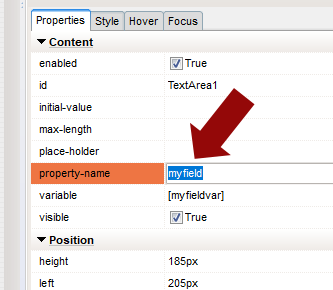
Quote from luishp on October 31, 2022, 9:09 am@pfavaro be sure to add a property-name to each form field (see attached picture) so it can be detected on server side.
If you want me to take a look at your app I will be more than happy to help.
@pfavaro be sure to add a property-name to each form field (see attached picture) so it can be detected on server side.
If you want me to take a look at your app I will be more than happy to help.