
Error in IfEx block

Quote from nikyred on August 21, 2023, 12:24 pmHi,
I'm creating an application and I'm encountering an issue with a code block where a series of IF statements are being used.
I need to check a code within the box and color the box based on the selected content.
However, even though the code is not the same, the program still executes the code within the IF condition.
Attached is the image of the error.
Hi,
I'm creating an application and I'm encountering an issue with a code block where a series of IF statements are being used.
I need to check a code within the box and color the box based on the selected content.
However, even though the code is not the same, the program still executes the code within the IF condition.
Attached is the image of the error.
Uploaded files: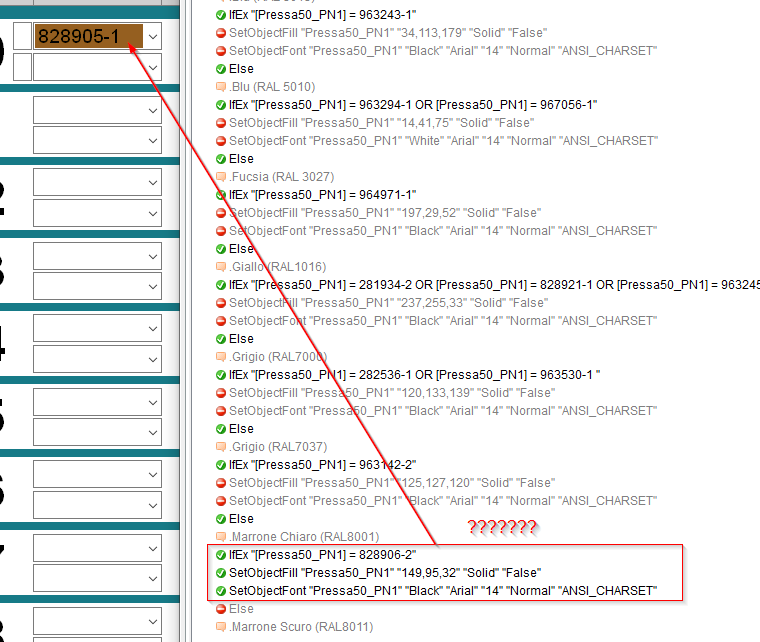

Quote from susan on August 21, 2023, 1:21 pmMy guess is that it looks like both strings are being interpreted as numeric expressions, so
828905 - 1 = 828904
and
828906 - 2 = 828904
And so they are seen as equal in the IfEx action. I don't know enough to suggest the how to stop this, but I imagine someone with more experience than me in VisualNEO Win will know a solution?
My guess is that it looks like both strings are being interpreted as numeric expressions, so
828905 - 1 = 828904
and
828906 - 2 = 828904
And so they are seen as equal in the IfEx action. I don't know enough to suggest the how to stop this, but I imagine someone with more experience than me in VisualNEO Win will know a solution?

Quote from luishp on August 21, 2023, 2:06 pm@nikyred, I think @susan is right. Please prepend "!" to the variables value to avoid VisualNEO Win doing the math operation.
Example:
SetVar "[myVar]" "!828905 - 1"Please, let me know if this solves the issue.
Regards.
@nikyred, I think @susan is right. Please prepend "!" to the variables value to avoid VisualNEO Win doing the math operation.
Example:
SetVar "[myVar]" "!828905 - 1"
Please, let me know if this solves the issue.
Regards.
Quote from nikyred on August 21, 2023, 3:13 pmI tried to put ! , but it does not work.
Can I send you the TEST file so I could check it?
the only thing if I can send it to you privately
I tried to put ! , but it does not work.
Can I send you the TEST file so I could check it?
the only thing if I can send it to you privately
Quote from mishem on August 21, 2023, 3:34 pmFirst, your conditions are written incorrectly.
Should be:IfEx "" Else EndIfBut not:
IfEx "" Else Else Else EndIfReplace Else with EndIf everywhere. And let me know.
First, your conditions are written incorrectly.
Should be:
IfEx ""

Else

EndIf
But not:
IfEx ""

Else

Else

Else

EndIf
Replace Else with EndIf everywhere. And let me know.
Quote from mishem on August 21, 2023, 3:39 pmSecondly, if you think that something is not working correctly, use AlertBox . For example:
IfEx ”[Pressa50_PN1] = 963243-1"
AlertBox "" "[Pressa50_PN1]"
SetObjectFill"Pressa50_PN1“ "34,113,179" "Solid" "False"
SetObjectFont "Pressa50_PN1" "Black" "Arial" "14" "Normal" "ANSI_CHARSET"
EndIf
Secondly, if you think that something is not working correctly, use AlertBox . For example:
IfEx ”[Pressa50_PN1] = 963243-1"
AlertBox "" "[Pressa50_PN1]"
SetObjectFill"Pressa50_PN1“ "34,113,179" "Solid" "False"
SetObjectFont "Pressa50_PN1" "Black" "Arial" "14" "Normal" "ANSI_CHARSET"
EndIf
Quote from nikyred on August 21, 2023, 4:24 pmQuote from mishem on August 21, 2023, 3:34 pmFirst, your conditions are written incorrectly.
Should be:Plain textCopy to clipboardOpen code in new windowEnlighterJS 3 Syntax HighlighterIfEx ""ElseEndIfIfEx "" Else EndIfIfEx "" Else EndIfBut not:
Plain textCopy to clipboardOpen code in new windowEnlighterJS 3 Syntax HighlighterIfEx ""ElseElseElseEndIfIfEx "" Else Else Else EndIfIfEx "" Else Else Else EndIfReplace Else with EndIf everywhere. And let me know.
Thank you for your suggestion.
I tried to edit but it didn't solve the problem.
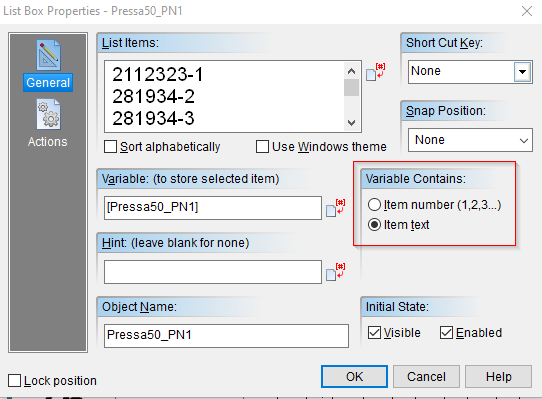
but I replaced this "-" symbol with this "_" and it works.So it is confirmed that VisualNeo is likely doing a mathematical calculation.
I tried adding the "!" symbol to the variable. but it doesn't resolve.I will try to make the selection in number and not in Text, in the box. So then in the program in the condition comparison with a number and not with a Text
Quote from mishem on August 21, 2023, 3:34 pmFirst, your conditions are written incorrectly.
Should be:Plain textCopy to clipboardOpen code in new windowEnlighterJS 3 Syntax HighlighterIfEx ""ElseEndIfIfEx "" Else EndIfIfEx "" Else EndIfBut not:
Plain textCopy to clipboardOpen code in new windowEnlighterJS 3 Syntax HighlighterIfEx ""ElseElseElseEndIfIfEx "" Else Else Else EndIfIfEx "" Else Else Else EndIfReplace Else with EndIf everywhere. And let me know.
Thank you for your suggestion.
I tried to edit but it didn't solve the problem.
but I replaced this "-" symbol with this "_" and it works.
So it is confirmed that VisualNeo is likely doing a mathematical calculation.
I tried adding the "!" symbol to the variable. but it doesn't resolve.
I will try to make the selection in number and not in Text, in the box. So then in the program in the condition comparison with a number and not with a Text

Quote from mishem on August 21, 2023, 5:17 pmQuote from nikyred on August 21, 2023, 4:24 pmbut I replaced this "-" symbol with this "_" and it works.Alertbox shows subtraction or a whole line? I have a whole line.
Quote from nikyred on August 21, 2023, 4:24 pmbut I replaced this "-" symbol with this "_" and it works.
Alertbox shows subtraction or a whole line? I have a whole line.
Quote from Gaev on August 21, 2023, 11:02 pm@nikyred
I think @mishem has the right reason ... unlike some other languages, NeoScript does NOT support multiple Else code blocks within If and IfEx commands.
This small example worked for me ...
...AlertBox "Selection" "[ListBox1]"

IfEx "[ListBox1] = 828906-1"
   AlertBox "828906-1" "selected"
   Return
EndIf

IfEx "[ListBox1] = 963142-2"
   AlertBox "963142-2" "selected"
   Return
EndIf
... where my ListBox had just two entries viz. 828906-1 and 963142-2 (ok, I was too lazy to add more entries).
So, in your pub, add the appropriate commands in place of the AlertBox (after it is seen to work for you).
I think @mishem has the right reason ... unlike some other languages, NeoScript does NOT support multiple Else code blocks within If and IfEx commands.
This small example worked for me ...
...AlertBox "Selection" "[ListBox1]"

IfEx "[ListBox1] = 828906-1"
   AlertBox "828906-1" "selected"
   Return
EndIf

IfEx "[ListBox1] = 963142-2"
   AlertBox "963142-2" "selected"
   Return
EndIf
... where my ListBox had just two entries viz. 828906-1 and 963142-2 (ok, I was too lazy to add more entries).
So, in your pub, add the appropriate commands in place of the AlertBox (after it is seen to work for you).
Quote from susan on August 22, 2023, 4:14 amIn case it is relevant, I found this in the definition of the SetVar action in the Help. I presume attempting to evaluate a string as a mathematical formula might apply to strings in contexts beyond the SetVar action?
In case it is relevant, I found this in the definition of the SetVar action in the Help. I presume attempting to evaluate a string as a mathematical formula might apply to strings in contexts beyond the SetVar action?
Uploaded files: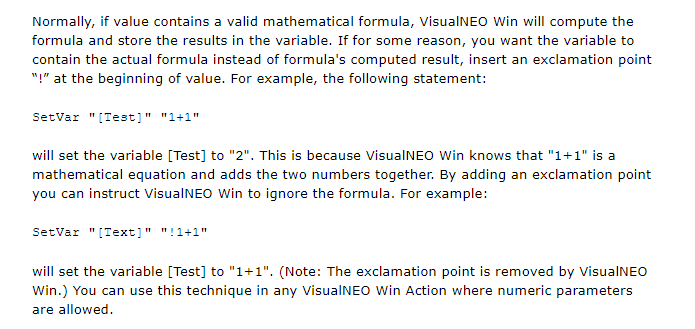
Quote from mishem on August 22, 2023, 7:08 amQuote from nikyred on August 21, 2023, 3:13 pmI tried to put ! , but it does not work.
Did a little experiment. The AlertBox displays the correct variable value as 828906-2.
IfEx performs a mathematical operation on both the variable and the value. So it should be written like this:
IfEx "![ComboBox1]=!828906-2"
Quote from nikyred on August 21, 2023, 3:13 pmI tried to put ! , but it does not work.
Did a little experiment. The AlertBox displays the correct variable value as 828906-2.
IfEx performs a mathematical operation on both the variable and the value. So it should be written like this:
IfEx "![ComboBox1]=!828906-2"
Quote from nikyred on August 25, 2023, 3:17 pmHi,
Thanks for everyone's support.
I tried your advice but with no success.
I then chose to transform the Box selection into a numeric value. In this case everything works :)
Hi,
Thanks for everyone's support.
I tried your advice but with no success.
I then chose to transform the Box selection into a numeric value. In this case everything works :)