
Es posible mostrar las ListBox normalmente en móvil

Quote from Palamar on September 16, 2021, 5:24 pmHola gente!:
Hay posibilidad de visualizar un ListBox en un dispositivo móvil de igual manera en la que se visualiza en un navegador de pc?. En el móvil solo se visualiza la lista si hacemos clic en ella y de ahí nos da a elegir.
Saludos!
Hola gente!:
Hay posibilidad de visualizar un ListBox en un dispositivo móvil de igual manera en la que se visualiza en un navegador de pc?. En el móvil solo se visualiza la lista si hacemos clic en ella y de ahí nos da a elegir.
Saludos!

Quote from roccocogliano on November 6, 2021, 8:43 pmHi @palamar, did you find the answer to your question? interests me too.
Greetings
Hi @palamar, did you find the answer to your question? interests me too.
Greetings

Quote from Vadim on November 6, 2021, 8:54 pm@palamar @roccocogliano
If I understood the question correctly, then yes, this possibility exists. For example, you can see such a appearing list in my project: https://orgpsiholog.com/mp
On the Styles tab of my project properties, I have this written down:
#Dropdown5 ul.dropdown-menu{
min-width: 50px; /*width of the opening list*/.
margin-left: -50px; /* indent left */
margin-top: -192px; /* indent at top*/
}
#Dropdown4 ul.dropdown-menu{
min-width: 50px;
margin-left: -50px;
margin-top: -192px;
}
#Dropdown3 ul.dropdown-menu{
min-width: 50px;
margin-left: -50px;
margin-top: -192px;
}
#Dropdown2 ul.dropdown-menu{
min-width: 50px;
margin-left: -50px;
margin-top: -192px;
}
#Dropdown1 ul.dropdown-menu{
min-width: 50px;
margin-left: -50px;
margin-top: -192px;
}
p {
white-space: normal;
}
If I understood the question correctly, then yes, this possibility exists. For example, you can see such a appearing list in my project: https://orgpsiholog.com/mp
On the Styles tab of my project properties, I have this written down:
#Dropdown5 ul.dropdown-menu{
min-width: 50px; /*width of the opening list*/.
margin-left: -50px; /* indent left */
margin-top: -192px; /* indent at top*/
}
#Dropdown4 ul.dropdown-menu{
min-width: 50px;
margin-left: -50px;
margin-top: -192px;
}
#Dropdown3 ul.dropdown-menu{
min-width: 50px;
margin-left: -50px;
margin-top: -192px;
}
#Dropdown2 ul.dropdown-menu{
min-width: 50px;
margin-left: -50px;
margin-top: -192px;
}
#Dropdown1 ul.dropdown-menu{
min-width: 50px;
margin-left: -50px;
margin-top: -192px;
}
p {
white-space: normal;
}
Quote from roccocogliano on November 6, 2021, 9:33 pmHi @vadim,
I'll explain.
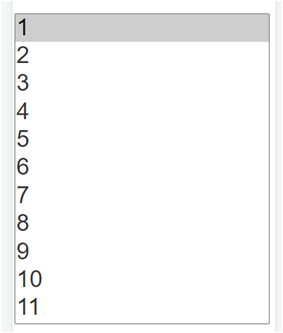
The 'listbox' in a desktop browser is shown like image 2 (in attach)
This visualization depends by the 'size' parameter set to value 2. While if 'size' is set to value 1 the listbox is shown like image 1 (in attach).
In mobile browser there is no difference and it is always shown like image 1.A thousand thanks vadim
Greetings
Hi @vadim,
I'll explain.
The 'listbox' in a desktop browser is shown like image 2 (in attach)
This visualization depends by the 'size' parameter set to value 2. While if 'size' is set to value 1 the listbox is shown like image 1 (in attach).
In mobile browser there is no difference and it is always shown like image 1.
A thousand thanks vadim
Greetings
Uploaded files:

Quote from luishp on November 7, 2021, 1:02 pmI hope this helps:
https://www.sitepoint.com/community/t/listbox-doesnt-look-good-on-mobile-device/363500
https://stackoverflow.com/questions/30454948/html-css-list-box-on-mobile
https://www.nngroup.com/articles/listbox-dropdown/Regards.
I hope this helps:
https://www.sitepoint.com/community/t/listbox-doesnt-look-good-on-mobile-device/363500
https://stackoverflow.com/questions/30454948/html-css-list-box-on-mobile
https://www.nngroup.com/articles/listbox-dropdown/
Regards.