
Excel to App

Quote from luishp on January 11, 2022, 9:19 amWhat’s Excel to App?
An easy way to put your Microsoft Excel file online.
Covert it into a Web App by loading its content into a functional table where users can sort and search any content with automatic pagination. The web app is a PWA (Progressive Web App) This means users can easily install the application on their desktop or mobile devices. No need to upload your app to an App Store, but, if you want, use pwabuilder.com to pack it for Windows Store, Google Play or Play Store.How to use?
Just replace the existing sample .xlsx file with yours and edit settings.json with a plain text editor like Windows Notepad. Upload to your web hosting and ready!
- Responsive design
- PWA (Progressive Web App
- Automatic fields detection
- Automatic pagination
- Show data as a table or card format
- Search data in any field
- Sort data by any field
- Export data in different formats
- Set your own title and subtitle
- Hide any fields
- Multilanguage. More than 30 languages included
- Source code included (VisualNEO Web)
Where to buy?
You can buy Excel to App script at CodeCanyon:
https://codecanyon.net/item/excel-to-app/35377881Developed with VisualNEO Web.
What’s Excel to App?
An easy way to put your Microsoft Excel file online.
Covert it into a Web App by loading its content into a functional table where users can sort and search any content with automatic pagination. The web app is a PWA (Progressive Web App) This means users can easily install the application on their desktop or mobile devices. No need to upload your app to an App Store, but, if you want, use pwabuilder.com to pack it for Windows Store, Google Play or Play Store.
How to use?
Just replace the existing sample .xlsx file with yours and edit settings.json with a plain text editor like Windows Notepad. Upload to your web hosting and ready!
- Responsive design
- PWA (Progressive Web App
- Automatic fields detection
- Automatic pagination
- Show data as a table or card format
- Search data in any field
- Sort data by any field
- Export data in different formats
- Set your own title and subtitle
- Hide any fields
- Multilanguage. More than 30 languages included
- Source code included (VisualNEO Web)
Where to buy?
You can buy Excel to App script at CodeCanyon:
https://codecanyon.net/item/excel-to-app/35377881
Developed with VisualNEO Web.

Quote from fredf92 on January 11, 2022, 4:37 pmHi and well done for this app that I just bought.
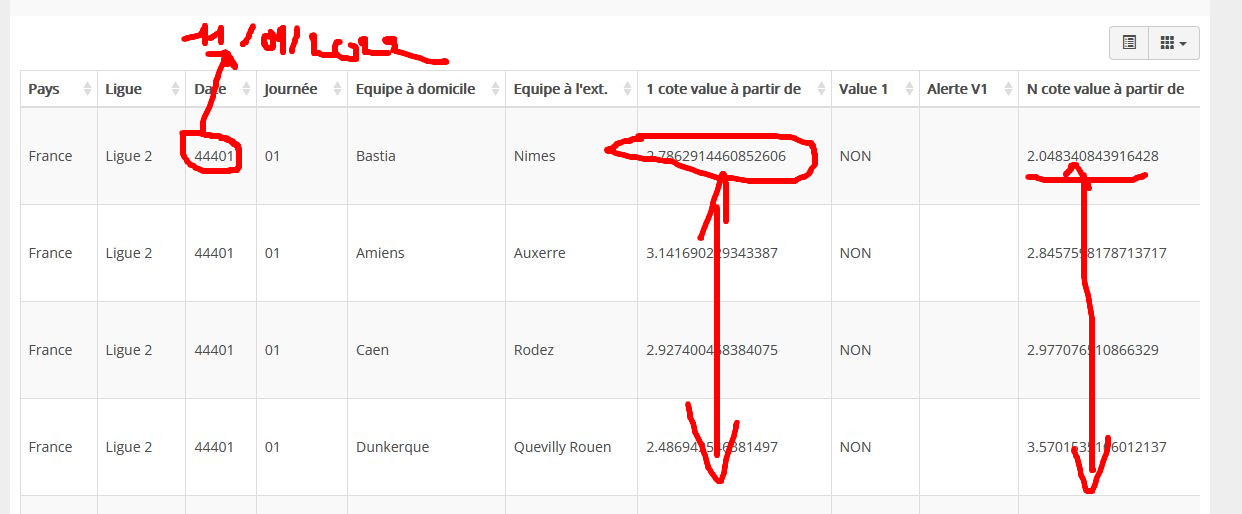
I have a small problem in my table the date is not readable and the figures are not limited to two decimal places after the decimal point.
How to do ?
Thank you
===
Bonjour et bravo pour cette application que je viens d'acheter.
J'ai un petit soucis dans mon tableau la date n'est pas lisible et les chiffres ne se limite pas à deux décimales après la virgule.
Comment faire ?
Merci
Hi and well done for this app that I just bought.
I have a small problem in my table the date is not readable and the figures are not limited to two decimal places after the decimal point.
How to do ?
Thank you
===
Bonjour et bravo pour cette application que je viens d'acheter.
J'ai un petit soucis dans mon tableau la date n'est pas lisible et les chiffres ne se limite pas à deux décimales après la virgule.
Comment faire ?
Merci
Uploaded files:
Quote from luishp on January 11, 2022, 6:28 pmHi @fredf92,
Can you provide a sample Excel file? Please attach it here (you will need to zip it first)
Thank you!
Hi @fredf92,
Can you provide a sample Excel file? Please attach it here (you will need to zip it first)
Thank you!
Quote from luishp on January 11, 2022, 7:38 pm@fredf92 please take a look at the attached fixed Excel file.
What I have done to fix the date problem:
- Rename the "Date" column to "Date (hide)"
- Add a new column with name "Date"
- Use this Excel formula to transform the "date" data from "Date (hide)" field into "text" data for "Data" field:
=TEXT(D2;"dd/mm/yyyy")Note that the form name and parameters may change depending on your sytem language. In Spanish it's:
=TEXTO(D2;"dd/mm/aaaa")What I have done to fix the number problem:
- Rename the "1 cote value à partir de " column to "1 cote value à partir de (hide)"
- Add a new column with name "1 cote value à partir de "
- Use this Excel formula to transform the multiple decimals data from "1 cote value à partir de (hide)" field into "2 decimal only" data for "1 cote value à partir de" field:
=ROUND(I2;2)I hope it helps.
Regards.
@fredf92 please take a look at the attached fixed Excel file.
What I have done to fix the date problem:
- Rename the "Date" column to "Date (hide)"
- Add a new column with name "Date"
- Use this Excel formula to transform the "date" data from "Date (hide)" field into "text" data for "Data" field:
=TEXT(D2;"dd/mm/yyyy")
Note that the form name and parameters may change depending on your sytem language. In Spanish it's:
=TEXTO(D2;"dd/mm/aaaa")
What I have done to fix the number problem:
- Rename the "1 cote value à partir de " column to "1 cote value à partir de (hide)"
- Add a new column with name "1 cote value à partir de "
- Use this Excel formula to transform the multiple decimals data from "1 cote value à partir de (hide)" field into "2 decimal only" data for "1 cote value à partir de" field:
=ROUND(I2;2)
I hope it helps.
Regards.
Uploaded files: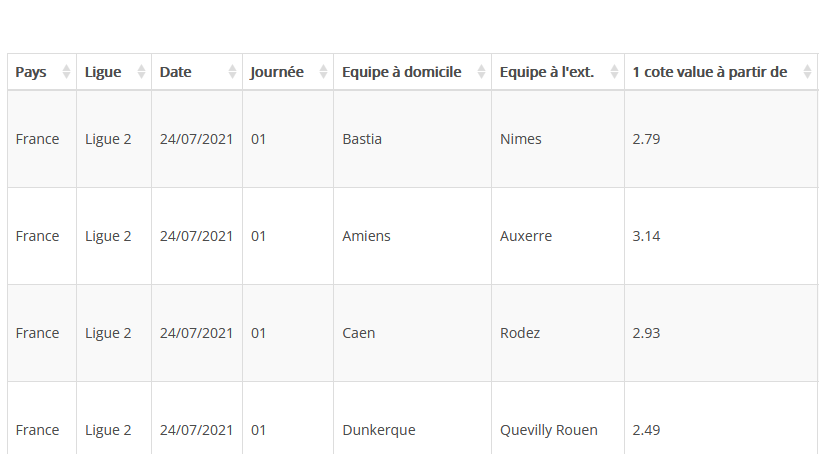
Quote from luishp on January 11, 2022, 7:40 pmThe key point is hidding any field with a wrong format adding (hide) to the column name and to create a new column with the appropiate data format.
Best regards.
The key point is hidding any field with a wrong format adding (hide) to the column name and to create a new column with the appropiate data format.
Best regards.
Quote from fredf92 on January 11, 2022, 8:44 pmTop! thank you very much!
I understood everything and you taught me things that I did not know by using excel ...
sorry for the translation, i'm french.
A +
FRED
Top! thank you very much!
I understood everything and you taught me things that I did not know by using excel ...
sorry for the translation, i'm french.
A +
FRED
Quote from luishp on January 11, 2022, 9:50 pm@fredf92 great! Please don't forget to add a small review on CodeCanyon.
Thank you!
@fredf92 great! Please don't forget to add a small review on CodeCanyon.
Thank you!
Quote from fredf92 on January 12, 2022, 5:37 pmHi luishp!
I was perfectly successful with your instructions, thank you!
test here:
https://gagnerfute.com/php/excel/#!/dataJust the research module? it doesn't seem to be working? is it able to look for any data in the table regardless of the columns? and pages?
Otherwise when unzipping the purchased file, I see an excel2app-src folder?
What is it used for ?I put a well deserved review! I've been fighting with WpDataTables for months without ever having the result you offer with Excel to app!
In addition to being very light, there is a huge potential for your applications to customize etc.
Thank you
FRED
Hi luishp!
I was perfectly successful with your instructions, thank you!
test here:
https://gagnerfute.com/php/excel/#!/data
Just the research module? it doesn't seem to be working? is it able to look for any data in the table regardless of the columns? and pages?
Otherwise when unzipping the purchased file, I see an excel2app-src folder?
What is it used for ?
I put a well deserved review! I've been fighting with WpDataTables for months without ever having the result you offer with Excel to app!
In addition to being very light, there is a huge potential for your applications to customize etc.
Thank you
FRED
Quote from luishp on January 12, 2022, 6:22 pm@fredf92 I think something is not working properly in your project. The search box doesn't work probably due to some data that the script is not able to parse within your Excel file, but it's difficult to know wich data is causing the problem. I have tested many Excel files in different languages with no issues.
Otherwise when unzipping the purchased file, I see an excel2app-src folder?
What is it used for ?The excel2app.neoapp file is the VisualNEO Web project source file. You can load it into VisualNEO Web and edit the project, modify the design, add new funcionalities, etc. It's our development tool. You will probably get surprised to discover that the whole project has only 30 lines of neoscript code.
I put a well deserved review! I've been fighting with WpDataTables for months without ever having the result you offer with Excel to app!
In addition to being very light, there is a huge potential for your applications to customize etc.Thank you so much!
I plan to release a similar project for Google Sheets :)Thanks again.
@fredf92 I think something is not working properly in your project. The search box doesn't work probably due to some data that the script is not able to parse within your Excel file, but it's difficult to know wich data is causing the problem. I have tested many Excel files in different languages with no issues.
Otherwise when unzipping the purchased file, I see an excel2app-src folder?
What is it used for ?
The excel2app.neoapp file is the VisualNEO Web project source file. You can load it into VisualNEO Web and edit the project, modify the design, add new funcionalities, etc. It's our development tool. You will probably get surprised to discover that the whole project has only 30 lines of neoscript code.
I put a well deserved review! I've been fighting with WpDataTables for months without ever having the result you offer with Excel to app!
In addition to being very light, there is a huge potential for your applications to customize etc.
Thank you so much!
I plan to release a similar project for Google Sheets :)
Thanks again.
Quote from luishp on January 12, 2022, 6:56 pm@fredf92 I think I have found why your search box is not working. Please delete any dot from the column headers.
For example change "Equipe à l'ext." to "Equipe à l'ext"
I'm quite sure it will sove the problem.
Please let me know if it works.Regards
@fredf92 I think I have found why your search box is not working. Please delete any dot from the column headers.
For example change "Equipe à l'ext." to "Equipe à l'ext"
I'm quite sure it will sove the problem.
Please let me know if it works.
Regards
Quote from BGUK on January 17, 2022, 7:01 pmAs an experienced Excel user, I like this app. very much.
My only change to fix the number problem was to use =DOLLAR(I2,2) to print a leading currency symbol and 2 decimal places for all decimal values including zeros.
I look forward to the Google Sheets version.
Thanks.
As an experienced Excel user, I like this app. very much.
My only change to fix the number problem was to use =DOLLAR(I2,2) to print a leading currency symbol and 2 decimal places for all decimal values including zeros.
I look forward to the Google Sheets version.
Thanks.
Quote from luishp on January 17, 2022, 8:32 pm@bguk thanks so much!
The Google Sheets version is waiting to be approved at CodeCanyon.
I hope it will be available very soon.Best regards.
@bguk thanks so much!
The Google Sheets version is waiting to be approved at CodeCanyon.
I hope it will be available very soon.
Best regards.
Quote from fredf92 on January 17, 2022, 10:59 pmMerci @luishp et @bguk tout ceci m'aide grandement !
Parfait !
Thank you @luishp and @bguk all this helps me a lot! Perfect !
Merci @luishp et @bguk tout ceci m'aide grandement !
Parfait !
Thank you @luishp and @bguk all this helps me a lot! Perfect !

Quote from YASIN on January 20, 2022, 11:51 pmhow to use ??
I'm confused !
Quote from luishp on January 11, 2022, 9:19 amJust replace the existing sample .xlsx file with yours and edit settings.json with a plain text editor like Windows Notepad. Upload to your web hosting and ready
I do not see the sample file
how to use ??
I'm confused !
Quote from luishp on January 11, 2022, 9:19 amJust replace the existing sample .xlsx file with yours and edit settings.json with a plain text editor like Windows Notepad. Upload to your web hosting and ready
I do not see the sample file
Quote from luishp on January 21, 2022, 7:58 am@yasin no sample file, sorry. It's a commercial app. It's sold at CodeCanyon.
@yasin no sample file, sorry. It's a commercial app. It's sold at CodeCanyon.
Quote from fredf92 on January 21, 2022, 10:26 amHi @yasin !
Everything was noted on the sales page:
"
How to use?
Just replace the existing sample .xlsx file with yours and edit settings.json with a plain text editor like Windows Notepad. Upload to your web hosting and ready! "
Edit the settings.json fileYou personalize according to your file name.Go in your browser to the address of your directory that you created to do this test.It finds your document formatted column, line etc.Good luck !
Hi @yasin !
Everything was noted on the sales page:
"
How to use?
Just replace the existing sample .xlsx file with yours and edit settings.json with a plain text editor like Windows Notepad. Upload to your web hosting and ready! "
Quote from YASIN on January 21, 2022, 10:32 amBut I still do not understand! @fredf92
Please explain with pictures and examples <3
But I still do not understand! @fredf92
Please explain with pictures and examples <3