
fabDrawingMode Undo Last Object

Quote from paultomo on January 26, 2021, 2:44 amI've been working through the tutorials and sample app's and making some changes to get to grips with the numerous Actions available in VisualNEO Web and getting on just fine but I can't seem to work out how I would remove the very last fabDrawingMode Object that was created by means of an Undo Action.
I can use fabRemove if I select the last Object I've just drawn but I can't seem to find a way to perform an Undo Action, something commonly used to remove the last Action a user has performed if it was a mistake or not correct for some reason, a fail safe!
I've Uploaded a screen shot to show an example of an app I've created to learn how to use fabDrawingMode. The Light Blue curvy line in the center is the last drawing action and I'd like to use the Undo button to remove it with a single click.
Any help appreciated..
Thanks
I've been working through the tutorials and sample app's and making some changes to get to grips with the numerous Actions available in VisualNEO Web and getting on just fine but I can't seem to work out how I would remove the very last fabDrawingMode Object that was created by means of an Undo Action.
I can use fabRemove if I select the last Object I've just drawn but I can't seem to find a way to perform an Undo Action, something commonly used to remove the last Action a user has performed if it was a mistake or not correct for some reason, a fail safe!
I've Uploaded a screen shot to show an example of an app I've created to learn how to use fabDrawingMode. The Light Blue curvy line in the center is the last drawing action and I'd like to use the Undo button to remove it with a single click.
Any help appreciated..
Thanks
Uploaded files: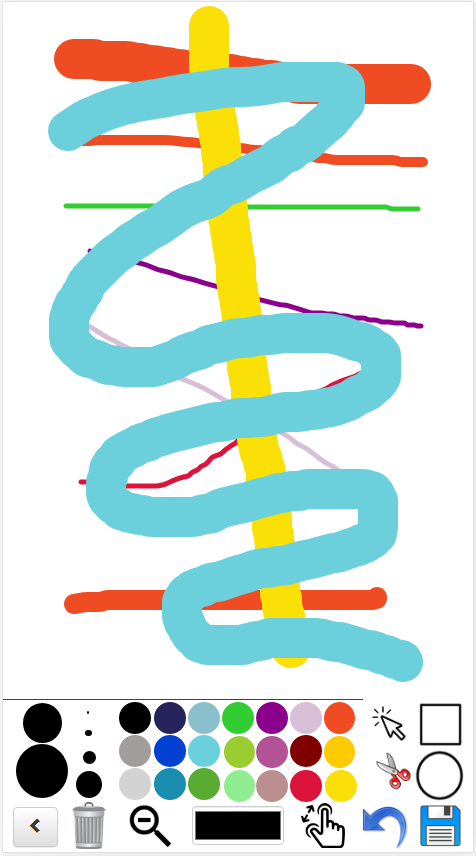

Quote from luishp on January 26, 2021, 8:04 amHi @paultomo,
That's a good idea :)
I will add this functionality to the soon to be released next version. Meanwhile, please do this:Go to:
Project > Subroutines...
Choose New JavaScript Subroutine from the New Subroutine icon.
Give a name to the subroutine (ie: undoDraw) and add this code:
var lastItemIndex = (window["CanvasContainer1"].getObjects().length - 1);
var item = window["CanvasContainer1"].item(lastItemIndex);

if(item.get('type') === 'path') {
  window["CanvasContainer1"].remove(item);
  window["CanvasContainer1"].renderAll();
}
If your Container object name is different than Container1 just change it.
Done :)
Now you have a new undoDraw command.
Hi @paultomo,
That's a good idea :)
I will add this functionality to the soon to be released next version. Meanwhile, please do this:
Go to:
Project > Subroutines...
Choose New JavaScript Subroutine from the New Subroutine icon.
Give a name to the subroutine (ie: undoDraw) and add this code:
var lastItemIndex = (window["CanvasContainer1"].getObjects().length - 1);
var item = window["CanvasContainer1"].item(lastItemIndex);

if(item.get('type') === 'path') {
  window["CanvasContainer1"].remove(item);
  window["CanvasContainer1"].renderAll();
}
If your Container object name is different than Container1 just change it.
Done :)
Now you have a new undoDraw command.
Quote from paultomo on January 26, 2021, 12:01 pmMany thanks for the quick reply.
That worked perfectly. Multiple Undo actions too...
Paul
Many thanks for the quick reply.
That worked perfectly. Multiple Undo actions too...
Paul