
File will not load if Variable used as file name

Quote from paultomo on January 28, 2021, 2:22 amI have been experimenting with saving files to local and retrieving them later, all of which which works fine.
But I have noticed that if I save the file name into a variable when selected say in a dropdown or manually, the file will not then be loaded if the variable is used in place of it's real file name.
Example:
Here I am checking if there is already an image file saved to Local from a previous session and if there is, to load it to Container 1 but if not, to use the stock image I have packaged with the app that resides in the img folder.
If [LoadImage] == "MyImage1"
   GetItem "MyImage1" [BackUpFnd]
           If [BackUpFnd] > ""
              fabLoadLocal "Container1" "[LoadImage]"
           Else
               fabLoadImage "Container1" "[LoadImage]" "img/[LoadImage].jpg" 0 0
           EndIf
Else
EndIf
This line fails - fabLoadImage "Container1" "[LoadImage]" "img/[LoadImage].jpg" 0 0
Nothing is loaded to Container 1 because of the variable being used as the file name. If I check the value of [LoadImage] it is set to MyImage1.
But if change this line to - fabLoadImage "Container1" "[LoadImage]" "img/MyImage1.jpg" 0 0
The image is loaded to Container 1 and shown on screen.
Thanks
I have been experimenting with saving files to local and retrieving them later, all of which which works fine.
But I have noticed that if I save the file name into a variable when selected say in a dropdown or manually, the file will not then be loaded if the variable is used in place of it's real file name.
Example:
Here I am checking if there is already an image file saved to Local from a previous session and if there is, to load it to Container 1 but if not, to use the stock image I have packaged with the app that resides in the img folder.
If [LoadImage] == "MyImage1"
   GetItem "MyImage1" [BackUpFnd]
           If [BackUpFnd] > ""
              fabLoadLocal "Container1" "[LoadImage]"
           Else
               fabLoadImage "Container1" "[LoadImage]" "img/[LoadImage].jpg" 0 0
           EndIf
Else
EndIf
This line fails - fabLoadImage "Container1" "[LoadImage]" "img/[LoadImage].jpg" 0 0
Nothing is loaded to Container 1 because of the variable being used as the file name. If I check the value of [LoadImage] it is set to MyImage1.
But if change this line to - fabLoadImage "Container1" "[LoadImage]" "img/MyImage1.jpg" 0 0
The image is loaded to Container 1 and shown on screen.
Thanks
Quote from paultomo on January 28, 2021, 12:20 pmUpdate on Post.....
I have found another an issue related to using fabLoadImage.
I have used Libraries / Files to point to a folder named "img" containing some images I want to make available to open with fabLoadImage. I used this file name as images would then be added to the correct image folder created when complied.
So far so good and It all works fine if tested with Chrome but there is an issue when compiling.
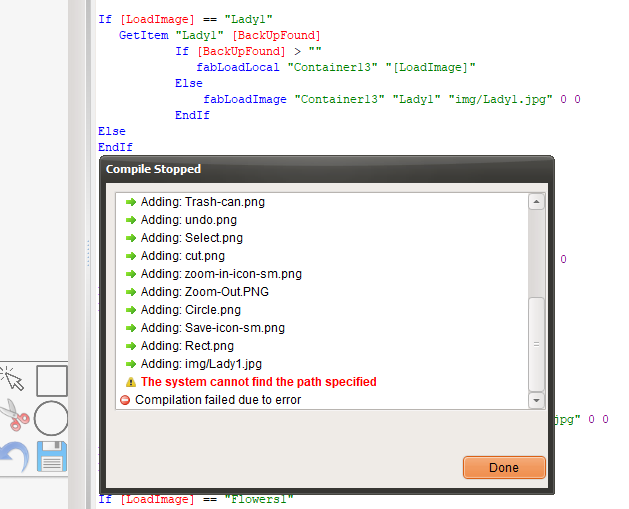
If fabLoadImage "Container13" "[LoadImage]" "img/Lady1.jpg" 0 0 is in the code, when I compile to Web, it fails with "System cannot find specified path." In the attached image you can see this is the path and file named img/Lady1.jpg it can't find.
If I compile as a mobile application, which is what I want the app for, it compiles but creates the an "img" folder within the "img" folder, see screenshot.
It appears that when compiling, "img/Lady1.jpg" is being included due to fabLoadImage referencing it and wanting to load the folder and files.
If I change "img/Lady1.jpg" to "img/[LoadImage].jpg", use the variable, it all compiles as it should Web and Mobile but as in my first post, fabLoadImage fails to now load the files.
It's probably something I'm doing wrong but I can't see what.
Thanks
Update on Post.....
I have found another an issue related to using fabLoadImage.
I have used Libraries / Files to point to a folder named "img" containing some images I want to make available to open with fabLoadImage. I used this file name as images would then be added to the correct image folder created when complied.
So far so good and It all works fine if tested with Chrome but there is an issue when compiling.
If fabLoadImage "Container13" "[LoadImage]" "img/Lady1.jpg" 0 0 is in the code, when I compile to Web, it fails with "System cannot find specified path." In the attached image you can see this is the path and file named img/Lady1.jpg it can't find.
If I compile as a mobile application, which is what I want the app for, it compiles but creates the an "img" folder within the "img" folder, see screenshot.
It appears that when compiling, "img/Lady1.jpg" is being included due to fabLoadImage referencing it and wanting to load the folder and files.
If I change "img/Lady1.jpg" to "img/[LoadImage].jpg", use the variable, it all compiles as it should Web and Mobile but as in my first post, fabLoadImage fails to now load the files.
It's probably something I'm doing wrong but I can't see what.
Thanks
Uploaded files: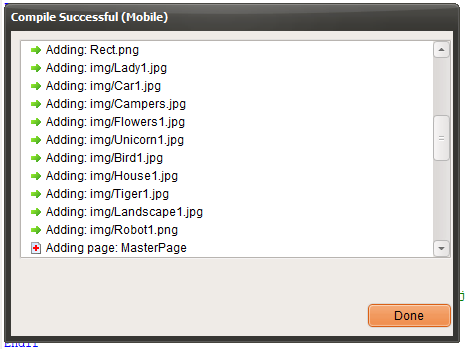
Quote from paultomo on January 28, 2021, 1:20 pmOkay, I can get around this issue by placing all my images in the same folder that the VisualNEO Web application is in and removing any reference in Libraries / Files that to point to any folders or files.
Now when complied due to "fabLoadImage" referencing each image file by name and automatically loading the files when compiling, they are placed in the correct "img" folder and both Web and Mob compiling works again.
So I now still have an issue with saving a file name into a variable and using the variable to reference the file name "[LoadImage].jpg" not working as I'd expect.
And wonder if there is an issue with the complier to as I would not expect it to fail when fabLoadImage is looking to load an image file from a folder.
Thanks
Okay, I can get around this issue by placing all my images in the same folder that the VisualNEO Web application is in and removing any reference in Libraries / Files that to point to any folders or files.
Now when complied due to "fabLoadImage" referencing each image file by name and automatically loading the files when compiling, they are placed in the correct "img" folder and both Web and Mob compiling works again.
So I now still have an issue with saving a file name into a variable and using the variable to reference the file name "[LoadImage].jpg" not working as I'd expect.
And wonder if there is an issue with the complier to as I would not expect it to fail when fabLoadImage is looking to load an image file from a folder.
Thanks

Quote from luishp on January 28, 2021, 5:25 pm@paultomo please do this:
- Add your images FOLDER to Project > Properties > Libraries / Files
- Do not select your image files directly in fabLoadImage:
SetVar [mypath] "./foldername/"fabLoadImage "Container1" "img1" "[mypath]myimage.jpg" 0 0This way you can include your images easily.
If you need to test your app without compiling it just change [mypath] with your local absolute path:SetVar [mypath] "file://C:/myfolder/"Best regards.
@paultomo please do this:
- Add your images FOLDER to Project > Properties > Libraries / Files
- Do not select your image files directly in fabLoadImage:
This way you can include your images easily.
If you need to test your app without compiling it just change [mypath] with your local absolute path:
Best regards.
Quote from paultomo on January 28, 2021, 8:11 pmOkay, I'll do that.
I have so many questions but will try and work things out my-self and not bother you to much..
Thanks
Paul
Okay, I'll do that.
I have so many questions but will try and work things out my-self and not bother you to much..
Thanks
Paul
Quote from xcger on March 9, 2024, 7:35 amMay I ask if your problem has been resolved? I also really hope to get the answer to this question, thank you sincerely~
May I ask if your problem has been resolved? I also really hope to get the answer to this question, thank you sincerely~