
FileToVar to fill listbox object...

Quote from lesanch on March 9, 2020, 12:47 amHi i'm trying to fill a listbox object with the result of FileToVar call, so i have this:
FileToVar "http://localhost/cfg_conn/bbdd_conn.txt" [bbdd_conn_cfg]
The file bbdd_conn.txt contains this line: AVAR, PROD | SARARA:1521/DBDB
but inside the listbox i'm getting the result in the image. i'm missing something ??
Regards,
Sam
Hi i'm trying to fill a listbox object with the result of FileToVar call, so i have this:
FileToVar "http://localhost/cfg_conn/bbdd_conn.txt" [bbdd_conn_cfg]
The file bbdd_conn.txt contains this line: AVAR, PROD | SARARA:1521/DBDB
but inside the listbox i'm getting the result in the image. i'm missing something ??
Regards,
Sam
Uploaded files: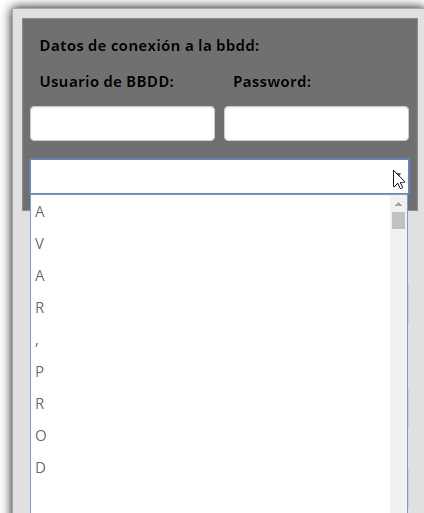

Quote from Gaev on March 9, 2020, 2:28 am@lesanch
The file bbdd_conn.txt contains this line: AVAR, PROD | SARARA:1521/DBDB
but inside the listbox i'm getting the result in the image. i'm missing something ??Entries (Items) of a ListBox need to be specified as an Array (one Array item per ListBox Item) ... when you specify a string, it treats each character as an Array Item.
There is a sample app (ListExample.neoapp) that shows you how to populate ListBoxes ... note that ...
- the ones on Page1 are for ListBoxes whose entries are defined at Design Time and do not change at Run time
- you should look at the one on Page2; particularly the code associated with the PushButtons that create an Array and the one that adds an entry afterwards.If you need assistance in loading the contents of your file, please post ...
a) what the file contents look like when viewed with (say) notepad.exe
b) what the ListBox entries should look like e.g.
AVAR
PROD
SARARA ???
etc.
The file bbdd_conn.txt contains this line: AVAR, PROD | SARARA:1521/DBDB
but inside the listbox i'm getting the result in the image. i'm missing something ??
Entries (Items) of a ListBox need to be specified as an Array (one Array item per ListBox Item) ... when you specify a string, it treats each character as an Array Item.
There is a sample app (ListExample.neoapp) that shows you how to populate ListBoxes ... note that ...
- the ones on Page1 are for ListBoxes whose entries are defined at Design Time and do not change at Run time
- you should look at the one on Page2; particularly the code associated with the PushButtons that create an Array and the one that adds an entry afterwards.
If you need assistance in loading the contents of your file, please post ...
a) what the file contents look like when viewed with (say) notepad.exe
b) what the ListBox entries should look like e.g.
AVAR
PROD
SARARA ???
etc.
Quote from lesanch on March 9, 2020, 2:40 amHi @Gaev,
Thank for replay. I'll check what you said, any question i'll post. The entry in listbox must be the entire line.
Ex: AVAR, PROD | SARARA:1521/DBDB
in runtime only must show: AVAR, PROD that's why y put |
Regards,
Sam
Hi @Gaev,
Thank for replay. I'll check what you said, any question i'll post. The entry in listbox must be the entire line.
Ex: AVAR, PROD | SARARA:1521/DBDB
in runtime only must show: AVAR, PROD that's why y put |
Regards,
Sam
Quote from lesanch on March 9, 2020, 3:13 amHi @Gaev,
Ok i got the point, the problem i have now is at the moment of load file.cfg as an Array of items. I could load ok the file inside [bbdd_conn_cfg] variable without problems.
I tested this as an example to see how it works and works OK: CreateArray [bbdd_conn_array] "pepe,lola,corto,largo" (but i don't need this)
What i need is to load the variable more less this:
CreateArray [bbdd_conn_array] [bbdd_conn_cfg] <------ this variable contains the lines inside file.cfg (txt plain text)
but as i see it's not posible to put variables inside, only elements of array, i need to convert those elements from a variable to an array of elements for processing.
Regards,
Samir
Hi @Gaev,
Ok i got the point, the problem i have now is at the moment of load file.cfg as an Array of items. I could load ok the file inside [bbdd_conn_cfg] variable without problems.
I tested this as an example to see how it works and works OK: CreateArray [bbdd_conn_array] "pepe,lola,corto,largo" (but i don't need this)
What i need is to load the variable more less this:
CreateArray [bbdd_conn_array] [bbdd_conn_cfg] <------ this variable contains the lines inside file.cfg (txt plain text)
but as i see it's not posible to put variables inside, only elements of array, i need to convert those elements from a variable to an array of elements for processing.
Regards,
Samir
Quote from Gaev on March 9, 2020, 4:25 am@lesanch
The entry in listbox must be the entire line.
Ex: AVAR, PROD | SARARA:1521/DBDBin runtime only must show: AVAR, PROD that's why y put |
I don't understand what you mean by "entry in listbox" vs. "in run time only must show" ... for the ListBox, each entry IS what is displayed.
If the entries on file contain additional information, you have to extract just what is needed, AFTER loading the contents of the file.
What i need is to load the variable more less this:
CreateArray [bbdd_conn_array] [bbdd_conn_cfg] <------ this variable contains the lines inside file.cfg (txt plain text)
but as i see it's not posible to put variables inside, only elements of array, i need to convert those elements from a variable to an array of elements for processing.What you will need to do is ...
a) load the contents of the file into a variable
b) parse the contents of this variable (separator character is whatever you choose to separate entries) ... so you get an Array
c) you then loop through the items in this array ... with each iteration, you ...- either do an ArrayAdditem (to the array variable associated with the ListBox)
- or append the item (plus a comma) ... and then do a CreateArray from this dynamically created, comma seaparated contentAs mentioned before, if you need assistance with this script ...
- attach a copy of the txt file (3 or 4 entries will do)
- show exactly what you want these entries to be displayed in the ListBox to look like e.g.pepe
lola
corto
largo
It is time to go to bed in Toronto, so I will look at your response tomorrow morning.
The entry in listbox must be the entire line.
Ex: AVAR, PROD | SARARA:1521/DBDBin runtime only must show: AVAR, PROD that's why y put |
I don't understand what you mean by "entry in listbox" vs. "in run time only must show" ... for the ListBox, each entry IS what is displayed.
If the entries on file contain additional information, you have to extract just what is needed, AFTER loading the contents of the file.
What i need is to load the variable more less this:
CreateArray [bbdd_conn_array] [bbdd_conn_cfg] <------ this variable contains the lines inside file.cfg (txt plain text)
but as i see it's not posible to put variables inside, only elements of array, i need to convert those elements from a variable to an array of elements for processing.
What you will need to do is ...
a) load the contents of the file into a variable
b) parse the contents of this variable (separator character is whatever you choose to separate entries) ... so you get an Array
c) you then loop through the items in this array ... with each iteration, you ...
- either do an ArrayAdditem (to the array variable associated with the ListBox)
- or append the item (plus a comma) ... and then do a CreateArray from this dynamically created, comma seaparated content
As mentioned before, if you need assistance with this script ...
- attach a copy of the txt file (3 or 4 entries will do)
- show exactly what you want these entries to be displayed in the ListBox to look like e.g.
pepe
lola
corto
largo
It is time to go to bed in Toronto, so I will look at your response tomorrow morning.
Quote from lesanch on March 9, 2020, 11:15 pmHi @Gaev,
Quote from Gaev on March 9, 2020, 4:25 am@lesanch
I don't understand what you mean by "entry in listbox" vs. "in run time only must show" ... for the ListBox, each entry IS what is displayed
I mean, what i attached in image in red. that´s why i put the pipe ( | ) inside bbdd_conn.cfg
the image show a variable inside, that's what i need, but that's not possible.
so i have to read the external file and put the result into the variable [bbdd_conn_array]
and then parse that variable to get the lines inside.
i need that the parsed variable containts all this:
File bbdd_conn.cfg:
AVAR,PROD|SUSI713:1521/abcdef
AVMX,DES|HYLAM717:1521/abcdef
AVMX,PROD|HELI716:1521/abcdef
DESA,DES|HOLA324:1527/DESA
EISROD,DES|SARA234:1521/EISROS.WORLD
EISROS,PROD|SARCAM233:1521/EISROS.WORLD
HYLMA,PROD|HYLOS231:1521/HYLMA
HYLMA,PROD|HYLUOS232:1521/HYLMA
HYLMAQA,QA|TERCAN267:1521/HYLMAQA
HYLMAQA,QA|TECAM245:1521/HYLCAQA
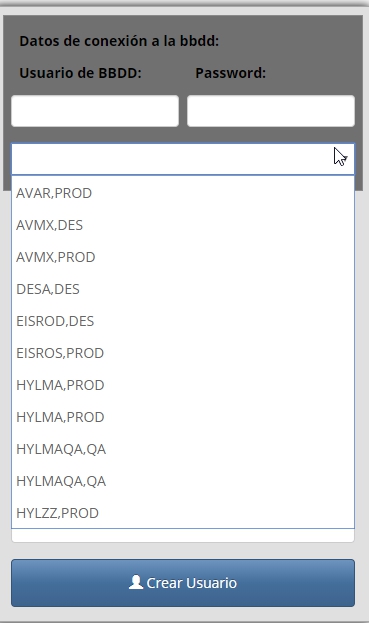
HYLZZ,PROD|HOLAF342:1521/HYLZZbut in runtime the listbox will show this:
AVAR,PROD
AVMX,DES
AVMX,PROD
DESA,DES
EISROD,DES
EISROS,PROD
HYLMA,PROD
HYLMA,PROD
HYLMAQA,QA
HYLMAQA,QA
HYLZZ,PRODRegards,
Sam
Hi @Gaev,
Quote from Gaev on March 9, 2020, 4:25 amI don't understand what you mean by "entry in listbox" vs. "in run time only must show" ... for the ListBox, each entry IS what is displayed
I mean, what i attached in image in red. that´s why i put the pipe ( | ) inside bbdd_conn.cfg
the image show a variable inside, that's what i need, but that's not possible.
so i have to read the external file and put the result into the variable [bbdd_conn_array]
and then parse that variable to get the lines inside.
i need that the parsed variable containts all this:
File bbdd_conn.cfg:
AVAR,PROD|SUSI713:1521/abcdef
AVMX,DES|HYLAM717:1521/abcdef
AVMX,PROD|HELI716:1521/abcdef
DESA,DES|HOLA324:1527/DESA
EISROD,DES|SARA234:1521/EISROS.WORLD
EISROS,PROD|SARCAM233:1521/EISROS.WORLD
HYLMA,PROD|HYLOS231:1521/HYLMA
HYLMA,PROD|HYLUOS232:1521/HYLMA
HYLMAQA,QA|TERCAN267:1521/HYLMAQA
HYLMAQA,QA|TECAM245:1521/HYLCAQA
HYLZZ,PROD|HOLAF342:1521/HYLZZ
but in runtime the listbox will show this:
AVAR,PROD
AVMX,DES
AVMX,PROD
DESA,DES
EISROD,DES
EISROS,PROD
HYLMA,PROD
HYLMA,PROD
HYLMAQA,QA
HYLMAQA,QA
HYLZZ,PROD
Regards,
Sam
Uploaded files: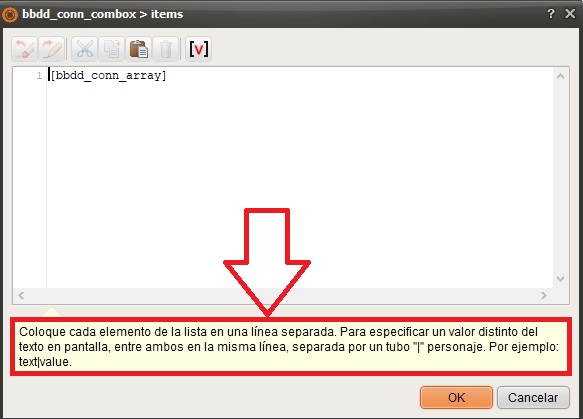
Quote from lesanch on March 9, 2020, 11:38 pmI need the image1 but using a variable containing the data readed in bbdd_conn.cfg file, to obtain the result in image2
Regards,
Sam
I need the image1 but using a variable containing the data readed in bbdd_conn.cfg file, to obtain the result in image2
Regards,
Sam
Uploaded files: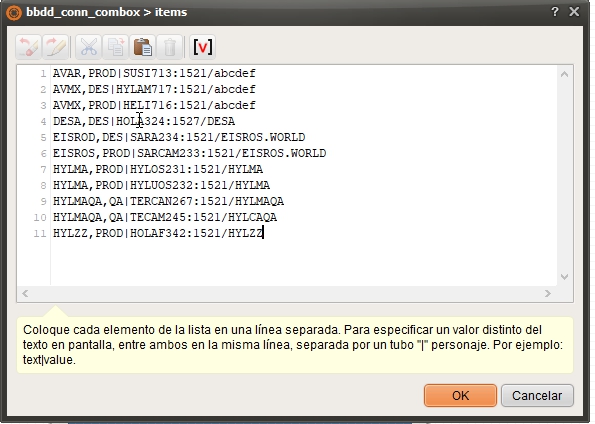
Quote from Gaev on March 10, 2020, 12:10 am@lesanch
LOL ... looks like you posted while I was composing this !!!L
Thank you for the explanation ... now I understand what you meant.
Bad news is that CreateArray command has a deficiency/defect.
This works ...
CreateArray [gkListItems] "Apple|A,Banana|B,Cherry|C,Date|D,Egg|E,Fish|F,Gooseberry|G"... but this does not ...
SetVar [gkListItemsText] "Apple|A,Banana|B,Cherry|C,Date|D,Egg|E,Fish|F,Gooseberry|G"
CreateArray [gkListItems] [gkListItemsText]
... I will leave it to @luishp to explain or correct this anomaly.
But all is not lost ... there is a work around.
Say, your file contains the following ...
Apple|A,Banana|B,Cherry|C,Date|D,Egg|E,Fish|F,Gooseberry|G
... i.e. the items and their selection values are in one Loooong (comma separated) text string (no new line characters between items) ... then all you have to do (after loading the contents of the file) is ..
StrParse "[gkListItemsText]" "," "[gkListItems]"... where ...
[gkListItemsText] is the comma separated text string
[gkListItems] is the array variable specified for your ListBoxIf your file contains the following ...
Apple|A
Banana|B
Cherry|C
Date|D
Egg|E
Fish|F
Gooseberry|G... i.e. the items and their selection values are in separate lines ... then (after loading the contents of the file) you have to do ..
StrParse "[gkListItemsText]" "\n" "[gkListItems]"... note that if the text file was created under Windows, the \n might have to be replaced by \r\n
One final note ... looks like you are using a ComboBox and not a ListBox ... I have been trying things out with the Listbox only.
LOL ... looks like you posted while I was composing this !!!L
Thank you for the explanation ... now I understand what you meant.
Bad news is that CreateArray command has a deficiency/defect.
This works ...
CreateArray [gkListItems] "Apple|A,Banana|B,Cherry|C,Date|D,Egg|E,Fish|F,Gooseberry|G"
... but this does not ...
SetVar [gkListItemsText] "Apple|A,Banana|B,Cherry|C,Date|D,Egg|E,Fish|F,Gooseberry|G"
CreateArray [gkListItems] [gkListItemsText]
... I will leave it to @luishp to explain or correct this anomaly.
But all is not lost ... there is a work around.
Say, your file contains the following ...
Apple|A,Banana|B,Cherry|C,Date|D,Egg|E,Fish|F,Gooseberry|G
... i.e. the items and their selection values are in one Loooong (comma separated) text string (no new line characters between items) ... then all you have to do (after loading the contents of the file) is ..
StrParse "[gkListItemsText]" "," "[gkListItems]"
... where ...
[gkListItemsText] is the comma separated text string
[gkListItems] is the array variable specified for your ListBox
If your file contains the following ...
Apple|A
Banana|B
Cherry|C
Date|D
Egg|E
Fish|F
Gooseberry|G
... i.e. the items and their selection values are in separate lines ... then (after loading the contents of the file) you have to do ..
StrParse "[gkListItemsText]" "\n" "[gkListItems]"
... note that if the text file was created under Windows, the \n might have to be replaced by \r\n
One final note ... looks like you are using a ComboBox and not a ListBox ... I have been trying things out with the Listbox only.
Quote from Gaev on March 10, 2020, 5:55 am@lesanch
Uff tested a lot without results :-(
Can you be more specific ? i.e. what happened (or did not happen) ? ... and did you try both, a long comma separated string and multiple lines ?
In order to debug this step by step ...
a) Try this code attached to a PushButton...
SetVar [gkListItemsText] "Apple|A,Banana|B,Cherry|C,Date|D,Egg|E,Fish|F,Gooseberry|G"
StrParse "[gkListItemsText]" "," "[gkListItems]"
... in place of [gkListItems], use the variable you specified in your ComboBox for the Items property.
b) If this works as expected, we can check if the file load is working as expected ... show (via screenshot) the effect of inserting an AlertBox command immediately after receiving the contents of the file in your variable. Might be preferable to first try with simple items like in (a).
c) If this works as expected, then do the StrParse (using a comma to separate the items in your file) ... and show the value of the first element of the resulting array element ...
AlertBox "FirstElement" "[gkListItems(0)]" ""... in place of gkListItems, use the variable you specified in your ComboBox for the Items property.
d) If this works, repeat (c) but using a file with items on separate lines.
Please post your results.
Uff tested a lot without results :-(
Can you be more specific ? i.e. what happened (or did not happen) ? ... and did you try both, a long comma separated string and multiple lines ?
In order to debug this step by step ...
a) Try this code attached to a PushButton...
SetVar [gkListItemsText] "Apple|A,Banana|B,Cherry|C,Date|D,Egg|E,Fish|F,Gooseberry|G"
StrParse "[gkListItemsText]" "," "[gkListItems]"
... in place of [gkListItems], use the variable you specified in your ComboBox for the Items property.
b) If this works as expected, we can check if the file load is working as expected ... show (via screenshot) the effect of inserting an AlertBox command immediately after receiving the contents of the file in your variable. Might be preferable to first try with simple items like in (a).
c) If this works as expected, then do the StrParse (using a comma to separate the items in your file) ... and show the value of the first element of the resulting array element ...
AlertBox "FirstElement" "[gkListItems(0)]" ""
... in place of gkListItems, use the variable you specified in your ComboBox for the Items property.
d) If this works, repeat (c) but using a file with items on separate lines.
Please post your results.
Quote from lesanch on March 12, 2020, 4:11 amHi @Luishp,
This that @Gaev found, it's normal behavior ??
This works ...
- CreateArray [gkListItems] "Apple|A,Banana|B,Cherry|C,Date|D,Egg|E,Fish|F,Gooseberry|G"
... but this does not ...
- SetVar [gkListItemsText] "Apple|A,Banana|B,Cherry|C,Date|D,Egg|E,Fish|F,Gooseberry|G"
- CreateArray [gkListItems] [gkListItemsText]
... I will leave it to @luishp to explain or correct this anomaly.Hi @Gaev, as soon as possible i'll do some test and let you know about your last post.Regard,Sam
Hi @Luishp,
This that @Gaev found, it's normal behavior ??
This works ...
- CreateArray [gkListItems] "Apple|A,Banana|B,Cherry|C,Date|D,Egg|E,Fish|F,Gooseberry|G"
... but this does not ...
- SetVar [gkListItemsText] "Apple|A,Banana|B,Cherry|C,Date|D,Egg|E,Fish|F,Gooseberry|G"
- CreateArray [gkListItems] [gkListItemsText]
Quote from Gaev on March 12, 2020, 5:28 am@lesanch
Hi Luishp,
This that Gaev found, it's normal behavior ??I did some more digging ... it looks like this is also how it is done in JavaScript ...
//create an array from inline values
var cars = ["Saab", "Volvo", "BMW"];

//create an array from a comma (or other character) separated string
var str = "a,b,c,d,e,f";
var arr = str.split(",");
So the equivalent NeoScript commands are ...
CreateArray
StrParse
I suppose one could create a NeoScript command, subroutine or plugin command called ...
CreateArrayFromString [NameOfArrayToBeCreated] [VariableContainingSeparatedElements] [CharacterSeparatingElements]... which would just invoke StrParse (using a different order for the parameters) ... but with a long list of other (important) ToDo features, development of this one might be a long time away :-((
Hi Luishp,
This that Gaev found, it's normal behavior ??
I did some more digging ... it looks like this is also how it is done in JavaScript ...
//create an array from inline values
var cars = ["Saab", "Volvo", "BMW"];

//create an array from a comma (or other character) separated string
var str = "a,b,c,d,e,f";
var arr = str.split(",");
So the equivalent NeoScript commands are ...
CreateArray
StrParse
I suppose one could create a NeoScript command, subroutine or plugin command called ...
CreateArrayFromString [NameOfArrayToBeCreated] [VariableContainingSeparatedElements] [CharacterSeparatingElements]
... which would just invoke StrParse (using a different order for the parameters) ... but with a long list of other (important) ToDo features, development of this one might be a long time away :-((

Quote from luishp on March 12, 2020, 2:43 pmThis that @Gaev found, it's normal behavior ??
I think so. It's one of the very first commands from Dave. I think you just need StrParse instead.
If you can't get the result you are looking for, please attach a sample app so I can check it please.
Thanks!
This that @Gaev found, it's normal behavior ??
I think so. It's one of the very first commands from Dave. I think you just need StrParse instead.
If you can't get the result you are looking for, please attach a sample app so I can check it please.
Thanks!
Quote from lesanch on March 16, 2020, 4:23 amWell, after playing a little bit, this is my best effort :-). Have some errors but please help me with some comments i put inside the pub. For example after reading the file the appl stop and i have to click the boton again to continue, so i had to put the read file code on page enter. I'm sure you both can do coding more professional but more less is what i need. If there is any improvement in the code please feel free to change it.
as a web server i'm using LARAGON in this route: C:\laragon\www\cfg_conn
Contents of bbdd_conn.txt:
AVAR-PROD|PAD713:1521/dbssi,ASER-DES|ASER717:1521/DHIS,RADS-PROD|ROOR716:1521/CAFUS,DES-DES|ROSP324:1527/DES
Regards,
Sam
Well, after playing a little bit, this is my best effort :-). Have some errors but please help me with some comments i put inside the pub. For example after reading the file the appl stop and i have to click the boton again to continue, so i had to put the read file code on page enter. I'm sure you both can do coding more professional but more less is what i need. If there is any improvement in the code please feel free to change it.
as a web server i'm using LARAGON in this route: C:\laragon\www\cfg_conn
Contents of bbdd_conn.txt:
AVAR-PROD|PAD713:1521/dbssi,ASER-DES|ASER717:1521/DHIS,RADS-PROD|ROOR716:1521/CAFUS,DES-DES|ROSP324:1527/DES
Regards,
Sam
Uploaded files:Quote from Gaev on March 16, 2020, 3:03 pm@lesanch and any one else that seeks support from fellow members ...
a) when you encounter unexpected results in a multi-step process, investigate the process "one step at a time" ... examine the outputs of each step to confirm that this particular step is working as expected ... then, if one of the steps does not perform as expected, you can ask about that particular step
b) you are more likely to get assistance if you follow (a) ... and then follow the instructions (suggestions) from community responders to perform/investigate specific (isolated) steps ... and report your findings ... speaking personally, it is very frustrating when you ask someone to do x, y and z ... and they come back with d or e
So, I ask if you performed the tests suggested in my last post ... what worked and what did not ?
I can not debug your project ... for one, I do not have any experience with your server (LARAGON).
Note that I developed a sample project related to ListBoxes and reading text from remote files ... it is currently with @luishp ... when he gets time to review/publish it, it will help the whole community ... until then, you may have to wait (especially during these trying times).
@lesanch and any one else that seeks support from fellow members ...
a) when you encounter unexpected results in a multi-step process, investigate the process "one step at a time" ... examine the outputs of each step to confirm that this particular step is working as expected ... then, if one of the steps does not perform as expected, you can ask about that particular step
b) you are more likely to get assistance if you follow (a) ... and then follow the instructions (suggestions) from community responders to perform/investigate specific (isolated) steps ... and report your findings ... speaking personally, it is very frustrating when you ask someone to do x, y and z ... and they come back with d or e
So, I ask if you performed the tests suggested in my last post ... what worked and what did not ?
I can not debug your project ... for one, I do not have any experience with your server (LARAGON).
Note that I developed a sample project related to ListBoxes and reading text from remote files ... it is currently with @luishp ... when he gets time to review/publish it, it will help the whole community ... until then, you may have to wait (especially during these trying times).
Quote from lesanch on March 16, 2020, 3:56 pm@Gaev i respond in your comment end's.
a) when you encounter unexpected results in a multi-step process, investigate the process "one step at a time" ... examine the outputs of each step to confirm that this particular step is working as expected ... then, if one of the steps does not perform as expected, you can ask about that particular step. This is exactly what was done here. if a attached a file it's because Luis asked for it.
Quote from luishp on March 12, 2020, 2:43 pmThis that @Gaev found, it's normal behavior ??
I think so. It's one of the very first commands from Dave. I think you just need StrParse instead.
If you can't get the result you are looking for, please attach a sample app so I can check it please.
Thanks!b) you are more likely to get assistance if you follow (a) ... and then follow the instructions (suggestions) from community responders to perform/investigate specific (isolated) steps ... and report your findings ... speaking personally, it is very frustrating when you ask someone to do x, y and z ... and they come back with d or e
So, I ask if you performed the tests suggested in my last post ... what worked and what did not ?. The results are commented inside the pub
I can not debug your project ... for one, I do not have any experience with your server (LARAGON). I don't ask you to debug the project, i attached a simple example of what i was testing with almost done and with your guidelines. and i think it's the best way to show the problem and resolution. You don't have to use laragon as i did not ask anything about laragon, it's just informative and any web server can be used .
Note that I developed a sample project related to ListBoxes and reading text from remote files ... it is currently with @luishp ... when he gets time to review/publish it, it will help the whole community ... until then, you may have to wait (especially during these trying times).
Regards,
Sam
@Gaev i respond in your comment end's.
a) when you encounter unexpected results in a multi-step process, investigate the process "one step at a time" ... examine the outputs of each step to confirm that this particular step is working as expected ... then, if one of the steps does not perform as expected, you can ask about that particular step. This is exactly what was done here. if a attached a file it's because Luis asked for it.
Quote from luishp on March 12, 2020, 2:43 pmThis that @Gaev found, it's normal behavior ??
I think so. It's one of the very first commands from Dave. I think you just need StrParse instead.
If you can't get the result you are looking for, please attach a sample app so I can check it please.
Thanks!
b) you are more likely to get assistance if you follow (a) ... and then follow the instructions (suggestions) from community responders to perform/investigate specific (isolated) steps ... and report your findings ... speaking personally, it is very frustrating when you ask someone to do x, y and z ... and they come back with d or e
So, I ask if you performed the tests suggested in my last post ... what worked and what did not ?. The results are commented inside the pub
I can not debug your project ... for one, I do not have any experience with your server (LARAGON). I don't ask you to debug the project, i attached a simple example of what i was testing with almost done and with your guidelines. and i think it's the best way to show the problem and resolution. You don't have to use laragon as i did not ask anything about laragon, it's just informative and any web server can be used .
Note that I developed a sample project related to ListBoxes and reading text from remote files ... it is currently with @luishp ... when he gets time to review/publish it, it will help the whole community ... until then, you may have to wait (especially during these trying times).
Regards,
Sam
Quote from Gaev on March 16, 2020, 6:21 pm@lesanch
This is exactly what was done here. if a attached a file it's because Luis asked for it.
If your post was in response to Luis's post, then I will stay out of it (since it was addressed to me as well, my response reflected the fact that my previous response/requests were ignored).
Otherwise, before I make any more responses, I need you to say if (a) worked or not; if not, you can describe it or provide a project (.neoapp) with just a PushButton and your ComboBox ... nothing else that might cause unexpected errors.
You don't have to use laragon as i did not ask anything about laragon, it's just informative and any web server can be used .
I don't want to presume anything, but the most likely problem in your situation is that the content of the file is NOT being received ... I had similar issues when trying to read a text file on Luis's server ... it has to do with the setup of CORS (access control configuration) on your server; this may vary from server to server !!!
That was why, I asked you to perform the tests in the order that I stated ... that way, all other issues (related to the populating of the ComboBox) can be eliminated.
If the issue is with the setup of your server, then the solution will be in changing the setup of up your server ... nothing to do with the rest of the steps.
This is exactly what was done here. if a attached a file it's because Luis asked for it.
If your post was in response to Luis's post, then I will stay out of it (since it was addressed to me as well, my response reflected the fact that my previous response/requests were ignored).
Otherwise, before I make any more responses, I need you to say if (a) worked or not; if not, you can describe it or provide a project (.neoapp) with just a PushButton and your ComboBox ... nothing else that might cause unexpected errors.
You don't have to use laragon as i did not ask anything about laragon, it's just informative and any web server can be used .
I don't want to presume anything, but the most likely problem in your situation is that the content of the file is NOT being received ... I had similar issues when trying to read a text file on Luis's server ... it has to do with the setup of CORS (access control configuration) on your server; this may vary from server to server !!!
That was why, I asked you to perform the tests in the order that I stated ... that way, all other issues (related to the populating of the ComboBox) can be eliminated.
If the issue is with the setup of your server, then the solution will be in changing the setup of up your server ... nothing to do with the rest of the steps.
Quote from lesanch on March 16, 2020, 6:51 pm@Gaev
We definitely don't understand each other correctly, maybe because of my bad English. Thanks for your invaluable help.
@Luishp, te agradecería por favor continuar este tema contigo en cualquier momento que tengas de tu sabido poco tiempo. No tengo apuro.
Te agradezco de antemano.Saludos,
Sam
We definitely don't understand each other correctly, maybe because of my bad English. Thanks for your invaluable help.
@Luishp, te agradecería por favor continuar este tema contigo en cualquier momento que tengas de tu sabido poco tiempo. No tengo apuro.
Te agradezco de antemano.
Saludos,
Sam