
First assessment

Quote from Patrik on March 23, 2023, 5:02 pmI did various tests with VNW. The product is quite good, but it does not seem to meet my needs. I am looking to set up small applications for the web and smartphones. Which seems to be VNW's domain.
But I'm a fan of strongly visual applications, even visual programming, like Authorware, for example. I like to present data in the form of a graph or a network. Or use trees, boxes etc. And with VNW, I have some difficulties.
The syntax of the language is a bit odd, especially when you are used to programming in classical languages (C++, Java, Javascript, Php, Python, VB, Delphi...). Besides, I often have to put a lot of JavaScript in my VNW code.
Access to object properties is not uniform, it is necessary to know the underside of these (HTML, CSS...). Whereas it would have been possible to standardize calls to properties. For now, I feel like it's easier to write pure javascript in a simple HTML page to get what I'm interested in.
Nevertheless, making "page-turners" (I don't know the exact word in English) is very easy, I admit. Maybe I'm asking too much of VNW :)
Here, I wanted to share my feelings with you...
Nota : An image attached to get an idea of what I like to program...
I did various tests with VNW. The product is quite good, but it does not seem to meet my needs. I am looking to set up small applications for the web and smartphones. Which seems to be VNW's domain.
But I'm a fan of strongly visual applications, even visual programming, like Authorware, for example. I like to present data in the form of a graph or a network. Or use trees, boxes etc. And with VNW, I have some difficulties.
The syntax of the language is a bit odd, especially when you are used to programming in classical languages (C++, Java, Javascript, Php, Python, VB, Delphi...). Besides, I often have to put a lot of JavaScript in my VNW code.
Access to object properties is not uniform, it is necessary to know the underside of these (HTML, CSS...). Whereas it would have been possible to standardize calls to properties. For now, I feel like it's easier to write pure javascript in a simple HTML page to get what I'm interested in.
Nevertheless, making "page-turners" (I don't know the exact word in English) is very easy, I admit. Maybe I'm asking too much of VNW :)
Here, I wanted to share my feelings with you...
Nota : An image attached to get an idea of what I like to program...
Uploaded files: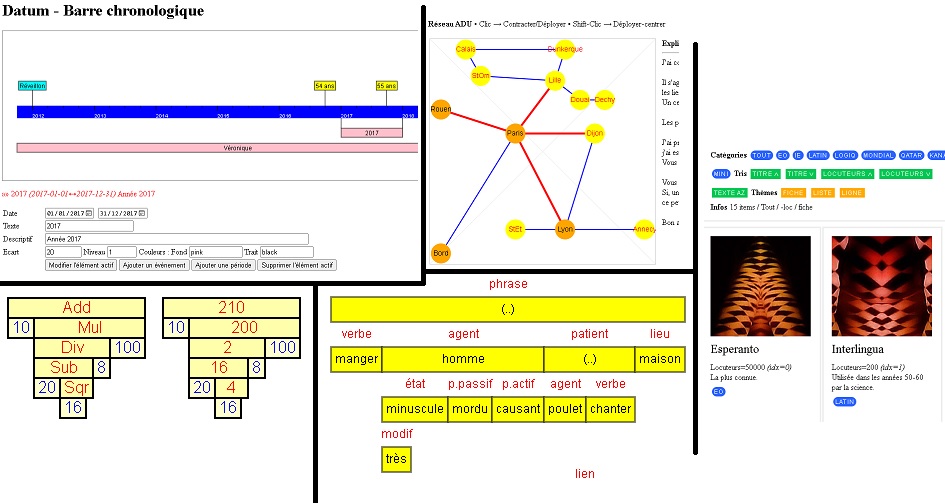

Quote from luishp on March 23, 2023, 10:26 pm@patrik note that you can use any JavaScript library. Although VisualNEO Web includes a bunch of plugins, it's impossible to cover any possible necessity. That's the reason we have included a Plugin Generator under the Tools menu. This way you can transform any JavaScript library into a plugin with your own easy to use NeoScript commands.
Regards.
@patrik note that you can use any JavaScript library. Although VisualNEO Web includes a bunch of plugins, it's impossible to cover any possible necessity. That's the reason we have included a Plugin Generator under the Tools menu. This way you can transform any JavaScript library into a plugin with your own easy to use NeoScript commands.
Regards.
Quote from Patrik on March 23, 2023, 10:46 pmThank you for that answer :)
I know that JS can be incorporated into VNW, and that we can also make plugins. But I have the feeling that if I write an HTML page with JS in it, I would go faster than if I mixed VNW and JS. Maybe I'm wrong. It is true that I don't know VNW thoroughly, and that I may be missing out on certain facilities.
I agree that VNW is more convenient for drawing a page with widgets. It's more beautiful and it's cleaner.
Thank you for that answer :)
I know that JS can be incorporated into VNW, and that we can also make plugins. But I have the feeling that if I write an HTML page with JS in it, I would go faster than if I mixed VNW and JS. Maybe I'm wrong. It is true that I don't know VNW thoroughly, and that I may be missing out on certain facilities.
I agree that VNW is more convenient for drawing a page with widgets. It's more beautiful and it's cleaner.
Quote from Patrik on April 3, 2023, 4:02 pmI can't get used to the language of VNW. I'm probably too used to writing in the C style. However, the interface of VNW is well done, I recognize it easily.
If I compare with AppInventor, I would say that VNW wins in terms of interface, but falls short in terms of language. And yet, I don't really like the logic of interlocking blocks, but it offers a big standardization in terms of properties and methods. And although it sounds like a toy (in AppInventor), I'm doing better.
With VNW, I can indeed write Javascript, but the communication between the two (JS and VNW) seems a bit cumbersome to me anyway.
Nota : the same project (on my Android)
WNW : 2.7 MB
AppInventor : 9.8 MB
I can't get used to the language of VNW. I'm probably too used to writing in the C style. However, the interface of VNW is well done, I recognize it easily.
If I compare with AppInventor, I would say that VNW wins in terms of interface, but falls short in terms of language. And yet, I don't really like the logic of interlocking blocks, but it offers a big standardization in terms of properties and methods. And although it sounds like a toy (in AppInventor), I'm doing better.
With VNW, I can indeed write Javascript, but the communication between the two (JS and VNW) seems a bit cumbersome to me anyway.
Nota : the same project (on my Android)
WNW : 2.7 MB
AppInventor : 9.8 MB
Quote from luishp on April 3, 2023, 5:47 pm@patrik note that one of the best VNWeb tools is the command wizard: Each command comes with a wizard interface you can access double-clicking any command within your code or in the command list. Also, the syntax have been simplified as much as possible to help new comers and non-programmers.
Anyway, thank you for your comments!
@patrik note that one of the best VNWeb tools is the command wizard: Each command comes with a wizard interface you can access double-clicking any command within your code or in the command list. Also, the syntax have been simplified as much as possible to help new comers and non-programmers.
Anyway, thank you for your comments!
Quote from Patrik on April 4, 2023, 3:40 pmThe problem is not in the syntax of each command, but in how to implement each statement. Often I need to do calculations, and having to go through "Math" seems strange to me. Same when the result is the end parameter.
Often with VNW, I have to write in several lines/instructions what I write in one line, in other languages.
VNW : GetObjectAttribute "id" "attr" [res]
More usual #1 : set [res] GetObjectAttribute "id" "attr"
More usual #2 : res = GetObjectAttribute "id" "attr"
Function : res = GetObjectAttribute("id","attr")
OOP #1 : res = id.GetAttribute("attr") or res = "id".GetAttribute("attr")
OOP #2 : res = id.attr or res = "id"."attr"
The problem is not in the syntax of each command, but in how to implement each statement. Often I need to do calculations, and having to go through "Math" seems strange to me. Same when the result is the end parameter.
Often with VNW, I have to write in several lines/instructions what I write in one line, in other languages.
VNW : GetObjectAttribute "id" "attr" [res]
More usual #1 : set [res] GetObjectAttribute "id" "attr"
More usual #2 : res = GetObjectAttribute "id" "attr"
Function : res = GetObjectAttribute("id","attr")
OOP #1 : res = id.GetAttribute("attr") or res = "id".GetAttribute("attr")
OOP #2 : res = id.attr or res = "id"."attr"

Quote from Phil78 on April 7, 2023, 4:27 pmQuote from luishp on April 3, 2023, 5:47 pm@patrik note that one of the best VNWeb tools is the command wizard: Each command comes with a wizard interface you can access double-clicking any command within your code or in the command list. Also, the syntax have been simplified as much as possible to help new comers and non-programmers.
Anyway, thank you for your comments!
Hi luis can you give us the url of this program command wizard ?
thank you
Quote from luishp on April 3, 2023, 5:47 pm@patrik note that one of the best VNWeb tools is the command wizard: Each command comes with a wizard interface you can access double-clicking any command within your code or in the command list. Also, the syntax have been simplified as much as possible to help new comers and non-programmers.
Anyway, thank you for your comments!
Hi luis can you give us the url of this program command wizard ?
thank you