
Flexbox - Column Height Stretching To Fit Content?

Quote from susan on September 10, 2022, 1:08 amI must be missing something really obvious, but I don't understand why Container12 which is neo-col-12 does not expand to show all the text in Paragraph2? When viewed in the browser the height of the column remains fixed. I have read this https://webhelp.visualneo.com/Flexboxbasedgridsystem.html and watched https://www.youtube.com/watch?v=WbuuwUMPR0Y and tried google for flexbox information without success.
Can anyone please point me in the right direction?
I must be missing something really obvious, but I don't understand why Container12 which is neo-col-12 does not expand to show all the text in Paragraph2? When viewed in the browser the height of the column remains fixed. I have read this https://webhelp.visualneo.com/Flexboxbasedgridsystem.html and watched https://www.youtube.com/watch?v=WbuuwUMPR0Y and tried google for flexbox information without success.
Can anyone please point me in the right direction?
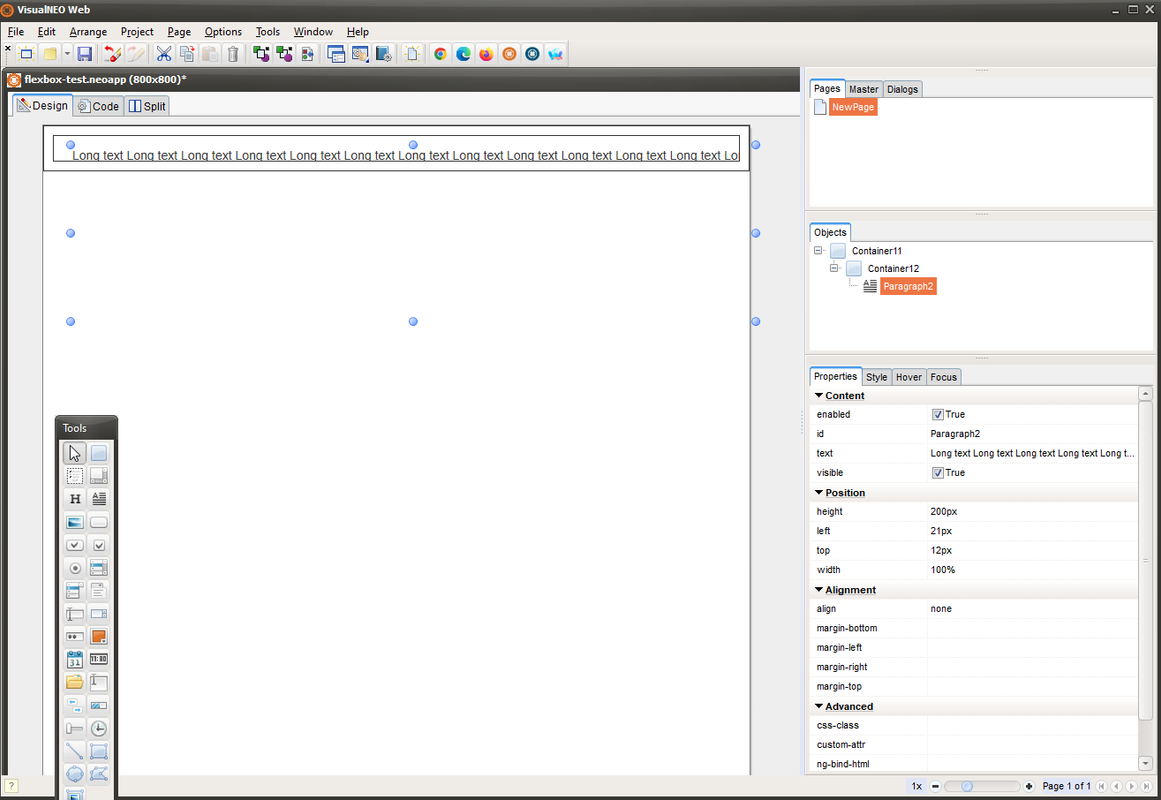
Uploaded files:
- You need to login to have access to uploads.

Quote from luishp on September 10, 2022, 8:47 am@susan two different options to solve it:
- Don't use the Parapraph object and add the HTML content directly into the neo-col-12 Container
- Just add neo-col-12 class to the Paragraph object
Attached both possibilities.
Keep in mind that all VisualNEO Objects have position:absolute by default.
You can use any of the responsive classes to change that or the special positioning classes.CSS classes to facilitate objects positioning in both responsive and standard designs:
.neo-top-right
.neo-bottom-right
.neo-top-left
.neo-bottom-left
.neo-top-center
.neo-bottom-center
.neo-middle-center
.neo-middle-left
.neo-middle-rightI usually use theese positioning classes for small details into responsive Containers.
Please let me know if you need additional information or samples.
@susan two different options to solve it:
- Don't use the Parapraph object and add the HTML content directly into the neo-col-12 Container
- Just add neo-col-12 class to the Paragraph object
Attached both possibilities.
Keep in mind that all VisualNEO Objects have position:absolute by default.
You can use any of the responsive classes to change that or the special positioning classes.
CSS classes to facilitate objects positioning in both responsive and standard designs:
.neo-top-right
.neo-bottom-right
.neo-top-left
.neo-bottom-left
.neo-top-center
.neo-bottom-center
.neo-middle-center
.neo-middle-left
.neo-middle-right
I usually use theese positioning classes for small details into responsive Containers.
Please let me know if you need additional information or samples.
- You need to login to have access to uploads.
Quote from susan on September 10, 2022, 1:25 pm@luishp thank you! That is exactly the information I needed and is very helpful.
@luishp thank you! That is exactly the information I needed and is very helpful.