
For the russian friends...

Quote from DaviddeArgentina on January 7, 2024, 3:26 amhello everyone.
Could someone tell me what this dialogue means (in English) and if there is anything I should do to avoid it?Thank you so much !
hello everyone.
Could someone tell me what this dialogue means (in English) and if there is anything I should do to avoid it?
Thank you so much !
Uploaded files: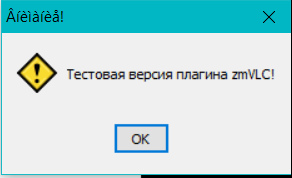

Quote from lolo on January 7, 2024, 8:41 pm
@daviddeargentina
test version
@daviddeargentina
test version

Quote from Vadim on January 9, 2024, 8:21 am@daviddeargentina
Yes, lolo is right, it is a message that a test version of the plugin is being used. The plugin is completely free and works fine, but this message appears when closing the compiled application. Unfortunately, the author of the plugin (Peter Pavlov) is dead, so there is no way to contact him for help. But if we manage to make a fix and remove this window, I'll be sure to post information about it. As a temporary solution, you can use a separate application that removes this window.
To do this, on the ShutDown tab of the main application, you can add a utility call with the Run command.
And on the StartUp tab of this utility, write this code (using the zmFunctions plugin by Peter Pavlov):While "[HWND_WinTestPlug]" "=" ""
zmFindWindow "Внимание!" "" "[HWND_WinTestPlug]"
EndWhilezmShowWindow "[HWND_WinTestPlug]" "Close"
Exit "" ""But unfortunately, the window will still appear for a moment.
Yes, lolo is right, it is a message that a test version of the plugin is being used. The plugin is completely free and works fine, but this message appears when closing the compiled application. Unfortunately, the author of the plugin (Peter Pavlov) is dead, so there is no way to contact him for help. But if we manage to make a fix and remove this window, I'll be sure to post information about it. As a temporary solution, you can use a separate application that removes this window.
To do this, on the ShutDown tab of the main application, you can add a utility call with the Run command.
And on the StartUp tab of this utility, write this code (using the zmFunctions plugin by Peter Pavlov):
While "[HWND_WinTestPlug]" "=" ""
zmFindWindow "Внимание!" "" "[HWND_WinTestPlug]"
EndWhile
zmShowWindow "[HWND_WinTestPlug]" "Close"
Exit "" ""
But unfortunately, the window will still appear for a moment.