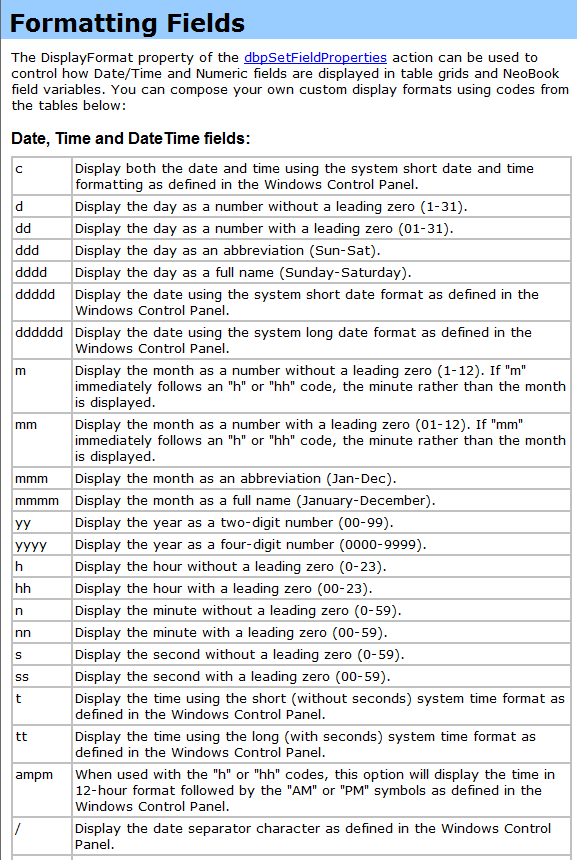
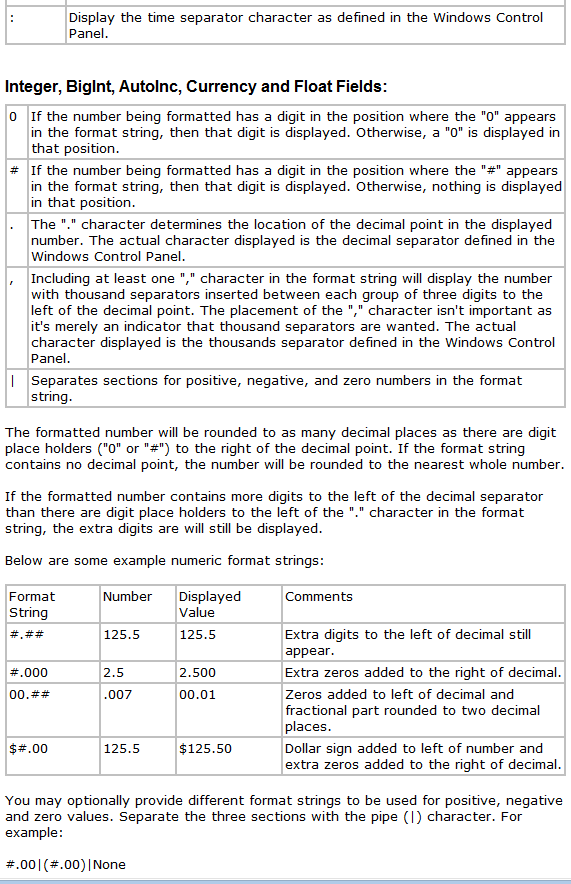
formato de fechas / ABOUT FORMAT DATE

Quote from joferar333 on May 4, 2024, 4:39 pmHola! @rasl,@gaev,@vadim
a ver si alguien me puede dar una manito orientandome con este tema.
Yo utilizo un popup calendar para seleccionar una fecha para que sea mostrada en una vista de base de datos
dbpPopupDateSelector "Left=602;Top=82;InitialDate=;DateFormat=mm/dd/yyyy" "[desde1]"
funciona perfecto solo que tengo que establecer el formato mm/dd/yyyy para que funcione correctamente al mostrar los registros de la base...
esto quiere decir que la variable [desde1] tiene este formato....
Ahora bien el problema se me presenta porque cuando mando a imprimir un reporte cuyo titulo lleva la fecha de esa variable me muestra ese formato y yo necesito que el formato de esa fecha para el titulo sea dd/mm/yyyy
hay alguna sentencia que me permita hacer esta conversion para tal fin)
Mil gracias
ENGLISH
Let's see if someone can give me a hand guiding me with this issue.
I use a popup calendar to select a date to be displayed in a database view
dbpPopupDateSelector "Left=602;Top=82;InitialDate=;DateFormat=mm/dd/yyyy" "[DESDE1]"
It works perfectly, I just have to set the mm/dd/yyyy format for it to work correctly when displaying the database records...
This means that the variable [DESDE1] has this format....
Now the problem arises because when I send a report to print whose title has the date of that variable, it shows me that format and I need the format of that date for the title to be dd/mm/yyyy
Is there a statement that allows me to do this conversion for this purpose)
Thank you
a ver si alguien me puede dar una manito orientandome con este tema.
Yo utilizo un popup calendar para seleccionar una fecha para que sea mostrada en una vista de base de datos
dbpPopupDateSelector "Left=602;Top=82;InitialDate=;DateFormat=mm/dd/yyyy" "[desde1]"
funciona perfecto solo que tengo que establecer el formato mm/dd/yyyy para que funcione correctamente al mostrar los registros de la base...
esto quiere decir que la variable [desde1] tiene este formato....
Ahora bien el problema se me presenta porque cuando mando a imprimir un reporte cuyo titulo lleva la fecha de esa variable me muestra ese formato y yo necesito que el formato de esa fecha para el titulo sea dd/mm/yyyy
hay alguna sentencia que me permita hacer esta conversion para tal fin)
Mil gracias
ENGLISH
Let's see if someone can give me a hand guiding me with this issue.
I use a popup calendar to select a date to be displayed in a database view
dbpPopupDateSelector "Left=602;Top=82;InitialDate=;DateFormat=mm/dd/yyyy" "[DESDE1]"
It works perfectly, I just have to set the mm/dd/yyyy format for it to work correctly when displaying the database records...
This means that the variable [DESDE1] has this format....
Now the problem arises because when I send a report to print whose title has the date of that variable, it shows me that format and I need the format of that date for the title to be dd/mm/yyyy
Is there a statement that allows me to do this conversion for this purpose)
Thank you

Quote from Gaev on May 4, 2024, 8:01 pm@joferar333
Now the problem arises because when I send a report to print whose title has the date of that variable, it shows me that format and I need the format of that date for the title to be dd/mm/yyyy
This is a known deficiency with the MS Access Database... it only stores dates in the American (mm/dd/yyyy) format.
Is there a statement that allows me to do this conversion for this purpose
The only workaround that I know of is to create an additional field (type is String) that is normally hidden from the user, but each time the current record is created or updated, you call a subroutine (that is specified as the third parameter in the dbpOpenTable command) which translates the date in the first field to a text string (mm/dd/yy) and stores the result in the second (hidden) field ... then, have your report use the second (text string) field.
Now the problem arises because when I send a report to print whose title has the date of that variable, it shows me that format and I need the format of that date for the title to be dd/mm/yyyy
This is a known deficiency with the MS Access Database... it only stores dates in the American (mm/dd/yyyy) format.
Is there a statement that allows me to do this conversion for this purpose
The only workaround that I know of is to create an additional field (type is String) that is normally hidden from the user, but each time the current record is created or updated, you call a subroutine (that is specified as the third parameter in the dbpOpenTable command) which translates the date in the first field to a text string (mm/dd/yy) and stores the result in the second (hidden) field ... then, have your report use the second (text string) field.
Quote from joferar333 on May 6, 2024, 2:21 pm@gaev are there any plugins that you know of that allow me to convert the date that neodpro brings and stores in the date field?
(mm/dd/yyyy) as I said, you can take this field and store the month field in a separate variable, the same as the day and the year, that is, from a variable that contains the month, day and year, transform 3 independent variables with each one. of the values of the day, month and year?
@gaev are there any plugins that you know of that allow me to convert the date that neodpro brings and stores in the date field?
(mm/dd/yyyy) as I said, you can take this field and store the month field in a separate variable, the same as the day and the year, that is, from a variable that contains the month, day and year, transform 3 independent variables with each one. of the values of the day, month and year?
Quote from Gaev on May 6, 2024, 3:35 pm@joferar333
I do not know of any plugin (in VisualNEOWin), but there are VisualNEOWin commands to extract and/or translate dates from one format to another; later today/tomorrow, I will upload a subroutine/Call that will facilitate this.
I do not know of any plugin (in VisualNEOWin), but there are VisualNEOWin commands to extract and/or translate dates from one format to another; later today/tomorrow, I will upload a subroutine/Call that will facilitate this.
Quote from joferar333 on May 6, 2024, 3:44 pm@gaev
Thank you very much, I am waiting for your routine... you have no idea how much it saves my life...
Thank you very much, I am waiting for your routine... you have no idea how much it saves my life...
Quote from Gaev on May 7, 2024, 3:45 am@joferar333
A generic routine to convert "any date format" to "any other date format" will take longer than I anticipated.
In order to not hold up your project, here are commands that you can use to convert the date that MSAccess uses (i.e. US Date Format m/d/yyyy) to one you need (dd/mm/yyyy) ...
Say this date is in variable [dateMSAccess], then ...
DateToNum "[dateMSAccess]" "m/d/y" "[numMSAccess]"
NumToDate "[numMSAccess]" "dd/mm/yyyy" "[dateMMDDYYYY]"
... then variable [dateMMDDYYYY] will contain the date in the format you desire.
1) Try this code first with different values for [dateMSAccess]
For additional information refer to the help file here ... https://winhelp.visualneo.com/Control.html#DATETONUM
2) You can then ...
- replace the variable names with field names in your database/table
- run the code in the subroutine specified in your dbpOpenTable commandIf you encounter problems or unexpected results, upload a minimal pub with just the relevant fields and your code.
A generic routine to convert "any date format" to "any other date format" will take longer than I anticipated.
In order to not hold up your project, here are commands that you can use to convert the date that MSAccess uses (i.e. US Date Format m/d/yyyy) to one you need (dd/mm/yyyy) ...
Say this date is in variable [dateMSAccess], then ...
DateToNum "[dateMSAccess]" "m/d/y" "[numMSAccess]"
NumToDate "[numMSAccess]" "dd/mm/yyyy" "[dateMMDDYYYY]"
... then variable [dateMMDDYYYY] will contain the date in the format you desire.
1) Try this code first with different values for [dateMSAccess]
For additional information refer to the help file here ... https://winhelp.visualneo.com/Control.html#DATETONUM
2) You can then ...
- replace the variable names with field names in your database/table
- run the code in the subroutine specified in your dbpOpenTable command
If you encounter problems or unexpected results, upload a minimal pub with just the relevant fields and your code.
Quote from joferar333 on May 7, 2024, 8:57 amYes! @gaev this command found perfect!!!!
New fix my problem.
THANKS!!!!!!!!
Yes! @gaev this command found perfect!!!!
New fix my problem.
THANKS!!!!!!!!
Quote from mishem on May 7, 2024, 5:31 pmdbpSetFieldProperties >> Formatting Fields
For some reason this page is not available in the online help. See offline help.
dbpSetFieldProperties >> Formatting Fields
For some reason this page is not available in the online help. See offline help.
Quote from Gaev on May 8, 2024, 1:38 am@mishem
For some reason this page is not available in the online help.
It is there, but the link from the Action Commands page i.e. https://neodbprohelp.visualneo.com/ActionCommandReference.html takes you to the top of the page with all the Grid Commands ... if you scroll down (quite a bit), you will find the help section for this command.
For some reason this page is not available in the online help.
It is there, but the link from the Action Commands page i.e. https://neodbprohelp.visualneo.com/ActionCommandReference.html takes you to the top of the page with all the Grid Commands ... if you scroll down (quite a bit), you will find the help section for this command.
Quote from mishem on May 8, 2024, 6:05 pm@gaev
The link does not work on Formatting Fields.https://neodbprohelp.visualneo.com/FormattingFields.html
@gaev
The link does not work on Formatting Fields.
https://neodbprohelp.visualneo.com/FormattingFields.html
Uploaded files: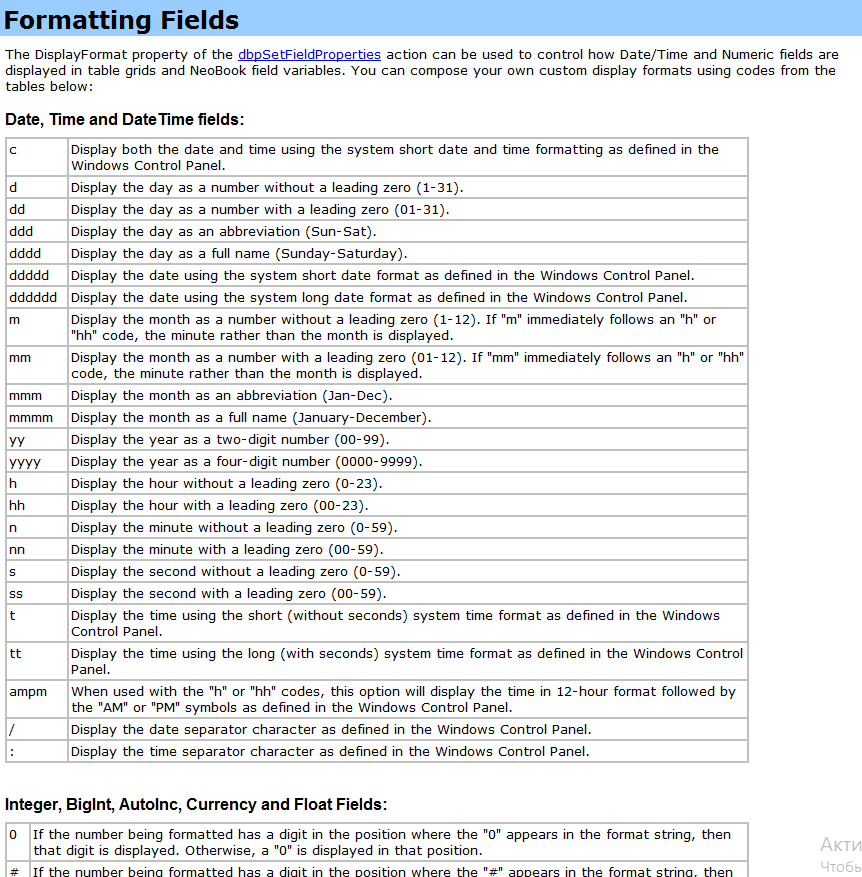
Quote from Gaev on May 8, 2024, 7:11 pm@mishem
The link does not work on Formatting Fields.
https://neodbprohelp.visualneo.com/FormattingFields.htmlWhere in the Help file is this link present ?
The link does not work on Formatting Fields.
https://neodbprohelp.visualneo.com/FormattingFields.html
Where in the Help file is this link present ?
Quote from mishem on May 8, 2024, 8:15 pm@gaev
NeoBookDBPro version 1.6а
dbpPopupDateSelector
dbpSetFieldProperties
NeoBookDBPro version 1.6а
dbpPopupDateSelector
dbpSetFieldProperties
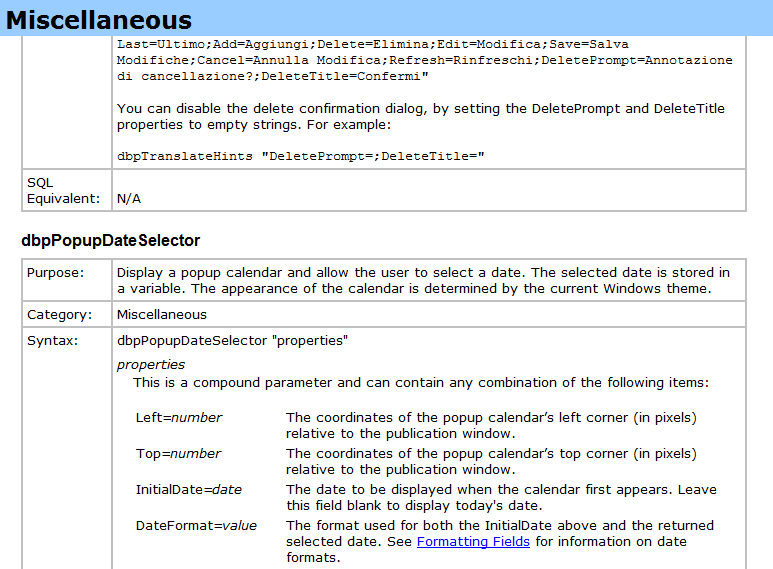
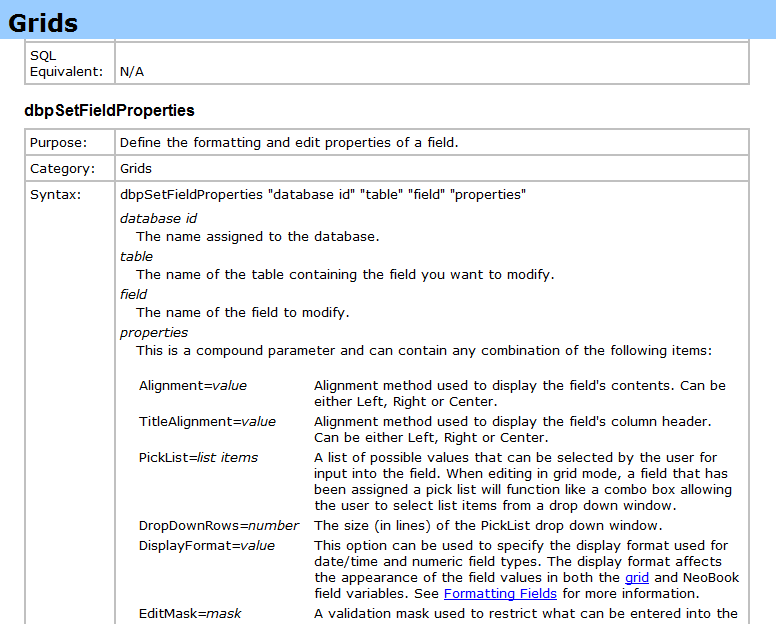
Quote from Gaev on May 8, 2024, 10:26 pm@mishem
I see; looks like whoever did the transformation of the Help file "missed this page".
Looks like an issue to be attended by @luishp
I see; looks like whoever did the transformation of the Help file "missed this page".
Looks like an issue to be attended by @luishp