
GPS, plugin or a solution

Quote from naglieri on December 28, 2021, 6:56 pmFor VisualNeo Web I found a little example to show Latitude and Longitude ( positioning.neoapp )
Some have a solution or a plugin for Win version ?Thanks
For VisualNeo Web I found a little example to show Latitude and Longitude ( positioning.neoapp )
Some have a solution or a plugin for Win version ?
Thanks

Quote from emo on December 28, 2021, 9:18 pmHello @naglieri , you can use powershell to determine coordinates in windows.
In this case, you must activate the location in windows.
@daviddeargentina made a plugin to run powershell scripts, contact him.
Greeting
Hello @naglieri , you can use powershell to determine coordinates in windows.
In this case, you must activate the location in windows.
@daviddeargentina made a plugin to run powershell scripts, contact him.
Greeting

Quote from DaviddeArgentina on December 29, 2021, 12:16 amHi @naglieri, @emmanuel-fernandez
I just addapted that script, and generate Latitude and Longitude variables
Remember you must generate each variable into the visualneowin script / plugin, because each returned variable is located via clipboard, and, when the second variable is generated, the clipboard is updated.
here is the script: (addapt yourself as you need)
Tested on powershell ISE console using win 10 and tested ok
cls

Add-Type -AssemblyName System.Device #Required to access System.Device.Location namespace
$GeoWatcher = New-Object System.Device.Location.GeoCoordinateWatcher #Create the required object
$GeoWatcher.Start() #Begin resolving current locaton

while (($GeoWatcher.Status -ne 'Ready') -and ($GeoWatcher.Permission -ne 'Denied')) {
Start-Sleep -Milliseconds 100 #Wait for discovery.
}

if ($GeoWatcher.Permission -eq 'Denied'){
Write-Error 'Access Denied for Location Information'
} else {
# $GeoWatcher.Position.Location | Select Latitude,Longitude #Select the relevent results.
$Lat = $GeoWatcher.Position.Location.Latitude
$Long = $GeoWatcher.Position.Location.Longitude

echo $Lat
echo $Long
}
Hi @naglieri, @emmanuel-fernandez
I just addapted that script, and generate Latitude and Longitude variables
Remember you must generate each variable into the visualneowin script / plugin, because each returned variable is located via clipboard, and, when the second variable is generated, the clipboard is updated.
here is the script: (addapt yourself as you need)
Tested on powershell ISE console using win 10 and tested ok
cls

Add-Type -AssemblyName System.Device #Required to access System.Device.Location namespace
$GeoWatcher = New-Object System.Device.Location.GeoCoordinateWatcher #Create the required object
$GeoWatcher.Start() #Begin resolving current locaton

while (($GeoWatcher.Status -ne 'Ready') -and ($GeoWatcher.Permission -ne 'Denied')) {
Start-Sleep -Milliseconds 100 #Wait for discovery.
}

if ($GeoWatcher.Permission -eq 'Denied'){
Write-Error 'Access Denied for Location Information'
} else {
# $GeoWatcher.Position.Location | Select Latitude,Longitude #Select the relevent results.
$Lat = $GeoWatcher.Position.Location.Latitude
$Long = $GeoWatcher.Position.Location.Longitude

echo $Lat
echo $Long
}
Quote from DaviddeArgentina on December 29, 2021, 12:52 amYou could get only one variable:
$ret = echo $Lat"***"$Long
The rest is StrParse as usual.
You could get only one variable:
$ret = echo $Lat"***"$Long
The rest is StrParse as usual.
Quote from emo on December 29, 2021, 1:35 pmHi Hi @naglieri , @daviddeargentina
Hidden version, with seconds to refresh and output to file ;-)
# para ejecutarlo:
# desde el cmd o un .bat
# powershell.exe -windowstyle hidden -noexit -ExecutionPolicy Bypass -File <path_al_ps1> -segundos -fichero_de_salida
# ejemplo: powershell -windowstyle hidden -ExecutionPolicy Bypass -noexit -File "c:\users\emo\desktop\gpswindowsok.ps1" 5 c:\users\emo\desktop\fichero.txt
# se jecutara invisible, para cerrarlo ir a administrador de tareas y elinminar power shell
# Tendras en el fichero de salida las coordenadas en formato xx.xxxxxxx;xx.xxxxxxx cada x segundos
# para permitir ejecucion de scripts :   Set-ExecutionPolicy -ExecutionPolicy RemoteSigned -Scope LocalMachine
# para volver a restringir la ejecucion de scripts: Set-ExecutionPolicy Restricted

# to run:
# from cmd or bat file
# powershell.exe -windowstyle hidden -noexit -ExecutionPolicy Bypass -File <path_al_ps1> -seconds -output_file
# example: powershell -windowstyle hidden -ExecutionPolicy Bypass -noexit -File "path_to_the_ps1" 5 path_to_output_file_txt
# it will run hidden, to close go to task manager and delete power shell
# You will have in the output file the coordinates in format xx.xxxxxxx;xx.xxxxxxx every x seconds
# to allow script execution :   Set-ExecutionPolicy -ExecutionPolicy RemoteSigned -Scope LocalMachine
# to disable script execution: Set-ExecutionPolicy Restricted

param (
    [Parameter(Mandatory=$true)][int]$segundos,
    [Parameter(Mandatory = $true)] [string] $fichero
    )

Add-Type -AssemblyName System.Device #Required to access System.Device.Location namespace
$GeoWatcher = New-Object System.Device.Location.GeoCoordinateWatcher #Create the required object
$GeoWatcher.Start() #Begin resolving current locaton
while (($GeoWatcher.Status -ne 'Ready') -and ($GeoWatcher.Permission -ne 'Denied')) {
Start-Sleep -Milliseconds 100 #Wait for discovery.
}
if ($GeoWatcher.Permission -eq 'Denied'){
Write-Error 'Access Denied for Location Information'
} else {
Do {
# $GeoWatcher.Position.Location | Select Latitude,Longitude #Select the relevent results.
$Lat = $GeoWatcher.Position.Location.Latitude
$Long = $GeoWatcher.Position.Location.Longitude
echo $Lat";"$Long
Set-Content -Path $fichero -Value $Lat";"$Long
# if you want to append instead of owerwrite uncomment above and uncoment below
# Add-Content -Path $fichero -Value $Lat";"$Long
[int]$tiempo=[int]$segundos*1000
} Until (Start-Sleep -Milliseconds $tiempo)
}
Hi Hi @naglieri , @daviddeargentina
Hidden version, with seconds to refresh and output to file ;-)
# para ejecutarlo:
# desde el cmd o un .bat
# powershell.exe -windowstyle hidden -noexit -ExecutionPolicy Bypass -File <path_al_ps1> -segundos -fichero_de_salida
# ejemplo: powershell -windowstyle hidden -ExecutionPolicy Bypass -noexit -File "c:\users\emo\desktop\gpswindowsok.ps1" 5 c:\users\emo\desktop\fichero.txt
# se jecutara invisible, para cerrarlo ir a administrador de tareas y elinminar power shell
# Tendras en el fichero de salida las coordenadas en formato xx.xxxxxxx;xx.xxxxxxx cada x segundos
# para permitir ejecucion de scripts :   Set-ExecutionPolicy -ExecutionPolicy RemoteSigned -Scope LocalMachine
# para volver a restringir la ejecucion de scripts: Set-ExecutionPolicy Restricted

# to run:
# from cmd or bat file
# powershell.exe -windowstyle hidden -noexit -ExecutionPolicy Bypass -File <path_al_ps1> -seconds -output_file
# example: powershell -windowstyle hidden -ExecutionPolicy Bypass -noexit -File "path_to_the_ps1" 5 path_to_output_file_txt
# it will run hidden, to close go to task manager and delete power shell
# You will have in the output file the coordinates in format xx.xxxxxxx;xx.xxxxxxx every x seconds
# to allow script execution :   Set-ExecutionPolicy -ExecutionPolicy RemoteSigned -Scope LocalMachine
# to disable script execution: Set-ExecutionPolicy Restricted

param (
    [Parameter(Mandatory=$true)][int]$segundos,
    [Parameter(Mandatory = $true)] [string] $fichero
    )

Add-Type -AssemblyName System.Device #Required to access System.Device.Location namespace
$GeoWatcher = New-Object System.Device.Location.GeoCoordinateWatcher #Create the required object
$GeoWatcher.Start() #Begin resolving current locaton
while (($GeoWatcher.Status -ne 'Ready') -and ($GeoWatcher.Permission -ne 'Denied')) {
Start-Sleep -Milliseconds 100 #Wait for discovery.
}
if ($GeoWatcher.Permission -eq 'Denied'){
Write-Error 'Access Denied for Location Information'
} else {
Do {
# $GeoWatcher.Position.Location | Select Latitude,Longitude #Select the relevent results.
$Lat = $GeoWatcher.Position.Location.Latitude
$Long = $GeoWatcher.Position.Location.Longitude
echo $Lat";"$Long
Set-Content -Path $fichero -Value $Lat";"$Long
# if you want to append instead of owerwrite uncomment above and uncoment below
# Add-Content -Path $fichero -Value $Lat";"$Long
[int]$tiempo=[int]$segundos*1000
} Until (Start-Sleep -Milliseconds $tiempo)
}
Quote from emo on December 29, 2021, 6:26 pmA source demo and exe if you want to test
Also available in http://emotools.hopto.org
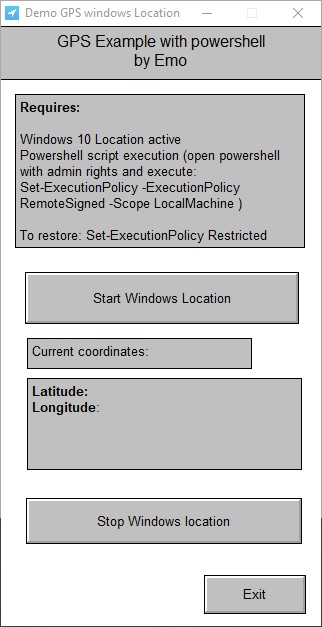
A source demo and exe if you want to test
Also available in http://emotools.hopto.org
Uploaded files:

Quote from Vadim on December 30, 2021, 9:00 am@emmanuel-fernandez
Thank you so much for the example!! It works great!! Accuracy in my case is about 20 meters.
I noticed that powershell.exe is still hanging in the processes, maybe it makes sense to add closing this process at the end of the application.
Thank you so much for the example!! It works great!! Accuracy in my case is about 20 meters.
I noticed that powershell.exe is still hanging in the processes, maybe it makes sense to add closing this process at the end of the application.
Quote from emo on December 30, 2021, 11:08 amThank you @vadim to test.
This version restart powershell ok, i remove the -noexit option in the scriopt.
Thank you @vadim to test.
This version restart powershell ok, i remove the -noexit option in the scriopt.
Uploaded files:
Quote from DaviddeArgentina on October 14, 2022, 11:04 pmCiao Marco @naglieri,
If you still have a GPS-based project in development, I can put at your disposal an entire anti-panic button system, based on two components:
a) an Android app, which users can activate to call Police, Fire, Ambulance and other services.
b) a monitoring console, which is automatically updated every time users activate a panic alert.Basically, users send the following information to a server ( the monitoring console):
* User ID
* Alert Id (the number generated in the database)
* Alert Type Id (Police, Fire, Ambulance, Crane, etc)
* Date and Time
* Coordinates of the location of the Alert.
All this is already finished and working.
Maybe it will give you ideas for some possible venture that we can share.
Greetings from Buenos Aires,
David from Argentina
Si todavía tienes en desarrollo algún proyecto basado en GPS, puedo poner a tu disposición todo un sistema de botón antipánico, basado en dos componentes:
a) una app para Android, que los usuarios pueden activar para llamar a Policia, a Bomberos, Ambulancias y otros servicios.
b) una consola de monitoreo, que se actualiza automáticamente cada vez que los usuarios activen un alerta de pánico.Basicamente, los usuarios envian la siguiente información a un servidor ( la consola de monitoreo ):
* Id de Usuario
* Id de Alerta (el numero generado en la base de datos)
* Id de Tipo de Alerta (Policia, Bomberos, Ambulancias, Gruas, etc)
* Fecha y Hora
* Coordenadas de la ubicación del Alerta.Todo esto ya está terminado y funcionando.
Tal vez te de ideas para algun posible emprendimiento que podamos compartir.
Saludos desde Buenos Aires,
David de Argentina
Ciao Marco @naglieri,
If you still have a GPS-based project in development, I can put at your disposal an entire anti-panic button system, based on two components:
a) an Android app, which users can activate to call Police, Fire, Ambulance and other services.
b) a monitoring console, which is automatically updated every time users activate a panic alert.
Basically, users send the following information to a server ( the monitoring console):
* User ID
* Alert Id (the number generated in the database)
* Alert Type Id (Police, Fire, Ambulance, Crane, etc)
* Date and Time
* Coordinates of the location of the Alert.
All this is already finished and working.
Maybe it will give you ideas for some possible venture that we can share.
Greetings from Buenos Aires,
David from Argentina
Si todavía tienes en desarrollo algún proyecto basado en GPS, puedo poner a tu disposición todo un sistema de botón antipánico, basado en dos componentes:
a) una app para Android, que los usuarios pueden activar para llamar a Policia, a Bomberos, Ambulancias y otros servicios.
b) una consola de monitoreo, que se actualiza automáticamente cada vez que los usuarios activen un alerta de pánico.
Basicamente, los usuarios envian la siguiente información a un servidor ( la consola de monitoreo ):
* Id de Usuario
* Id de Alerta (el numero generado en la base de datos)
* Id de Tipo de Alerta (Policia, Bomberos, Ambulancias, Gruas, etc)
* Fecha y Hora
* Coordenadas de la ubicación del Alerta.
Todo esto ya está terminado y funcionando.
Tal vez te de ideas para algun posible emprendimiento que podamos compartir.
Saludos desde Buenos Aires,
David de Argentina
Quote from naglieri on October 15, 2022, 2:23 pmThank you, but if you remember my problem dated back to the end of December 2021.
In the meantime I have found a solution.However, you could always prepare a demo version.
Someone might be interested.Greetings
Thank you, but if you remember my problem dated back to the end of December 2021.
In the meantime I have found a solution.
However, you could always prepare a demo version.
Someone might be interested.
Greetings
Quote from DaviddeArgentina on October 19, 2022, 6:58 pmCiao @naglieri,
Email me to:
aplicaciones (at) rocketmail (dot) com
and i will send you a sample ( spanish only... sorry )
Greetings from Buenos Aires,
David de Argentina
Ciao @naglieri,
Email me to:
aplicaciones (at) rocketmail (dot) com
and i will send you a sample ( spanish only... sorry )
Greetings from Buenos Aires,
David de Argentina
Quote from DaviddeArgentina on November 19, 2022, 12:42 amCiao @naglieri,
Several days ago (20/10/2022) I sent you an email.
Could you tell me if you have received it?
Greetings from Buenos Aires,
Ciao @naglieri,
Several days ago (20/10/2022) I sent you an email.
Could you tell me if you have received it?
Greetings from Buenos Aires,
Quote from DaviddeArgentina on November 19, 2022, 4:52 pm@naglieri
I just resend you the complete email.
Please, check your inbox.
Greeetings from Buenos Aires,
David de Argentina
I just resend you the complete email.
Please, check your inbox.
Greeetings from Buenos Aires,
David de Argentina
Quote from naglieri on November 20, 2022, 4:40 pmQuote from DaviddeArgentina on November 19, 2022, 4:52 pm@naglieri
I just resend you the complete email.
Please, check your inbox.
Greeetings from Buenos Aires,
David de Argentina
Is not possible, I have not received anything.
My email is
naglieri@gmail.com
Quote from DaviddeArgentina on November 19, 2022, 4:52 pmI just resend you the complete email.
Please, check your inbox.
Greeetings from Buenos Aires,
David de Argentina
Is not possible, I have not received anything.
My email is