Help and guidance regarding the implementation and use of the organizational chart plugin - Forum
Help and guidance regarding the implementation and use of the organizational chart plugin

Quote from javadrajabihakami on June 16, 2023, 4:16 pmHello and good time dear friends...!
Thank you for explaining to me in a simple and understandable way about the implementation and use of the organizational chart plugin, where should I place the required items in the project and container? thanks allI don't understand where to place the required items in the project and container!
https://www.jqueryscript.net/chart-graph/Fully-Customizable-Organisational-Chart-Plugin-With-jQuery-OrgChart.html
Hello and good time dear friends...!
Thank you for explaining to me in a simple and understandable way about the implementation and use of the organizational chart plugin, where should I place the required items in the project and container? thanks all
I don't understand where to place the required items in the project and container!

Quote from luishp on June 16, 2023, 6:15 pmHi @javadrajabihakami
I did a project for a company using that JavaScript plugin just a few months ago.
To make it easily updatable I used neoCMS for the back-end and it worked very well.Check it here:
https://www.conberge.info/organigramaAll the data is retrieved from here:
https://www.conberge.info/organigrama/admin/api/collections/get/equipo/First, load the JavaScript Libraries (Project > Properties > Advanced > Head):
<script src="https://d3js.org/d3.v7.min.js"></script>
<script src="https://cdn.jsdelivr.net/npm/d3-org-chart@2"></script>
<script src="https://cdn.jsdelivr.net/npm/d3-flextree@2.1.2/build/d3-flextree.js"></script>
This is the initialization JavaScript subroutine I used:
BeginJS
//var chart;
      d3.json(
        'https://www.conberge.info/organigrama/admin/api/collections/get/equipo/'
      ).then((theData) => {
        dataFlattened = new Object();
        dataFlattened = theData.entries;
        console.log(dataFlattened);

        $App.chart = new d3.OrgChart()
          .container('.chart-container')
          .data(dataFlattened)
          .rootMargin(100)
          .nodeWidth((d) => 210)
          .nodeHeight((d) => 180)
          .childrenMargin((d) => 130)
          .compactMarginBetween((d) => 85)
          .compactMarginPair((d) => 80)
          .linkUpdate(function (d, i, arr) {
            d3.select(this)
              .attr('stroke', (d) =>
                d.data._upToTheRootHighlighted ? '#0a355e' : '#0a355e'
              )
              .attr('stroke-width', (d) =>
                d.data._upToTheRootHighlighted ? 5 : 1.5
              )
              .attr('stroke-dasharray', '3,2');

            if (d.data._upToTheRootHighlighted) {
              d3.select(this).raise();
            }
          })
          .nodeContent(function (d, i, arr, state) {
            const colors = [
              '#ff5959',
              '#0a355e',
              '#0a355e',
              '#0a355e',
              '#0a355e',
              '#0a355e',
            ];
            const color = colors[d.depth % colors.length];
            const imageDim = 80;
            const lightCircleDim = 95;
            const outsideCircleDim = 110;


if(d.data.areaSpanish == undefined){
            return `
                <div style="background-color:white; position:absolute;width:${
                  d.width
                }px;height:${d.height}px;">
                   <div style="background-color:${color};position:absolute;margin-top:-${outsideCircleDim / 2}px;margin-left:${d.width / 2 - outsideCircleDim / 2}px;border-radius:100px;width:${outsideCircleDim}px;height:${outsideCircleDim}px;"></div>
                   <div style="background-color:#ffffff;position:absolute;margin-top:-${
                     lightCircleDim / 2
                   }px;margin-left:${d.width / 2 - lightCircleDim / 2}px;border-radius:100px;width:${lightCircleDim}px;height:${lightCircleDim}px;"></div>
                   <img src=" https://conberge.info/organigrama/admin/storage/uploads${
                     d.data.imageUrl.path
                   }" style="position:absolute;margin-top:-${imageDim / 2}px;margin-left:${d.width / 2 - imageDim / 2}px;border-radius:100px;width:${imageDim}px;height:${imageDim}px;" />
                   <div class="card" style="top:${
                     outsideCircleDim / 2 + 10
                   }px;position:absolute;height:30px;width:${d.width}px;background-color:#3AB6E3;">
                      <div style="font-family:arial;background-color:${color};height:auto;text-align:center;padding:5px;color:#ffffff;font-weight:bold;font-size:14px">
                          ${d.data.name}<br><small>${d.data.positionName}</small>
                      </div>
                      <div class="neo-middle-center-content" style="font-family:arial;background-color:#F0EDEF;height:65px;text-align:center;padding:5px;color:#0a355e;font-size:12px">
                          <i>${d.data.area}</i>
                      </div>
                   </div>
               </div>
  `;
}else{
           return `
                <div style="background-color:white; position:absolute;width:${
                  d.width
                }px;height:${d.height}px;">
                   <div style="background-color:${color};position:absolute;margin-top:-${outsideCircleDim / 2}px;margin-left:${d.width / 2 - outsideCircleDim / 2}px;border-radius:100px;width:${outsideCircleDim}px;height:${outsideCircleDim}px;"></div>
                   <div style="background-color:#ffffff;position:absolute;margin-top:-${
                     lightCircleDim / 2
                   }px;margin-left:${d.width / 2 - lightCircleDim / 2}px;border-radius:100px;width:${lightCircleDim}px;height:${lightCircleDim}px;"></div>
                   <img src=" https://conberge.info/organigrama/admin/storage/uploads${
                     d.data.imageUrl.path
                   }" style="position:absolute;margin-top:-${imageDim / 2}px;margin-left:${d.width / 2 - imageDim / 2}px;border-radius:100px;width:${imageDim}px;height:${imageDim}px;" />
                   <div class="card" style="top:${
                     outsideCircleDim / 2 + 10
                   }px;position:absolute;height:30px;width:${d.width}px;background-color:#3AB6E3;">
                      <div style="font-family:arial;background-color:${color};height:auto;text-align:center;padding:5px;color:#ffffff;font-weight:bold;font-size:14px">
                          ${d.data.name}<br><small>${d.data.positionName}</small>
                      </div>
                      <div class="neo-middle-center-content" style="font-family:arial;background-color:#F0EDEF;height:65px;text-align:center;padding:5px;color:#0a355e;font-size:12px">
                          <i>${d.data.area}<br>
                          ${d.data.areaSpanish}</i>
                      </div>
                   </div>
               </div>
  `;
}


          })
          .render();
      });
EndJS
Just add the chart-container CSS class to the Container you want to use to render the Org Chart and it should work.
Good luck!
I did a project for a company using that JavaScript plugin just a few months ago.
To make it easily updatable I used neoCMS for the back-end and it worked very well.
Check it here:
https://www.conberge.info/organigrama
All the data is retrieved from here:
https://www.conberge.info/organigrama/admin/api/collections/get/equipo/
First, load the JavaScript Libraries (Project > Properties > Advanced > Head):
<script src="https://d3js.org/d3.v7.min.js"></script>
<script src="https://cdn.jsdelivr.net/npm/d3-org-chart@2"></script>
<script src="https://cdn.jsdelivr.net/npm/d3-flextree@2.1.2/build/d3-flextree.js"></script>
This is the initialization JavaScript subroutine I used:
BeginJS
//var chart;
      d3.json(
        'https://www.conberge.info/organigrama/admin/api/collections/get/equipo/'
      ).then((theData) => {
        dataFlattened = new Object();
        dataFlattened = theData.entries;
        console.log(dataFlattened);

        $App.chart = new d3.OrgChart()
          .container('.chart-container')
          .data(dataFlattened)
          .rootMargin(100)
          .nodeWidth((d) => 210)
          .nodeHeight((d) => 180)
          .childrenMargin((d) => 130)
          .compactMarginBetween((d) => 85)
          .compactMarginPair((d) => 80)
          .linkUpdate(function (d, i, arr) {
            d3.select(this)
              .attr('stroke', (d) =>
                d.data._upToTheRootHighlighted ? '#0a355e' : '#0a355e'
              )
              .attr('stroke-width', (d) =>
                d.data._upToTheRootHighlighted ? 5 : 1.5
              )
              .attr('stroke-dasharray', '3,2');

            if (d.data._upToTheRootHighlighted) {
              d3.select(this).raise();
            }
          })
          .nodeContent(function (d, i, arr, state) {
            const colors = [
              '#ff5959',
              '#0a355e',
              '#0a355e',
              '#0a355e',
              '#0a355e',
              '#0a355e',
            ];
            const color = colors[d.depth % colors.length];
            const imageDim = 80;
            const lightCircleDim = 95;
            const outsideCircleDim = 110;


if(d.data.areaSpanish == undefined){
            return `
                <div style="background-color:white; position:absolute;width:${
                  d.width
                }px;height:${d.height}px;">
                   <div style="background-color:${color};position:absolute;margin-top:-${outsideCircleDim / 2}px;margin-left:${d.width / 2 - outsideCircleDim / 2}px;border-radius:100px;width:${outsideCircleDim}px;height:${outsideCircleDim}px;"></div>
                   <div style="background-color:#ffffff;position:absolute;margin-top:-${
                     lightCircleDim / 2
                   }px;margin-left:${d.width / 2 - lightCircleDim / 2}px;border-radius:100px;width:${lightCircleDim}px;height:${lightCircleDim}px;"></div>
                   <img src=" https://conberge.info/organigrama/admin/storage/uploads${
                     d.data.imageUrl.path
                   }" style="position:absolute;margin-top:-${imageDim / 2}px;margin-left:${d.width / 2 - imageDim / 2}px;border-radius:100px;width:${imageDim}px;height:${imageDim}px;" />
                   <div class="card" style="top:${
                     outsideCircleDim / 2 + 10
                   }px;position:absolute;height:30px;width:${d.width}px;background-color:#3AB6E3;">
                      <div style="font-family:arial;background-color:${color};height:auto;text-align:center;padding:5px;color:#ffffff;font-weight:bold;font-size:14px">
                          ${d.data.name}<br><small>${d.data.positionName}</small>
                      </div>
                      <div class="neo-middle-center-content" style="font-family:arial;background-color:#F0EDEF;height:65px;text-align:center;padding:5px;color:#0a355e;font-size:12px">
                          <i>${d.data.area}</i>
                      </div>
                   </div>
               </div>
  `;
}else{
           return `
                <div style="background-color:white; position:absolute;width:${
                  d.width
                }px;height:${d.height}px;">
                   <div style="background-color:${color};position:absolute;margin-top:-${outsideCircleDim / 2}px;margin-left:${d.width / 2 - outsideCircleDim / 2}px;border-radius:100px;width:${outsideCircleDim}px;height:${outsideCircleDim}px;"></div>
                   <div style="background-color:#ffffff;position:absolute;margin-top:-${
                     lightCircleDim / 2
                   }px;margin-left:${d.width / 2 - lightCircleDim / 2}px;border-radius:100px;width:${lightCircleDim}px;height:${lightCircleDim}px;"></div>
                   <img src=" https://conberge.info/organigrama/admin/storage/uploads${
                     d.data.imageUrl.path
                   }" style="position:absolute;margin-top:-${imageDim / 2}px;margin-left:${d.width / 2 - imageDim / 2}px;border-radius:100px;width:${imageDim}px;height:${imageDim}px;" />
                   <div class="card" style="top:${
                     outsideCircleDim / 2 + 10
                   }px;position:absolute;height:30px;width:${d.width}px;background-color:#3AB6E3;">
                      <div style="font-family:arial;background-color:${color};height:auto;text-align:center;padding:5px;color:#ffffff;font-weight:bold;font-size:14px">
                          ${d.data.name}<br><small>${d.data.positionName}</small>
                      </div>
                      <div class="neo-middle-center-content" style="font-family:arial;background-color:#F0EDEF;height:65px;text-align:center;padding:5px;color:#0a355e;font-size:12px">
                          <i>${d.data.area}<br>
                          ${d.data.areaSpanish}</i>
                      </div>
                   </div>
               </div>
  `;
}


          })
          .render();
      });
EndJS
Just add the chart-container CSS class to the Container you want to use to render the Org Chart and it should work.
Good luck!
Quote from luishp on June 16, 2023, 6:17 pmAlso note how I used neoMenu for the context menu (right click menu) :)
Also note how I used neoMenu for the context menu (right click menu) :)
Quote from javadrajabihakami on June 16, 2023, 7:01 pmWow! This is very, very good! Being your friend and student! It is a matter of pride for us! Does this chart have the ability to receive its data from the table? Thanks dear friend
Wow! This is very, very good! Being your friend and student! It is a matter of pride for us! Does this chart have the ability to receive its data from the table? Thanks dear friend
Quote from javadrajabihakami on June 16, 2023, 8:49 pmPlease explain more about the format of the address that calls the data! What is there in the desired address! I mean, what file should exist in this address?
And the second thing is: right click that opens and closes the chart! What commands are there?
Thanks
Please explain more about the format of the address that calls the data! What is there in the desired address! I mean, what file should exist in this address?
And the second thing is: right click that opens and closes the chart! What commands are there?
Thanks
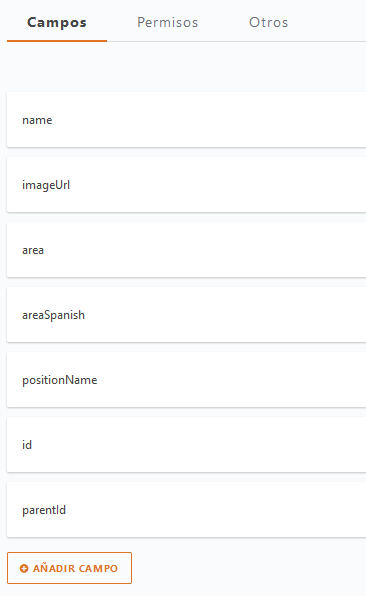
Quote from luishp on June 17, 2023, 7:52 am@javadrajabihakami I'm using neoCMS to store and manage the data!
It makes really easy to update the data and include new profiles for my customers (check the attached pictures with data fields and backend)"Expand All" command:
BeginJS
$App.chart.expandAll();
EndJS
"Contract All" command:
BeginJS
$App.chart.collapseAll();
EndJS
Check the plugin documentation to understand how it works :)
@javadrajabihakami I'm using neoCMS to store and manage the data!
It makes really easy to update the data and include new profiles for my customers (check the attached pictures with data fields and backend)
"Expand All" command:
BeginJS
$App.chart.expandAll();
EndJS
"Contract All" command:
BeginJS
$App.chart.collapseAll();
EndJS
Check the plugin documentation to understand how it works :)
Uploaded files: