
Help with progress bar

Quote from impactband4u on April 5, 2020, 10:49 pmThere is a plugin called avsProgress that you can create a progress bar. I want to know that when i copy files from one destination to another, i want the progress bar to work according to the time it takes for the files to copy.
Any help please
There is a plugin called avsProgress that you can create a progress bar. I want to know that when i copy files from one destination to another, i want the progress bar to work according to the time it takes for the files to copy.
Any help please

Quote from Vadim on April 6, 2020, 10:32 amGood day!
Here are the plugins that can make a progress bar:
asGauge 2.0 (Andrei Solodyankin)
dec_Bar 1.2 (David Esperalta)
FileUtils (Dražen Glojnarić, Marije Ljolje)
hpwUtility 2.16 (Hans-Peter Wickern)
NeoObjects 1.0.6 (David Esperalta)
tmCoolProgBar 1.00 (Alberto Meyer, TechMedia)
tmWIIProgress 1.01 (Alberto Meyer, TechMedia)
Good day!
Here are the plugins that can make a progress bar:
asGauge 2.0 (Andrei Solodyankin)
dec_Bar 1.2 (David Esperalta)
FileUtils (Dražen Glojnarić, Marije Ljolje)
hpwUtility 2.16 (Hans-Peter Wickern)
NeoObjects 1.0.6 (David Esperalta)
tmCoolProgBar 1.00 (Alberto Meyer, TechMedia)
tmWIIProgress 1.01 (Alberto Meyer, TechMedia)

Quote from impactband4u on April 7, 2020, 8:02 amThank You Vadim & rasl..... i'll check it out
Thank You Vadim & rasl..... i'll check it out
Quote from impactband4u on April 7, 2020, 8:20 amI have NeoDouble in my plugins list but don't have a loc file for it. Can someone help with the loc file please
I have NeoDouble in my plugins list but don't have a loc file for it. Can someone help with the loc file please
Quote from impactband4u on April 7, 2020, 8:37 amQuote from Vadim on April 6, 2020, 10:32 amGood day!
Here are the plugins that can make a progress bar:
asGauge 2.0 (Андрей Солодянкин)
dec_Bar 1.2 (David Esperalta)
FileUtils (Marije Ljolje)
hpwUtility 2.16 (Hans-Peter Wickern)
NeoObjects 1.0.6 (David Esperalta)
tmCoolProgBar 1.00 (Alberto Meyer, TechMedia)
tmWIIProgress 1.01 (Alberto Meyer, TechMedia)
I don't have the dec_Bar 1.2 (David Esperalta), NeoObjects 1.0.6 (David Esperalta), tmCoolProgBar 1.00 (Alberto Meyer, TechMedia) and tmCoolProgBar 1.00 (Alberto Meyer, TechMedia) plugins.
If it is free plugins can you direct me to where i can download it please
Quote from Vadim on April 6, 2020, 10:32 amGood day!
Here are the plugins that can make a progress bar:
asGauge 2.0 (Андрей Солодянкин)
dec_Bar 1.2 (David Esperalta)
FileUtils (Marije Ljolje)
hpwUtility 2.16 (Hans-Peter Wickern)
NeoObjects 1.0.6 (David Esperalta)
tmCoolProgBar 1.00 (Alberto Meyer, TechMedia)
tmWIIProgress 1.01 (Alberto Meyer, TechMedia)
I don't have the dec_Bar 1.2 (David Esperalta), NeoObjects 1.0.6 (David Esperalta), tmCoolProgBar 1.00 (Alberto Meyer, TechMedia) and tmCoolProgBar 1.00 (Alberto Meyer, TechMedia) plugins.
If it is free plugins can you direct me to where i can download it please
Quote from rasl on April 7, 2020, 3:51 pmI have NeoDouble in my plugins list but don't have a loc file for it. Can someone help with the loc file please
In which language do you need Neodoble?
it has three languages english, spanish and french in the locale folder
salu2
I have NeoDouble in my plugins list but don't have a loc file for it. Can someone help with the loc file please
In which language do you need Neodoble?
it has three languages english, spanish and french in the locale folder
salu2
Quote from impactband4u on April 7, 2020, 6:53 pm@rasl
I would like the loc file in English please
I would like the loc file in English please
Quote from rasl on April 7, 2020, 8:32 pmYou can download the original installer from http://www.siderac.com.ar/files/Neo/nd-1.0.6.zip, when asked choose English
salu2
You can download the original installer from http://www.siderac.com.ar/files/Neo/nd-1.0.6.zip, when asked choose English
salu2
Quote from Vadim on April 7, 2020, 8:35 pm@impactband4u
A collection of plugins is on my online course.
Here is the current version of the plugin library (to be updated):https://my.pcloud.com/publink/show?code=XZjga8kZSwTKb6iEVepV9Oelz1SBISlOv7W7
A collection of plugins is on my online course.
Here is the current version of the plugin library (to be updated):
https://my.pcloud.com/publink/show?code=XZjga8kZSwTKb6iEVepV9Oelz1SBISlOv7W7
Quote from impactband4u on April 7, 2020, 9:34 pm@rasl : Yes i can choose to install the .exe in English but when i open up the plugin in VisualNeo it is in another langauge. I still need the log file
@Vadim : Thank You i will take a look at it
@rasl : Yes i can choose to install the .exe in English but when i open up the plugin in VisualNeo it is in another langauge. I still need the log file
@Vadim : Thank You i will take a look at it
Quote from impactband4u on April 8, 2020, 5:18 amQuote from Vadim on April 7, 2020, 8:35 pm@impactband4u
A collection of plugins is on my online course.
Here is the current version of the plugin library (to be updated):https://my.pcloud.com/publink/show?code=XZjga8kZSwTKb6iEVepV9Oelz1SBISlOv7W7
@Vadim : I checked out the plugins and most of them i already have, but there is a few that looks interesting but again the problem is that it is in another language and there is no loc files available for them. @luishp should think of a page here in VisualNeo with a loc library where we can download loc files for different langauges < only a suggestion :)
Quote from Vadim on April 7, 2020, 8:35 pmA collection of plugins is on my online course.
Here is the current version of the plugin library (to be updated):https://my.pcloud.com/publink/show?code=XZjga8kZSwTKb6iEVepV9Oelz1SBISlOv7W7
@Vadim : I checked out the plugins and most of them i already have, but there is a few that looks interesting but again the problem is that it is in another language and there is no loc files available for them. @luishp should think of a page here in VisualNeo with a loc library where we can download loc files for different langauges < only a suggestion :)
Quote from PaulJonestindall on April 13, 2020, 2:46 pm@impactband4u
I did a quick translation of the NeoDouble help file from Spanish to English in a Word document. Maybe this will help.
I did a quick translation of the NeoDouble help file from Spanish to English in a Word document. Maybe this will help.
Uploaded files:Quote from impactband4u on April 14, 2020, 9:04 am@PaulJonestindall
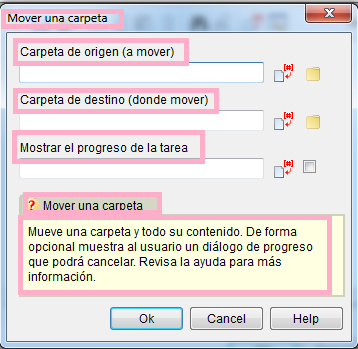
Thank You, it will help in the future, but my problem is still in the actions menu, i don't understand that language. see pictures
Thank You, it will help in the future, but my problem is still in the actions menu, i don't understand that language. see pictures
Uploaded files: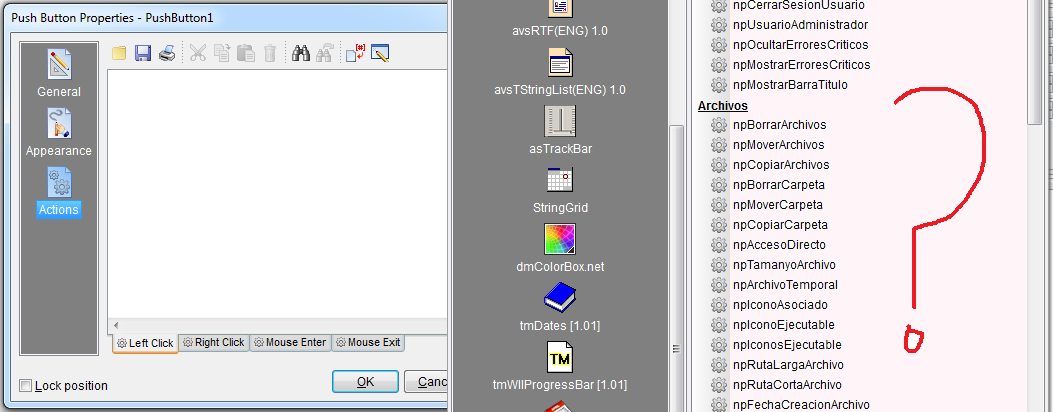
Quote from PaulJonestindall on April 14, 2020, 9:33 am@impactband4u
Yeah, I understand. You may just have to sift through the DOC file but it's all in order of the actions listed. Your pictures are showing the files section, move folder action. Reading the DOC and following the syntax, it follows basic NB action formats.
I printed it out, put it in a binder and made tabs for each section. It may take a little extra guess work on your part but I found this a very helpful plugin.
Hope it helps.
Yeah, I understand. You may just have to sift through the DOC file but it's all in order of the actions listed. Your pictures are showing the files section, move folder action. Reading the DOC and following the syntax, it follows basic NB action formats.
I printed it out, put it in a binder and made tabs for each section. It may take a little extra guess work on your part but I found this a very helpful plugin.
Hope it helps.

Quote from dglojnar on April 14, 2020, 11:43 am@impactband4u
NeoDouble doesn't have any LOC file.
You have to install NeoDouble from installer (EXE) and choose English as install language.
Then you have to manually add plug-in in Neobook (Options-Install Plug-ins).
When click on "About" button, you can also change language from Spanish to English and vice versa (need Neobook restart)
All functions are on Spanish, but in install folder (tipically Program files\David Esperalta\NeoPlugins\NeoDouble) you can find a folder EJEMPLOS (Examples) on 3 languages - English, Spanish and French, so just load PUB and check functions and syntax.
Hope it helps:-)
NeoDouble doesn't have any LOC file.
You have to install NeoDouble from installer (EXE) and choose English as install language.
Then you have to manually add plug-in in Neobook (Options-Install Plug-ins).
When click on "About" button, you can also change language from Spanish to English and vice versa (need Neobook restart)
All functions are on Spanish, but in install folder (tipically Program files\David Esperalta\NeoPlugins\NeoDouble) you can find a folder EJEMPLOS (Examples) on 3 languages - English, Spanish and French, so just load PUB and check functions and syntax.
Hope it helps:-)

Quote from fkapnist on December 1, 2020, 12:54 pmI am also having trouble implementing a progress bar. I want it for some video conversion routines which can take a very long time. My problem is figuring out an equation based on the video size and the process of conversion. It is not just the size in bites that matters. Some videos have larger width and height, others are more compressed, the conversion processes have filter options that affect the overall time, and I can't find a starting point to base my progress bar on. I am afraid I will need to run several boring tests, take note of their progress times, and then average everything out into an approximate estimate.
Any ideas?
I am also having trouble implementing a progress bar. I want it for some video conversion routines which can take a very long time. My problem is figuring out an equation based on the video size and the process of conversion. It is not just the size in bites that matters. Some videos have larger width and height, others are more compressed, the conversion processes have filter options that affect the overall time, and I can't find a starting point to base my progress bar on. I am afraid I will need to run several boring tests, take note of their progress times, and then average everything out into an approximate estimate.
Any ideas?