
[SOLVED] Convert string data to number type

Quote from noyzen on January 27, 2022, 7:36 pmHi everyone,
It's few days that my program faced some stupid wired problem which made me crazy...
I have no idea whats happening.I have if code there:
SetVar [var1] 7
SetVar [var2] 56

If [var1] >= [var2]
     jsAlert "[var1] is greater than [var2]"
EndIf
And alert says:
7 is greater than 56that "SetVar [var1] 7" and "SetVar [var2] 56" are not exactly same as my code, i get data from arrays:
SetVar [var1] [players(0)('block')]
SetVar [var2] [games(0)('mapmax')]above lines are exact code of my program.
I'm not sure you can check it in new clean project, Maybe something wrong somewhere else and make this part go crazy...
Hi everyone,
It's few days that my program faced some stupid wired problem which made me crazy...
I have no idea whats happening.
I have if code there:
SetVar [var1] 7
SetVar [var2] 56

If [var1] >= [var2]
     jsAlert "[var1] is greater than [var2]"
EndIf
And alert says:
7 is greater than 56
that "SetVar [var1] 7" and "SetVar [var2] 56" are not exactly same as my code, i get data from arrays:
SetVar [var1] [players(0)('block')]
SetVar [var2] [games(0)('mapmax')]
above lines are exact code of my program.
I'm not sure you can check it in new clean project, Maybe something wrong somewhere else and make this part go crazy...

Quote from Gaev on January 28, 2022, 2:24 am@noyzen
If I understand you correctly ...
"SetVar [var1] 7" and "SetVar [var2] 56" are not exactly same as my code, i get data from arrays:
SetVar [var1] [players(0)('block')]
SetVar [var2] [games(0)('mapmax')]... the alert message was the result of you deploying ...
SetVar [var1] [players(0)('block')]
SetVar [var2] [games(0)('mapmax')]

If [var1] >= [var2]
jsAlert "[var1] is greater than [var2]"
EndIf
... if so, this could be because [players(0)('block')] and [games(0)('mapmax')] are string (not numeric) variables ... hence [var1] and [var2] are treated as strings (text).
When you compare text variables, the comparison is done from left to right ... same as if you were comparing Q with ABC) ... since 7 is greater than 5, the comparison returns true.
Try ...
SetVar [var1Str] [players(0)('block')]
SetVar [var2Str] [games(0)('mapmax')]

Math "1*[var1Str]" "0" "[var1]"
Math "1*[var2Str]" "0" "[var2]"

If [var1] >= [var2]
   jsAlert "[var1] is greater than [var2]"
EndIf
If I understand you correctly ...
"SetVar [var1] 7" and "SetVar [var2] 56" are not exactly same as my code, i get data from arrays:
SetVar [var1] [players(0)('block')]
SetVar [var2] [games(0)('mapmax')]
... the alert message was the result of you deploying ...
SetVar [var1] [players(0)('block')]
SetVar [var2] [games(0)('mapmax')]

If [var1] >= [var2]
jsAlert "[var1] is greater than [var2]"
EndIf
... if so, this could be because [players(0)('block')] and [games(0)('mapmax')] are string (not numeric) variables ... hence [var1] and [var2] are treated as strings (text).
When you compare text variables, the comparison is done from left to right ... same as if you were comparing Q with ABC) ... since 7 is greater than 5, the comparison returns true.
Try ...
SetVar [var1Str] [players(0)('block')]
SetVar [var2Str] [games(0)('mapmax')]

Math "1*[var1Str]" "0" "[var1]"
Math "1*[var2Str]" "0" "[var2]"

If [var1] >= [var2]
   jsAlert "[var1] is greater than [var2]"
EndIf
Quote from noyzen on January 28, 2022, 2:44 am@gaev Man you are genius i love you!
Yes i had checked and knew both variables are strings using vartype command, but i failed to find a way to convert them into number type!
I tried your method and now code is working!
I used this data types in many parts of my app, before i go and change them all i need to know if this is best way to convert strings to numbers or maybe @luishp can make a command for that. (Convert String to number)
Thanks a lot!!!
@gaev Man you are genius i love you!
Yes i had checked and knew both variables are strings using vartype command, but i failed to find a way to convert them into number type!
I tried your method and now code is working!
I used this data types in many parts of my app, before i go and change them all i need to know if this is best way to convert strings to numbers or maybe @luishp can make a command for that. (Convert String to number)
Thanks a lot!!!

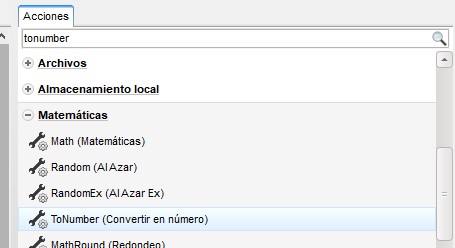
Quote from noyzen on January 28, 2022, 12:31 pmSo, I found the easy and correct way to do the job:
ToNumber "[players(0)('block')]" [var1](no need setvar command, that line is enouth)
So, I found the easy and correct way to do the job:
ToNumber "[players(0)('block')]" [var1]
(no need setvar command, that line is enouth)
Quote from Gaev on January 28, 2022, 3:17 pm@emmanuel-fernandez
Thanks for pointing to the ToNumber command ... I knew there was something like that available, but 30 minutes of searching the (online) Help file did not reveal it ... perhaps because the Help file is not uptodate.
Thanks for pointing to the ToNumber command ... I knew there was something like that available, but 30 minutes of searching the (online) Help file did not reveal it ... perhaps because the Help file is not uptodate.
Quote from emo on January 28, 2022, 4:48 pmyes @gaev and @noyzen is not in the online help and that's why it's hard to find unless you look and search at actions.
The same thing happened to me a year ago that I couldn't find it and I ended up using parseInt from javascript until @luishp reminded me of it.
yes @gaev and @noyzen is not in the online help and that's why it's hard to find unless you look and search at actions.
The same thing happened to me a year ago that I couldn't find it and I ended up using parseInt from javascript until @luishp reminded me of it.

Quote from luishp on January 28, 2022, 5:14 pm@gaev @noyzen @emmanuel-fernandez I'm very sorry. I promise to review all documentation core commands and include them as soon as possible.
Hopefully, thanks to @susan, all plugin commands are listed and they are really easy to include now.
Sorry again!Regards.
@gaev @noyzen @emmanuel-fernandez I'm very sorry. I promise to review all documentation core commands and include them as soon as possible.
Hopefully, thanks to @susan, all plugin commands are listed and they are really easy to include now.
Sorry again!
Regards.