
How to change only the "marked records" table and not all with the same variable. - Forum
How to change only the "marked records" table and not all with the same variable.

Quote from Simon Lundin on December 14, 2021, 10:20 pmI working with the Neo DB Pro plugin
How to change the string (see picture) "Next Start" but only the "marked record" table and not all with the same variable.
I working with the Neo DB Pro plugin
How to change the string (see picture) "Next Start" but only the "marked record" table and not all with the same variable.
Uploaded files: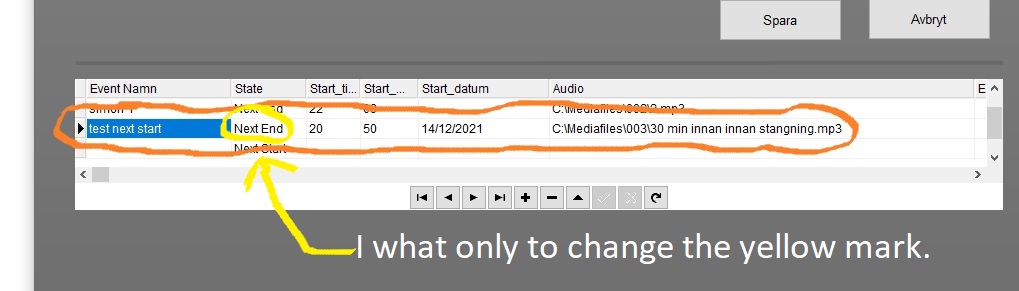
Quote from Simon Lundin on December 14, 2021, 10:30 pmdbpStrReplace "Start" "StartTable" "State" "[Start.StartTable.State]" "Next Start"
I tried this but it change all the records table called "State" see picture
dbpStrReplace "Start" "StartTable" "State" "[Start.StartTable.State]" "Next Start"
I tried this but it change all the records table called "State" see picture

Quote from Gaev on December 15, 2021, 2:09 am@simon-lundin
dbpStrReplace "Start" "StartTable" "State" "[Start.StartTable.State]" "Next Start"
I tried this but it change all the records table called "State" see pictureI think the problem arises when you try to use a database field syntax (which is for the current record) as your source string.
Please read this Help file section ... https://neodbprohelp.visualneo.com/WorkingwithData.html ... to get a better understanding of how the values in these special variables are automatically populated as you navigate from record to record.
Try this instead ...
SetVar "[desiredSource]" "Next End"
dbpStrReplace "Start" "StartTable" "State" "[desiredSource]" "Next Start"
If you want [desiredSource] to be dynamic e.g. value in current record, try this ...
SetVar "[desiredSource]" "[Start.StartTable.State]"
dbpStrReplace "Start" "StartTable" "State" "[desiredSource]" "Next Start"
dbpStrReplace "Start" "StartTable" "State" "[Start.StartTable.State]" "Next Start"
I tried this but it change all the records table called "State" see picture
I think the problem arises when you try to use a database field syntax (which is for the current record) as your source string.
Please read this Help file section ... https://neodbprohelp.visualneo.com/WorkingwithData.html ... to get a better understanding of how the values in these special variables are automatically populated as you navigate from record to record.
Try this instead ...
SetVar "[desiredSource]" "Next End"
dbpStrReplace "Start" "StartTable" "State" "[desiredSource]" "Next Start"
If you want [desiredSource] to be dynamic e.g. value in current record, try this ...
SetVar "[desiredSource]" "[Start.StartTable.State]"
dbpStrReplace "Start" "StartTable" "State" "[desiredSource]" "Next Start"