
How to make an arrow object?

Quote from Vadim on August 30, 2019, 11:52 amI need to make arrows between other objects.
And I need the ability to use the program to change the color of the arrows.
What is the best way to do this (as in the attached screenshot)?
The screenshot shows my program made in VisualNEO Win. I want to repeat this in VisualNEO Web.
I need to make arrows between other objects.
And I need the ability to use the program to change the color of the arrows.
What is the best way to do this (as in the attached screenshot)?
The screenshot shows my program made in VisualNEO Win. I want to repeat this in VisualNEO Web.
Uploaded files:

Quote from luishp on August 30, 2019, 7:30 pmHi @vadim, take a look at the attached sample app please.
I have added two subroutines "DrawArrow" and "RemoveArrow" to draw arrows very easily.
It doesn't work on Internet Explorer.
You guys are really pushing me :)
Hi @vadim, take a look at the attached sample app please.
I have added two subroutines "DrawArrow" and "RemoveArrow" to draw arrows very easily.
It doesn't work on Internet Explorer.
You guys are really pushing me :)
Quote from luishp on August 30, 2019, 8:18 pmEasy, try this using the previous subroutine:
DrawArrow "Rectangle1" "arrow01" 20 20 180 120 "orange" "2"
SetObjectAttribute "arrow01" "stroke-dasharray" "5,5"
You can play with the numbers to get different dashed styles.
Easy, try this using the previous subroutine:
DrawArrow "Rectangle1" "arrow01" 20 20 180 120 "orange" "2"
SetObjectAttribute "arrow01" "stroke-dasharray" "5,5"
You can play with the numbers to get different dashed styles.
Quote from luishp on August 30, 2019, 9:13 pm@vadim, for better reusability I have created a plugin (attached)
@vadim, for better reusability I have created a plugin (attached)
Uploaded files:Quote from Vadim on September 5, 2019, 1:01 pmHello!
How can I put an arrow in the foreground?
The ObjectToFront command does not work for arrows created by the neoDrawArrow plugin.
Hello!
How can I put an arrow in the foreground?
The ObjectToFront command does not work for arrows created by the neoDrawArrow plugin.
Quote from luishp on September 5, 2019, 1:21 pmHi @vadim,
It works for me. Please check attached app.
Just keep in mind all the "Draw Objects" are inside a Rectangle Object.
Perhaps you want to move to Front the Rectangle or even use diferent Rectangles at different levels to draw your arrows.
Regards
Hi @vadim,
It works for me. Please check attached app.
Just keep in mind all the "Draw Objects" are inside a Rectangle Object.
Perhaps you want to move to Front the Rectangle or even use diferent Rectangles at different levels to draw your arrows.
Regards
Quote from Vadim on September 5, 2019, 8:07 pmThank you Luis!
It really works!
But not in relation to other objects of VysualNEO.
For example, an arrow cannot rise above an image object. The arrow is drawn within the rectangle. But if the rectangle is brought to the fore, then other objects are blocked (disappear).
Thank you Luis!
It really works!
But not in relation to other objects of VysualNEO.
For example, an arrow cannot rise above an image object. The arrow is drawn within the rectangle. But if the rectangle is brought to the fore, then other objects are blocked (disappear).
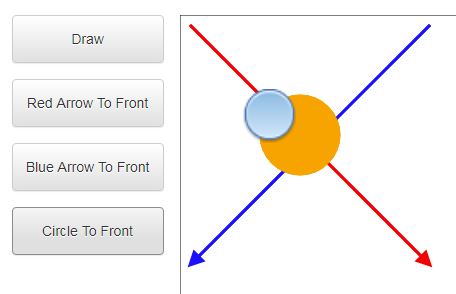
Quote from luishp on September 5, 2019, 8:48 pmif the rectangle is brought to the fore, then other objects are blocked (disappear).
Just make the rectangle to have a background transparent color. In properties panel:
fill: rgba(0,0,0,0)Let me know if it works for you :)
if the rectangle is brought to the fore, then other objects are blocked (disappear).
Just make the rectangle to have a background transparent color. In properties panel:
fill: rgba(0,0,0,0)
Let me know if it works for you :)