
how to reference and use JS library

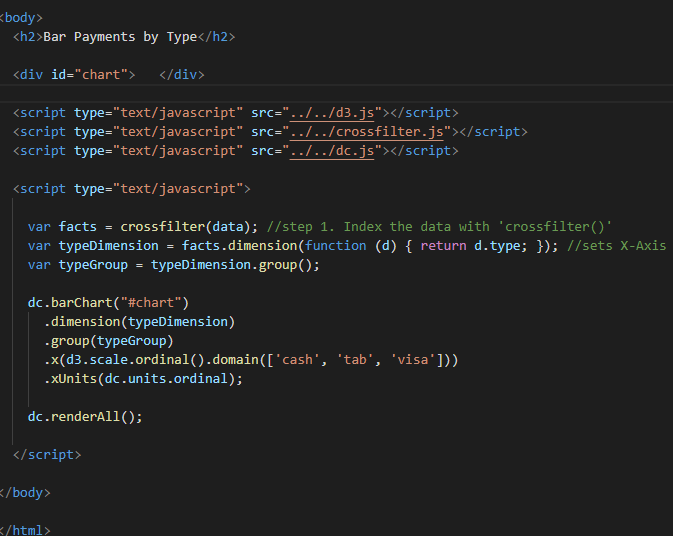
Quote from ilcaa72 on August 18, 2021, 6:52 pmmy boss want me to test/try a JS library in NeoWeb for charting that allows for cross filtering( DC.JS)
in a standard HTML i place the script reference in body section..
1. where do i place the files and how do i reference the scripts in ViualWeb???
2. where would the code go? within 'code' section of a container?
my boss want me to test/try a JS library in NeoWeb for charting that allows for cross filtering( DC.JS)
in a standard HTML i place the script reference in body section..
1. where do i place the files and how do i reference the scripts in ViualWeb???
2. where would the code go? within 'code' section of a container?


Quote from luishp on August 18, 2021, 7:11 pm@ilcaa72 there are many options. Simplest one: Go to Project > Properties > Libraries/Files and and your .js files there. The <script> tags will be included automatically. Use the Page "Code" tab to include your JavaScript between BeginJS and EndJS commands.
You can also include your libraries using an external CDN on Project > Properties > Advanced > Custom Metadata > Head
Finally you can also create your own plugin as described in this video:
https://www.youtube.com/watch?v=L_un3RVq-ks
Regards.
@ilcaa72 there are many options. Simplest one: Go to Project > Properties > Libraries/Files and and your .js files there. The <script> tags will be included automatically. Use the Page "Code" tab to include your JavaScript between BeginJS and EndJS commands.
You can also include your libraries using an external CDN on Project > Properties > Advanced > Custom Metadata > Head
Finally you can also create your own plugin as described in this video:
Regards.
Quote from ilcaa72 on August 19, 2021, 5:22 pmthanks. after the initial set-up i have other questions...
i created the reference to 3 .js files i need, have a container, and placed code within BeginJS command and i get nothing. what is the proper way to structure the syntax... i did both (separate lines, all on same line) and nothing appears... here are the 2 options in image. can you offer a suggestions... can i reference an external .js as a command? like.. thanks for the help
BeginJS
myJSfile.js
EndJS
thanks. after the initial set-up i have other questions...
i created the reference to 3 .js files i need, have a container, and placed code within BeginJS command and i get nothing. what is the proper way to structure the syntax... i did both (separate lines, all on same line) and nothing appears... here are the 2 options in image. can you offer a suggestions... can i reference an external .js as a command? like.. thanks for the help
BeginJS
myJSfile.js
EndJS


Quote from luishp on August 19, 2021, 5:58 pm@ilcaa72 have you renamed your Container from "Container1" to "chart"?
BeginJS myJSfile.js EndJSNo, this is incorrect. It's the same as writing this in HTML:
<script>
myJSfile.js
</script>
That's not correct.
@ilcaa72 have you renamed your Container from "Container1" to "chart"?
BeginJS
myJSfile.js
EndJS
No, this is incorrect. It's the same as writing this in HTML:
<script>
myJSfile.js
</script>
That's not correct.
Quote from ilcaa72 on August 19, 2021, 6:35 pmyes my container id is chart.... these commands work in a standard HTML doc (i can produce a chart) so the script is correct..
i am attaching the VisNeo sourcefile and 3 reference scripts, i cant see what i need to change, can you take a look
yes my container id is chart.... these commands work in a standard HTML doc (i can produce a chart) so the script is correct..
i am attaching the VisNeo sourcefile and 3 reference scripts, i cant see what i need to change, can you take a look
Uploaded files:
Quote from luishp on August 19, 2021, 6:58 pm@ilcaa72 As I don't understand what you have done, I have started a new project from scratch. I works fine.
Please take a look at the attached file. Note that the code is included in the "Page" Code tab and not in the "Container" Click event code tab as you did.Let me know if you have any questions.
Regards.
@ilcaa72 As I don't understand what you have done, I have started a new project from scratch. I works fine.
Please take a look at the attached file. Note that the code is included in the "Page" Code tab and not in the "Container" Click event code tab as you did.
Let me know if you have any questions.
Regards.
Uploaded files:Quote from ilcaa72 on August 19, 2021, 7:52 pmthanks, its working for me...
I didnt know it would go into the Page code, id figure the container was displaying it so that where it was needed..
thanks for the help,
thanks, its working for me...
I didnt know it would go into the Page code, id figure the container was displaying it so that where it was needed..
thanks for the help,
Quote from luishp on August 19, 2021, 8:41 pm@ilcaa72 you should allways include the code in the appropiate event. If you want to execute the code when the Container is clicked, then add the code inside the Container "click" Code tab. If you want to execute the code on page-enter then include your code on the Page "page-enter"event Code tab.
Regards.
@ilcaa72 you should allways include the code in the appropiate event. If you want to execute the code when the Container is clicked, then add the code inside the Container "click" Code tab. If you want to execute the code on page-enter then include your code on the Page "page-enter"event Code tab.
Regards.
Quote from suyonob on April 20, 2023, 4:33 pmHello @luishp
i also want to combine select box from :
JSON Binding Sample - JSON Binding with Combo Box Control - Ignite UI for jQuery™
please guide me how to achieve that, my purpose is using combobox with search that receive json format
Thank you
Hello @luishp
i also want to combine select box from :
JSON Binding Sample - JSON Binding with Combo Box Control - Ignite UI for jQuery™
please guide me how to achieve that, my purpose is using combobox with search that receive json format
Thank you
Uploaded files:
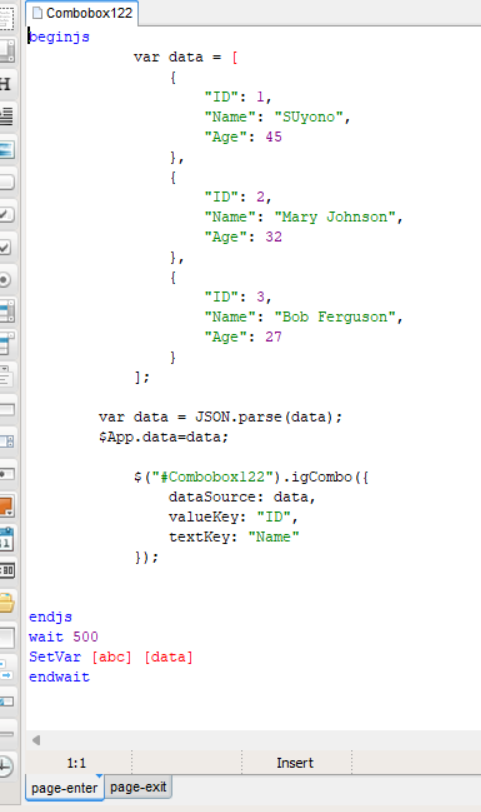

Quote from suyonob on April 20, 2023, 11:33 pmI'm sorry @luishp if my previous message was unclear. I want to integrate the library from the URL above into visualneoweb. I have tried to integrate it as shown in the file and screenshot I sent earlier. Could you please provide me with guidance on how to achieve this? Thank you.
I'm sorry @luishp if my previous message was unclear. I want to integrate the library from the URL above into visualneoweb. I have tried to integrate it as shown in the file and screenshot I sent earlier. Could you please provide me with guidance on how to achieve this? Thank you.
Quote from luishp on April 22, 2023, 7:08 am@suyonob do you want to integrate IgniteUI for JQuery into VisualNEO Web?
I would need to read the library documentation in order to help you...
@suyonob do you want to integrate IgniteUI for JQuery into VisualNEO Web?
I would need to read the library documentation in order to help you...
Quote from suyonob on April 22, 2023, 8:19 amYes, please help, for documentation like on the link: https://igniteui.com/combo/json-binding
for the case above we can make it a reference for the future if we need external libraries again.
@luishp , can you directly receive variables in JSON format from listbox or combox ? if you refer to the sample and documentation, it accepts format in Array format, Currently I am using a REST API approach for frontend and backend communication, therefore although it can be done by changing from JSON format to Array format, it will be more practical if from Listbox or combobox can accept data in JSON format like NeoTable which can directly accept in JSON format.
Thank you
Yes, please help, for documentation like on the link: https://igniteui.com/combo/json-binding
for the case above we can make it a reference for the future if we need external libraries again.
@luishp , can you directly receive variables in JSON format from listbox or combox ? if you refer to the sample and documentation, it accepts format in Array format, Currently I am using a REST API approach for frontend and backend communication, therefore although it can be done by changing from JSON format to Array format, it will be more practical if from Listbox or combobox can accept data in JSON format like NeoTable which can directly accept in JSON format.
Thank you
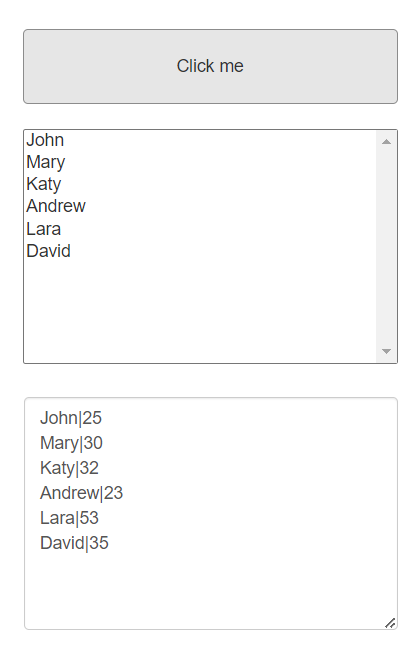
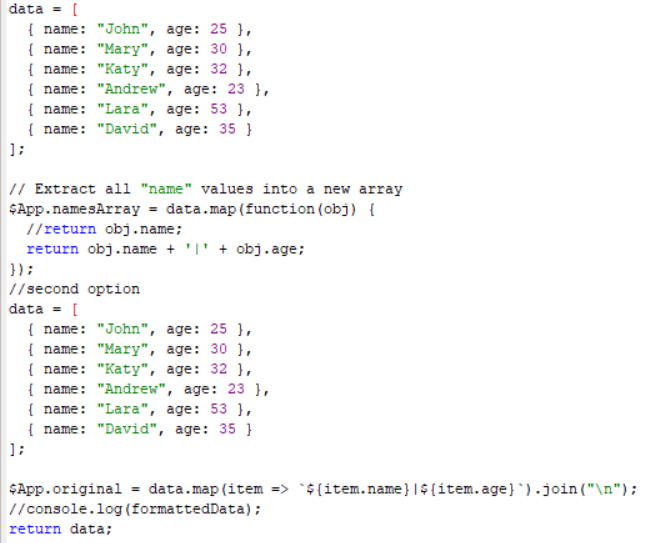
Quote from suyonob on April 22, 2023, 5:37 pmThank you @luishp, you give me alternative way.
i have modified script so contain id and alias to be ready put on combobox.
but if you do not mind please give me a clue how to include library (any spesification criteria maybe that fit and compatible with Visualneoweb) using CDN example maybe.
we know that VISUALNEOWEB is angular Based.
Thanks Again for great App
Thank you @luishp, you give me alternative way.
i have modified script so contain id and alias to be ready put on combobox.
but if you do not mind please give me a clue how to include library (any spesification criteria maybe that fit and compatible with Visualneoweb) using CDN example maybe.
we know that VISUALNEOWEB is angular Based.
Thanks Again for great App
Uploaded files:
Quote from luishp on April 23, 2023, 8:12 ambut if you do not mind please give me a clue how to include library (any spesification criteria maybe that fit and compatible with Visualneoweb) using CDN example maybe.
@suyonob go to Project > Properties > Advanced > Custom Metadata > Head and paste this:
<!-- Ignite UI for jQuery Required Combined CSS Files -->
    <link href="http://cdn-na.infragistics.com/igniteui/2022.2/latest/css/themes/infragistics/infragistics.theme.css" rel="stylesheet" />
    <link href="http://cdn-na.infragistics.com/igniteui/2022.2/latest/css/structure/infragistics.css" rel="stylesheet" />

<!-- Ignite UI for jQuery Required Combined JavaScript Files -->
    <script src="http://cdn-na.infragistics.com/igniteui/2022.2/latest/js/infragistics.core.js"></script>
    <script src="http://cdn-na.infragistics.com/igniteui/2022.2/latest/js/infragistics.lob.js"></script>
Done :)
This will include all the required libraries so they are available within your VisualNEO Web app.
If you prefer not to use a CDN, just go to Project > Properties > Libraries/Files and include there all the .js and .css files. They will be available into your application automatically so you don't need to add any additional <link> or <script> tag,
Regards.
but if you do not mind please give me a clue how to include library (any spesification criteria maybe that fit and compatible with Visualneoweb) using CDN example maybe.
@suyonob go to Project > Properties > Advanced > Custom Metadata > Head and paste this:
<!-- Ignite UI for jQuery Required Combined CSS Files -->
    <link href="http://cdn-na.infragistics.com/igniteui/2022.2/latest/css/themes/infragistics/infragistics.theme.css" rel="stylesheet" />
    <link href="http://cdn-na.infragistics.com/igniteui/2022.2/latest/css/structure/infragistics.css" rel="stylesheet" />

<!-- Ignite UI for jQuery Required Combined JavaScript Files -->
    <script src="http://cdn-na.infragistics.com/igniteui/2022.2/latest/js/infragistics.core.js"></script>
    <script src="http://cdn-na.infragistics.com/igniteui/2022.2/latest/js/infragistics.lob.js"></script>
Done :)
This will include all the required libraries so they are available within your VisualNEO Web app.
If you prefer not to use a CDN, just go to Project > Properties > Libraries/Files and include there all the .js and .css files. They will be available into your application automatically so you don't need to add any additional <link> or <script> tag,
Regards.