
How to translate a greek text to english with google translate.

Quote from sakismor on June 3, 2023, 9:06 pmHello to team
Is it possible to translate a greek text to english with VisualNEO win? Maybe with google translate or any other way?
Thank you!!
Hello to team
Is it possible to translate a greek text to english with VisualNEO win? Maybe with google translate or any other way?
Thank you!!
Quote from Gaev on June 4, 2023, 12:07 am@sakismor
In my browser, I have shortcut for Google's translation site ... https://translate.google.ca/?hl=en
When I type ... I am unilingual ... and specify it as English Text, and ask for the translation in Greek, I get ... Είμαι μονόγλωσσος
At this time, the url changes to ... https://translate.google.ca/?hl=en&sl=en&tl=el&text=I%20am%20unilingual&op=translate
So, you might be able to invoke it from within your App using this url; note that ...
- in the url, you may have to use google.gr instead of google.ca
- Google may only allow their page to be shown in a separate Tab
In my browser, I have shortcut for Google's translation site ... https://translate.google.ca/?hl=en
When I type ... I am unilingual ... and specify it as English Text, and ask for the translation in Greek, I get ... Είμαι μονόγλωσσος
At this time, the url changes to ... https://translate.google.ca/?hl=en&sl=en&tl=el&text=I%20am%20unilingual&op=translate
So, you might be able to invoke it from within your App using this url; note that ...
- in the url, you may have to use google.gr instead of google.ca
- Google may only allow their page to be shown in a separate Tab
Quote from sakismor on June 5, 2023, 8:21 amVery nice and really thank you.
I know about how to syntax the search link but I don't how to take the result from broswer as a variable.
Very nice and really thank you.
I know about how to syntax the search link but I don't how to take the result from broswer as a variable.

Quote from Vadim on June 5, 2023, 8:56 am@sakismor
The author of this project uses automatic translation. And with the help of several sources (not just google). You can ask him a question.
The author of this project uses automatic translation. And with the help of several sources (not just google). You can ask him a question.
Quote from Gaev on June 5, 2023, 2:51 pm@sakismor
but I don't how to take the result from broswer as a variable.
Sorry, I did not realize you wanted the result within your own App; here is the reference to Google's API ...
https://cloud.google.com/translate/docs/reference/rest
... the pricing is not stated; you have to talk to their Sales staff for exact details (there is a capped free amount and then Pay As You Use).
but I don't how to take the result from broswer as a variable.
Sorry, I did not realize you wanted the result within your own App; here is the reference to Google's API ...
https://cloud.google.com/translate/docs/reference/rest
... the pricing is not stated; you have to talk to their Sales staff for exact details (there is a capped free amount and then Pay As You Use).

Quote from DaviddeArgentina on June 5, 2023, 7:14 pm@sakismorPowershell sample from autodetect language to greekMy 0.01
Quote from sakismor on June 6, 2023, 8:36 pmHello David
And thank you very much for your solution. I check the file that you send but i really don't know how to use it.
Is it possible to have an example pub which work with powershell file?
Best regards
Hello David
And thank you very much for your solution. I check the file that you send but i really don't know how to use it.
Is it possible to have an example pub which work with powershell file?
Best regards
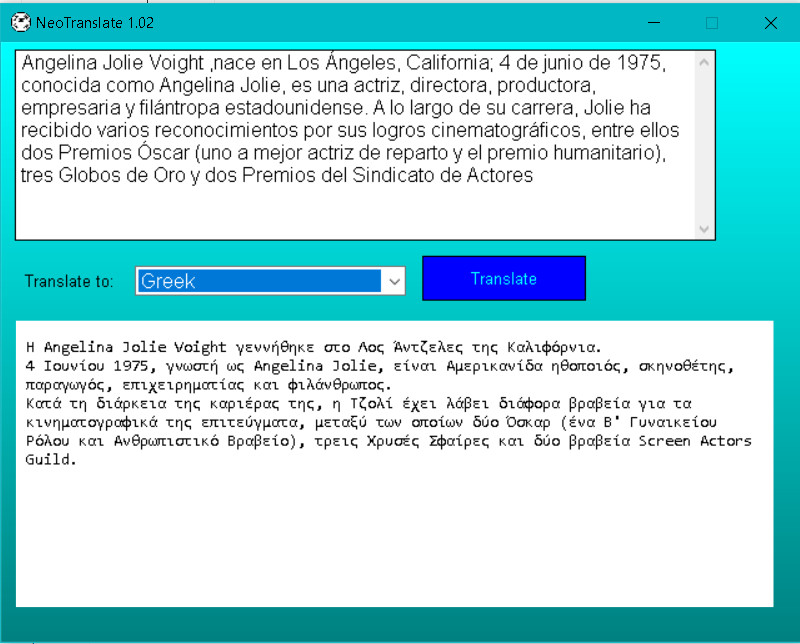
Quote from DaviddeArgentina on June 6, 2023, 9:49 pm@sakismorThis is the fist attempt or the translate service with powershellThis is not perfect, but testeable. You need to select the language and click the blue "Translate" button a couple or times.The zip has 2 files: the EXE itself and the webbrowser DLL for display non-utf8 charsets.When execute the program, you will have 2 files more:This files could be edited with notepad:· Translate.txt: that receives the translated text and· Patapufete.ps1, that calls the powershell engine and genetates the translate string.Tell me if enough good for you.Greetings from Buenos Aires
Quote from mishem on June 7, 2023, 1:11 pmQuote from sakismor on June 5, 2023, 8:21 amI don't how to take the result from broswer as a variable.
InternetGet "https://translate.googleapis.com/translate_a/single?client=gtx&sl=en&tl=el&dt=t&q=mother" "[result]" "HideProgress"Where:
client: gtx - extension Google Translate; t - website Google Translate;
sl - source language : auto (autodetect); en (English); full list here;
tl - translation language : el (Greek);
hl -Interface language: default en (English);
dt - what is returned on response (can be enabled multiple times):
- t - the translation of the original text is returned;
- at - return alternative translation;
- rm - returns transliteration;
- bd - back translation returns.
ie - input encoding: default UTF-8;
oe - output encoding: default UTF-8;
q - source-text.
Quote from sakismor on June 5, 2023, 8:21 amI don't how to take the result from broswer as a variable.
InternetGet "https://translate.googleapis.com/translate_a/single?client=gtx&sl=en&tl=el&dt=t&q=mother" "[result]" "HideProgress"
Where:
client: gtx - extension Google Translate; t - website Google Translate;
sl - source language : auto (autodetect); en (English); full list here;
tl - translation language : el (Greek);
hl -Interface language: default en (English);
dt - what is returned on response (can be enabled multiple times):
- t - the translation of the original text is returned;
- at - return alternative translation;
- rm - returns transliteration;
- bd - back translation returns.
ie - input encoding: default UTF-8;
oe - output encoding: default UTF-8;
q - source-text.
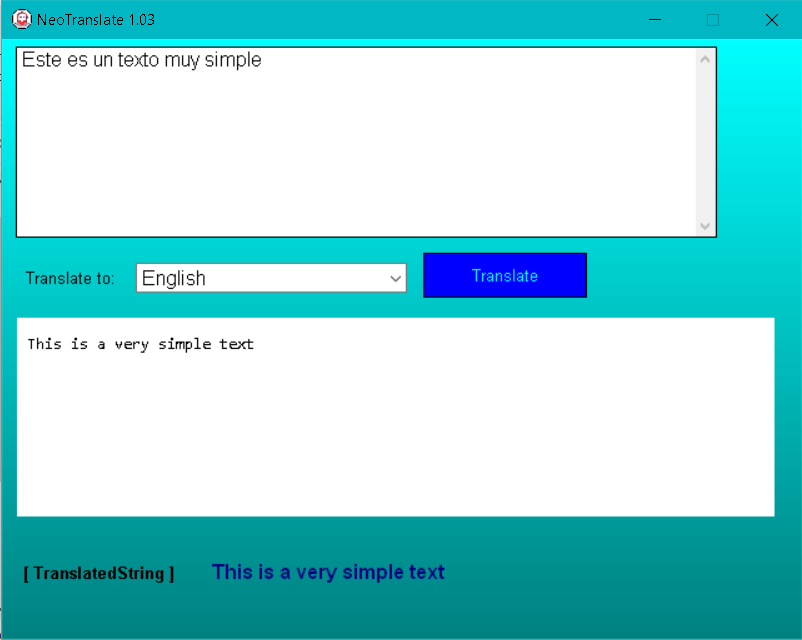
Quote from DaviddeArgentina on June 7, 2023, 6:15 pm@sakismorNew development, more simple, robust and no external dependences. (of course, it need a webbrowser, for display utf-8 charset)You can see a the webbrowser and the [variable] that store the translated string (i used [TranslatedString] variable name)Another 0.01
Quote from sakismor on June 11, 2023, 1:47 pmHello again,
I try many things to make it work but without success. I try to translate greek text to english.
ANy other solution? Maybe a plugin? (I can pay a normal price!!!)
Maybe a jscript or VBscript?
I need your help!!! Please !!!
Hello again,
I try many things to make it work but without success. I try to translate greek text to english.
ANy other solution? Maybe a plugin? (I can pay a normal price!!!)
Maybe a jscript or VBscript?
I need your help!!! Please !!!
Quote from Gaev on June 11, 2023, 8:29 pm@sakismor
Taking my cues from @mishem , I pasted this in my browser's address box ...
https://translate.googleapis.com/translate_a/single?client=gtx&sl=en&tl=el&dt=t&q=mother... it automatically downloaded a json.txt file (and later json(2).txt, json(3).txt etc.) ... using notepad.exe, I saw the contents as ...
[[["μητέρα","mother",null,null,1]],null,"en",null,null,null,null,[]]... I believe that the text before ,"mother" is greek for mother.
I then attached mishem's InternetGet command to a button, and a Text object whose content is defined as [result] ...
a) it took a while for the Text object to be populated, indicating an asynchronous operation.
b) the display was similar except for the text before the ,"mother" was different (symbol for the 1/4 sign etc. ... I believe this is because VisualNEOWin (or my Regional Settings) does not recognize greek characters ... perhaps you can try the same on your computer and see if you get something readable.
Once you provide results of your experience, we can take it forward from there.
Taking my cues from @mishem , I pasted this in my browser's address box ...
https://translate.googleapis.com/translate_a/single?client=gtx&sl=en&tl=el&dt=t&q=mother
... it automatically downloaded a json.txt file (and later json(2).txt, json(3).txt etc.) ... using notepad.exe, I saw the contents as ...
[[["μητέρα","mother",null,null,1]],null,"en",null,null,null,null,[]]
... I believe that the text before ,"mother" is greek for mother.
I then attached mishem's InternetGet command to a button, and a Text object whose content is defined as [result] ...
a) it took a while for the Text object to be populated, indicating an asynchronous operation.
b) the display was similar except for the text before the ,"mother" was different (symbol for the 1/4 sign etc. ... I believe this is because VisualNEOWin (or my Regional Settings) does not recognize greek characters ... perhaps you can try the same on your computer and see if you get something readable.
Once you provide results of your experience, we can take it forward from there.
Quote from Gaev on June 12, 2023, 3:04 am@sakismor
Take a look at the attached sample pub to see if this is what you wanted.
I took the url specified in the InternetGet command by @mishem as the base.
In order to support multi-line text (which the Get method can not support), I replace the [#13] character that separates one line from another, by 3 semi-colons (you can use any text string that will never be part of the real text) before making the request, and then replace the 3 semi-colons in the translated result back to [#13].
You may have to copy all the objects to a new pub of yours if your Regional settings (Greek) cause issues with my pub (Canadian English).
Take a look at the attached sample pub to see if this is what you wanted.
I took the url specified in the InternetGet command by @mishem as the base.
In order to support multi-line text (which the Get method can not support), I replace the [#13] character that separates one line from another, by 3 semi-colons (you can use any text string that will never be part of the real text) before making the request, and then replace the 3 semi-colons in the translated result back to [#13].
You may have to copy all the objects to a new pub of yours if your Regional settings (Greek) cause issues with my pub (Canadian English).
Uploaded files:
Quote from mishem on June 12, 2023, 10:23 amTry this example. You need the zmFunctions plugin.
Try this example. You need the zmFunctions plugin.
Uploaded files:

Quote from Talker on July 10, 2023, 3:08 amInteresting project. Thanks!
But is it possible to replace the IE-based WebBrowser1 control with one of the available browser plug-ins like ezEdge, zmwOnTheEdge, npEdge in this project, for security reasons?
Also, there appears to be a maximum input of only two lines or so. Is this correct?
Interesting project. Thanks!
But is it possible to replace the IE-based WebBrowser1 control with one of the available browser plug-ins like ezEdge, zmwOnTheEdge, npEdge in this project, for security reasons?
Also, there appears to be a maximum input of only two lines or so. Is this correct?