
How to Use SendMail

Quote from CSSystems on December 14, 2019, 9:58 pmHow do I setup SendMail to send a message through gmail or hotmail etc. by using a Button in my app?
I don't want to activate Outlook on my computer or add Gmail to Outlook.
Any help would be appreciated.
How do I setup SendMail to send a message through gmail or hotmail etc. by using a Button in my app?
I don't want to activate Outlook on my computer or add Gmail to Outlook.
Any help would be appreciated.
Quote from CSSystems on December 14, 2019, 11:13 pmForget it. Simple solution for me. Use InternetLink to go to gmal.com or hotmail.com etc.
Then send email.
Forget it. Simple solution for me. Use InternetLink to go to gmal.com or hotmail.com etc.
Then send email.

Quote from Vadim on December 15, 2019, 9:22 amHello!
I have detailed instructions on how to send an email from my application. Including with the attached file.
You will need to register for the online course. The course is free.
There is also a demo project.
Uses a function written by David Riley.
This feature allows you to connect to any of your email accounts and send mail on his behalf.
Without the use of Outlook and other third-party programs.
Hello!
I have detailed instructions on how to send an email from my application. Including with the attached file.
You will need to register for the online course. The course is free.
There is also a demo project.
Uses a function written by David Riley.
This feature allows you to connect to any of your email accounts and send mail on his behalf.
Without the use of Outlook and other third-party programs.

Quote from dglojnar on December 15, 2019, 11:40 pm@vadim
Wonderful job, found some interesting stuff:-)
And have one question:
On the bottom of the start page I found following information:
* Last update: 02/10/2019 - Added a collection of 155 plug- s;
I'll be very happy to see your collection of plug-ins if possible, didn't found on web pages...
Cheers!
Wonderful job, found some interesting stuff:-)
And have one question:
On the bottom of the start page I found following information:
* Last update: 02/10/2019 - Added a collection of 155 plug- s;
I'll be very happy to see your collection of plug-ins if possible, didn't found on web pages...
Cheers!
Quote from CSSystems on December 16, 2019, 12:23 amVadim,
I am not receiving the email to create an account to take your course.
Although I have been using Neobook for years and am interested in what you have to offer.
Vadim,
I am not receiving the email to create an account to take your course.
Although I have been using Neobook for years and am interested in what you have to offer.
Quote from Vadim on December 16, 2019, 5:03 pmHello!
@dglojnar
Plugins can be downloaded from the course page.
Register and use for the good of the world! :)@cssystems
Write your login used to register, I will activate your account manually.
Hello!
Plugins can be downloaded from the course page.
Register and use for the good of the world! :)
Write your login used to register, I will activate your account manually.
Quote from Vadim on December 16, 2019, 11:57 pmDrop me an email.
The dog sign changed to protect the address from bots.
v{a}orgpsiholog.com
Drop me an email.
The dog sign changed to protect the address from bots.
v{a}orgpsiholog.com
Quote from dglojnar on December 17, 2019, 1:21 am@vadim
Sorry for disturbing...
I was registered, but I can't find "Resources" section ?
Am I doing something wrong ?
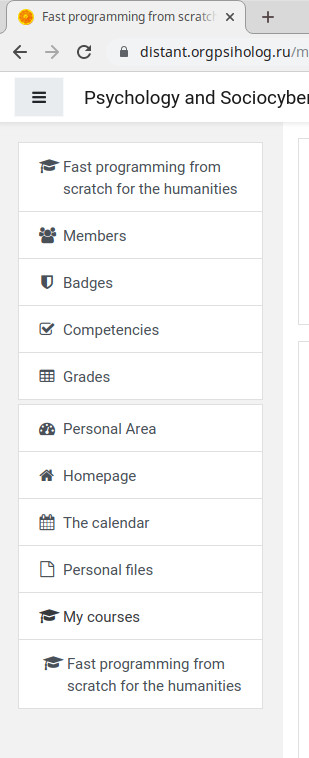
In attachment you can find a screenshot of my dashboard...no "Resources"
Cheers!
Sorry for disturbing...
I was registered, but I can't find "Resources" section ?
Am I doing something wrong ?
In attachment you can find a screenshot of my dashboard...no "Resources"
Cheers!
Uploaded files:
Quote from Vadim on December 17, 2019, 7:10 amHi!
To enter the course you need to select the Homepage. Then click on the course "Fast programming from scratch for humanitarian" and click on the button "Sign up for a course" below.
After that, the course will be available. All resources are inside.
Hi!
To enter the course you need to select the Homepage. Then click on the course "Fast programming from scratch for humanitarian" and click on the button "Sign up for a course" below.
After that, the course will be available. All resources are inside.