
How update pwa on mobile chrome?

Quote from asmat on December 9, 2023, 2:13 pmOnce I opened my PWA in mobile Chrome, then I deployed the next update,
but In mobile Chrome, it does not update!This is my PWA link:
https://mirwaisneka-3da85.web.app
Once I opened my PWA in mobile Chrome, then I deployed the next update,
but In mobile Chrome, it does not update!
This is my PWA link:
https://mirwaisneka-3da85.web.app
Uploaded files: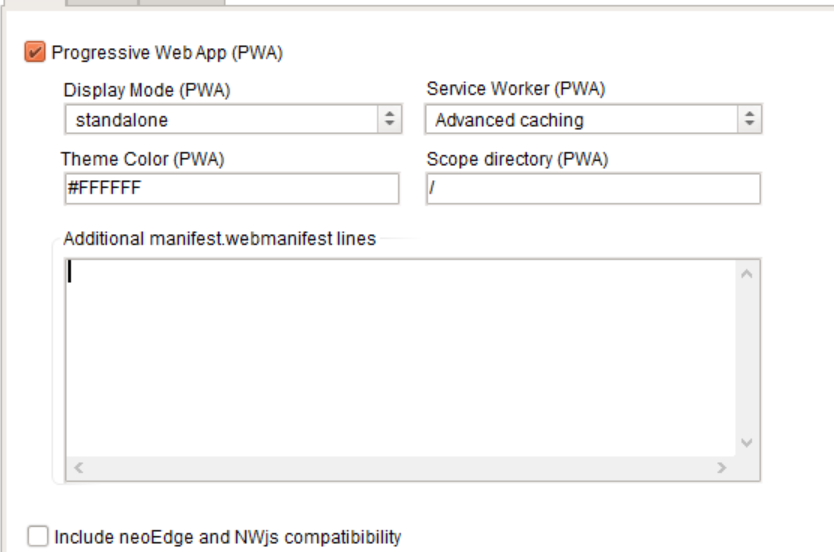

Quote from luishp on December 9, 2023, 2:39 pm@asmat be sure you have updated the app version number so it's saved into the manifest file.
Also you should take a look at this to better understand how PWA updates works:https://stackoverflow.com/questions/49739438/when-and-how-does-a-pwa-update-itself
If you need to force updating, just empty the web browser cache.
@asmat be sure you have updated the app version number so it's saved into the manifest file.
Also you should take a look at this to better understand how PWA updates works:
https://stackoverflow.com/questions/49739438/when-and-how-does-a-pwa-update-itself
If you need to force updating, just empty the web browser cache.
Quote from luishp on December 20, 2023, 12:20 pmIs there any way to make empty the web browser cache programmatically?
@asmat
Clearing the web browser cache using JavaScript running in a web page is not directly possible due to security and privacy concerns. Web browsers restrict web pages from directly accessing or modifying the cache to prevent potential misuse or privacy breaches.
However, there are a few techniques that can be employed to indirectly control or influence the browser's cache behavior:
Cache Control Headers: While you cannot clear the cache using JavaScript, you can instruct the browser how to cache resources via HTTP headers. Setting headers like Cache-Control: no-cache or Cache-Control: no-store in your server responses can instruct the browser not to cache certain resources.
Versioning Resources: By changing the URL of a resource (like adding a query parameter or altering the file name), you can force the browser to fetch a fresh copy. This is commonly used in web development to ensure users receive the latest version of CSS or JavaScript files.
Service Workers: If you're using service workers, you have more control over caching as they act as a proxy between the browser and the network. You can programmatically manage the cache for resources that pass through the service worker.
Local Storage and Session Storage: While not directly related to the browser's cache, you can control local and session storage via JavaScript. This can be useful for storing data on the client side without relying on the browser cache.
Reloading the Page: You can force a page reload with location.reload(true), which in some browsers requests the server to send fresh content instead of using the cache. However, this behavior is not consistent across all browsers and versions.
Remember, these methods are more about influencing future caching behavior or managing client-side storage, rather than clearing the existing cache. Direct access to the browser's cache is restricted for web pages due to security and privacy concerns.
Is there any way to make empty the web browser cache programmatically?
Clearing the web browser cache using JavaScript running in a web page is not directly possible due to security and privacy concerns. Web browsers restrict web pages from directly accessing or modifying the cache to prevent potential misuse or privacy breaches.
However, there are a few techniques that can be employed to indirectly control or influence the browser's cache behavior:
Cache Control Headers: While you cannot clear the cache using JavaScript, you can instruct the browser how to cache resources via HTTP headers. Setting headers like Cache-Control: no-cache or Cache-Control: no-store in your server responses can instruct the browser not to cache certain resources.
Versioning Resources: By changing the URL of a resource (like adding a query parameter or altering the file name), you can force the browser to fetch a fresh copy. This is commonly used in web development to ensure users receive the latest version of CSS or JavaScript files.
Service Workers: If you're using service workers, you have more control over caching as they act as a proxy between the browser and the network. You can programmatically manage the cache for resources that pass through the service worker.
Local Storage and Session Storage: While not directly related to the browser's cache, you can control local and session storage via JavaScript. This can be useful for storing data on the client side without relying on the browser cache.
Reloading the Page: You can force a page reload with location.reload(true), which in some browsers requests the server to send fresh content instead of using the cache. However, this behavior is not consistent across all browsers and versions.
Remember, these methods are more about influencing future caching behavior or managing client-side storage, rather than clearing the existing cache. Direct access to the browser's cache is restricted for web pages due to security and privacy concerns.