
How use import function in VisualNeo Web

Quote from asmat on October 12, 2023, 9:13 pmEarly I used this code snippet of Firebase at Project>Properties> Advanced> Custom Metadata with VisualNEO Web, and it worked fine,
<!-- The core Firebase JS SDK is always required and must be listed first -->
<script src="https://www.gstatic.com/firebasejs/7.15.1/firebase-app.js"></script>
<script src="https://www.gstatic.com/firebasejs/7.15.1/firebase-auth.js"></script>
<script src="https://www.gstatic.com/firebasejs/7.15.1/firebase-storage.js"></script>
<script src="https://www.gstatic.com/firebasejs/7.15.1/firebase-database.js"></script>
<!-- TODO: Add SDKs for Firebase products that you want to use
     https://firebase.google.com/docs/web/setup#available-libraries -->
<script src="https://www.gstatic.com/firebasejs/7.15.1/firebase-analytics.js"></script>

<script>
  // Your web app's Firebase configuration
  var firebaseConfig = {
    apiKey: "AIzaSyC2Hu4DeqYh04Sccx5CKOl-SFFB-OolX1wj38",
    authDomain: "kankor-plus-80e20.firebaseapp.com",
    databaseURL: "https://kankor-plus-80e20.firebaseio.com",
    projectId: "kankor-plus-80e20",
    storageBucket: "kankor-plus-80e20.appspot.com",
    messagingSenderId: "281909991504808",
    appId: "1:2819015084808:web:a0141d44ba18273ead981d",
    measurementId: "G-5W5CDB8JGD"
  };
  // Initialize Firebase
  firebase.initializeApp(firebaseConfig);
  firebase.analytics();
</script>
but now the firebase has updated and changed the snippet as follows:
<script type="module">
  // Import the functions you need from the SDKs you need
  import { initializeApp } from "https://www.gstatic.com/firebasejs/10.4.0/firebase-app.js";
  import { getAnalytics } from "https://www.gstatic.com/firebasejs/10.4.0/firebase-analytics.js";
  import { getDatabase } from "https://www.gstatic.com/firebasejs/10.4.0/firebase-database.js";
  // TODO: Add SDKs for Firebase products that you want to use
  // https://firebase.google.com/docs/web/setup#available-libraries
  // Your web app's Firebase configuration
  // For Firebase JS SDK v7.20.0 and later, measurementId is optional
  const firebaseConfig = {
    apiKey: "AIzaSyD4QFs8jjj8LJeZVC-kmNJ2LIEHSmJfCW0MI4",
    authDomain: "mirwaisneka-e93db.firebaseapp.com",
    databaseURL: "https://mirwaisneka-e93db-default-rtdb.asia-southeast1.xxxxxx",
    projectId: "xxxxxxxxxxxxx",
    storageBucket: "mirwaisnekaxxxxxx.com",
    messagingSenderId: "299229036583",
    appId: "1:299229036583:web:469d5308549de21ae50e02",
    measurementId: "G-BQSRB8W8FK"
  };
  // Initialize Firebase
  const app = initializeApp(firebaseConfig);
  const analytics = getAnalytics(app);
</script>
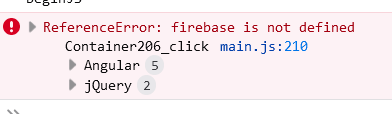
When I use it, it does not work & I receive an error firebase is not defined,
How can I solve this problem?
Early I used this code snippet of Firebase at Project>Properties> Advanced> Custom Metadata with VisualNEO Web, and it worked fine,
<!-- The core Firebase JS SDK is always required and must be listed first -->
<script src="https://www.gstatic.com/firebasejs/7.15.1/firebase-app.js"></script>
<script src="https://www.gstatic.com/firebasejs/7.15.1/firebase-auth.js"></script>
<script src="https://www.gstatic.com/firebasejs/7.15.1/firebase-storage.js"></script>
<script src="https://www.gstatic.com/firebasejs/7.15.1/firebase-database.js"></script>
<!-- TODO: Add SDKs for Firebase products that you want to use
     https://firebase.google.com/docs/web/setup#available-libraries -->
<script src="https://www.gstatic.com/firebasejs/7.15.1/firebase-analytics.js"></script>

<script>
  // Your web app's Firebase configuration
  var firebaseConfig = {
    apiKey: "AIzaSyC2Hu4DeqYh04Sccx5CKOl-SFFB-OolX1wj38",
    authDomain: "kankor-plus-80e20.firebaseapp.com",
    databaseURL: "https://kankor-plus-80e20.firebaseio.com",
    projectId: "kankor-plus-80e20",
    storageBucket: "kankor-plus-80e20.appspot.com",
    messagingSenderId: "281909991504808",
    appId: "1:2819015084808:web:a0141d44ba18273ead981d",
    measurementId: "G-5W5CDB8JGD"
  };
  // Initialize Firebase
  firebase.initializeApp(firebaseConfig);
  firebase.analytics();
</script>
but now the firebase has updated and changed the snippet as follows:
<script type="module">
  // Import the functions you need from the SDKs you need
  import { initializeApp } from "https://www.gstatic.com/firebasejs/10.4.0/firebase-app.js";
  import { getAnalytics } from "https://www.gstatic.com/firebasejs/10.4.0/firebase-analytics.js";
  import { getDatabase } from "https://www.gstatic.com/firebasejs/10.4.0/firebase-database.js";
  // TODO: Add SDKs for Firebase products that you want to use
  // https://firebase.google.com/docs/web/setup#available-libraries
  // Your web app's Firebase configuration
  // For Firebase JS SDK v7.20.0 and later, measurementId is optional
  const firebaseConfig = {
    apiKey: "AIzaSyD4QFs8jjj8LJeZVC-kmNJ2LIEHSmJfCW0MI4",
    authDomain: "mirwaisneka-e93db.firebaseapp.com",
    databaseURL: "https://mirwaisneka-e93db-default-rtdb.asia-southeast1.xxxxxx",
    projectId: "xxxxxxxxxxxxx",
    storageBucket: "mirwaisnekaxxxxxx.com",
    messagingSenderId: "299229036583",
    appId: "1:299229036583:web:469d5308549de21ae50e02",
    measurementId: "G-BQSRB8W8FK"
  };
  // Initialize Firebase
  const app = initializeApp(firebaseConfig);
  const analytics = getAnalytics(app);
</script>
When I use it, it does not work & I receive an error firebase is not defined,
How can I solve this problem?
Uploaded files: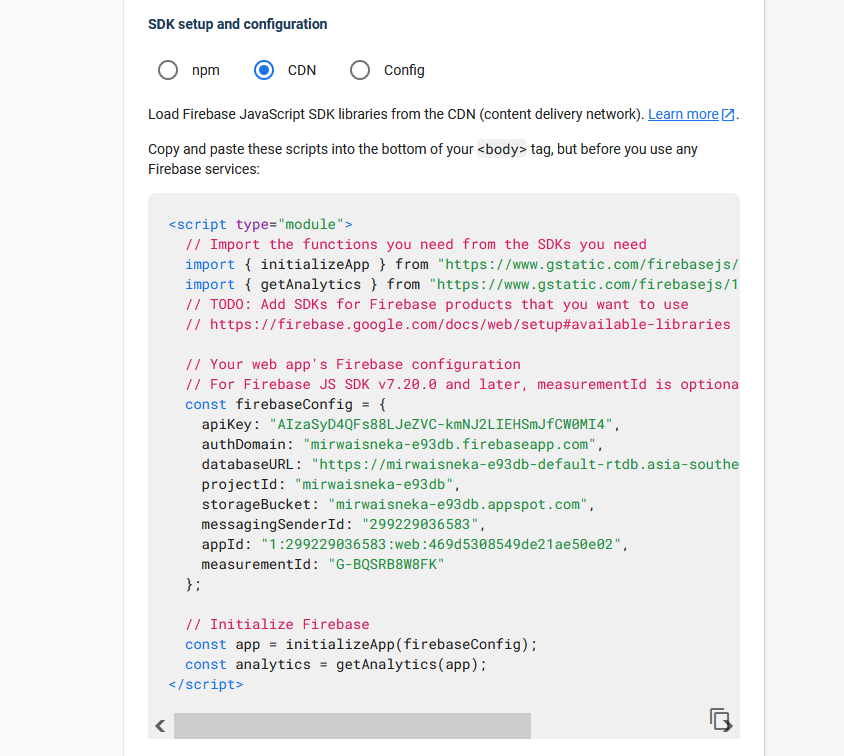

Quote from luishp on October 13, 2023, 9:31 am@asmat it seems like a problem in FireBase initialization.
Are you using a valid API Key?If I use your code as it's I get this error:
FirebaseError: Installations: Create Installation request failed with error "400 INVALID_ARGUMENT: API key not valid. Please pass a valid API key." (installations/request-failed).
@asmat it seems like a problem in FireBase initialization.
Are you using a valid API Key?
If I use your code as it's I get this error:
FirebaseError: Installations: Create Installation request failed with error "400 INVALID_ARGUMENT: API key not valid. Please pass a valid API key." (installations/request-failed).