hpwUtility ProgressBar

Quote from fkapnist on June 21, 2020, 10:05 pmI want to use the hpwUtility Progress Bar but I don't know what some of its actions do....
Let's say "Process 1" is an external application that stabilizes a video file, and the time it takes depends on the size in bytes of the video file.
Run "[PubDir]\MyApp.exe" "-i MyOldVideo.mp4 -blabla-something MyNewVideo.mp4" "Minimized" "" ""
How do I set the progress bar to run for the duration of Process 1, and how do I adjust the length of the progress bar, which is based on the size of the video file? Is there maybe another progress bar utility that is easier to use?
I want to use the hpwUtility Progress Bar but I don't know what some of its actions do....
Let's say "Process 1" is an external application that stabilizes a video file, and the time it takes depends on the size in bytes of the video file.
Run "[PubDir]\MyApp.exe" "-i MyOldVideo.mp4 -blabla-something MyNewVideo.mp4" "Minimized" "" ""
How do I set the progress bar to run for the duration of Process 1, and how do I adjust the length of the progress bar, which is based on the size of the video file? Is there maybe another progress bar utility that is easier to use?

Quote from JnCon on June 22, 2020, 2:44 pmYou have to get the video file size, define a rectangle object to display the progress bar and setup the main parameters:
FileSize "YourVideoFilePath" "[YourVideoFileSize]"
hpwUtilitySetvar "[hpwProgressBarMin]" "0" <- set the minimum value (int)
hpwUtilitySetvar "[hpwProgressBarMax]" "[YourVideoFileSize]" <- set the maximum value (int) to file size
hpwUtilitySetvar "[hpwProgressBarOrientation]" "1" <- vertical or horizontal (int).constructor for progress bar:
hpwProgressBarCreate "Rectangle name for progress bar (string)" "initial value (int)"... After this you can actualize value of progress bar by repeating last command with actual value.
You have to get the video file size, define a rectangle object to display the progress bar and setup the main parameters:
FileSize "YourVideoFilePath" "[YourVideoFileSize]"
hpwUtilitySetvar "[hpwProgressBarMin]" "0" <- set the minimum value (int)
hpwUtilitySetvar "[hpwProgressBarMax]" "[YourVideoFileSize]" <- set the maximum value (int) to file size
hpwUtilitySetvar "[hpwProgressBarOrientation]" "1" <- vertical or horizontal (int)
.constructor for progress bar:
hpwProgressBarCreate "Rectangle name for progress bar (string)" "initial value (int)"
... After this you can actualize value of progress bar by repeating last command with actual value.

Quote from josevdr95 on June 23, 2020, 2:09 pmPrueba este ejemplo a ver si te sirve, se aplica para todos los tipos de barras de proceso que conozco, no es más que el cálculo de porcentaje.
Ejemplo:
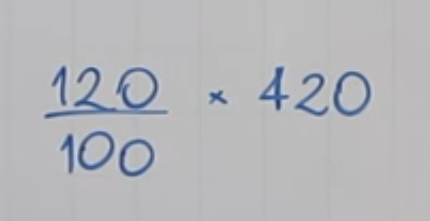
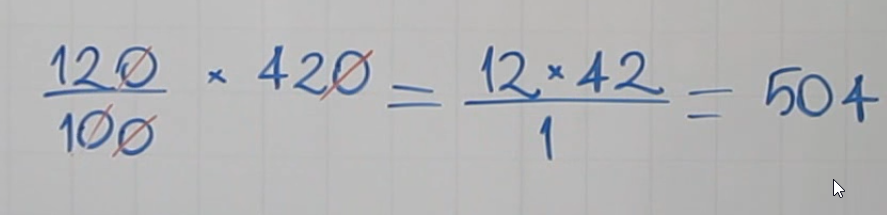
Encontrar el 120% de 420
Prueba este ejemplo a ver si te sirve, se aplica para todos los tipos de barras de proceso que conozco, no es más que el cálculo de porcentaje.
Ejemplo:
Encontrar el 120% de 420
Uploaded files: