
HTML context menu

Quote from DaviddeArgentina on March 26, 2022, 12:35 amHello everyone,
I found an html program that has potential for my developments.
It is a context menu generator, which has no external dependencies.
It's easy to configure, but I don't know how to change the height of each menu item, nor how to change the font and size of the text.
If someone can improve this program, I will be very grateful.
I leave attached the html in a zip.
Thanks in advance,
David from Argentina
hola a todos,
encontré un programa html que tiene potencial para mis desarrollos.
Es un generador de menú contextual, que no tiene dependencias externas.
Es facil de configurar, pero no se cómo cambiar el alto de cada item del menu, ni como cambiar el font y tamaño del texto.
Si alguien puede mejorar este programa, le voy a quedar muy agradecido.
les dejo adjunto el html en un zip.
Gracias por adelantado,
David de Argentina
Hello everyone,
I found an html program that has potential for my developments.
It is a context menu generator, which has no external dependencies.
It's easy to configure, but I don't know how to change the height of each menu item, nor how to change the font and size of the text.
If someone can improve this program, I will be very grateful.
I leave attached the html in a zip.
Thanks in advance,
David from Argentina
hola a todos,
encontré un programa html que tiene potencial para mis desarrollos.
Es un generador de menú contextual, que no tiene dependencias externas.
Es facil de configurar, pero no se cómo cambiar el alto de cada item del menu, ni como cambiar el font y tamaño del texto.
Si alguien puede mejorar este programa, le voy a quedar muy agradecido.
les dejo adjunto el html en un zip.
Gracias por adelantado,
David de Argentina

Quote from Phil78 on March 26, 2022, 8:14 pmHi @daviddeargentina,
I hope this what you want
#contextMenu > p {
padding: 0 1rem;
margin: 0;
line-height: 50px;
font-size: 14pt;
font-family: Roman,Times,serif
}Regards
I hope this what you want
#contextMenu > p {
padding: 0 1rem;
margin: 0;
line-height: 50px;
font-size: 14pt;
font-family: Roman,Times,serif
}
Regards
Quote from DaviddeArgentina on March 28, 2022, 4:42 pmthanks a lot @phil78 !
Seeing that you are very kind, I will tell you about the state of development of this website.
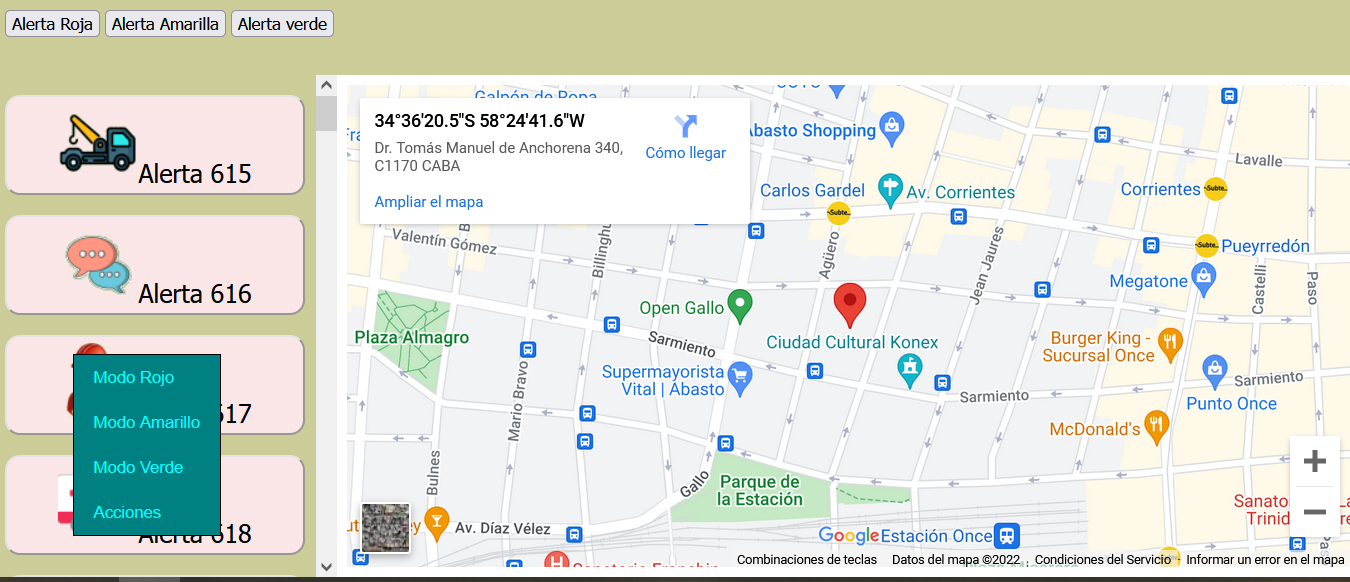
In the attached image you can see the frameset, top, left and main.
the left frame is dynamically updated with buttons like "document . createElement( " button " );" and all styles. all this works fine, even the scroll of that frame works correctly.
when I add the context menu control, the result is visible: it works well with buttons that appear physically in the visible (real) part of the left frame. the other existing buttons that appear by scrolling do not appear.
I imagine this should be changeable through the viewport settings, but I couldn't get it to work.
Again, I ask for your help.
infinitely grateful,
David from Argentina
thanks a lot @phil78 !
Seeing that you are very kind, I will tell you about the state of development of this website.
In the attached image you can see the frameset, top, left and main.
the left frame is dynamically updated with buttons like "document . createElement( " button " );" and all styles. all this works fine, even the scroll of that frame works correctly.
when I add the context menu control, the result is visible: it works well with buttons that appear physically in the visible (real) part of the left frame. the other existing buttons that appear by scrolling do not appear.
I imagine this should be changeable through the viewport settings, but I couldn't get it to work.
Again, I ask for your help.
infinitely grateful,
David from Argentina
Quote from Phil78 on March 28, 2022, 7:15 pm@daviddeargentina, sorry I do not know...
Regards
@daviddeargentina, sorry I do not know...
Regards