
HTML tools

Quote from fkapnist on January 2, 2022, 4:33 pmVisualNEO Web uses the HTML properties very much. Can the built-in editor include a few more tools? Switching programs to edit your HTML text and then paste it back into a VisualNEO textbox is not so easy.
Thanks
VisualNEO Web uses the HTML properties very much. Can the built-in editor include a few more tools? Switching programs to edit your HTML text and then paste it back into a VisualNEO textbox is not so easy.
Thanks
Uploaded files: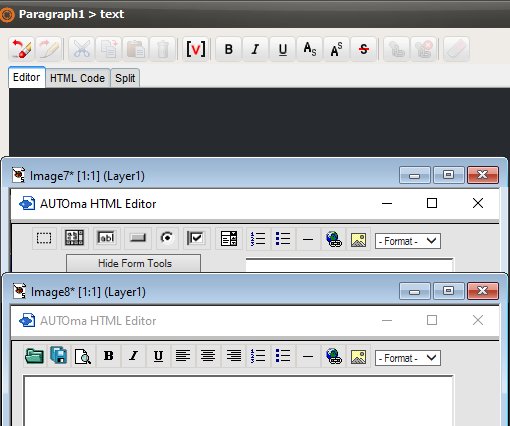

Quote from fkapnist on January 3, 2022, 2:56 amQuote from luishp on January 2, 2022, 7:42 pm@fkapnist sorry, I don't understand you very well. Sorry.
An example: "Paragraph" object properties allow you to edit the HTML, with a right click, (Edit "text" Property...) and a small box will pop up with a few edit controls. But I think there should be some more controls there! Say, for example, that I want to change the font and color of only one word in my paragraph, or I want to embed a variable image somewhere in my paragraph. I would have to edit all that stuff manually. The limited (Edit "text" Property...) popup controls are not what one might expect from an advanced HTML code-generating app. In such situations I would usually copy the entire HTML over to Frontpage where I can fine tune the adjustments with a few clicks, and then copy and paste the HTML back into VisualNEO. I would like to do everything within one program. But lets face it, you will also need a external bitmap editor as well as a 3rd party browser for the best results...
Quote from luishp on January 2, 2022, 7:42 pm@fkapnist sorry, I don't understand you very well. Sorry.
An example: "Paragraph" object properties allow you to edit the HTML, with a right click, (Edit "text" Property...) and a small box will pop up with a few edit controls. But I think there should be some more controls there! Say, for example, that I want to change the font and color of only one word in my paragraph, or I want to embed a variable image somewhere in my paragraph. I would have to edit all that stuff manually. The limited (Edit "text" Property...) popup controls are not what one might expect from an advanced HTML code-generating app. In such situations I would usually copy the entire HTML over to Frontpage where I can fine tune the adjustments with a few clicks, and then copy and paste the HTML back into VisualNEO. I would like to do everything within one program. But lets face it, you will also need a external bitmap editor as well as a 3rd party browser for the best results...
Quote from fkapnist on January 3, 2022, 3:40 amMaybe a JavaScript plugin can be made to add more controls to the Edit "text" Property popup? It would be nice to align, center, or justify paragraphs. Or to add bulleted lists and insert images, etc...
Maybe a JavaScript plugin can be made to add more controls to the Edit "text" Property popup? It would be nice to align, center, or justify paragraphs. Or to add bulleted lists and insert images, etc...
Uploaded files: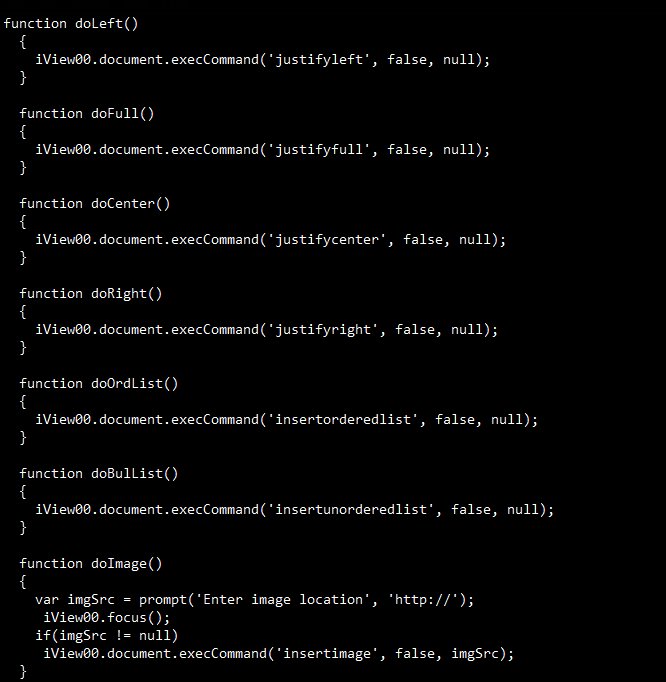
Quote from fkapnist on January 3, 2022, 4:00 amYou can align and justify everything in a Paragraph1 object with Properties settings. But if you want, for example, one line bulleted and another line centered in the very same Paragraph1 object, that HTML has to be coded manually .... I think you understand....
You can align and justify everything in a Paragraph1 object with Properties settings. But if you want, for example, one line bulleted and another line centered in the very same Paragraph1 object, that HTML has to be coded manually .... I think you understand....
Quote from luishp on January 3, 2022, 10:41 amThank you. Now I understand. I will try to add additional options to the HTML WYSIWYG editor.
Regards.
Thank you. Now I understand. I will try to add additional options to the HTML WYSIWYG editor.
Regards.