
HTTP Post request

Quote from nikyred on July 31, 2022, 2:38 pmThanks in advance for the support,
below is the python script
import time
from turtle import delay
import requests


url = '192.168.1.100:8100/work/123456'

call_system = { "pass": "123456789",
    "@START":"user1",
    "@END":"user2"
}

x = requests.post(url, json = call_system)


print(x.text)
when I run this script in python the server replies me, as below:
{"𝑖𝑑": 100000010000010017, "𝑠𝑡𝑎𝑡𝑢𝑠": "𝑠𝑢𝑐𝑐𝑒𝑠𝑠"}
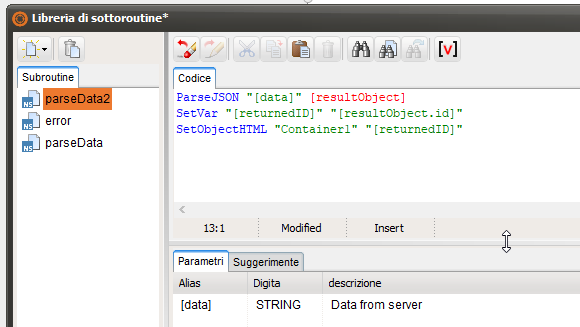
About the subroutine you pointed out to me, is it correct as I wrote?See Attachment
PS: Next week I can try the new VisualNeoWeb script with the new subroutine and I will update you
Thanks in advance for the support,
below is the python script
import time
from turtle import delay
import requests


url = '192.168.1.100:8100/work/123456'

call_system = { "pass": "123456789",
    "@START":"user1",
    "@END":"user2"
}

x = requests.post(url, json = call_system)


print(x.text)
when I run this script in python the server replies me, as below:
{"𝑖𝑑": 100000010000010017, "𝑠𝑡𝑎𝑡𝑢𝑠": "𝑠𝑢𝑐𝑐𝑒𝑠𝑠"}
About the subroutine you pointed out to me, is it correct as I wrote?See Attachment
PS: Next week I can try the new VisualNeoWeb script with the new subroutine and I will update you
Uploaded files:
Quote from Gaev on July 31, 2022, 6:28 pm@nikyred
About the Python script ...
- can you tell how you invoke it ? ... from your Browser's Address Box ?
- I will try and investigate if there is something in the imports that is missing when you use neoAjaxSendAbout the subroutine you pointed out to me, is it correct as I wrote?See Attachment
Yes, but for added investigative facility, I would add a jsAlert command before the parseJSON command (the error subroutine already has one of these commands).
If neither of the jsAlert commands are popped up at run time (meaning there was no return from the router), you will need to 'Inspect' the browser for clues about why the request was blocked.
About the Python script ...
- can you tell how you invoke it ? ... from your Browser's Address Box ?
- I will try and investigate if there is something in the imports that is missing when you use neoAjaxSend
About the subroutine you pointed out to me, is it correct as I wrote?See Attachment
Yes, but for added investigative facility, I would add a jsAlert command before the parseJSON command (the error subroutine already has one of these commands).
If neither of the jsAlert commands are popped up at run time (meaning there was no return from the router), you will need to 'Inspect' the browser for clues about why the request was blocked.
Quote from nikyred on July 31, 2022, 7:50 pm@gaev
- can you tell how you invoke it ? ... from your Browser's Address Box ?
I call it directly in the Visual studio Code environment
Thanks
- can you tell how you invoke it ? ... from your Browser's Address Box ?
I call it directly in the Visual studio Code environment
Thanks

Quote from luishp on August 1, 2022, 9:06 pm@nikyred your NeoScript code should work exactly the same as the Python script:
CreateEmptyObject [mydata]
SetVar [mydata('pass')] "123456789"
SetVar [mydata('@START')] "user1"
SetVar [mydata('@END')] "user2"
neoAjaxSend "http://192.168.1.100:8100/work/123456" "POST" "[mydata]" "json" "parseData2" "error"
The parseData2 subroutine:
ConsoleLog [data]
ParseJSON "[data]" [resultObject]
SetVar "[returnedID]" "[resultObject.id]"
SetObjectHTML "Container1" "[returnedID]"
This could be the error subroutine:
jsAlert "There has been an error"Also be sure there is not any CORS blocking problem.
Regards
@nikyred your NeoScript code should work exactly the same as the Python script:
CreateEmptyObject [mydata]
SetVar [mydata('pass')] "123456789"
SetVar [mydata('@START')] "user1"
SetVar [mydata('@END')] "user2"
neoAjaxSend "http://192.168.1.100:8100/work/123456" "POST" "[mydata]" "json" "parseData2" "error"
The parseData2 subroutine:
ConsoleLog [data]
ParseJSON "[data]" [resultObject]
SetVar "[returnedID]" "[resultObject.id]"
SetObjectHTML "Container1" "[returnedID]"
This could be the error subroutine:
jsAlert "There has been an error"
Also be sure there is not any CORS blocking problem.
Regards
Quote from nikyred on November 9, 2022, 11:32 amHi, back to this topic.
how can i insert an SSL certificate? when I make the request it tells me that I need the SSL certificate.
Do I have the certificate and have it entered?I have installed the certificate in "Manage user certificates" of windows 10, is it correct?
or should I insert it in Visual neo WEB?
Hi, back to this topic.
how can i insert an SSL certificate? when I make the request it tells me that I need the SSL certificate.
Do I have the certificate and have it entered?
I have installed the certificate in "Manage user certificates" of windows 10, is it correct?
or should I insert it in Visual neo WEB?
Quote from luishp on November 9, 2022, 1:00 pm@nikyred SSL certificate is for your server. It should be installed by your hosting provider usualy for free. It allows your script to be served under a secure "https" protocol instead of just "http" so the information sent between your web browser and the server is encrypted.
Regards.
@nikyred SSL certificate is for your server. It should be installed by your hosting provider usualy for free. It allows your script to be served under a secure "https" protocol instead of just "http" so the information sent between your web browser and the server is encrypted.
Regards.
Quote from nikyred on November 9, 2022, 4:15 pmOk thanks for the reply.
The request is not to an Internet web server but to a machine web server.
I have 2 certificates, one to insert in the machine and the other in my PC.my doubt was if I had to specify to Visual Neo web where the certificate was.
Ok thanks for the reply.
The request is not to an Internet web server but to a machine web server.
I have 2 certificates, one to insert in the machine and the other in my PC.
my doubt was if I had to specify to Visual Neo web where the certificate was.
Quote from luishp on November 9, 2022, 5:16 pmmy doubt was if I had to specify to Visual Neo web where the certificate was
No. it's just for the connection between the app running into the web browser and the web server.
As far as I know, the certificate must be installed to be used by your web server.
my doubt was if I had to specify to Visual Neo web where the certificate was
No. it's just for the connection between the app running into the web browser and the web server.
As far as I know, the certificate must be installed to be used by your web server.
Quote from nikyred on November 11, 2022, 6:11 pmSorry if I come back to this topic again.
I managed to make the call through the neoAjaxSendEx method and not with the neoAjaxSend method.
Now the problem is with the return information from the server.
Returns a problem on the object.The information returned from the server is as follows:
{"status": "success","id": 1111111111111111111111}
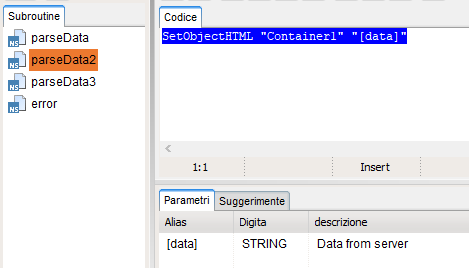
The subroutine used is in the attached image.
Is the error in the subroutine used?
How can I solve?Thanks
Sorry if I come back to this topic again.
I managed to make the call through the neoAjaxSendEx method and not with the neoAjaxSend method.
Now the problem is with the return information from the server.
Returns a problem on the object.
The information returned from the server is as follows:
The subroutine used is in the attached image.
Is the error in the subroutine used?
How can I solve?
Thanks
Uploaded files:
Quote from luishp on November 12, 2022, 7:55 am@nikyred you must parse the JSON data you are receiving from the server. Please check this thread:
https://visualneo.com/forum/topic/help-with-json-neophp-login-result
Regards.
@nikyred you must parse the JSON data you are receiving from the server. Please check this thread:
https://visualneo.com/forum/topic/help-with-json-neophp-login-result
Regards.
Quote from nikyred on December 14, 2022, 4:20 pm
Hi,
The Json that comes back to me from the server is as follows.
I tried to follow the guide and the advice of the forum but I could not.How could I manage the subroutine?
Thanks
This below is the return server json
{
    "status": "success",
    "id": 123456789
}
Hi,
The Json that comes back to me from the server is as follows.
I tried to follow the guide and the advice of the forum but I could not.
How could I manage the subroutine?
Thanks
This below is the return server json
{
    "status": "success",
    "id": 123456789
}
Quote from luishp on December 14, 2022, 11:06 pm@nikyred please include a complete sample app so we can take a look.
It's easier that it seems.Regards.
@nikyred please include a complete sample app so we can take a look.
It's easier that it seems.
Regards.
Quote from nikyred on December 15, 2022, 1:11 pmHi Luishp,
I want to remember that the request is made successfully, but it returns me the error on the response.
I probably got the subroutine wrong.Thanks for collaboration
Below the file app.
Hi Luishp,
I want to remember that the request is made successfully, but it returns me the error on the response.
I probably got the subroutine wrong.
Thanks for collaboration
Below the file app.
Uploaded files:
Quote from luishp on December 19, 2022, 7:07 pm@nikyred I can't test your app. You are doing a local call I can't do.
I have modified your sample to call the WordPress API of this site. Please check the attached file.
Regards.
@nikyred I can't test your app. You are doing a local call I can't do.
I have modified your sample to call the WordPress API of this site. Please check the attached file.
Regards.
Quote from nikyred on February 15, 2023, 1:34 pmHI
I wanted to ask You if with Visual Neo There is a function to bypass the certificate check.Thanks
HI
I wanted to ask You if with Visual Neo There is a function to bypass the certificate check.
Thanks
Quote from nikyred on February 15, 2023, 2:51 pmHi,
in python through the verify_False statement
response = requests.post(url, headers=headers, json=data, verify=False)
I don't check the certificate, It can't be done even in Visual Neo Web through the Ajax call
Hi,
in python through the verify_False statement
response = requests.post(url, headers=headers, json=data, verify=False)
I don't check the certificate, It can't be done even in Visual Neo Web through the Ajax call
Quote from luishp on February 15, 2023, 3:12 pm@nikyred that's because web apps have additional security measures. They are forced by the web browser.
@nikyred that's because web apps have additional security measures. They are forced by the web browser.