
HTTP Post request

Quote from nikyred on June 17, 2022, 3:36 pmHi everyone, I need some information.
It is possible to make an HTTP POST request?example: ℎ𝑡𝑡𝑝: //192.168.1.10: xxxx / example / 999
and send attached a json file?
Thank you
Hi everyone, I need some information.
It is possible to make an HTTP POST request?
example: ℎ𝑡𝑡𝑝: //192.168.1.10: xxxx / example / 999
and send attached a json file?
Thank you

Quote from luishp on June 18, 2022, 7:58 am@nikyred you can find more informaion about neoAjax here:
https://visualneo.com/forum/topic/neoajax-plugin
And also here (how to send headers):
https://visualneo.com/forum/topic/neoajaxsend-header-authorizaton-token
Regards.
@nikyred you can find more informaion about neoAjax here:
https://visualneo.com/forum/topic/neoajax-plugin
And also here (how to send headers):
https://visualneo.com/forum/topic/neoajaxsend-header-authorizaton-token
Regards.
Quote from nikyred on June 18, 2022, 2:24 pmthanks for the replies.
With this plug in is it possible to insert also a json file in the body?
thanks for the replies.
With this plug in is it possible to insert also a json file in the body?
Quote from luishp on June 19, 2022, 12:06 pm@nikyred you probably don't want to "insert a json file in the body", but to send JSON data to a server script or API.
You can try something like this for example:CreateEmptyObject [mydata] SetVar [mydata.firstName] "John" SetVar [mydata.lastName] "Smidth" SetVar [mydata.age] 48 SetVar [mydata.gender] "Male" neoAjaxSend "https://apps.visualneo.com/neoapptest.php" "POST" "[mydata]" "text" "parseData2" "error"or
BeginJS $App.mydata = { firstName: "John", lastName: "Smith", age: 48, gender: "Male" }; EndJS neoAjaxSend "https://apps.visualneo.com/neoapptest.php" "POST" "[mydata]" "text" "parseData2" "error"or
SetVar [mydata] {firstName:'John',lastName:'Smith',age:48,gender:'Male'} neoAjaxSend "https://apps.visualneo.com/neoapptest.php" "POST" "[mydata]" "text" "parseData2" "error"Note that there is a sample app included with VisualNEO Web where you can see how to get server response.
Regards.
@nikyred you probably don't want to "insert a json file in the body", but to send JSON data to a server script or API.
You can try something like this for example:
CreateEmptyObject [mydata]
SetVar [mydata.firstName] "John"
SetVar [mydata.lastName] "Smidth"
SetVar [mydata.age] 48
SetVar [mydata.gender] "Male"
neoAjaxSend "https://apps.visualneo.com/neoapptest.php" "POST" "[mydata]" "text" "parseData2" "error"
or
BeginJS
  $App.mydata = {
     firstName: "John",
     lastName: "Smith",
     age: 48,
     gender: "Male"
  };
EndJS
neoAjaxSend "https://apps.visualneo.com/neoapptest.php" "POST" "[mydata]" "text" "parseData2" "error"
or
SetVar [mydata] {firstName:'John',lastName:'Smith',age:48,gender:'Male'}
neoAjaxSend "https://apps.visualneo.com/neoapptest.php" "POST" "[mydata]" "text" "parseData2" "error"
Note that there is a sample app included with VisualNEO Web where you can see how to get server response.
Regards.
Quote from nikyred on June 20, 2022, 10:34 amOk, thanks for the replies.
When I make a POST request, the server returns me a response. where should i store it?
I saw the example, but there is a button for the SEND and a button for the LOAD,
but when I make a POST request in my program the server responds
Ok, thanks for the replies.
When I make a POST request, the server returns me a response. where should i store it?
I saw the example, but there is a button for the SEND and a button for the LOAD,
but when I make a POST request in my program the server responds
Quote from luishp on June 20, 2022, 10:38 am@nikyred with SEND you can use both POST and GET requests.
When using neoAjaxSend you can define a subroutine to manage the server response. In the included sample its name is parseData2.
Take a look at that subroutine to understand how to manage the JSON response.Regards.
@nikyred with SEND you can use both POST and GET requests.
When using neoAjaxSend you can define a subroutine to manage the server response. In the included sample its name is parseData2.
Take a look at that subroutine to understand how to manage the JSON response.
Regards.
Quote from nikyred on June 20, 2022, 10:44 amPerfect thanks, I'll check it better.
I wanted to ask another question, I saw that VisualNeo WIN can also make a POST request to a server, but is it also possible to send json data? i was thinking of uploading a json file in variable and then attaching it. could it be done?
Perfect thanks, I'll check it better.
I wanted to ask another question, I saw that VisualNeo WIN can also make a POST request to a server, but is it also possible to send json data? i was thinking of uploading a json file in variable and then attaching it. could it be done?
Quote from luishp on June 20, 2022, 11:02 am@nikyred VisualNEO Win doesn't support JSON data management.
Although there is a third party plugin wich offers that functionality (I have not tested it):
https://zmware.rcmediaservices.net/zmwjson/Regards.
@nikyred VisualNEO Win doesn't support JSON data management.
Although there is a third party plugin wich offers that functionality (I have not tested it):
https://zmware.rcmediaservices.net/zmwjson/
Regards.
Quote from nikyred on June 28, 2022, 9:24 amHello everybody.
In the example program, I don't understand how "Container1" is related to the button code.
In the code I don't see the reference to "Container1".CreateEmptyObject [mydata]
SetVar [mydata.firstName] "Luis"
SetVar [mydata.lastName] "Hernández"
SetVar [mydata.age] 48
SetVar [mydata.gender] "Male"
neoAjaxSend "https://apps.visualneo.com/neoapptest.php" "POST" "[mydata]" "text" "parseData2" "error"Thank you
Hello everybody.
In the example program, I don't understand how "Container1" is related to the button code.
In the code I don't see the reference to "Container1".
CreateEmptyObject [mydata]
SetVar [mydata.firstName] "Luis"
SetVar [mydata.lastName] "Hernández"
SetVar [mydata.age] 48
SetVar [mydata.gender] "Male"
neoAjaxSend "https://apps.visualneo.com/neoapptest.php" "POST" "[mydata]" "text" "parseData2" "error"
Thank you
Uploaded files: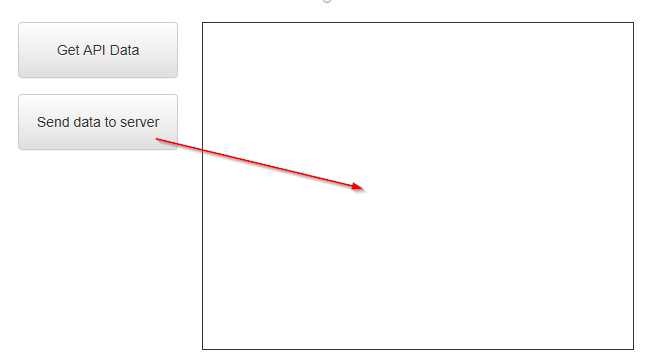
Quote from nikyred on June 28, 2022, 2:26 pmHi, Could you give me a hand to write the code?
under the attributes:Url: http://192.168.1.100:8100/work/123456
Method: POST
Post body(json):
{
"pass":"123456789",
"@START":"user1",
"@END":"user2"
}
Thanks
Hi, Could you give me a hand to write the code?
under the attributes:
Url: http://192.168.1.100:8100/work/123456
Method: POST
Post body(json):
{
"pass":"123456789",
"@START":"user1",
"@END":"user2"
}
Thanks

Quote from CDY@44 on June 28, 2022, 3:15 pmHi @nikyred
About your question with button code and "container 1", just take a look at the code :
neoAjaxSend "https://apps.visualneo.com/neoapptest.php" "POST" "[mydata]" "text" "parseData2" "error"
parseData2 is a subroutine. In this subroutine you find this code : SetObjectHTML "Container1" "[data]"
Hope this helps !
Hi @nikyred
About your question with button code and "container 1", just take a look at the code :
neoAjaxSend "https://apps.visualneo.com/neoapptest.php" "POST" "[mydata]" "text" "parseData2" "error"
parseData2 is a subroutine. In this subroutine you find this code : SetObjectHTML "Container1" "[data]"
Hope this helps !
Quote from luishp on June 29, 2022, 9:49 am@nikyred try this:
CreateEmptyObject [mydata]
SetVar [mydata('pass')] "123456789"
SetVar [mydata('@START')] "user1"
SetVar [mydata('@END')] "user2"
neoAjaxSend "http://192.168.1.100:8100/work/123456" "POST" "[mydata]" "json" "parseData" "error"
Regards.
@nikyred try this:
CreateEmptyObject [mydata]
SetVar [mydata('pass')] "123456789"
SetVar [mydata('@START')] "user1"
SetVar [mydata('@END')] "user2"
neoAjaxSend "http://192.168.1.100:8100/work/123456" "POST" "[mydata]" "json" "parseData" "error"
Regards.
Quote from luishp on July 7, 2022, 5:02 pm@nikyred not sure about understanding your question but you can include as many subroutines as you need and you can use whatever name you want to call them.
@nikyred not sure about understanding your question but you can include as many subroutines as you need and you can use whatever name you want to call them.
Quote from nikyred on July 29, 2022, 4:20 pmScusate se torno sull',argomento ma posso ancora risolverlo.
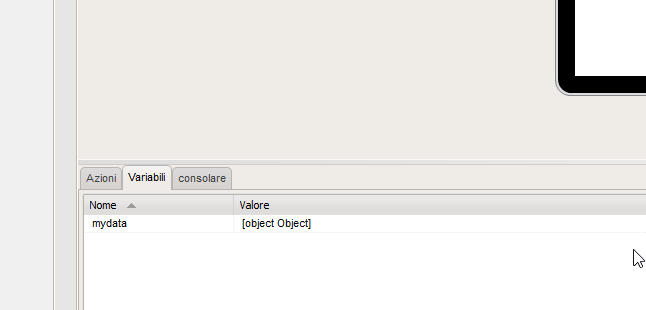
Ho creato l'applicazione, come suggerito, ma ho allegato questo errore
Grazie
questo è il mio codice:
CreateEmptyObject [ i miei dati ]SetVar [ mydata ( 'pass' )] "123456789"SetVar [ dati personali ( '@START' )] "utente1"SetVar [ dati personali ( '@END' )] "utente2"neoAjaxSend "http://192.168.1.100:8100/work/123456" "POST" "[mydata]" "json" "parseData" "error"
Scusate se torno sull',argomento ma posso ancora risolverlo.
Ho creato l'applicazione, come suggerito, ma ho allegato questo errore
Grazie
questo è il mio codice:
Uploaded files:

Quote from luishp on July 29, 2022, 8:08 pm@nikyred please note you can't include spaces in variable names.
Also be sure not to add spaces between [ character and the variable name.This is valid:
[myVariable]
These are not valid:
[my Variable]
[ myVariable]
[myVariable ]
[my#Variable]Variable names are pretty flexible as long as you follow a few rules:
- Start them with a letter.
- After the first letter, you can use numbers, as well as letters and underscores.
- Don’t use any of JavaScript’s reserved keywords nor special characters (spaces, #, @, %...)
Regards.
@nikyred please note you can't include spaces in variable names.
Also be sure not to add spaces between [ character and the variable name.
This is valid:
[myVariable]
These are not valid:
[my Variable]
[ myVariable]
[myVariable ]
[my#Variable]
Variable names are pretty flexible as long as you follow a few rules:
- Start them with a letter.
- After the first letter, you can use numbers, as well as letters and underscores.
- Don’t use any of JavaScript’s reserved keywords nor special characters (spaces, #, @, %...)
Regards.
Quote from nikyred on July 30, 2022, 3:05 pmThank you for your answer.
In my software no spaces added and the variables are ok.I tried to write a python script and everything is working.
The server, with the python script, replies to me, see below:
{"𝑖𝑑": 100000010000010017, "𝑠𝑡𝑎𝑡𝑢𝑠": "𝑠𝑢𝑐𝑐𝑒𝑠𝑠"}This is the software I wrote:
CreateEmptyObject [mydata]
SetVar [mydata('pass')] "123456789"
SetVar [mydata('@START')] "user1"
SetVar [mydata('@END')] "user2"
neoAjaxSend "http://192.168.1.100:8100/work/123456" "POST" "[mydata]" "json" "parseData2" "error"
I wanted to ask you a question.
Could the subroutine be wrong for the type of response?attached my subroutineThanks for the invaluable support.
I bought this software for this function and I hope I will be able to fix it
Thank you for your answer.
In my software no spaces added and the variables are ok.
I tried to write a python script and everything is working.
The server, with the python script, replies to me, see below:
{"𝑖𝑑": 100000010000010017, "𝑠𝑡𝑎𝑡𝑢𝑠": "𝑠𝑢𝑐𝑐𝑒𝑠𝑠"}
This is the software I wrote:
CreateEmptyObject [mydata]
SetVar [mydata('pass')] "123456789"
SetVar [mydata('@START')] "user1"
SetVar [mydata('@END')] "user2"
neoAjaxSend "http://192.168.1.100:8100/work/123456" "POST" "[mydata]" "json" "parseData2" "error"
I wanted to ask you a question.
Could the subroutine be wrong for the type of response?
I bought this software for this function and I hope I will be able to fix it
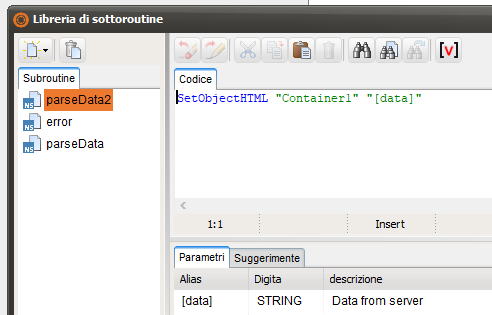
Quote from Gaev on July 30, 2022, 7:52 pm@nikyred
I am not experienced in Python, nor can I access "http://192.168.1.100:8100/work/123456" (which is a special ip address of your Router) ... so I am unable to determine if the result you posted is a JSON object or a stringified version of it.
In the subroutine, you need to extract the value of the object item with the key of "id".
If the object is being returned in a stringified format, you will need to ...
ParseJSON "[data]" [resultObject]Then, the value of the item with the key of "id" can be extracted using ...
SetVar "[returnedID]" "[resultObject.id]"After that, you can ...
SetObjectHTML "Container1" "[returnedID]"
If this does not work, can you post the Python script you used ?
I am not experienced in Python, nor can I access "http://192.168.1.100:8100/work/123456" (which is a special ip address of your Router) ... so I am unable to determine if the result you posted is a JSON object or a stringified version of it.
In the subroutine, you need to extract the value of the object item with the key of "id".
If the object is being returned in a stringified format, you will need to ...
ParseJSON "[data]" [resultObject]
Then, the value of the item with the key of "id" can be extracted using ...
SetVar "[returnedID]" "[resultObject.id]"
After that, you can ...
SetObjectHTML "Container1" "[returnedID]"
If this does not work, can you post the Python script you used ?