I found Flaws ... This is a huge drag (bummer)!!!

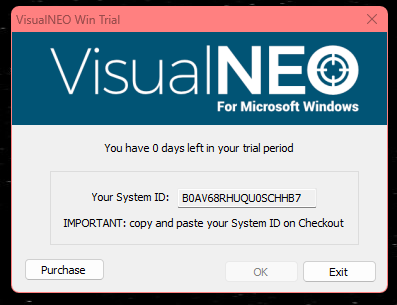
Quote from Thinkr8 on November 6, 2022, 1:34 pmWhile using the 30-day trial period I found some flaws (and one really bad one). After my trial period, I really meant to purchase the program, but now I'm not sure if I will. The first issue I found involved the executables in the !/Windows/System32 folder (the program I'm building makes use of those) not all of them show up using the "RUN" command (dialog window). I'd like to know why? The second issue I had was when I reached 13-days to go with my trial period the program kept crashing my PC and saving my .pub wasn't being saved. That really messed up my efforts to continue with progressing to build my program. So I fixed that by moving my build to another drive and getting it off "One Drive." With that said, once I reloaded all the missing files and saved my .pub as a different version VNW crashed my PC. (I really want to know why???) After finally getting my PC up and running again -and- restarting VNW the system ID window said my trial was over. BIG SAD FACE AND VOCAL WORDS!!! I really do want the last 13-days back, please. The USA is having inflation issues and my work out in the field has dwindled to a nearly impossible level as to where I could not be making a purchase like I said I was in mid-November. How can I get my 13-days left?
I'm running Windows 11 22H2 build 22621.755
Thank you.
While using the 30-day trial period I found some flaws (and one really bad one). After my trial period, I really meant to purchase the program, but now I'm not sure if I will. The first issue I found involved the executables in the !/Windows/System32 folder (the program I'm building makes use of those) not all of them show up using the "RUN" command (dialog window). I'd like to know why? The second issue I had was when I reached 13-days to go with my trial period the program kept crashing my PC and saving my .pub wasn't being saved. That really messed up my efforts to continue with progressing to build my program. So I fixed that by moving my build to another drive and getting it off "One Drive." With that said, once I reloaded all the missing files and saved my .pub as a different version VNW crashed my PC. (I really want to know why???) After finally getting my PC up and running again -and- restarting VNW the system ID window said my trial was over. BIG SAD FACE AND VOCAL WORDS!!! I really do want the last 13-days back, please. The USA is having inflation issues and my work out in the field has dwindled to a nearly impossible level as to where I could not be making a purchase like I said I was in mid-November. How can I get my 13-days left?
I'm running Windows 11 22H2 build 22621.755
Thank you.


Quote from luishp on November 6, 2022, 3:15 pmHi @thinkr8, your issues are quite strange. I can't remember anyone having similar problems.
How can I get my 13-days left?
As far as I know, once the program is locked you can't reactivate the trial period.
Sorry for the inconveniences.
Hi @thinkr8, your issues are quite strange. I can't remember anyone having similar problems.
How can I get my 13-days left?
As far as I know, once the program is locked you can't reactivate the trial period.
Sorry for the inconveniences.
Quote from Thinkr8 on November 6, 2022, 4:34 pmThank you for your reply. I will be rethinking making my purchase. I suppose $MS is at fault. :( And by the way, will the MS Store app of VNW accept plug-ins? (some apps in the store don't) Also, I suggest hpw (I did my research) look into this! Do you think he will? Thank you.
Thank you for your reply. I will be rethinking making my purchase. I suppose $MS is at fault. :( And by the way, will the MS Store app of VNW accept plug-ins? (some apps in the store don't) Also, I suggest hpw (I did my research) look into this! Do you think he will? Thank you.

Quote from HPW on November 6, 2022, 5:21 pmHello,
> ... do you think he will?
What do you mean with that? Your problem with the run command wizard dialog? user-rights problem?
In your research you may have noticed that I am a freetime developer that helped out when VNWIN dev had stuck.
Last year I spent my complete summer-holiday because of corona restrictions for development.
So it is not a matter of "will". It is matter of free time, motivation and resources.
For example I have no windows 11 system yet.
And my day job do need most of my resources and this will pay my bills.
And we also have enough problem with inflation and energy cost explosion.
So I will not promise any details or timeline for further development. Sorry.
Regards
Hans-Peter
Hello,
> ... do you think he will?
What do you mean with that? Your problem with the run command wizard dialog? user-rights problem?
In your research you may have noticed that I am a freetime developer that helped out when VNWIN dev had stuck.
Last year I spent my complete summer-holiday because of corona restrictions for development.
So it is not a matter of "will". It is matter of free time, motivation and resources.
For example I have no windows 11 system yet.
And my day job do need most of my resources and this will pay my bills.
And we also have enough problem with inflation and energy cost explosion.
So I will not promise any details or timeline for further development. Sorry.
Regards
Hans-Peter
Quote from Thinkr8 on November 6, 2022, 6:13 pm"...problem with the run command wizard dialog? user-rights problem?"
Navigating to the !/Windows/System32 folder by the way of the Run command plug-in not all of the "Programs" executables show up even if I select "all files."
(I would provide a screenshot but I no longer have access)
I'm the admin on my system.
Thank you for the details about any further VNW development much appreciated.
"...problem with the run command wizard dialog? user-rights problem?"
Navigating to the !/Windows/System32 folder by the way of the Run command plug-in not all of the "Programs" executables show up even if I select "all files."
(I would provide a screenshot but I no longer have access)
I'm the admin on my system.
Thank you for the details about any further VNW development much appreciated.

Quote from fkapnist on November 7, 2022, 9:18 amQuote from Thinkr8 on November 6, 2022, 6:13 pm"...problem with the run command wizard dialog? user-rights problem?"
Navigating to the !/Windows/System32 folder by the way of the Run command plug-in not all of the "Programs" executables show up even if I select "all files."
(I would provide a screenshot but I no longer have access)
I'm the admin on my system.
Thank you for the details about any further VNW development much appreciated.show hidden files with attrib command
1. Open Command Prompt.2. Type attrib -h -r -s /s /d F:\*.* and press Enter to unhide hidden files in drive F. Replace the drive letter with yours.
Attrib Command
Tips:
▪ -h—clears the Hidden file attribute; -r—clears the Read-only file attribute; -s—clears the System file attribute;
▪ /s—applies attrib and any command-line options to matching files in the current directory and all of its subdirectories;
▪ /d—applies attrib and any command-line options to directories.3. Type exit and press Enter to exit Command Prompt. You can then see the hidden files in corresponding drive.
Quote from Thinkr8 on November 6, 2022, 6:13 pm"...problem with the run command wizard dialog? user-rights problem?"
Navigating to the !/Windows/System32 folder by the way of the Run command plug-in not all of the "Programs" executables show up even if I select "all files."
(I would provide a screenshot but I no longer have access)
I'm the admin on my system.
Thank you for the details about any further VNW development much appreciated.
show hidden files with attrib command
1. Open Command Prompt.
2. Type attrib -h -r -s /s /d F:\*.* and press Enter to unhide hidden files in drive F. Replace the drive letter with yours.
Attrib Command
Tips:
▪ -h—clears the Hidden file attribute; -r—clears the Read-only file attribute; -s—clears the System file attribute;
▪ /s—applies attrib and any command-line options to matching files in the current directory and all of its subdirectories;
▪ /d—applies attrib and any command-line options to directories.
3. Type exit and press Enter to exit Command Prompt. You can then see the hidden files in corresponding drive.
Quote from Thinkr8 on November 7, 2022, 10:57 amThank you @fkapnist. If I get VNW up and running again I will try using your tip. As of now, I haven't decided what I'm going to do about VNW. It's my personal belief that Microsoft doesn't want me to use the VNW product. By the way, everyone reading this thread, stay away from Win11 22H2 build 22621.755 it's worst than Vista.
Thank you @fkapnist. If I get VNW up and running again I will try using your tip. As of now, I haven't decided what I'm going to do about VNW. It's my personal belief that Microsoft doesn't want me to use the VNW product. By the way, everyone reading this thread, stay away from Win11 22H2 build 22621.755 it's worst than Vista.

Quote from CN_Iceman on November 14, 2022, 8:18 amHi @thinkr8
As for the problem with the trial period I can't help you.
But as for the access to the System32 folder... I don't quite understand the problem you have. Can't you run the EXEs from that folder?
Try running VisualNEO Win as Administrator. Although your user is Administrator, VisualNEO Win may not be running as such. Give it Administrator access from the properties on its icon.
I use the same version of Windows 11 as you and I have no problems.
I can open a window in C:\Windows\System32 and select any file from within an application with no problem. Same with RUN command.Here two examples:
Run "msinfo32.exe" "" "Normal" "" ""Run "C:\Windows\System32\joy.cpl" "" "Normal" "" ""Greetings.
PS. (And remember... nothing is worse than Windows Vista. ;-) )
Hi @thinkr8
As for the problem with the trial period I can't help you.
But as for the access to the System32 folder... I don't quite understand the problem you have. Can't you run the EXEs from that folder?
Try running VisualNEO Win as Administrator. Although your user is Administrator, VisualNEO Win may not be running as such. Give it Administrator access from the properties on its icon.
I use the same version of Windows 11 as you and I have no problems.
I can open a window in C:\Windows\System32 and select any file from within an application with no problem. Same with RUN command.
Here two examples:
Run "msinfo32.exe" "" "Normal" "" ""
Run "C:\Windows\System32\joy.cpl" "" "Normal" "" ""
Greetings.
PS. (And remember... nothing is worse than Windows Vista. ;-) )
Quote from Thinkr8 on November 14, 2022, 4:11 pm@cn_iceman
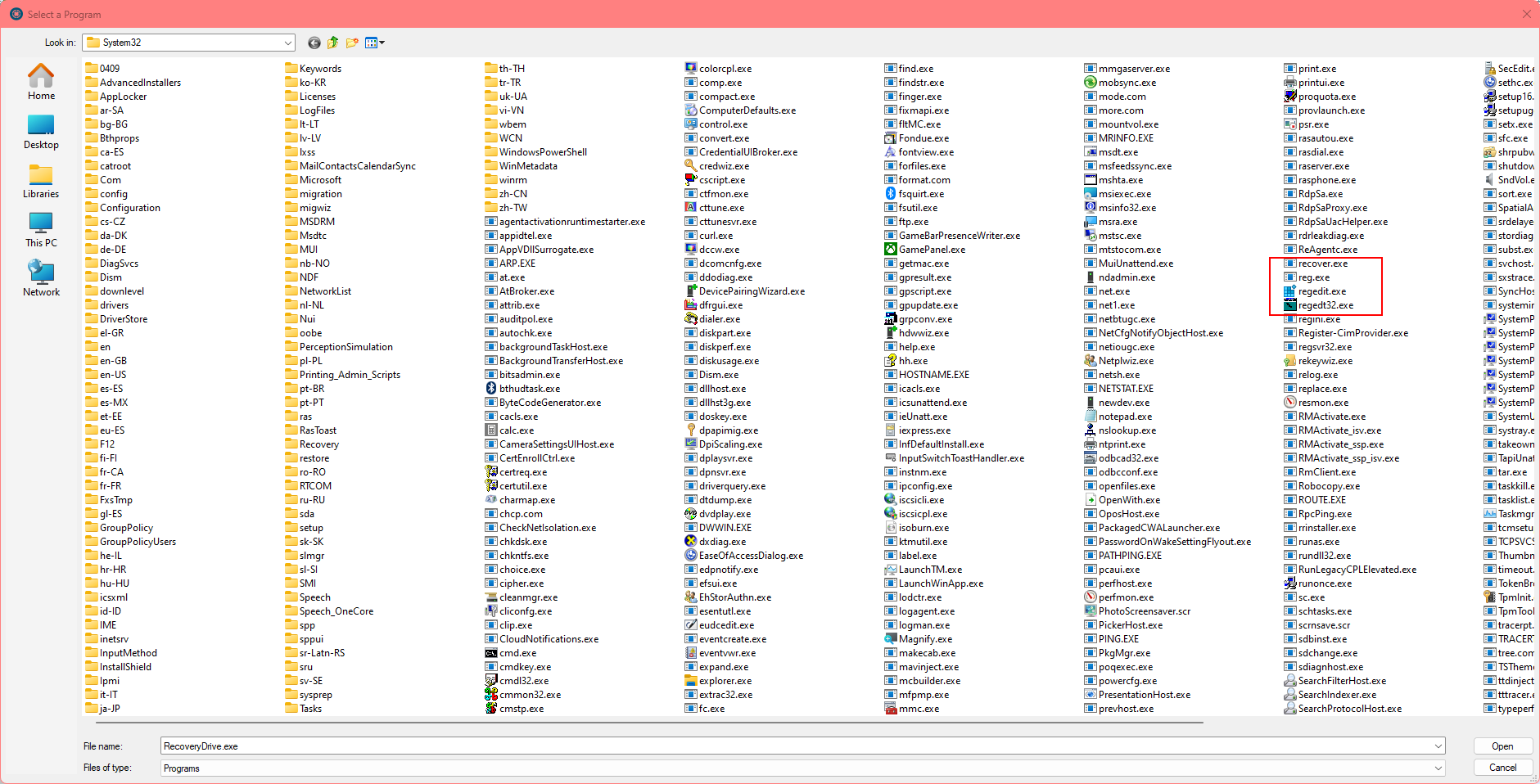
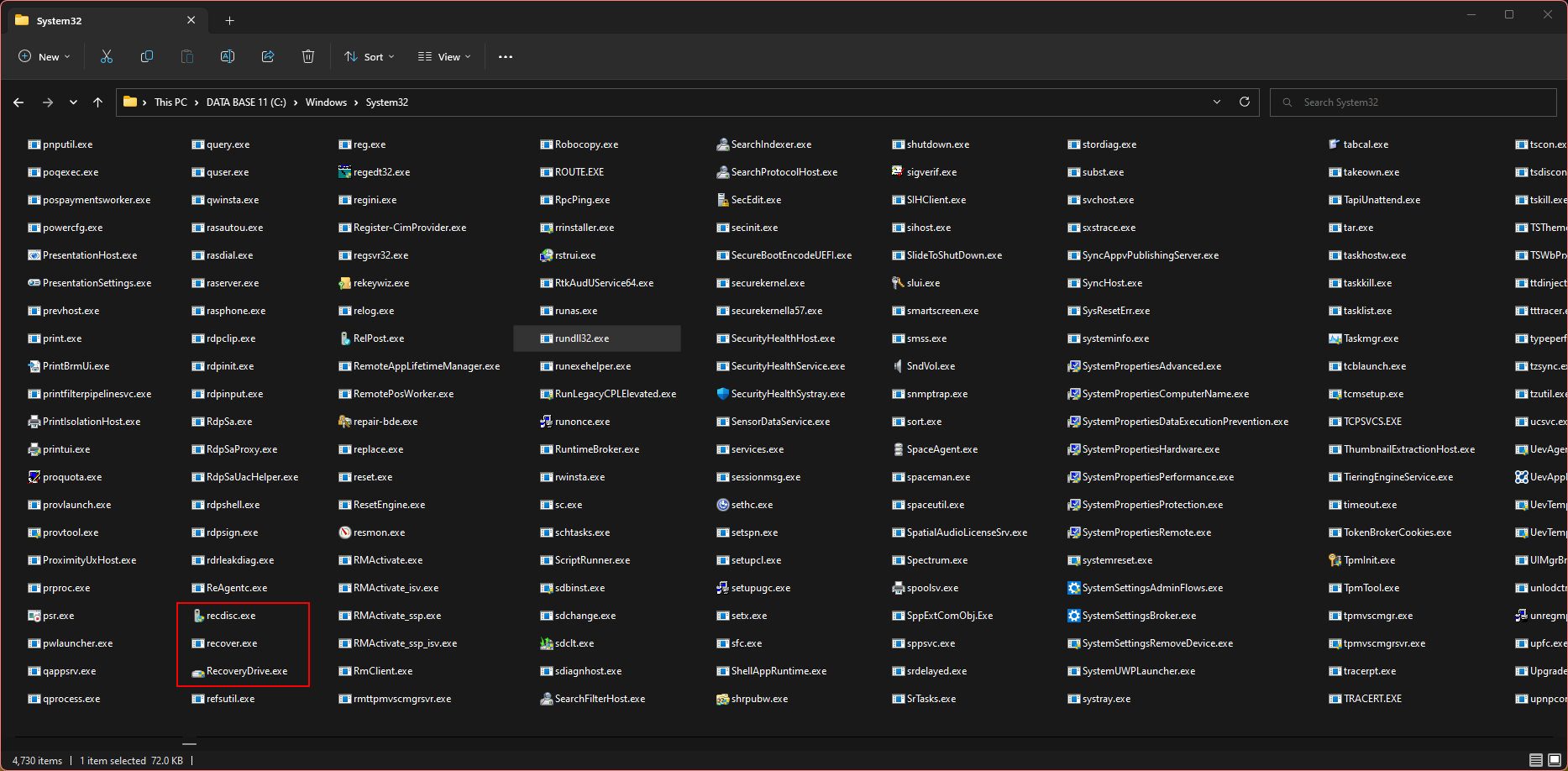
I ran VNWin as the administrator, and navigated to the Windows/Sysytem32 folder using the "Run" command (see screenshot/Redbox) no RecoveryDrive.exe
RecoveryDrive.exe is with Windows 11, see screenshot/Redbox.
Something is wrong with VNWin or MS is restricting VNWin from gaining access to all of the executables. :(
I ran VNWin as the administrator, and navigated to the Windows/Sysytem32 folder using the "Run" command (see screenshot/Redbox) no RecoveryDrive.exe
RecoveryDrive.exe is with Windows 11, see screenshot/Redbox.
Something is wrong with VNWin or MS is restricting VNWin from gaining access to all of the executables. :(
Uploaded files: