
I need to make this work on my Mac using Parallels

Quote from no1g8tor96 on July 18, 2022, 5:26 pmI just got a M1 MacBook Pro with Parallels. I installed windows 11 using ARM version (same as surface pro X) and VisualNEO and it runs startup screen then quits!!
All of my other windows software runs fine as its fully x86 and x64 compatible now.
I installed my other Developer Apps as well. I won't name them unless you want. Dont want to advertise for them here.
I really like the VisualNeo Programs and want to explore them more.
What needs to be installed to make this work....Maybe I don't have the right Dot net installed?
Thanks so much for the help.
You have a GREAT Product here and really want to make it my goto.
Thanks
I just got a M1 MacBook Pro with Parallels. I installed windows 11 using ARM version (same as surface pro X) and VisualNEO and it runs startup screen then quits!!
All of my other windows software runs fine as its fully x86 and x64 compatible now.
I installed my other Developer Apps as well. I won't name them unless you want. Dont want to advertise for them here.
I really like the VisualNeo Programs and want to explore them more.
What needs to be installed to make this work....Maybe I don't have the right Dot net installed?
Thanks so much for the help.
You have a GREAT Product here and really want to make it my goto.
Thanks

Quote from luishp on July 19, 2022, 9:47 am@no1g8tor96 I think an ARM processor will not be able to run our executables. It's not a libraries problem but the processor itself.
But I am not an expert, so maybe there is some solution I don't know about. Please let me know if you finally succeed.
Sorry!
@no1g8tor96 I think an ARM processor will not be able to run our executables. It's not a libraries problem but the processor itself.
But I am not an expert, so maybe there is some solution I don't know about. Please let me know if you finally succeed.
Sorry!
Quote from UserNoN on September 9, 2022, 5:22 pmHi,
I managed to get VisualNeo running in on my M1 Mac Mini with Win 11 in Parallels 18.
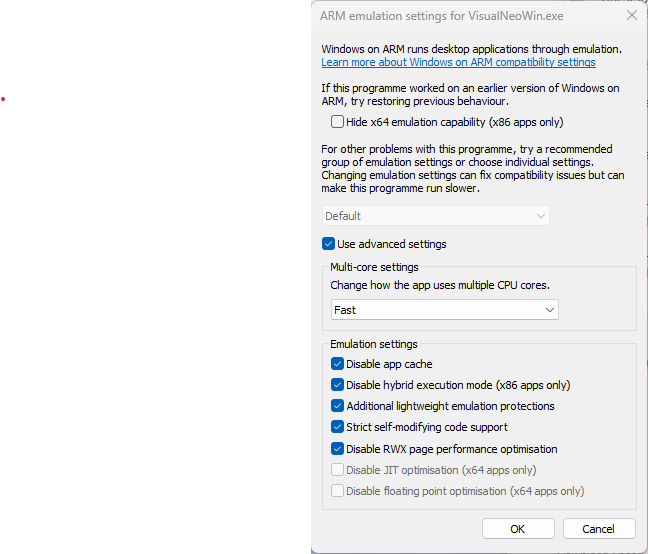
It was necessary to tweak the ARM emulation settings a bit. Attached is a screendump of my working settings.
Screenshot looks so-so but I hope it helps.
Hi,
I managed to get VisualNeo running in on my M1 Mac Mini with Win 11 in Parallels 18.
It was necessary to tweak the ARM emulation settings a bit. Attached is a screendump of my working settings.
Screenshot looks so-so but I hope it helps.

Quote from roccocogliano on January 2, 2023, 5:15 pmThanks @usernon for the suggestion.
It also works using UTM instead of Parallels.
I installed and ran VisualNeo Web on Windows 11 arm on a macbook pro with Apple Silicon M2 processor.Great!
Thanks @usernon for the suggestion.
It also works using UTM instead of Parallels.
I installed and ran VisualNeo Web on Windows 11 arm on a macbook pro with Apple Silicon M2 processor.
Great!