
Image 'Fit to Screen'

Quote from Zaqueo on August 23, 2023, 9:31 pmI'm new to this marvelous software. My question is: When displaying an image, is there any way to adjust the dimensions of the image so it 'fits to screen" or 'best fit to screen'?
I'm new to this marvelous software. My question is: When displaying an image, is there any way to adjust the dimensions of the image so it 'fits to screen" or 'best fit to screen'?

Quote from susan on August 24, 2023, 1:48 amWelcome!
Is your question about VisualNEO Web? It would be best to start a topic in Getting Started or General VisualNEO Web in the future. (Or otherwise in VisualNEO Win for that app.)
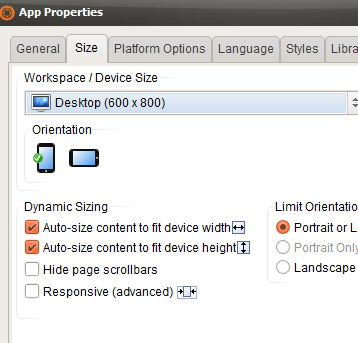
A general answer is that in the Properties for an image, you can use percentages and also in the Project Properties there is a section for dynamic resizing.
The Project Properties also has a Responsive option which is labelled advanced, and which I imagine may require careful reading of this page from the help and the other links there.
Welcome!
Is your question about VisualNEO Web? It would be best to start a topic in Getting Started or General VisualNEO Web in the future. (Or otherwise in VisualNEO Win for that app.)
A general answer is that in the Properties for an image, you can use percentages and also in the Project Properties there is a section for dynamic resizing.
The Project Properties also has a Responsive option which is labelled advanced, and which I imagine may require careful reading of this page from the help and the other links there.
https://webhelp.visualneo.com/Responsiveapps.html
Uploaded files: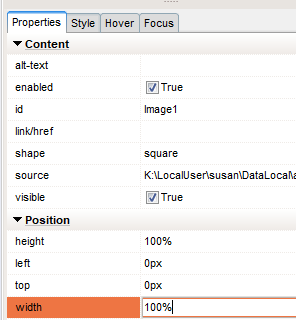

Quote from luishp on August 24, 2023, 12:07 pm@susan and @zaqueo, it's important to be aware that within VisualNEO Web, there are various methods available to adjust the application's size. An alternative option involves utilizing the FitAppToScreen command. For newcomers, I highly recommend considering this approach as it tends to yield favorable outcomes.
@susan and @zaqueo, it's important to be aware that within VisualNEO Web, there are various methods available to adjust the application's size. An alternative option involves utilizing the FitAppToScreen command. For newcomers, I highly recommend considering this approach as it tends to yield favorable outcomes.