Information need within Config.php

Quote from m.burdess on September 21, 2022, 10:02 pmWhat is the least amount of information needed within the Config.php file to load and do a search of a database.
All I want to do is search the databbase table "AZcode" and show the information on the app.
the tabke is "AZcode" and field is "postcode".
Sorry for the way this has been written but this is the third time that I have tried to post this.
What is the least amount of information needed within the Config.php file to load and do a search of a database.
All I want to do is search the databbase table "AZcode" and show the information on the app.
the tabke is "AZcode" and field is "postcode".
Sorry for the way this has been written but this is the third time that I have tried to post this.

Quote from luishp on September 22, 2022, 9:13 am@m-burdess this should be the minimun you need. I suppose you are using a MySQL database whose file name is mydatabase.db
//SQLite database setup
$dbAlias[0]="db1";
$dbNames[0]="mydatabase.db";

//Select query
$sqlAlias[0]="select";
$sqlQuerys[0]="SELECT * FROM AZcode";
$sqlMaxUserLevel[0]=-1;
Please take a look at the YouTube tutorial for more information.
Regards.
@m-burdess this should be the minimun you need. I suppose you are using a MySQL database whose file name is mydatabase.db
//SQLite database setup
$dbAlias[0]="db1";
$dbNames[0]="mydatabase.db";

//Select query
$sqlAlias[0]="select";
$sqlQuerys[0]="SELECT * FROM AZcode";
$sqlMaxUserLevel[0]=-1;
Please take a look at the YouTube tutorial for more information.
Regards.
Quote from m.burdess on September 28, 2022, 10:52 am@luishp sorry for the delay answering. The database is on the CloudNeo Control MySQL, show as "trainman_postcode" with a Table "AZcode" , field "postcode".
When I posted this question I did try to post the code I have work on but the system would not let me. ( and again today )
This is my first try to use MySQL within VisualNeo,and just wanted to have the code looked at, and give a an pointers to the best way to code a datbase.
Regards
@luishp sorry for the delay answering. The database is on the CloudNeo Control MySQL, show as "trainman_postcode" with a Table "AZcode" , field "postcode".
When I posted this question I did try to post the code I have work on but the system would not let me. ( and again today )
This is my first try to use MySQL within VisualNeo,and just wanted to have the code looked at, and give a an pointers to the best way to code a datbase.
Regards
Quote from luishp on September 28, 2022, 7:49 pm@m-burdess this should be the code to connect to your MySQL database. Just change realDatabaseName, MySQLUserName and MySQLUserPassword with your real database name, user and password respectively:
//MySQL sample
$dbAlias[0]="db1";
$dbNames[0]="realDataBaseName";
$dbServerNames[0]="localhost";
$dbUserNames[0]="MySQLUserName";
$dbPasswords[0]="MySQLUserPassword";

//Select query
$sqlAlias[0]="select";
$sqlQuerys[0]="SELECT * FROM AZcode";
$sqlMaxUserLevel[0]=-1;
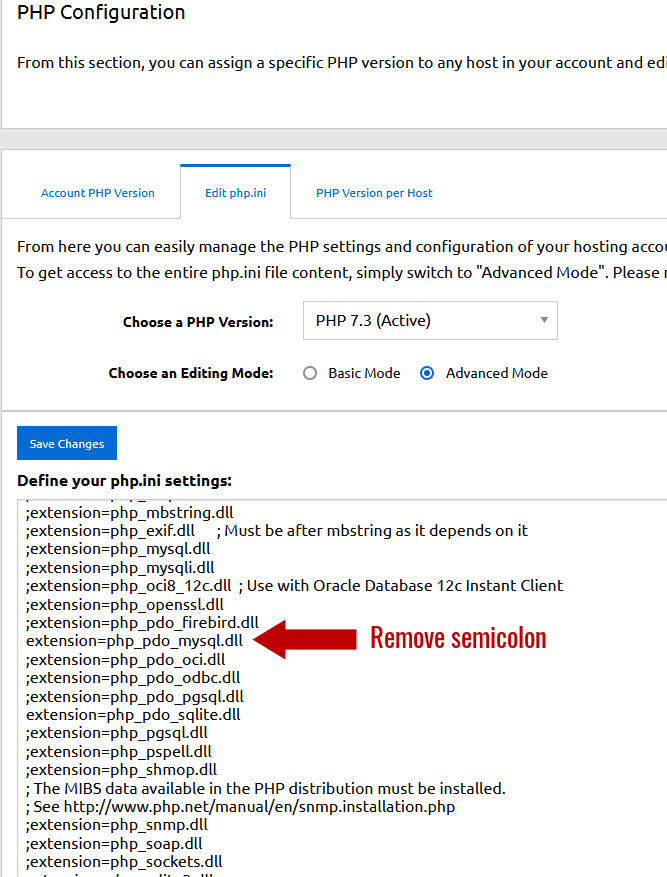
Also be sure the PHP extensions for MySQL PDO is activated using your CloudNEO control panel.
If you need to share sample code, please save it to a file, zip it and attach it here, so it's not blocked by the security system.
Go to Advanced > PHP Settings > Edit php.ini > Advanced mode (take a look at the attached picture)Regards.
@m-burdess this should be the code to connect to your MySQL database. Just change realDatabaseName, MySQLUserName and MySQLUserPassword with your real database name, user and password respectively:
//MySQL sample
$dbAlias[0]="db1";
$dbNames[0]="realDataBaseName";
$dbServerNames[0]="localhost";
$dbUserNames[0]="MySQLUserName";
$dbPasswords[0]="MySQLUserPassword";

//Select query
$sqlAlias[0]="select";
$sqlQuerys[0]="SELECT * FROM AZcode";
$sqlMaxUserLevel[0]=-1;
Also be sure the PHP extensions for MySQL PDO is activated using your CloudNEO control panel.
If you need to share sample code, please save it to a file, zip it and attach it here, so it's not blocked by the security system.
Go to Advanced > PHP Settings > Edit php.ini > Advanced mode (take a look at the attached picture)
Regards.
Uploaded files: