
Install PWA

Quote from CDY@44 on March 4, 2020, 3:38 amHi Luis,
When the visitor came for first time on PWA site, is it possible to have a kind of "message box", saying that it is possible to install the PWA ?
Best regards,
Hi Luis,
When the visitor came for first time on PWA site, is it possible to have a kind of "message box", saying that it is possible to install the PWA ?
Best regards,
Quote from CDY@44 on March 4, 2020, 3:44 am....I was thinking to myself, and may be we can write a sub routine to check if PWA installed (isInstalled) and if answer is FALSE, we can pop up the message box.
...But I don't think it is possible to install the PWA, without using the browser menu.Sorry if I am not clear in my request...It is late...early in the morning...I must sleep right now !! I am really passionate about VNW !
....I was thinking to myself, and may be we can write a sub routine to check if PWA installed (isInstalled) and if answer is FALSE, we can pop up the message box.
...But I don't think it is possible to install the PWA, without using the browser menu.
Sorry if I am not clear in my request...It is late...early in the morning...I must sleep right now !! I am really passionate about VNW !

Quote from luishp on March 4, 2020, 8:01 amHi @cdy44-2, note that isInstalled already exists :)
You can show a message explaining how to install. There is also a neoDevice plugin to detect dektop, mobile phone or tablet.
And finally, setResponsivePages will help you to show the user the appropiate design resolution.
Thank you for sharing your passion!
Hi @cdy44-2, note that isInstalled already exists :)
You can show a message explaining how to install. There is also a neoDevice plugin to detect dektop, mobile phone or tablet.
And finally, setResponsivePages will help you to show the user the appropiate design resolution.
Thank you for sharing your passion!
Quote from CDY@44 on March 4, 2020, 2:44 pmHi Luis,
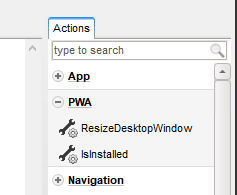
In my previous message I just referred to this 'IsInstalled' instruction. As I told you, I no longer had very clear ideas in front of my computer. I am not being reasonable, but I have a real thirst to learn how to use VNW well, which is a great tool.
Impatient to know what you have in mind for the next updates !! ;)
Best regards,
Hi Luis,
In my previous message I just referred to this 'IsInstalled' instruction. As I told you, I no longer had very clear ideas in front of my computer. I am not being reasonable, but I have a real thirst to learn how to use VNW well, which is a great tool.
Impatient to know what you have in mind for the next updates !! ;)
Best regards,

Quote from farhad2008 on March 5, 2020, 10:29 amhi, luishp
Do I need to upload the file to the site with the https Protocol so we can get output and there is no other way?
Regards
hi, luishp
Do I need to upload the file to the site with the https Protocol so we can get output and there is no other way?
Regards
Quote from luishp on March 5, 2020, 11:14 amDo I need to upload the file to the site with the https Protocol so we can get output and there is no other way?
@farhad2008 I don't understand quite well your question. Do you mean if the https protocol is necessary in your hosting service to host a PWA? If so, yes. If you serve your app under http it will not be considered safe enough to be a PWA in any web browser.
Do I need to upload the file to the site with the https Protocol so we can get output and there is no other way?
@farhad2008 I don't understand quite well your question. Do you mean if the https protocol is necessary in your hosting service to host a PWA? If so, yes. If you serve your app under http it will not be considered safe enough to be a PWA in any web browser.
Quote from farhad2008 on March 5, 2020, 11:44 amThank you for your answer . You understood my question precisely.
Regards
Thank you for your answer . You understood my question precisely.
Regards

Quote from rrey on August 12, 2020, 1:28 pmHola,
He seguido todos los pasos necesarios para crear la PWA, pero cuando la configuro en https://www.pwabuilder.com/
me dice que no encuntra en archivo manifest.json.
No sé que pude pasar. ¿Alguna pista?
Adjunto una captura.
Hola,
He seguido todos los pasos necesarios para crear la PWA, pero cuando la configuro en https://www.pwabuilder.com/
me dice que no encuntra en archivo manifest.json.
No sé que pude pasar. ¿Alguna pista?
Adjunto una captura.
Uploaded files: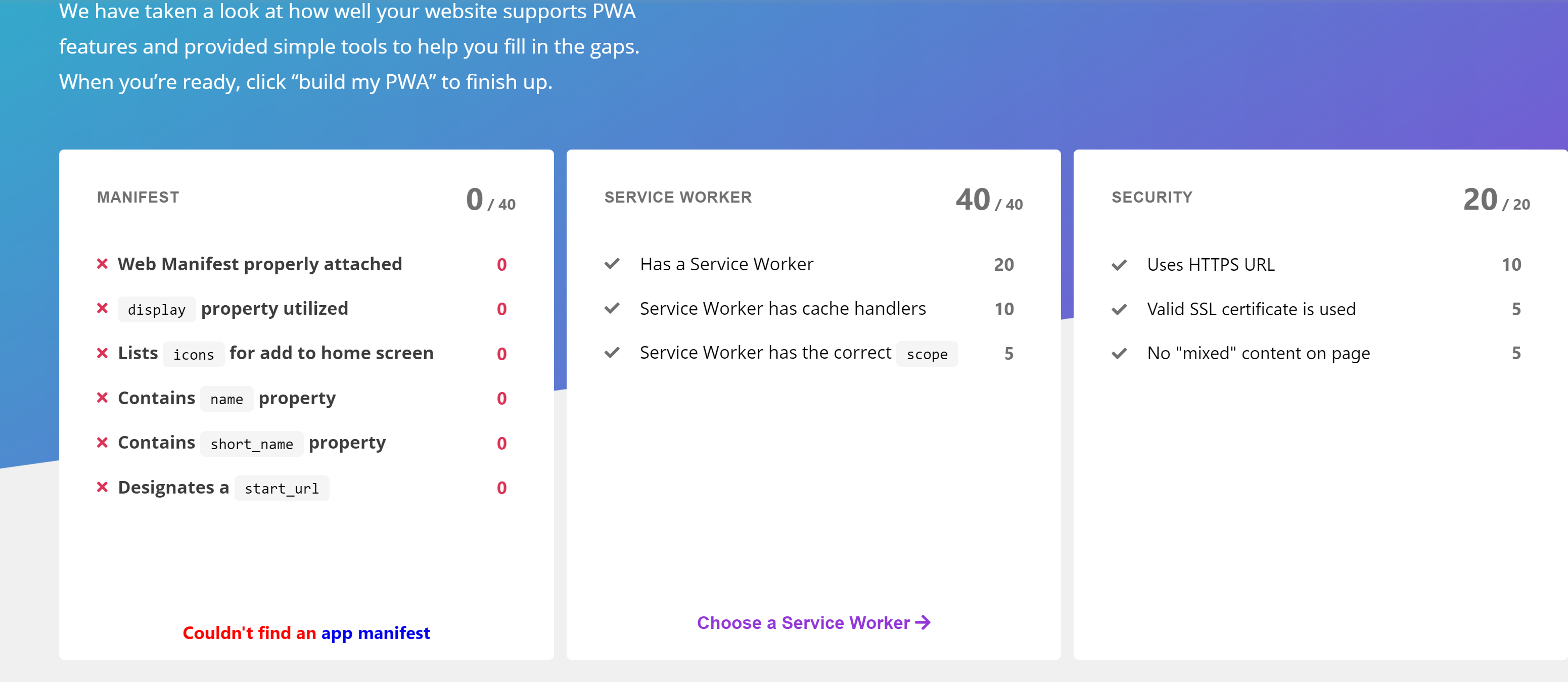
Quote from luishp on August 12, 2020, 5:55 pm@rrey el archivo manifest.json lo crea VisualNEO Web automáticamente al compilar para PWA.
Asegúrate de subir al servidor todos los archivos y de haber marcado la opción de compilar a PWA.
@rrey el archivo manifest.json lo crea VisualNEO Web automáticamente al compilar para PWA.
Asegúrate de subir al servidor todos los archivos y de haber marcado la opción de compilar a PWA.
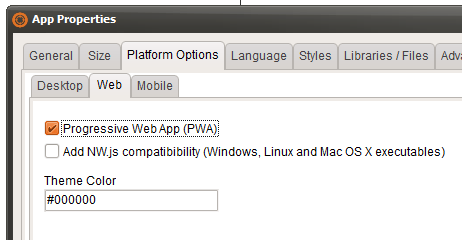
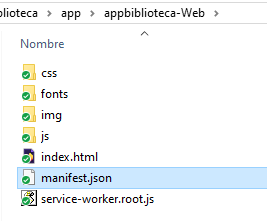
Quote from rrey on August 12, 2020, 9:23 pm@luishp Sí todo eso lo he hecho, por eso me extraña que no funcione. Adjunto captura.
@luishp Sí todo eso lo he hecho, por eso me extraña que no funcione. Adjunto captura.
Uploaded files: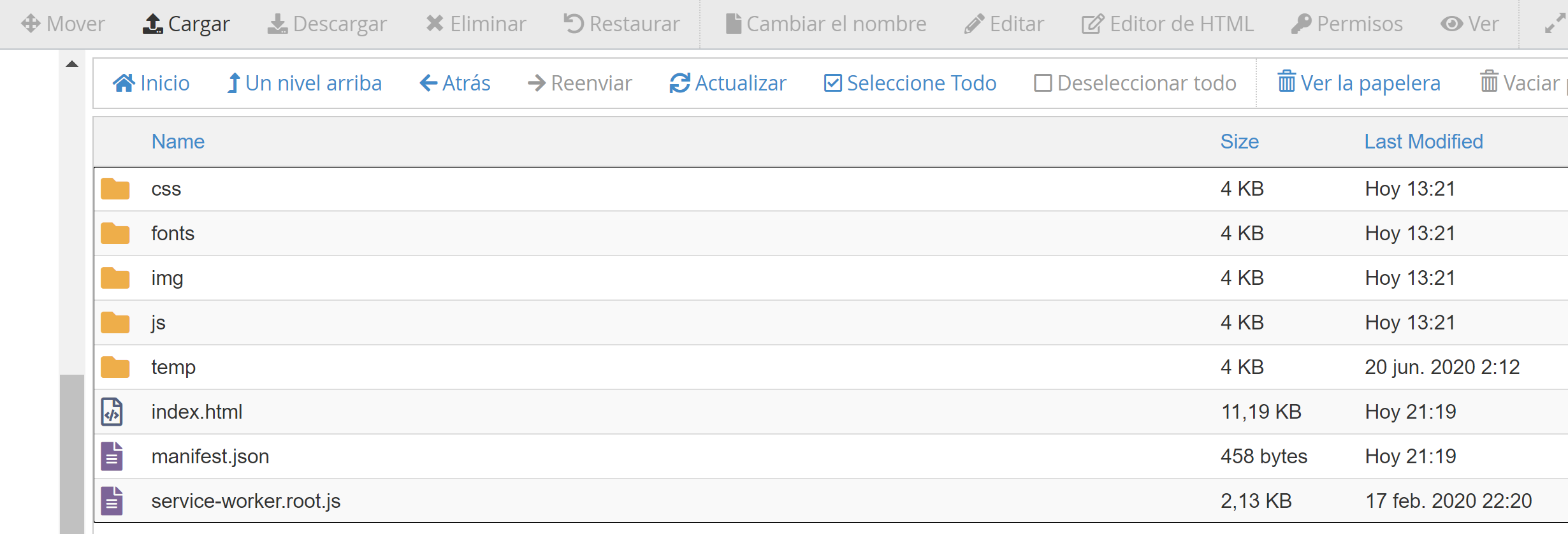
Quote from luishp on August 13, 2020, 7:28 am@rrey intenta utilizar Lighthouse de Google para auditar la app y ver donde puede estar el problema:
https://developers.google.com/web/tools/lighthouseTambién asegúrate de que tu hosting tiene registrados los archivos con extension .json (trata de acceder a él desde la URL directamente. Debería mostrarse el contenido en el navegador).
@rrey intenta utilizar Lighthouse de Google para auditar la app y ver donde puede estar el problema:
https://developers.google.com/web/tools/lighthouse
También asegúrate de que tu hosting tiene registrados los archivos con extension .json (trata de acceder a él desde la URL directamente. Debería mostrarse el contenido en el navegador).
Quote from rrey on August 13, 2020, 11:31 pm@luishp Pues despues de hacer la autoria con lighthouse sale correcto (adjunto captura). Pero cuando lo paso por www.pwabuilder.com me dice que no encuentra el manifiesto,json. En el servidor está activado como typo mime json además que tengo ya aplicaiones que usan este archivo. No acabo de entender que no detecte este archivo json.
El contenido del json es este:
{
"name": "Lectura Al revés.",
"scope": "/",
"start_url": "index.html",
"theme_color": "#000000",
"background_color": "#000000",
"short_name": "LecturaAlrev",
"description": "Crea los espacios para separar las palabras",
"author": "Roger Rey",
"lang": "es",
"version": "1",
"display": "fullscreen",
"orientation": "any",
"icons": [{
"src": "img/default-icon.png",
"sizes": "512x512",
"purpose": "any maskable"
}]
}
En el index.html
<link rel="manifest" href="./manifest.json">También probé con
<link rel="manifest" href="/manifest.json">Pero nada. El archivo service-worker.root.js no lo he tocado. No sé si hay que hacer algo más.
La idea era probar el tema PWA con una aplicación sencilla de ejemplo: https://genmagic.net/lengua/lectura_alreves
Seguiré investingando a ver si doy con el error.
Gracias por las herrmientas que me has indeicado.
Roger Rey
@luishp Pues despues de hacer la autoria con lighthouse sale correcto (adjunto captura). Pero cuando lo paso por http://www.pwabuilder.com me dice que no encuentra el manifiesto,json. En el servidor está activado como typo mime json además que tengo ya aplicaiones que usan este archivo. No acabo de entender que no detecte este archivo json.
El contenido del json es este:
{
"name": "Lectura Al revés.",
"scope": "/",
"start_url": "index.html",
"theme_color": "#000000",
"background_color": "#000000",
"short_name": "LecturaAlrev",
"description": "Crea los espacios para separar las palabras",
"author": "Roger Rey",
"lang": "es",
"version": "1",
"display": "fullscreen",
"orientation": "any",
"icons": [{
"src": "img/default-icon.png",
"sizes": "512x512",
"purpose": "any maskable"
}]
}
En el index.html
<link rel="manifest" href="./manifest.json">
También probé con
<link rel="manifest" href="/manifest.json">
Pero nada. El archivo service-worker.root.js no lo he tocado. No sé si hay que hacer algo más.
La idea era probar el tema PWA con una aplicación sencilla de ejemplo: https://genmagic.net/lengua/lectura_alreves
Seguiré investingando a ver si doy con el error.
Gracias por las herrmientas que me has indeicado.
Roger Rey
Uploaded files: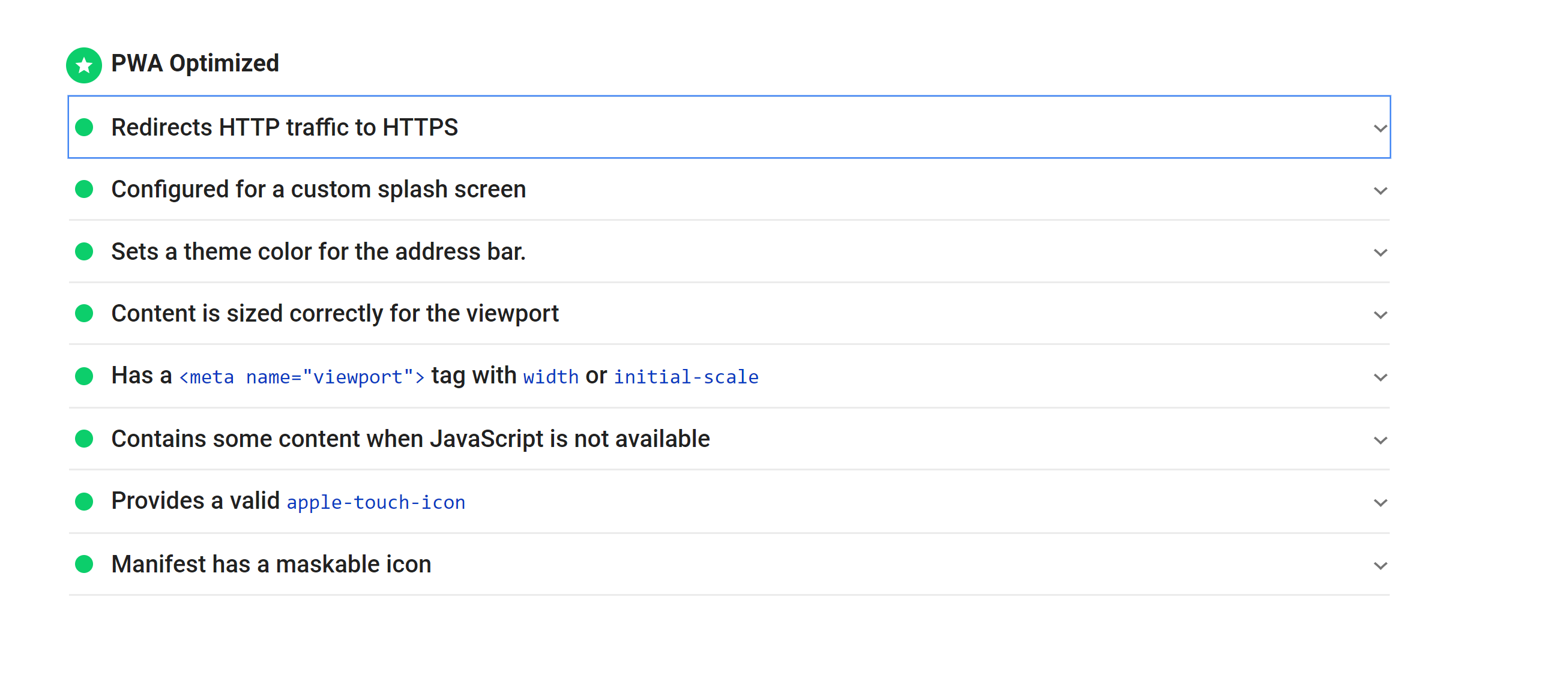
Quote from luishp on August 13, 2020, 11:41 pm@rrey el problema está en que estás tratando de instalar la PWA desde una subcarpeta. Puedes hacerlo desde un dominio o subdominio directamente pero si lo haces desde una subcarpeta tienes que modificar el archivo manifest.json.
Mira aquí:
https://stackoverflow.com/questions/55405231/ionic-4-how-to-configure-a-pwa-to-run-on-a-subfolder
@rrey el problema está en que estás tratando de instalar la PWA desde una subcarpeta. Puedes hacerlo desde un dominio o subdominio directamente pero si lo haces desde una subcarpeta tienes que modificar el archivo manifest.json.
Mira aquí:
https://stackoverflow.com/questions/55405231/ionic-4-how-to-configure-a-pwa-to-run-on-a-subfolder
Quote from rrey on August 14, 2020, 7:01 pm@luishp
Entonces desde la carpeta sería:
"start_url": "/lengua/lectura_alreves/index.html",
"scope": "/lengua/lectura_alreves/",Pero aunque pasa bien el test, cuando paso https://www.pwabuilder.com/ sale el mismo error que no encuetra el archivo.
Lo extraño es que lighthouse me da resultados coorectos en la PWA.
Seguiré estudiando el tema.
Gracias,
Entonces desde la carpeta sería:
"start_url": "/lengua/lectura_alreves/index.html",
"scope": "/lengua/lectura_alreves/",
Pero aunque pasa bien el test, cuando paso https://www.pwabuilder.com/ sale el mismo error que no encuetra el archivo.
Lo extraño es que lighthouse me da resultados coorectos en la PWA.
Seguiré estudiando el tema.
Gracias,
Quote from luishp on August 15, 2020, 10:59 am@rrey también será necesario que cambies esta linea en index.html:
<link rel="manifest" href="./manifest.json">Saludos.
@rrey también será necesario que cambies esta linea en index.html:
<link rel="manifest" href="./manifest.json">
Saludos.
Quote from rrey on August 15, 2020, 12:16 pm@luishp Gracias ya funciono parece que debía llevar su tiempo. Perfecto.
Me ha funcionado directamente sin ./
<link rel="manifest" href="manifest.json">Lo he probado en el móvil tamnién y funciona.
@luishp Gracias ya funciono parece que debía llevar su tiempo. Perfecto.
Me ha funcionado directamente sin ./
<link rel="manifest" href="manifest.json">
Lo he probado en el móvil tamnién y funciona.
Quote from rrey on December 5, 2020, 8:43 pmHola @luishp,
He visto que es posible añadir en una PWA un aviso para instalar la app.
Tengo este código que recomiendan en; https://www.pwaexperts.io/tutoriales/como-agregar-pwa-home-screen-movil-escritorio-chrome
Este código se podría añadir en VisualNeo para funcionara. Y en caso afoirmativo en qué lugar.
Saludos,
Roger Rey
Hola @luishp,
He visto que es posible añadir en una PWA un aviso para instalar la app.
Tengo este código que recomiendan en; https://www.pwaexperts.io/tutoriales/como-agregar-pwa-home-screen-movil-escritorio-chrome
Este código se podría añadir en VisualNeo para funcionara. Y en caso afoirmativo en qué lugar.
Saludos,
Roger Rey