
Introducing neoEXE

Quote from luishp on January 25, 2025, 11:40 amIntroducing neoEXE
I’m thrilled to announce neoEXE, a brand-new tool that will be included in the next version of VisualNEO Web. This lightweight application allows you to package your web apps into standalone Windows executables (.exe) effortlessly. Whether your app is hosted online or compiled locally, neoEXE makes deployment and distribution easy, modern, and compact. And it works with any web app, not only with VisualNEO Web generated ones!
What is neoEXE for?
neoEXE offers two ways to package your web applications:
- Local web app (zipped): Simply select a zipped folder containing your web app’s files (HTML, JavaScript, CSS, images, etc.) and neoEXE will embed everything into a single .exe file.
- Hosted web app: If your app is hosted on a web server, use the Start URL option to package it. Just leave the “Source file (.zip)” field empty and provide the URL of your web app. This creates an .exe that acts as a launcher for your hosted application, while still offering the flexibility of a desktop app.
Why choose neoEXE?
- Powered by WebView2: neoEXE uses Microsoft’s WebView2 technology, ensuring your app runs on a modern, high-performance browser engine. WebView2 is already present on Windows 10 and 11, so no additional setup is required.
- All-in-one packaging: For local apps, all resources are fully embedded into the .exe file—no need for external files or additional dependencies.
- Customizable experience: Adjust window size, title, icon, and behavior (e.g., fullscreen, resizable, frameless, etc.) to suit your app’s needs.
- Future-proof deployment: Whether you prefer local packaging or hosted solutions, neoEXE provides flexibility to match your app’s distribution strategy.
How does it work?
- Source file (.zip): For local apps, select a zipped folder containing your web app files. Leave this field empty if you’re using the StartURL option.
- Output file (.exe): Choose where to save the executable and give it a name.
- App icon (.ico): Add a custom icon to personalize your app.
- Window size: Specify the width and height for the application window.
- Window title & Start URL: Enter a title for your app and, if your app is hosted online, provide its URL in the StartURL field.
- Optional settings: Check or uncheck options like “Always on top,” “Resizable,” “Fullscreen,” “Show minimize/maximize buttons,” or “Frameless” to configure the app's behavior.
- Create Executable: Click the button, and neoEXE will generate your standalone .exe in seconds.
The screenshot below demonstrates the user-friendly interface of neoEXE. With its simple design, you can package your apps—both local and hosted—quickly and efficiently.
Coming soon to VisualNEO Web
neoEXE will be included as a standard tool in the next version of VisualNEO Web, making it easier than ever to create and distribute professional desktop applications from your web projects.Try neoEXE and experience the convenience and power it adds to your VisualNEO Web development workflow. Feedback and suggestions are always welcome!
Introducing neoEXE
I’m thrilled to announce neoEXE, a brand-new tool that will be included in the next version of VisualNEO Web. This lightweight application allows you to package your web apps into standalone Windows executables (.exe) effortlessly. Whether your app is hosted online or compiled locally, neoEXE makes deployment and distribution easy, modern, and compact. And it works with any web app, not only with VisualNEO Web generated ones!
What is neoEXE for?
neoEXE offers two ways to package your web applications:
- Local web app (zipped): Simply select a zipped folder containing your web app’s files (HTML, JavaScript, CSS, images, etc.) and neoEXE will embed everything into a single .exe file.
- Hosted web app: If your app is hosted on a web server, use the Start URL option to package it. Just leave the “Source file (.zip)” field empty and provide the URL of your web app. This creates an .exe that acts as a launcher for your hosted application, while still offering the flexibility of a desktop app.
Why choose neoEXE?
- Powered by WebView2: neoEXE uses Microsoft’s WebView2 technology, ensuring your app runs on a modern, high-performance browser engine. WebView2 is already present on Windows 10 and 11, so no additional setup is required.
- All-in-one packaging: For local apps, all resources are fully embedded into the .exe file—no need for external files or additional dependencies.
- Customizable experience: Adjust window size, title, icon, and behavior (e.g., fullscreen, resizable, frameless, etc.) to suit your app’s needs.
- Future-proof deployment: Whether you prefer local packaging or hosted solutions, neoEXE provides flexibility to match your app’s distribution strategy.
How does it work?
- Source file (.zip): For local apps, select a zipped folder containing your web app files. Leave this field empty if you’re using the StartURL option.
- Output file (.exe): Choose where to save the executable and give it a name.
- App icon (.ico): Add a custom icon to personalize your app.
- Window size: Specify the width and height for the application window.
- Window title & Start URL: Enter a title for your app and, if your app is hosted online, provide its URL in the StartURL field.
- Optional settings: Check or uncheck options like “Always on top,” “Resizable,” “Fullscreen,” “Show minimize/maximize buttons,” or “Frameless” to configure the app's behavior.
- Create Executable: Click the button, and neoEXE will generate your standalone .exe in seconds.
The screenshot below demonstrates the user-friendly interface of neoEXE. With its simple design, you can package your apps—both local and hosted—quickly and efficiently.
Coming soon to VisualNEO Web
neoEXE will be included as a standard tool in the next version of VisualNEO Web, making it easier than ever to create and distribute professional desktop applications from your web projects.
Try neoEXE and experience the convenience and power it adds to your VisualNEO Web development workflow. Feedback and suggestions are always welcome!
Uploaded files: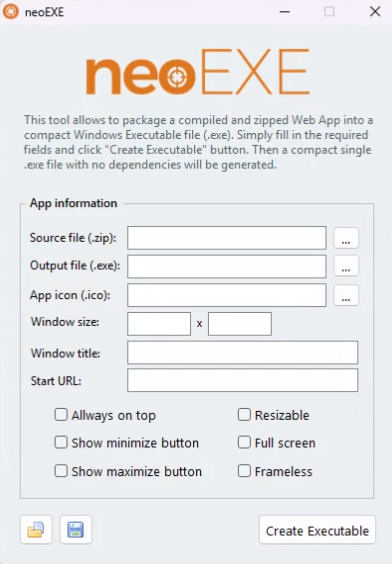


Quote from Anthony LaTorre on January 26, 2025, 2:17 pmI'm using NW.js in one of my programs because I need local file access. Will this work with a NW.js executable?
Thanks
I'm using NW.js in one of my programs because I need local file access. Will this work with a NW.js executable?
Thanks

Quote from luishp on January 26, 2025, 10:13 pm@anthony-latorre this is a simple way to wrap a webapp into an executable file, but you can't use any server side code (NodeJS or PHP) unless you are wrapping an online app.
@anthony-latorre this is a simple way to wrap a webapp into an executable file, but you can't use any server side code (NodeJS or PHP) unless you are wrapping an online app.
Quote from no1g8tor96 on August 29, 2026, 10:06 pmTried to make my first WIndows EXE today with Web ad it does not work. I zipped up all the need files and they work with no issues just clicking the index.
I tried several times. Brings up a browser but just errors out.
I included a pic of the files i am zipping.
Not sure whats wrong.
Tried to make my first WIndows EXE today with Web ad it does not work. I zipped up all the need files and they work with no issues just clicking the index.
I tried several times. Brings up a browser but just errors out.
I included a pic of the files i am zipping.
Not sure whats wrong.
Uploaded files: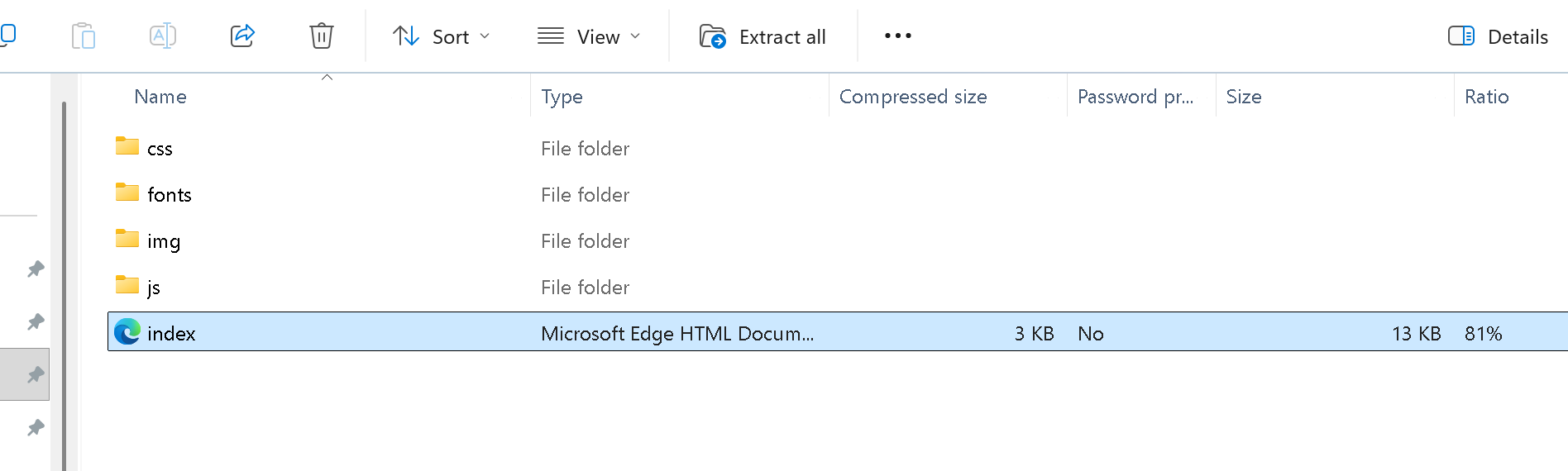
Quote from luishp on August 30, 2026, 9:17 am@no1g8tor96 I can't reproduce the problem here.
Are you filling the app information correctly?
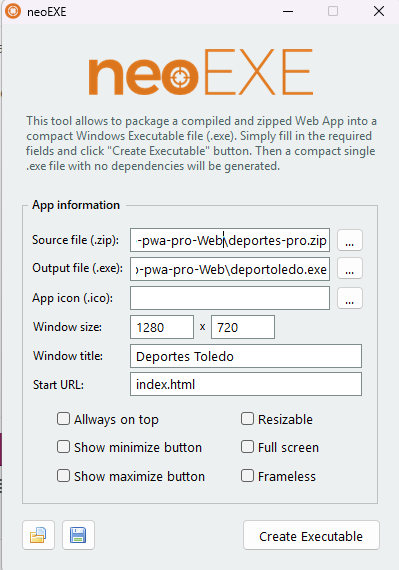
Please check attached sample image.
@no1g8tor96 I can't reproduce the problem here.
Are you filling the app information correctly?
Please check attached sample image.
Quote from no1g8tor96 on August 30, 2026, 5:40 pmI forgot to add the index.html. I tried it again and it still does not work. BUT if I unzip the the program zip file and double click the index.html file it runs perfect. So the NeoEXE is my problem.
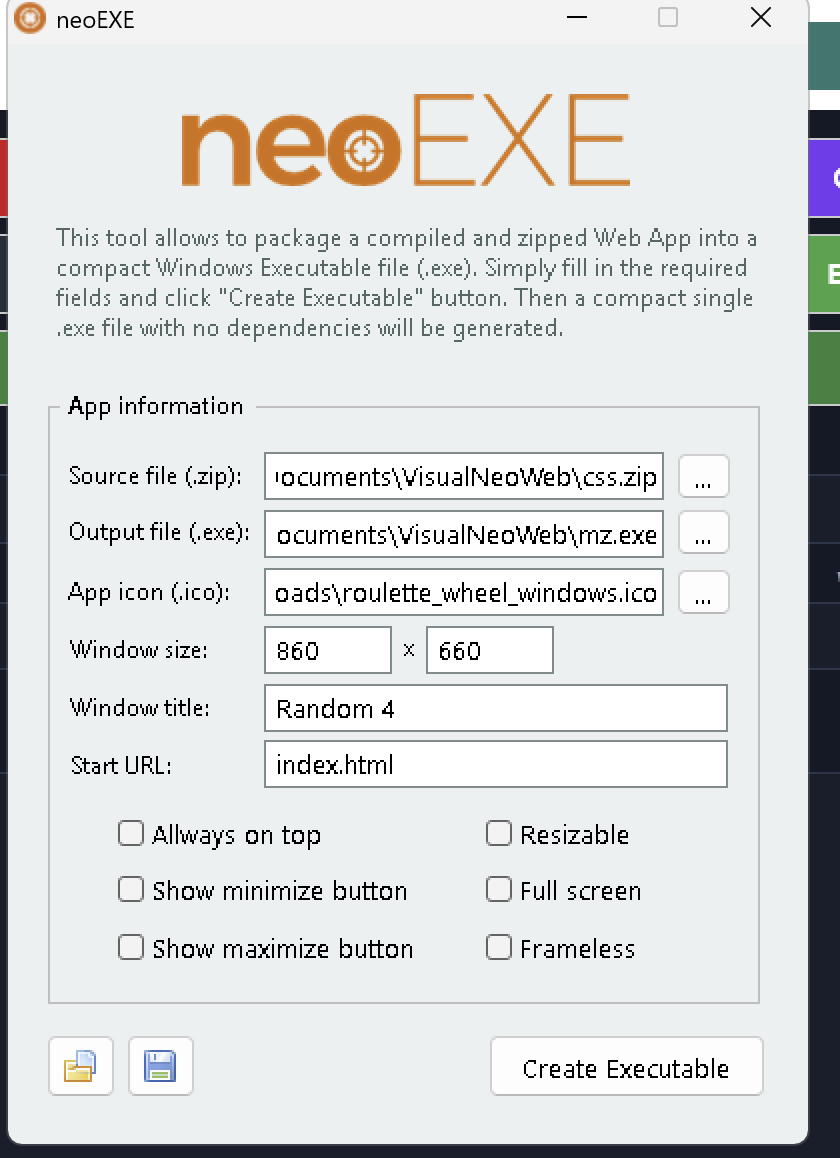
I am including the pics of my config and the error I am getting. Also I did not know this runs in a browser. I thought it would compile to an actual app. Is this not the case? Is there a way to do that?
Thanks Luis.
I forgot to add the index.html. I tried it again and it still does not work. BUT if I unzip the the program zip file and double click the index.html file it runs perfect. So the NeoEXE is my problem.
I am including the pics of my config and the error I am getting. Also I did not know this runs in a browser. I thought it would compile to an actual app. Is this not the case? Is there a way to do that?
Thanks Luis.
Uploaded files: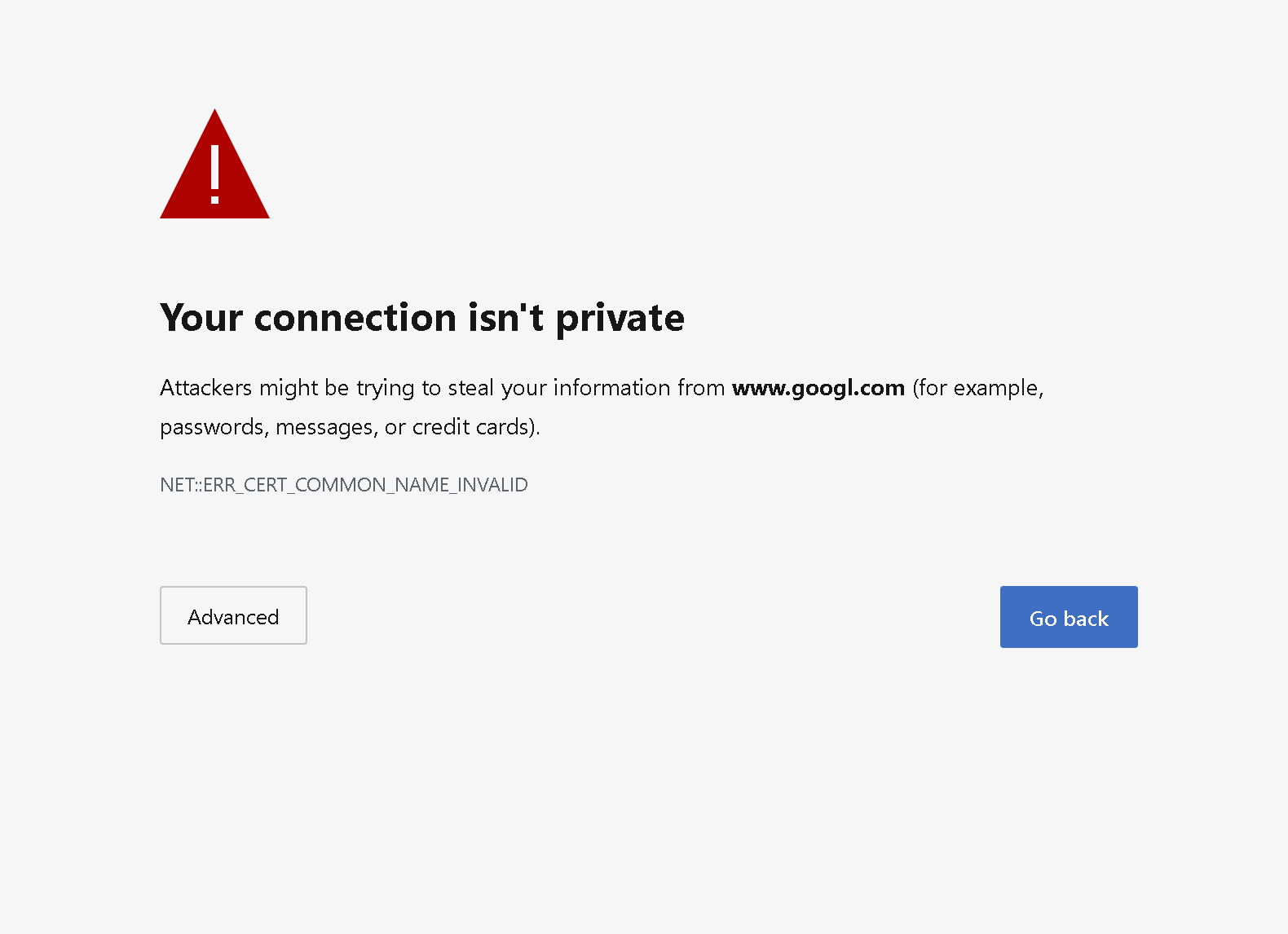
Quote from no1g8tor96 on August 30, 2026, 6:23 pmI just found an app called HTML2EXE and it works fine with it. That tells me there is nothing wrong with MY files. Please let me know what im missing with this.
I would prefer to have yours if possible.
Thanks again.
I just found an app called HTML2EXE and it works fine with it. That tells me there is nothing wrong with MY files. Please let me know what im missing with this.
I would prefer to have yours if possible.
Thanks again.
Quote from luishp on August 30, 2026, 11:47 pmHi @no1g8tor96,
Thanks for the screenshots. I noticed something important in the error message:
WebView2 is trying to open www.googl.com — not
www.google.com.The error:
NET::ERR_CERT_COMMON_NAME_INVALID
means that the SSL certificate being presented does not match the domain name being requested. In this case, the unexpected
www.googl.comURL is probably the key to understanding what is happening.Since your neoEXE Start URL is simply
index.html, I need to determine why WebView2 is navigating towww.googl.comduring startup.Could you please attach the exact ZIP file you are using with neoEXE? If possible, also attach the generated EXE. I will test the same package here and trace the navigation to see where that URL is coming from.
The fact that your files work when opening
index.htmldirectly and also work with HTML2EXE is useful information, but I would like to reproduce the exact neoEXE case before drawing conclusions.Regarding your other question, neoEXE does create a real Windows executable. The application runs inside a Windows EXE and uses Microsoft's WebView2 runtime internally to render the HTML/CSS/JavaScript interface. It is not simply launching Chrome or Edge.
Thanks for testing this. Please send me the ZIP and I'll investigate it.
Hi @no1g8tor96,
Thanks for the screenshots. I noticed something important in the error message:
WebView2 is trying to open http://www.googl.com — not www.google.com.
The error:
NET::ERR_CERT_COMMON_NAME_INVALID
means that the SSL certificate being presented does not match the domain name being requested. In this case, the unexpected www.googl.com URL is probably the key to understanding what is happening.
Since your neoEXE Start URL is simply index.html, I need to determine why WebView2 is navigating to www.googl.com during startup.
Could you please attach the exact ZIP file you are using with neoEXE? If possible, also attach the generated EXE. I will test the same package here and trace the navigation to see where that URL is coming from.
The fact that your files work when opening index.html directly and also work with HTML2EXE is useful information, but I would like to reproduce the exact neoEXE case before drawing conclusions.
Regarding your other question, neoEXE does create a real Windows executable. The application runs inside a Windows EXE and uses Microsoft's WebView2 runtime internally to render the HTML/CSS/JavaScript interface. It is not simply launching Chrome or Edge.
Thanks for testing this. Please send me the ZIP and I'll investigate it.
Quote from no1g8tor96 on August 31, 2026, 3:11 amHello Luis
I have one file luis test is the zip file for the NeoExe to make the EXE and then the zipped program file is what it created. Not working.
I was able to take the same files and make a NW.JS file and make an EXE for Mac today. So my files are good. I must be doing something wrong???Does VisualNeo Win make a a true EXE or is the same kind as this? Web Based? This is for Web but was wondering what kind of exe does Win create.
Thanks for the help
Hello Luis
I have one file luis test is the zip file for the NeoExe to make the EXE and then the zipped program file is what it created. Not working.
I was able to take the same files and make a NW.JS file and make an EXE for Mac today. So my files are good. I must be doing something wrong???
Does VisualNeo Win make a a true EXE or is the same kind as this? Web Based? This is for Web but was wondering what kind of exe does Win create.
Thanks for the help
Uploaded files:Quote from luishp on August 31, 2026, 10:49 amHi @no1g8tor96,
I found the problem.
Your ZIP contains an additional folder, and the application files are inside that folder. In other words, your
index.htmlis not located directly in the root of the ZIP.neoEXE expects the file specified in Start URL to be directly accessible from the ZIP root.
I have tested/inspected the package and there doesn't appear to be anything wrong with your application itself. It is simply the ZIP folder structure.
Once fixed I can compile it with no issues.neoExe, as any other existing solution, creates a true exe but with a WebView2 component to render the HTML, CSS and JS.
Regards.
Hi @no1g8tor96,
I found the problem.
Your ZIP contains an additional folder, and the application files are inside that folder. In other words, your index.html is not located directly in the root of the ZIP.
neoEXE expects the file specified in Start URL to be directly accessible from the ZIP root.
I have tested/inspected the package and there doesn't appear to be anything wrong with your application itself. It is simply the ZIP folder structure.
Once fixed I can compile it with no issues.
neoExe, as any other existing solution, creates a true exe but with a WebView2 component to render the HTML, CSS and JS.
Regards.
Quote from no1g8tor96 on August 31, 2026, 3:23 pmTry this one. Its in the root file and does not work. Please let me know whats wrong with this one.
Try this one. Its in the root file and does not work. Please let me know whats wrong with this one.
Uploaded files:Quote from luishp on September 1, 2026, 8:37 am@no1g8tor96 it works for me with no issues.
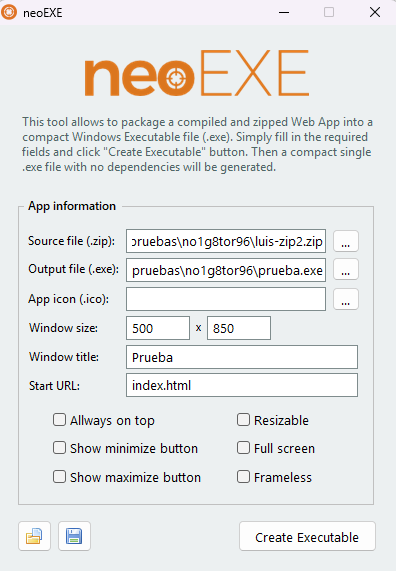
Attached compiled .exe file and neoExe configuration.
Regards.
@no1g8tor96 it works for me with no issues.
Attached compiled .exe file and neoExe configuration.
Regards.
Quote from no1g8tor96 on September 1, 2026, 3:00 pmIt still did not work on my computer I code on. BUT i loaded it up on anohter computer and it worked. Not sure what the problem is on that machine. The same error message comes up. then it just goes to google if I click continue.
Oh well. I built a drag n drop NW.js Builder and it rocks. Makes a larger file but runs great.
I will load VNW on this machine later and test.
Thanks Luis for the help.
edited....
Yes it did work on my other PC. I love how small the file is. Will just compile the ones i need on this machine. The only difference is that my other machine is a ARM processor but should not make a difference. Maybe it does.
It still did not work on my computer I code on. BUT i loaded it up on anohter computer and it worked. Not sure what the problem is on that machine. The same error message comes up. then it just goes to google if I click continue.
Oh well. I built a drag n drop NW.js Builder and it rocks. Makes a larger file but runs great.
I will load VNW on this machine later and test.
Thanks Luis for the help.
edited....
Yes it did work on my other PC. I love how small the file is. Will just compile the ones i need on this machine. The only difference is that my other machine is a ARM processor but should not make a difference. Maybe it does.