
Is fabSaveAsBase64 Asynchronous?

Quote from susan on April 18, 2023, 10:38 amI have a mysterious problem with fabSaveAsBase64. I load an image, and click on a button to get the base64 data, and it is undefined. But if I then click on a second button to check the same variable, it now contains the expected data. It's like the fabSaveAsBase64 action needs some time to finish what it is doing, but that doesn't seem right, based on my understanding of how the FabricJS plugin is supposed to work? Wouldn't fabSaveAsBase64 require a callback action if that was the case? (I am using version VisualNEO Web 23.1.23)
I have attached my test app and a screenshot showing the sequence of actions in the Console which clearly shows [data] is undefined, but later in time has the base64 string in it. This behaviour is very puzzling!
I have a mysterious problem with fabSaveAsBase64. I load an image, and click on a button to get the base64 data, and it is undefined. But if I then click on a second button to check the same variable, it now contains the expected data. It's like the fabSaveAsBase64 action needs some time to finish what it is doing, but that doesn't seem right, based on my understanding of how the FabricJS plugin is supposed to work? Wouldn't fabSaveAsBase64 require a callback action if that was the case? (I am using version VisualNEO Web 23.1.23)
I have attached my test app and a screenshot showing the sequence of actions in the Console which clearly shows [data] is undefined, but later in time has the base64 string in it. This behaviour is very puzzling!
Uploaded files: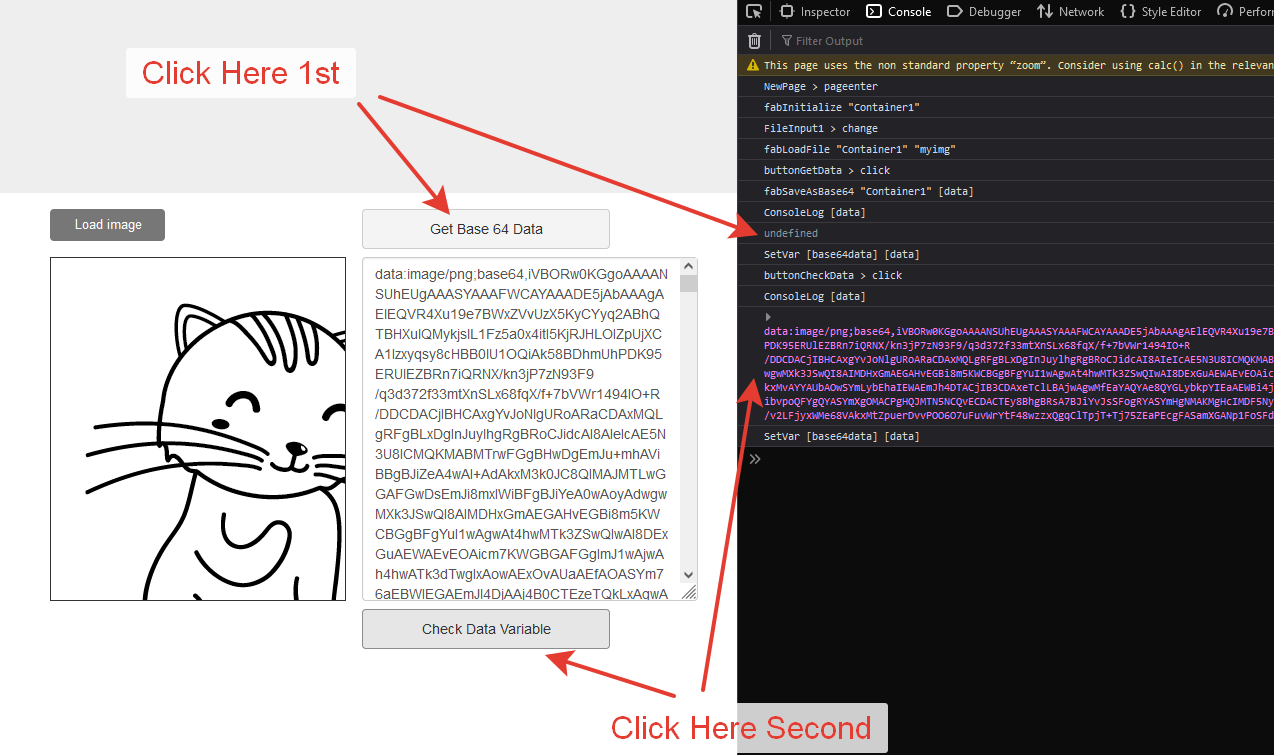

Quote from luishp on April 18, 2023, 9:50 pm@susan yes, it's asynchronous. This was one of my first plugins (when VisualNEO Web was NeoAppBuilder) and today I would do many things in a different way.
Two options to solve this problem:
- I can add a new command with a callback parameter ie: fabSaveAsBase64Ex
- Use Wait ... EndWait. A fraction of a second should be enough.
What do you prefer?
Kind regards
@susan yes, it's asynchronous. This was one of my first plugins (when VisualNEO Web was NeoAppBuilder) and today I would do many things in a different way.
Two options to solve this problem:
- I can add a new command with a callback parameter ie: fabSaveAsBase64Ex
- Use Wait ... EndWait. A fraction of a second should be enough.
What do you prefer?
Kind regards
Quote from susan on April 19, 2023, 12:06 am@luishp thank you for the explanation. FabricJS is a wonderful plugin that does so much, and the fabric-canvas-demo-02 is amazing.
Now that I know what is happening and why, there is no need for you to change anything, as I can work with it.
In general, I think a callback is "more correct" than a wait loop, but I appreciate that it makes the coding for the VisualNEO Web user more complex, which is undesirable.
Thanks for the quick tech support.
@luishp thank you for the explanation. FabricJS is a wonderful plugin that does so much, and the fabric-canvas-demo-02 is amazing.
Now that I know what is happening and why, there is no need for you to change anything, as I can work with it.
In general, I think a callback is "more correct" than a wait loop, but I appreciate that it makes the coding for the VisualNEO Web user more complex, which is undesirable.
Thanks for the quick tech support.
Quote from susan on April 19, 2023, 12:32 amBy peeking in the main.js file of my test app, I can see that both:
- fabSaveAsBase64
- fabSaveToClipboard
use the async keyword, so a warning when using either of them, don't assume that they act immediately.
By peeking in the main.js file of my test app, I can see that both:
- fabSaveAsBase64
- fabSaveToClipboard
use the async keyword, so a warning when using either of them, don't assume that they act immediately.
Quote from susan on April 19, 2023, 8:28 amIn case it is of interest, this is a solution that uses a timer and works for me.
In case it is of interest, this is a solution that uses a timer and works for me.
Uploaded files: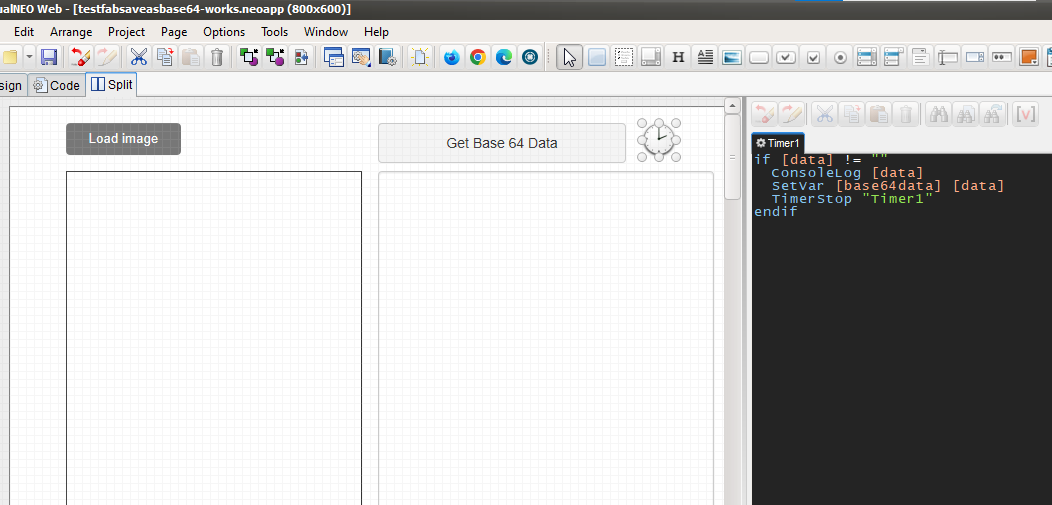

Quote from noyzen on June 2, 2023, 4:04 pmI have same problem, exactly same and I tested timer solution.
It worked for me but not for my friend.
So I had to put separated buttons there and force him click on them one by one :D
I think a callback function is needed. Specially when you want load multiple images on canvas which is my case also.
I have same problem, exactly same and I tested timer solution.
It worked for me but not for my friend.
So I had to put separated buttons there and force him click on them one by one :D
I think a callback function is needed. Specially when you want load multiple images on canvas which is my case also.
Quote from susan on June 3, 2023, 3:02 pmThe timer was sufficient for me, but maybe this code is better?
fabSaveAsBase64 "mycanvas" [gImg64]
Watch [gImg64] "usethedata"
Note, I haven't tried this, but after recently learning about the Watch action, I wonder if it would work?
The timer was sufficient for me, but maybe this code is better?
fabSaveAsBase64 "mycanvas" [gImg64]
Watch [gImg64] "usethedata"
Note, I haven't tried this, but after recently learning about the Watch action, I wonder if it would work?
Quote from noyzen on June 3, 2023, 10:18 pmYes I think we can make an empty variable and call a sub when It changes, (If it change one time) I may try this I forget we have watch command in VNWeb.
Yes I think we can make an empty variable and call a sub when It changes, (If it change one time) I may try this I forget we have watch command in VNWeb.