
Is it possible to add a Persian calendar to the program? Thanks

Quote from javadrajabihakami on February 8, 2021, 10:39 amHello and have a good time!
Thank you for your kindness and for some guidance on adding a Persian calendar to the app! Thanks for your help...
Hello and have a good time!
Thank you for your kindness and for some guidance on adding a Persian calendar to the app! Thanks for your help...

Quote from luishp on February 8, 2021, 1:27 pm@javadrajabihakami Do you mean like this?
@javadrajabihakami Do you mean like this?
Quote from javadrajabihakami on February 8, 2021, 7:02 pmHello and have a good time ! I meant the Persian calendar! The calendar is in the Gregorian calendar and only converts the names of the months to Persian, but it is the Gregorian calendar. And it does not have much use for Persian language! Thank you for your guidance in this regard. Thanks ...
Hello and have a good time ! I meant the Persian calendar! The calendar is in the Gregorian calendar and only converts the names of the months to Persian, but it is the Gregorian calendar. And it does not have much use for Persian language! Thank you for your guidance in this regard. Thanks ...
Uploaded files: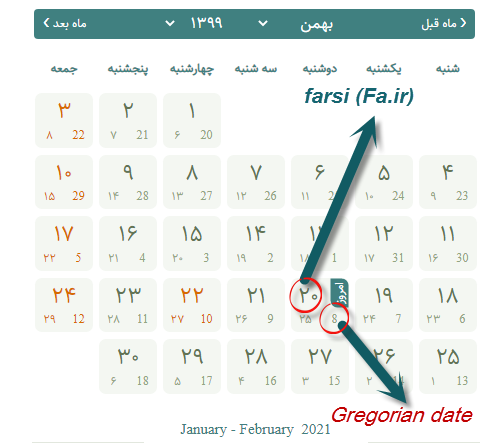
Quote from luishp on February 8, 2021, 7:12 pmSorry, I know almost nothing about the Persian calendar. You will have to find out any JavaScript library.
It's possible to use any JavaScript library within VisualNEO Web.
Sorry, I know almost nothing about the Persian calendar. You will have to find out any JavaScript library.
It's possible to use any JavaScript library within VisualNEO Web.
Quote from javadrajabihakami on February 8, 2021, 8:18 pmYour dear ...! Thank you very much for your response ...
Your dear ...! Thank you very much for your response ...
Quote from javadrajabihakami on February 8, 2021, 9:04 pmSample JavaScript file from Persian calendar! Thank you for taking the time to take a look at it and tell me how it can be used in the program! I am ashamed to disturb your precious time ...
Sample JavaScript file from Persian calendar! Thank you for taking the time to take a look at it and tell me how it can be used in the program! I am ashamed to disturb your precious time ...
Uploaded files:Quote from javadrajabihakami on February 11, 2021, 8:06 pmHello and have a good time! Please advise me on how to use the JavaScript file that I attached and how to use this file in my program! This file is a Java Persian calendar! Thankful
Hello and have a good time! Please advise me on how to use the JavaScript file that I attached and how to use this file in my program! This file is a Java Persian calendar! Thankful

Quote from shahram on February 11, 2021, 9:42 pmQuote from javadrajabihakami on February 11, 2021, 8:06 pmHello and have a good time! Please advise me on how to use the JavaScript file that I attached and how to use this file in my program! This file is a Java Persian calendar! Thankful
Hello Javad.
It is simple to do.
1: import javascript and css
2: insert a "Text Input" on page
3: insert these lines in pageEnter (or start up, etc) events. (based on library documentations) and replace red texts with your own text input and button id
BeginJS
Calendar.setup({
inputField : "datetextinput", // id of the input field
button : "datebselectBtn", // trigger for the calendar (button ID)
ifFormat : "%Y/%m/%d", // format of the input field
dateType : 'jalali',
showOthers : true,
weekNumbers : true
});
EndJS4: Just run your app and click on text input (or button)
Quote from javadrajabihakami on February 11, 2021, 8:06 pmHello and have a good time! Please advise me on how to use the JavaScript file that I attached and how to use this file in my program! This file is a Java Persian calendar! Thankful
Hello Javad.
It is simple to do.
1: import javascript and css

2: insert a "Text Input" on page

3: insert these lines in pageEnter (or start up, etc) events. (based on library documentations) and replace red texts with your own text input and button id
BeginJS
Calendar.setup({
inputField : "datetextinput", // id of the input field
button : "datebselectBtn", // trigger for the calendar (button ID)
ifFormat : "%Y/%m/%d", // format of the input field
dateType : 'jalali',
showOthers : true,
weekNumbers : true
});
EndJS
4: Just run your app and click on text input (or button)
.png)
Quote from javadrajabihakami on February 12, 2021, 1:32 pmسلام ، یه دنیا تشکر دوست عزیز! تاج سری برادر ، خدا انشالله خیرت بده! خیلی عزیزی
سلام ، یه دنیا تشکر دوست عزیز! تاج سری برادر ، خدا انشالله خیرت بده! خیلی عزیزی

Quote from farhad2008 on February 12, 2021, 6:02 pmThank You shahram
Thank You shahram
Quote from shahram on February 12, 2021, 8:09 pmQuote from javadrajabihakami on February 12, 2021, 1:32 pmسلام ، یه دنیا تشکر دوست عزیز! تاج سری برادر ، خدا انشالله خیرت بده! خیلی عزیزی
خواهش میکنم اقا جواد عزیز. در خدمتیم.
Quote from javadrajabihakami on February 12, 2021, 1:32 pmسلام ، یه دنیا تشکر دوست عزیز! تاج سری برادر ، خدا انشالله خیرت بده! خیلی عزیزی
خواهش میکنم اقا جواد عزیز. در خدمتیم.
Quote from shahram on February 12, 2021, 8:10 pmQuote from farhad2008 on February 12, 2021, 6:02 pmThank You shahram
Your welcome, sir Farhad.
Quote from farhad2008 on February 12, 2021, 6:02 pmThank You shahram
Your welcome, sir Farhad.
Quote from javadrajabihakami on March 16, 2021, 12:20 pmHello and have a good time! I receive data from the calendar and pass it to TextInput, but when I want to do the set var command! My variable I get from TextInput is empty! Why?
Hello and have a good time! I receive data from the calendar and pass it to TextInput, but when I want to do the set var command! My variable I get from TextInput is empty! Why?
