
Is there a posibility to send midi from Visual Neo?

Quote from sinmorph on December 8, 2022, 11:43 pmHey everyone, i want to know if there is a way to implement sending Midi data like a cc note to a device from a button in visual neo,
I am not so good in Javascript and am looking for a way to communicate with midi devices via a software application and if possible within visualneo web.Cheers i hope some of you may know something or a workaround,
Thanks in advance!!
Hey everyone, i want to know if there is a way to implement sending Midi data like a cc note to a device from a button in visual neo,
I am not so good in Javascript and am looking for a way to communicate with midi devices via a software application and if possible within visualneo web.
Cheers i hope some of you may know something or a workaround,
Thanks in advance!!
Quote from sinmorph on December 9, 2022, 12:03 amI have found this, is there a way to implement it and make it configure-able? sorry if i ask alot, thanks in advance!
https://developer.mozilla.org/en-US/docs/Web/API/Web_MIDI_API
I have found this, is there a way to implement it and make it configure-able? sorry if i ask alot, thanks in advance!
https://developer.mozilla.org/en-US/docs/Web/API/Web_MIDI_API

Quote from luishp on December 9, 2022, 10:32 amHi @sinmorph,
I think this library is probably a better option:
I don't have any knowledge about MIDI devices but this library should be easily integrated into VisualNEO Web
Hi @sinmorph,
I think this library is probably a better option:
I don't have any knowledge about MIDI devices but this library should be easily integrated into VisualNEO Web
Quote from sinmorph on December 9, 2022, 12:18 pmHey!! i think i found something, is it possible to load in this Javascript and enable it, and can you maybe explain how i can read from these to query their function?
i have never used javascript before and have a very low code experience, and sadly i cannot learn due to discalculy dysfunction, but i do see sometimes what it does, thats why i ove visua neo, becasue its visual ;)Thi is the javascript i found;
const DEBUG = true
export var access
var midiOut
var globalChannelexport async function getAccess() {
try {
if (!access) {
// First try to get MIDI access, will throw error if fails
access = await navigator.requestMIDIAccess()
}
return access
} catch (err) {
console.error('MIDI getAccess failed', err)
}
}// =====================================================================================
// Configure globals used by MIDI, the output device and any global channel
// =====================================================================================
export function setup(deviceId = 'output-1', globalChan = 0) {
midiOut = deviceId
globalChannel = globalChan
}// =====================================================================================
// Send MIDI note ON
// =====================================================================================
export function sendNoteOn(note, chan = 1, velo = 127) {
if (!midiOut) return
const channel = globalChannel > 0 ? globalChannel : chancheckValue(note, 'note')
checkValue(velo, 'velocity')
checkChannel(channel)if (DEBUG) console.debug(`MIDI note on - note:${note}, velo:${velo}, channel:${channel}`)
midiOut.send([0x90 + (channel - 1), note, velo])
}// =====================================================================================
// Send MIDI note OFF, default velocity is zero
// =====================================================================================
export function sendNoteOff(note, chan = 1, velo = 0) {
if (!midiOut) return
const channel = globalChannel > 0 ? globalChannel : chancheckValue(note, 'note')
checkValue(velo, 'velocity')
checkChannel(channel)if (DEBUG) console.debug(`MIDI note off - note:${note}, velo:${velo}, channel:${channel}`)
midiOut.send([0x80 + (channel - 1), note, velo])
}// =====================================================================================
// Send MIDI controller change
// =====================================================================================
export function sendCC(cc, chan = 1, val = 0) {
if (!midiOut) return
const channel = globalChannel > 0 ? globalChannel : chancheckValue(cc, 'CC')
checkValue(val)
checkChannel(channel)if (DEBUG) console.debug(`MIDI control - cc:${cc}, val:${val}, channel:${channel}`)
midiOut.send([0xb0 + (channel - 1), cc, val])
}// =====================================================================================
// Send MIDI pitch bend
// =====================================================================================
export function sendPitchBend(chan = 1, val = 0) {
if (!midiOut) return
const channel = globalChannel > 0 ? globalChannel : chancheckChannel(channel)
// I have no idea if this 14 bit stuff works...
const val_msb = Math.floor(val / 128)
const val_lsb = Math.floor(val % 128)if (DEBUG) console.debug(`MIDI pitchbend - val_msb:${val_msb}, val_lsb:${val_lsb}, channel:${channel}`)
midiOut.send([0xe0 + (channel - 1), val_msb, val_lsb])
}// =====================================================================================
// Send series of messages for a NRPN change
// =====================================================================================
export function sendNRPN(bytePair, chan = 1, val = 0, highRes = false) {
if (!midiOut) return
const channel = globalChannel > 0 ? globalChannel : chantry {
const bytes = bytePair.split(',')
const lsb = parseInt(bytes[0].trim())
const msb = parseInt(bytes[1].trim())checkValue(lsb, 'NRPN LSB')
checkValue(msb, 'NRPN MSB')
checkChannel(channel)// Send two messages to select which NRPN we are updating
midiOut.send([0xb0 + (chan - 1), 0x63, msb])
midiOut.send([0xb0 + (chan - 1), 0x62, lsb])if (DEBUG) console.debug(`MIDI nrpn - lsb:${lsb}, msb:${msb}, val:${val}, channel:${channel}, highRes:${highRes}`)
// Handling of high res values (e.g. greater than 127 or 14-bits)
// This has been tested on a Novation Ultranova, not sure if this is MIDI standard
if (highRes) {
if (!Number.isInteger(val)) throw 'Bad value'
const val_msb = Math.floor(val / 128)
const val_lsb = Math.floor(val % 128)
// Send two messages to set both LSB and MSB of high res 14 bit value
midiOut.send([0xb0 + (chan - 1), 0x06, val_msb])
midiOut.send([0xb0 + (chan - 1), 0x26, val_lsb])
} else {
checkValue(val)
// Send one message (CC 6) to set value
midiOut.send([0xb0 + (chan - 1), 0x06, val])
}
} catch (err) {
console.warn('Malformed NRPN, it should be two integers separated by commas:', bytePair, val)
}
}// =====================================================================================
// Send MIDI program change with bank select
// =====================================================================================
export function sendProgChange(bytePair, chan = 1, progNum = 0) {
if (!midiOut) return
const channel = globalChannel > 0 ? globalChannel : chantry {
const bytes = bytePair.split(',')
const lsb = parseInt(bytes[0].trim())
const msb = parseInt(bytes[1].trim())checkValue(lsb, 'Bank LSB')
checkValue(msb, 'Bank MSB')
checkChannel(channel)if (DEBUG) console.debug(`MIDI prog change - lsb:${lsb}, msb:${msb}, progNum:${progNum}, channel:${channel}`)
// Send three messages two for bank select and one for prog change
midiOut.send([0xb0 + (channel - 1), 0x00, msb])
midiOut.send([0xb0 + (channel - 1), 0x20, lsb])
midiOut.send([0xc0 + (channel - 1), progNum])
} catch (err) {
console.warn('Malformed program change number, it should be two integers separated by commas:', bytePair, progNum)
}
}// =====================================================================================
// Validation functions
// =====================================================================================
function checkChannel(channel) {
if (!(channel > 0 && channel <= 16 && Number.isInteger(channel))) {
throw `MIDI channel '${channel}' is invalid, should be an integer between 1 and 16`
}
}function checkValue(value, type = 'value') {
if (!(value >= 0 && value <= 127 && Number.isInteger(value))) {
throw `MIDI value '${value}' for '${type}' is invalid, should be an integer between 0 and 127`
}
}
Hey!! i think i found something, is it possible to load in this Javascript and enable it, and can you maybe explain how i can read from these to query their function?
i have never used javascript before and have a very low code experience, and sadly i cannot learn due to discalculy dysfunction, but i do see sometimes what it does, thats why i ove visua neo, becasue its visual ;)Thi is the javascript i found;
const DEBUG = true
export var access
var midiOut
var globalChannel
export async function getAccess() {
try {
if (!access) {
// First try to get MIDI access, will throw error if fails
access = await navigator.requestMIDIAccess()
}
return access
} catch (err) {
console.error('MIDI getAccess failed', err)
}
}
// =====================================================================================
// Configure globals used by MIDI, the output device and any global channel
// =====================================================================================
export function setup(deviceId = 'output-1', globalChan = 0) {
midiOut = deviceId
globalChannel = globalChan
}
// =====================================================================================
// Send MIDI note ON
// =====================================================================================
export function sendNoteOn(note, chan = 1, velo = 127) {
if (!midiOut) return
const channel = globalChannel > 0 ? globalChannel : chan
checkValue(note, 'note')
checkValue(velo, 'velocity')
checkChannel(channel)
if (DEBUG) console.debug(`MIDI note on - note:${note}, velo:${velo}, channel:${channel}`)
midiOut.send([0x90 + (channel - 1), note, velo])
}
// =====================================================================================
// Send MIDI note OFF, default velocity is zero
// =====================================================================================
export function sendNoteOff(note, chan = 1, velo = 0) {
if (!midiOut) return
const channel = globalChannel > 0 ? globalChannel : chan
checkValue(note, 'note')
checkValue(velo, 'velocity')
checkChannel(channel)
if (DEBUG) console.debug(`MIDI note off - note:${note}, velo:${velo}, channel:${channel}`)
midiOut.send([0x80 + (channel - 1), note, velo])
}
// =====================================================================================
// Send MIDI controller change
// =====================================================================================
export function sendCC(cc, chan = 1, val = 0) {
if (!midiOut) return
const channel = globalChannel > 0 ? globalChannel : chan
checkValue(cc, 'CC')
checkValue(val)
checkChannel(channel)
if (DEBUG) console.debug(`MIDI control - cc:${cc}, val:${val}, channel:${channel}`)
midiOut.send([0xb0 + (channel - 1), cc, val])
}
// =====================================================================================
// Send MIDI pitch bend
// =====================================================================================
export function sendPitchBend(chan = 1, val = 0) {
if (!midiOut) return
const channel = globalChannel > 0 ? globalChannel : chan
checkChannel(channel)
// I have no idea if this 14 bit stuff works...
const val_msb = Math.floor(val / 128)
const val_lsb = Math.floor(val % 128)
if (DEBUG) console.debug(`MIDI pitchbend - val_msb:${val_msb}, val_lsb:${val_lsb}, channel:${channel}`)
midiOut.send([0xe0 + (channel - 1), val_msb, val_lsb])
}
// =====================================================================================
// Send series of messages for a NRPN change
// =====================================================================================
export function sendNRPN(bytePair, chan = 1, val = 0, highRes = false) {
if (!midiOut) return
const channel = globalChannel > 0 ? globalChannel : chan
try {
const bytes = bytePair.split(',')
const lsb = parseInt(bytes[0].trim())
const msb = parseInt(bytes[1].trim())
checkValue(lsb, 'NRPN LSB')
checkValue(msb, 'NRPN MSB')
checkChannel(channel)
// Send two messages to select which NRPN we are updating
midiOut.send([0xb0 + (chan - 1), 0x63, msb])
midiOut.send([0xb0 + (chan - 1), 0x62, lsb])
if (DEBUG) console.debug(`MIDI nrpn - lsb:${lsb}, msb:${msb}, val:${val}, channel:${channel}, highRes:${highRes}`)
// Handling of high res values (e.g. greater than 127 or 14-bits)
// This has been tested on a Novation Ultranova, not sure if this is MIDI standard
if (highRes) {
if (!Number.isInteger(val)) throw 'Bad value'
const val_msb = Math.floor(val / 128)
const val_lsb = Math.floor(val % 128)
// Send two messages to set both LSB and MSB of high res 14 bit value
midiOut.send([0xb0 + (chan - 1), 0x06, val_msb])
midiOut.send([0xb0 + (chan - 1), 0x26, val_lsb])
} else {
checkValue(val)
// Send one message (CC 6) to set value
midiOut.send([0xb0 + (chan - 1), 0x06, val])
}
} catch (err) {
console.warn('Malformed NRPN, it should be two integers separated by commas:', bytePair, val)
}
}
// =====================================================================================
// Send MIDI program change with bank select
// =====================================================================================
export function sendProgChange(bytePair, chan = 1, progNum = 0) {
if (!midiOut) return
const channel = globalChannel > 0 ? globalChannel : chan
try {
const bytes = bytePair.split(',')
const lsb = parseInt(bytes[0].trim())
const msb = parseInt(bytes[1].trim())
checkValue(lsb, 'Bank LSB')
checkValue(msb, 'Bank MSB')
checkChannel(channel)
if (DEBUG) console.debug(`MIDI prog change - lsb:${lsb}, msb:${msb}, progNum:${progNum}, channel:${channel}`)
// Send three messages two for bank select and one for prog change
midiOut.send([0xb0 + (channel - 1), 0x00, msb])
midiOut.send([0xb0 + (channel - 1), 0x20, lsb])
midiOut.send([0xc0 + (channel - 1), progNum])
} catch (err) {
console.warn('Malformed program change number, it should be two integers separated by commas:', bytePair, progNum)
}
}
// =====================================================================================
// Validation functions
// =====================================================================================
function checkChannel(channel) {
if (!(channel > 0 && channel <= 16 && Number.isInteger(channel))) {
throw `MIDI channel '${channel}' is invalid, should be an integer between 1 and 16`
}
}
function checkValue(value, type = 'value') {
if (!(value >= 0 && value <= 127 && Number.isInteger(value))) {
throw `MIDI value '${value}' for '${type}' is invalid, should be an integer between 0 and 127`
}
}
Quote from sinmorph on December 9, 2022, 12:26 pmI think i have found a way to load it in, but hwo do i define it and call its functions with say a button in visual neo web?
I think i have found a way to load it in, but hwo do i define it and call its functions with say a button in visual neo web?
Uploaded files: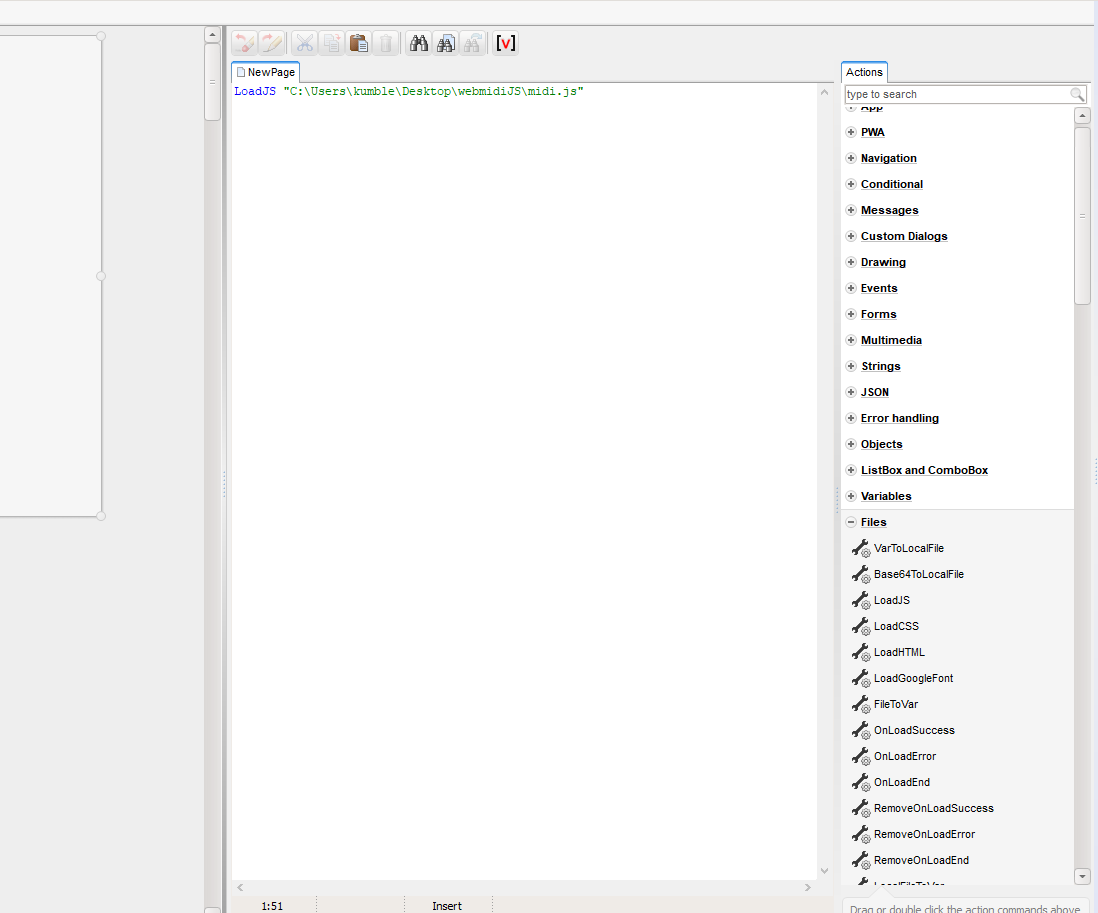
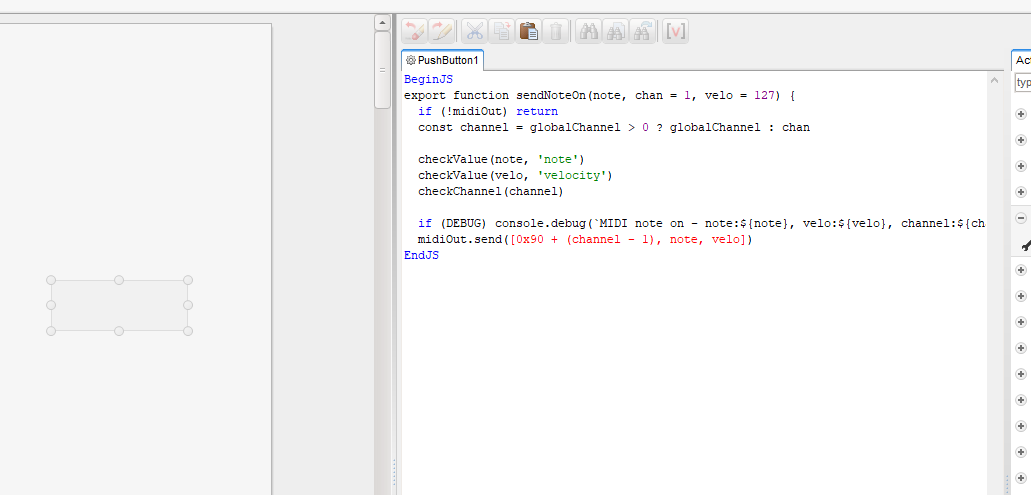
Quote from luishp on December 9, 2022, 3:47 pm@sinmorph the code you have included seems to be ECMAScript 6, and using it is a bit tricky.
Where have you found the code you have shared?
I need to see some documentation.
@sinmorph the code you have included seems to be ECMAScript 6, and using it is a bit tricky.
Where have you found the code you have shared?
I need to see some documentation.