
Java Quiz with images.

Quote from m.burdess on September 8, 2020, 10:56 amWith JSON version of the Quiz you can add images, but how is this done with the java version.
Yes I have asked about this before, but I am look to add more than four answer to a question, and
this is not possible with the JSON version of the Quiz (or is it?).
I do have other question, like putting answers in order and entering your own text, but these can wait.
Can anyone show me where to learn this, please
With JSON version of the Quiz you can add images, but how is this done with the java version.
Yes I have asked about this before, but I am look to add more than four answer to a question, and
this is not possible with the JSON version of the Quiz (or is it?).
I do have other question, like putting answers in order and entering your own text, but these can wait.
Can anyone show me where to learn this, please

Quote from luishp on September 8, 2020, 5:01 pm@m-burdess the JSON version is the more advanced and flexible option. You can add as many questions and answers as you need using JSON. Just take a look at the sample app to see the correct syntax. NeoScript version is limited to 4 answers to each question. In both cases images are included using HTML <img> tag.
Regards.
@m-burdess the JSON version is the more advanced and flexible option. You can add as many questions and answers as you need using JSON. Just take a look at the sample app to see the correct syntax. NeoScript version is limited to 4 answers to each question. In both cases images are included using HTML <img> tag.
Regards.
Quote from m.burdess on September 8, 2020, 5:26 pm@luishp Thank you for the information, I have added the HTML <img> tag to the JSON version and got an error or it has show as text. More reading and learning for me.
once again, Thank you.
@luishp Thank you for the information, I have added the HTML <img> tag to the JSON version and got an error or it has show as text. More reading and learning for me.
once again, Thank you.
Quote from luishp on September 8, 2020, 6:23 pm@m-burdess please open the nequizz-json.neoapp file and modify the first question just like this:
"questions": [
        { // Question 1 - Multiple Choice, Single True Answer
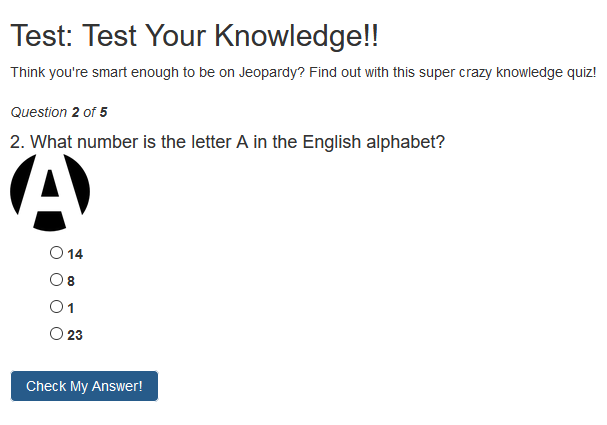
            "q": "What number is the letter A in the English alphabet?<br><img width='80' src='https://www.freepnglogos.com/uploads/a-letter-logo-png-4.png'>",
            "a": [
                {"option": "8",      "correct": false},
                {"option": "14",     "correct": false},
                {"option": "1",      "correct": true},
                {"option": "23",     "correct": false} // no comma here
            ],
            "correct": "<p><span>That's right!</span> The letter A is the first letter in the alphabet!</p>",
            "incorrect": "<p><span>Uhh no.</span> It's the first letter of the alphabet. Did you actually <em>go</em> to kindergarden?</p>" // no comma here
        },
As a result you will get the a letter as an image inside the question. Take a look at the attached image.
Regards.
@m-burdess please open the nequizz-json.neoapp file and modify the first question just like this:
"questions": [
        { // Question 1 - Multiple Choice, Single True Answer
            "q": "What number is the letter A in the English alphabet?<br><img width='80' src='https://www.freepnglogos.com/uploads/a-letter-logo-png-4.png'>",
            "a": [
                {"option": "8",      "correct": false},
                {"option": "14",     "correct": false},
                {"option": "1",      "correct": true},
                {"option": "23",     "correct": false} // no comma here
            ],
            "correct": "<p><span>That's right!</span> The letter A is the first letter in the alphabet!</p>",
            "incorrect": "<p><span>Uhh no.</span> It's the first letter of the alphabet. Did you actually <em>go</em> to kindergarden?</p>" // no comma here
        },
As a result you will get the a letter as an image inside the question. Take a look at the attached image.
Regards.
Quote from m.burdess on September 8, 2020, 11:10 pm@luishp Thank you for the information, I went away after you first message and read a couple of books and with a bit of working out end up with:-
"q": "What number is the letter A in the English alphabet? <p><img src=images/termin.gif></p>" ,
"a": [
{"option": "8", "correct": false},
{"option": "14", "correct": false},
{"option": "1", "correct": true},
{"option": "23", "correct": false} // no comma hereThe one thing that I found was that you do not need "" as you do with html, also using images/image.GIF , you need to have the folder within the test folder.
So once again, thank you for the help and work your doing with this software.
@luishp Thank you for the information, I went away after you first message and read a couple of books and with a bit of working out end up with:-
"q": "What number is the letter A in the English alphabet? <p><img src=images/termin.gif></p>" ,
"a": [
{"option": "8", "correct": false},
{"option": "14", "correct": false},
{"option": "1", "correct": true},
{"option": "23", "correct": false} // no comma here
The one thing that I found was that you do not need "" as you do with html, also using images/image.GIF , you need to have the folder within the test folder.
So once again, thank you for the help and work your doing with this software.