
JSON values are not accepted in the variable

Quote from alexander_loc on January 17, 2023, 11:54 pmHi, I need your help! I get data from MySQL database via php (not using neophp). I get all the values into an array and output it to JSON ( echo json_encode($row); )
I can output it to a container using Set Object HTML "Container1" "[arrayData]", but I can't output it to a variable in any way.
My subroutine:
Create Empty Array [arrayData]
SetVar [arrayData] [data]
SetVar [id] [arrayData(1).id]
Set Object HTML "Container1" "[arrayData]"
Button:
neoAjaxSend "https://.../load.php" "POST" "" "text" "parseData" ""What am I doing wrong?
PS I attach an image with a response from PHP, the container is filled with a JSON array, the rest of the fields are empty
Hi, I need your help! I get data from MySQL database via php (not using neophp). I get all the values into an array and output it to JSON ( echo json_encode($row); )
I can output it to a container using Set Object HTML "Container1" "[arrayData]", but I can't output it to a variable in any way.
My subroutine:
Create Empty Array [arrayData]
SetVar [arrayData] [data]
SetVar [id] [arrayData(1).id]
Set Object HTML "Container1" "[arrayData]"
Button:
neoAjaxSend "https://.../load.php" "POST" "" "text" "parseData" ""
What am I doing wrong?
PS I attach an image with a response from PHP, the container is filled with a JSON array, the rest of the fields are empty
Uploaded files: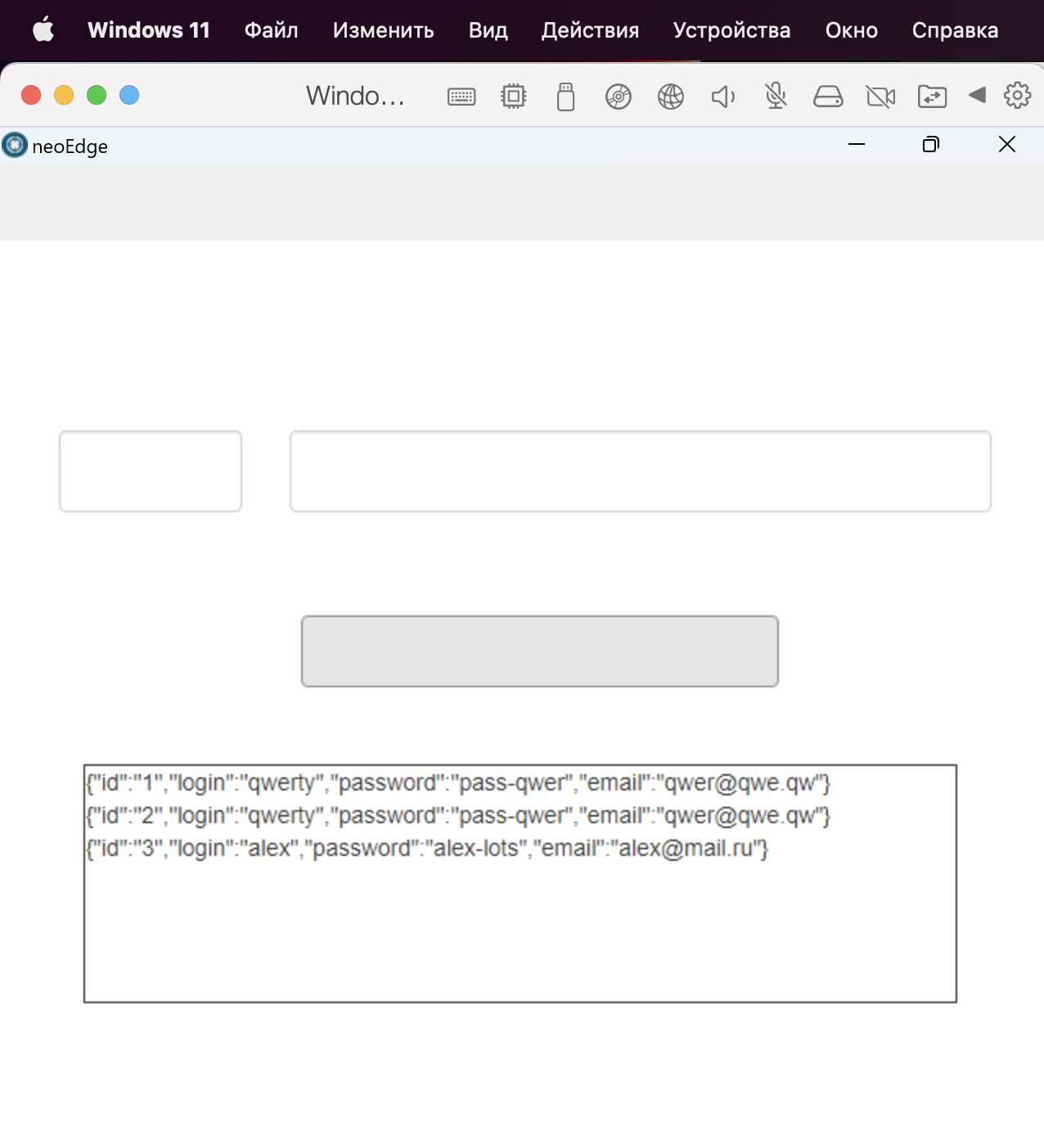

Quote from luishp on January 18, 2023, 8:16 am@alexander_loc have you checked how to manage the coming data in our YouTube database videos?
Although you don't use neoPhp, you should do exactly the same as you are getting the data correctly.
It's easier than it appears.Regards.
@alexander_loc have you checked how to manage the coming data in our YouTube database videos?
Although you don't use neoPhp, you should do exactly the same as you are getting the data correctly.
It's easier than it appears.
Regards.
Quote from alexander_loc on January 18, 2023, 10:02 amI watched this video, did as it says. I tried different options.
When SetVar [id] [array Data([CurrentRecord]).id] is displayed in the console - undefined
When SetVar [id] [array Data([CurrentRecord])], respectively, the first character is output - "{"
Did I really miss something?
I watched this video, did as it says. I tried different options.
When SetVar [id] [array Data([CurrentRecord]).id] is displayed in the console - undefined
When SetVar [id] [array Data([CurrentRecord])], respectively, the first character is output - "{"
Did I really miss something?
Quote from luishp on January 18, 2023, 2:37 pm@alexander_loc please attach a sample app source code so we can check what you have done.
It's not necessary to include the database as it seems you are getting the content correctly.
@alexander_loc please attach a sample app source code so we can check what you have done.
It's not necessary to include the database as it seems you are getting the content correctly.
Quote from alexander_loc on January 18, 2023, 2:48 pmI'm attaching the file, please take a look.
I really tried a lot of options, but to no avail. I'm upset because I can't move on because of this. You will help me out a lotThank you!
I'm attaching the file, please take a look.
I really tried a lot of options, but to no avail. I'm upset because I can't move on because of this. You will help me out a lot
Thank you!
Uploaded files:Quote from luishp on January 18, 2023, 7:04 pm@alexander_loc It seems your JSON data is malformed. Right now it's:
{"id":"1","login":"qwerty","password":"pass-qwer","email":"qwer@qwe.qw"}{"id":"2","login":"qwerty","password":"pass-qwer","email":"qwer@qwe.qw"}{"id":"3","login":"alex","password":"alex-lots","email":"alex@mail.ru"}And it should be:
[{"id":"1","login":"qwerty","password":"pass-qwer","email":"qwer@qwe.qw"},{"id":"2","login":"qwerty","password":"pass-qwer","email":"qwer@qwe.qw"},{"id":"3","login":"alex","password":"alex-lots","email":"alex@mail.ru"}]There are not separators between records nor initial and final brackets.
So please check your PHP script as I think it is sending incorrect JSON data.Regards.
@alexander_loc It seems your JSON data is malformed. Right now it's:
{"id":"1","login":"qwerty","password":"pass-qwer","email":"qwer@qwe.qw"}{"id":"2","login":"qwerty","password":"pass-qwer","email":"qwer@qwe.qw"}{"id":"3","login":"alex","password":"alex-lots","email":"alex@mail.ru"}
And it should be:
[{"id":"1","login":"qwerty","password":"pass-qwer","email":"qwer@qwe.qw"},{"id":"2","login":"qwerty","password":"pass-qwer","email":"qwer@qwe.qw"},{"id":"3","login":"alex","password":"alex-lots","email":"alex@mail.ru"}]
There are not separators between records nor initial and final brackets.
So please check your PHP script as I think it is sending incorrect JSON data.
Regards.
Quote from alexander_loc on January 18, 2023, 10:30 pmExactly. And I hoped for the json_encode function and didn't notice the catch.
I'll try to fix it, I'll report the results later.
Thanks for the help!
Exactly. And I hoped for the json_encode function and didn't notice the catch.
I'll try to fix it, I'll report the results later.
Thanks for the help!
Quote from alexander_loc on January 18, 2023, 11:13 pmЦитата из luishp от 18 января 2023 года, 7:04 вечера[{"id":"1","login":"qwerty","password":"pass-qwer","email":"qwer@qwe.qw"},{"id":"2","login":"qwerty","password":"pass-qwer","email":"qwer@qwe.qw"},{"id":"3","login":"alex","password":"alex-lots","email":"alex@mail.ru"}]Между записями нет разделителей, а также начальных и конечных скобок.
Поэтому, пожалуйста, проверьте свой PHP-скрипт, поскольку я думаю, что он отправляет неверные данные JSON.С уважением.
Please check again. I changed the function in my php file, now there are separators and square brackets between the entries, but to no avail :(
Цитата из luishp от 18 января 2023 года, 7:04 вечера[{"id":"1","login":"qwerty","password":"pass-qwer","email":"qwer@qwe.qw"},{"id":"2","login":"qwerty","password":"pass-qwer","email":"qwer@qwe.qw"},{"id":"3","login":"alex","password":"alex-lots","email":"alex@mail.ru"}]Между записями нет разделителей, а также начальных и конечных скобок.
Поэтому, пожалуйста, проверьте свой PHP-скрипт, поскольку я думаю, что он отправляет неверные данные JSON.С уважением.
Please check again. I changed the function in my php file, now there are separators and square brackets between the entries, but to no avail :(
Quote from luishp on January 19, 2023, 11:54 am@alexander_loc please check the Load button, now you have:
neoAjaxSend "https:..." "POST" "" "text" "parseData" ""It should be:
neoAjaxSend "https:..." "POST" "" "json" "parseData" ""You are loading the content as TEXT and not as JSON data.
If for any reason you need to load the response as text then use ParseJSON to convert the text to JSON.Regards.
@alexander_loc please check the Load button, now you have:
neoAjaxSend "https:..." "POST" "" "text" "parseData" ""
It should be:
neoAjaxSend "https:..." "POST" "" "json" "parseData" ""
You are loading the content as TEXT and not as JSON data.
If for any reason you need to load the response as text then use ParseJSON to convert the text to JSON.
Regards.
Quote from alexander_loc on January 19, 2023, 9:12 pmMany thanks to Luis, everything worked out!
You're great! :)
Many thanks to Luis, everything worked out!
You're great! :)

Quote from suyonob on February 12, 2023, 2:42 pm{"id":"1","login":"qwerty","password":"pass-qwer","email":"qwer@qwe.qw"}{"id":"2","login":"qwerty","password":"pass-qwer","email":"qwer@qwe.qw"}{"id":"3","login":"alex","password":"alex-lots","email":"alex@mail.ru"}
Suggest please how about insert above datas into database table using Loop and neoajaxsend in VisualNeo WEB ?
Thanks
{"id":"1","login":"qwerty","password":"pass-qwer","email":"qwer@qwe.qw"}{"id":"2","login":"qwerty","password":"pass-qwer","email":"qwer@qwe.qw"}{"id":"3","login":"alex","password":"alex-lots","email":"alex@mail.ru"}
Suggest please how about insert above datas into database table using Loop and neoajaxsend in VisualNeo WEB ?
Thanks
Quote from luishp on February 12, 2023, 9:11 pm@suyonob this is a server side scripting question. I would probably send all the data as a string to the PHP script and parse each dataset in the server side instead of sending many ajax request, one for each dataset. Also passwords would be encrypted.
@suyonob this is a server side scripting question. I would probably send all the data as a string to the PHP script and parse each dataset in the server side instead of sending many ajax request, one for each dataset. Also passwords would be encrypted.