ListBox get variable sorting problem

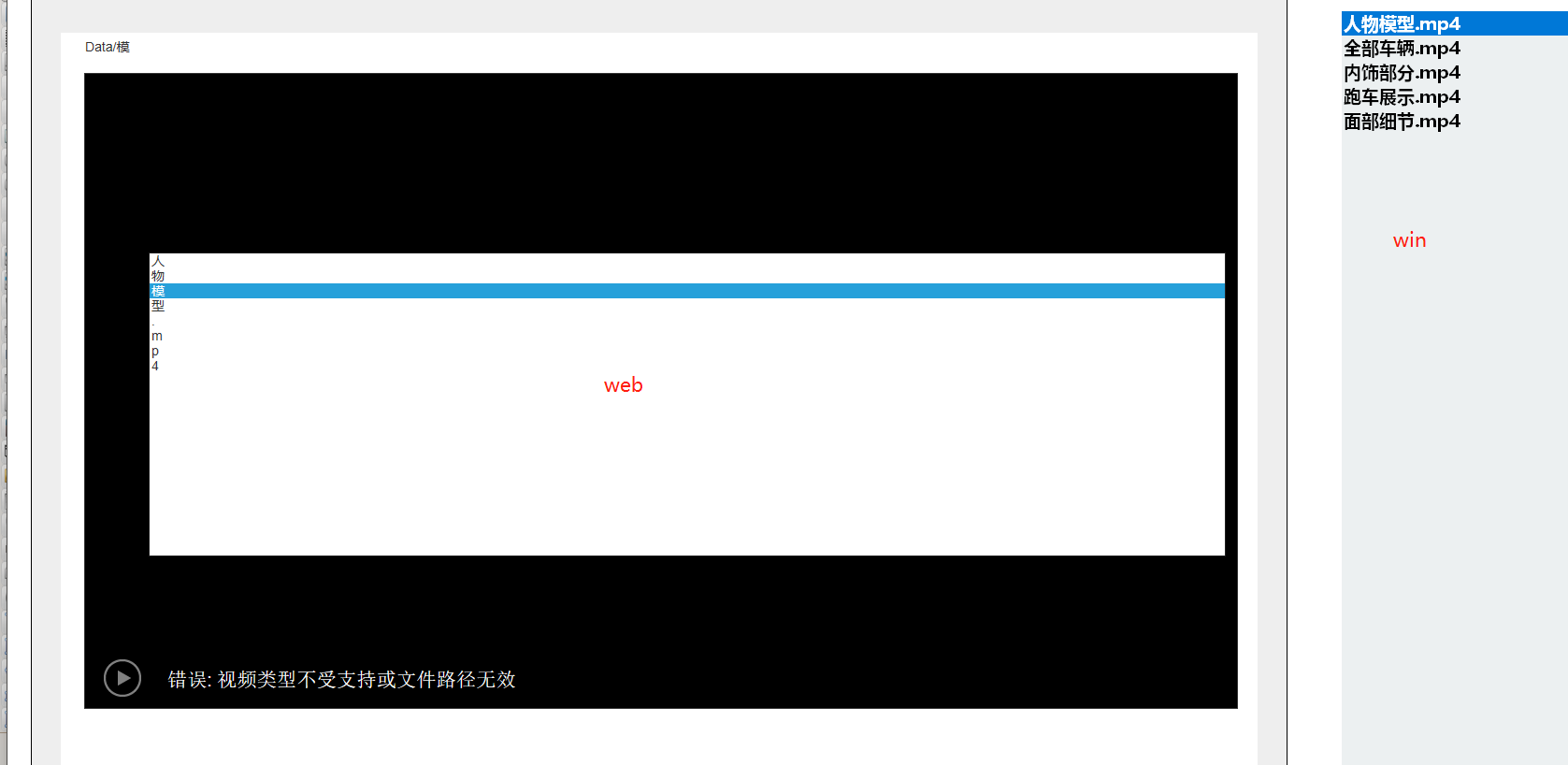
Quote from Deleted user on November 28, 2021, 2:15 pmThe list box in VisualNEO Web to get the VisualNEO WIN variables sorted is not what I want.
VisualNEO WIN gets a list of files in the local directory via FileList and saves them to the specified variable.
VisualNEO Web can get it, but the sorting is like this.
The list box in VisualNEO Web to get the VisualNEO WIN variables sorted is not what I want.
VisualNEO WIN gets a list of files in the local directory via FileList and saves them to the specified variable.
VisualNEO Web can get it, but the sorting is like this.
Uploaded files:
Quote from Deleted user on November 28, 2021, 9:37 pmQuote from Gaev on November 28, 2021, 9:22 pm@romxie2
Please post your code here.
VisualNEO Web
FileList "Data\*" "Files" "[txtdata]"
VisualNEO Web
web Launching
SetVar [MP4URL] "Data/"
WinGetVar "txtdata" [MP4MC]
StrIns "[MP4URL]" "[MP4MC]" 0 [JS]ListBox
Contents:[MP4MC]
ListBox click event
CreateVideoPlayer "Container1" "[JS]" true true true false
Select the video file in my relative path by clicking on the ListBox. The file is often changed, so use VisualNEO Web to read the list of files in the directory.
Quote from Gaev on November 28, 2021, 9:22 pmPlease post your code here.
VisualNEO Web
FileList "Data\*" "Files" "[txtdata]"
VisualNEO Web
web Launching
SetVar [MP4URL] "Data/"
WinGetVar "txtdata" [MP4MC]
StrIns "[MP4URL]" "[MP4MC]" 0 [JS]
ListBox
Contents:[MP4MC]
ListBox click event
CreateVideoPlayer "Container1" "[JS]" true true true false
Select the video file in my relative path by clicking on the ListBox. The file is often changed, so use VisualNEO Web to read the list of files in the directory.
Quote from Deleted user on November 28, 2021, 9:43 pmIn fact I have already implemented the column click in VisualNEO WIN, but I would like to do the same in VisualNEO WEB.
But this is what the VisualNEO Web ListBox looks like when it reads the data
In fact I have already implemented the column click in VisualNEO WIN, but I would like to do the same in VisualNEO WEB.
But this is what the VisualNEO Web ListBox looks like when it reads the data
Uploaded files: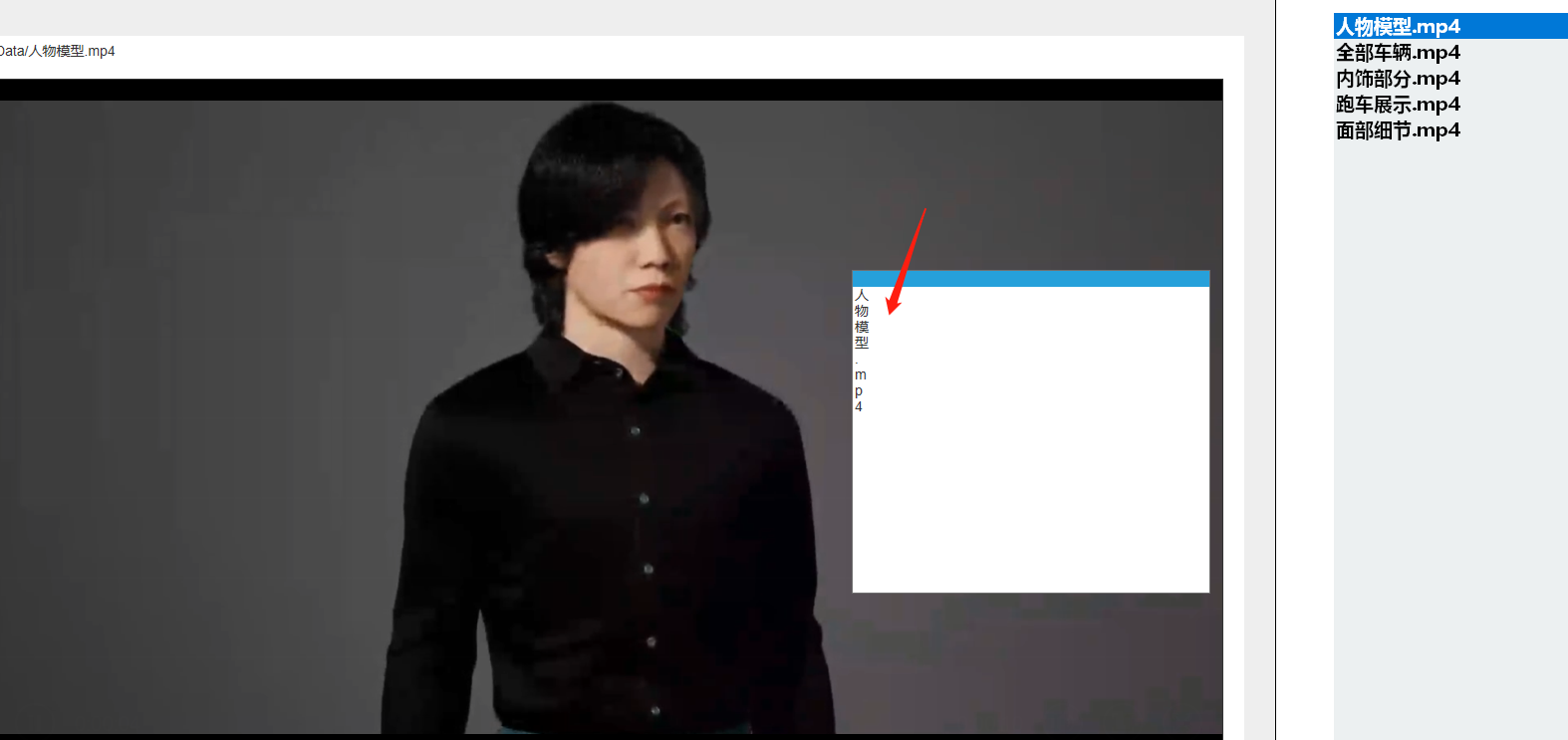
Quote from Gaev on November 29, 2021, 6:34 pm@romie2
In fact I have already implemented the column click in VisualNEO WIN, but I would like to do the same in VisualNEO WEB.
I understand; the ListBox operates differently in VisualNEOWeb than VisualNEOWin.
Add an AlertBox after these commands so you can view the contents of the various variables ...
WinGetVar "txtdata" [MP4MC]
StrIns "[MP4URL]" "[MP4MC]" 0 [JS]

AlertBox "variables1" "[MP4URL]</br>[MP4MC]</br>[JS]</br>" ""
... post the results of the AlertBox here.
As for the ListBox ...
- the variable [JS] needs to be specified in the property named items
- a variable (e.g. [selectedItem]) needs to be specified in the property name variable
- in the click event of the ListBox, you use the variable (like [selectedItem] to do further processing
- suggest you use an AlertBox inside this event code to see the contents of [selectedItem]Take a look at ListExample in the SampleApps folder to see how ListBoxes work in VisualNEOWeb.
If you have any questions, post your results here.
@romie2
In fact I have already implemented the column click in VisualNEO WIN, but I would like to do the same in VisualNEO WEB.
I understand; the ListBox operates differently in VisualNEOWeb than VisualNEOWin.
Add an AlertBox after these commands so you can view the contents of the various variables ...
WinGetVar "txtdata" [MP4MC]
StrIns "[MP4URL]" "[MP4MC]" 0 [JS]

AlertBox "variables1" "[MP4URL]</br>[MP4MC]</br>[JS]</br>" ""
... post the results of the AlertBox here.
As for the ListBox ...
- the variable [JS] needs to be specified in the property named items
- a variable (e.g. [selectedItem]) needs to be specified in the property name variable
- in the click event of the ListBox, you use the variable (like [selectedItem] to do further processing
- suggest you use an AlertBox inside this event code to see the contents of [selectedItem]
Take a look at ListExample in the SampleApps folder to see how ListBoxes work in VisualNEOWeb.
If you have any questions, post your results here.
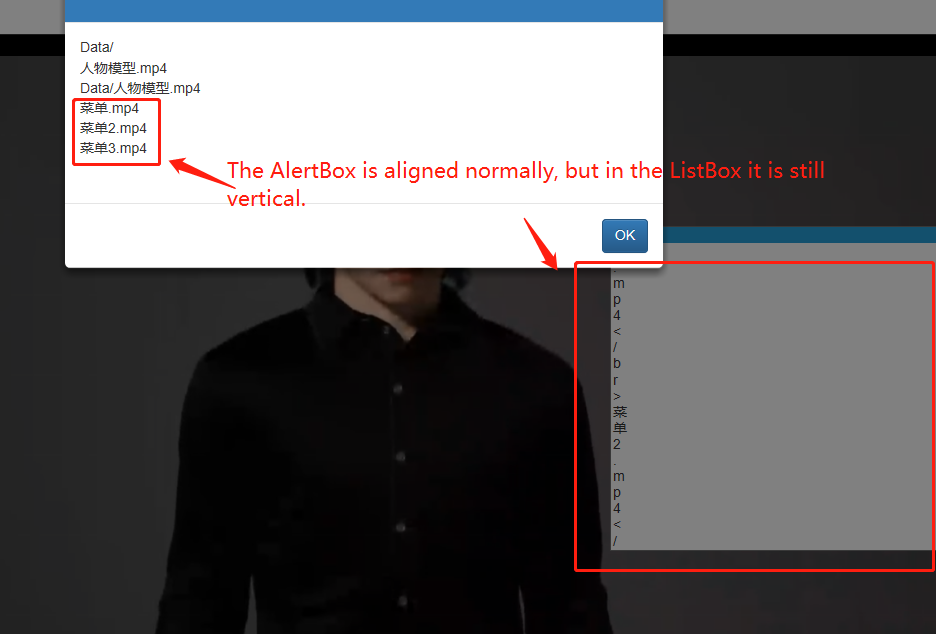
Quote from Deleted user on November 29, 2021, 7:00 pm@gaev//Receive files and suffixes in directories from win This process is correctWinGetVar "txtdata" [ MP4MC ] //The preset relative path (URL) variable is merged with the MP4MC variable to get Data/xxx.mp4 StrIns "[MP4URL]" "[MP4MC]" 0 [ JS ] This process is correctIf the ListBox takes the value of a variable directly it will not be able to confirm the arrangement, it will be displayed in a number of vertical shapes. I know I need to process the values passed to me and add them as a webListBox
//Receive files and suffixes in directories from win
This process is correctWinGetVar "txtdata" [ MP4MC ]

//The preset relative path (URL) variable is merged with the MP4MC variable to get Data/xxx.mp4
StrIns "[MP4URL]" "[MP4MC]" 0 [ JS ]

This process is correct
If the ListBox takes the value of a variable directly it will not be able to confirm the arrangement, it will be displayed in a number of vertical shapes. I know I need to process the values passed to me and add them as a webListBox

Quote from Gaev on November 29, 2021, 7:51 pm@romxie2
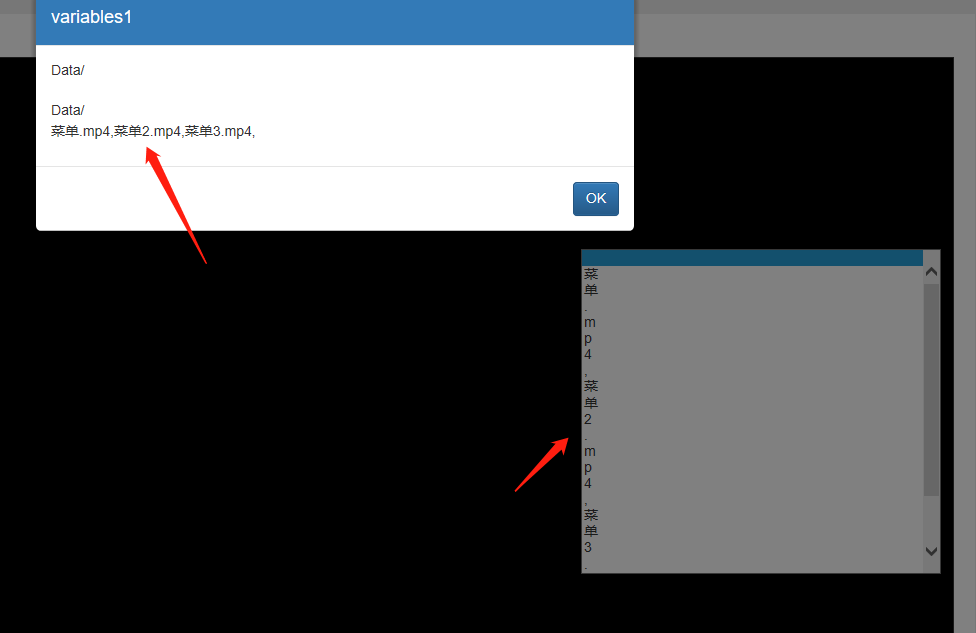
Thank you for the screenshots.
It looks like the variable [JS] has items separated by "</br>" ... but the ListBox requires them to be separated by commas ... so you need to do a StrReplace command, replacing all instances of "</br>" with ","
Thank you for the screenshots.
It looks like the variable [JS] has items separated by "</br>" ... but the ListBox requires them to be separated by commas ... so you need to do a StrReplace command, replacing all instances of "</br>" with ","
Quote from Deleted user on November 29, 2021, 8:11 pm@gaev
", "I'm in.
It would be nice if the values of the variables could be inserted directly into the array script.
@gaev
", "I'm in.
It would be nice if the values of the variables could be inserted directly into the array script.
Quote from Gaev on November 29, 2021, 8:24 pm@romxie2
", "I'm in.
It would be nice if the values of the variables could be inserted directly into the array script.I do not understand either of the statements.
Did you remember to specify [JS] for the items property of your ListBox ?
If you did, try and paste your (mixed language) comma separated list into the afore mentioned sample program (at design time) ... if it still displays as one item per character, it has to do with handling of mixed-language content.
Also, try it with all files having an English filename (like abcd1.mp4, abcd2.mp4 etc.).
", "I'm in.
It would be nice if the values of the variables could be inserted directly into the array script.
I do not understand either of the statements.
Did you remember to specify [JS] for the items property of your ListBox ?
If you did, try and paste your (mixed language) comma separated list into the afore mentioned sample program (at design time) ... if it still displays as one item per character, it has to do with handling of mixed-language content.
Also, try it with all files having an English filename (like abcd1.mp4, abcd2.mp4 etc.).
Quote from Deleted user on November 29, 2021, 10:14 pm@gaev
I have solved it without any problems
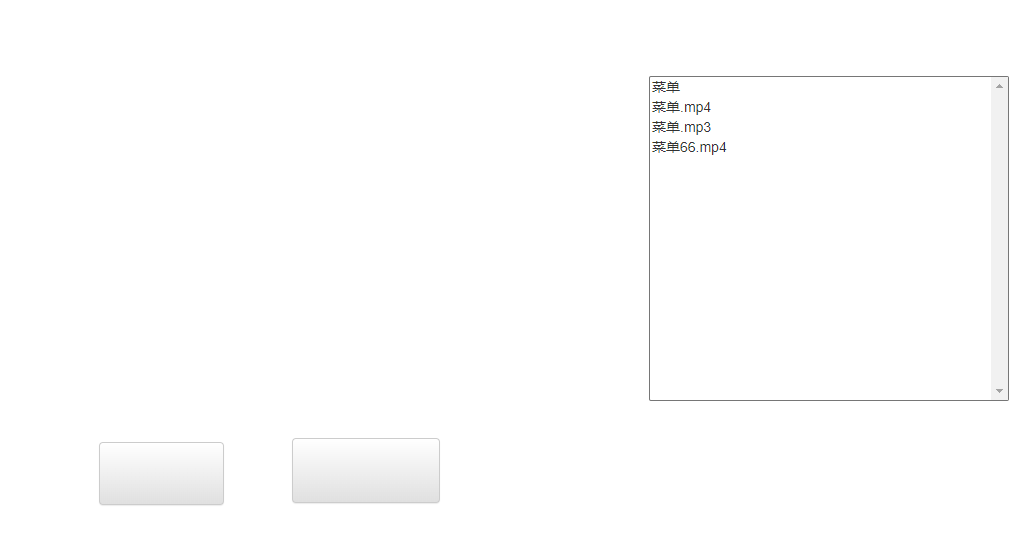
I used the set htmlSetObjectHTML "Listbox1" " </option><option>菜单</option><option>菜单.mp4</option><option>菜单.mp3</option><option>菜单66.mp4</option></select>"
@gaev
I have solved it without any problems
I used the set html
SetObjectHTML "Listbox1" " </option><option>菜单</option><option>菜单.mp4</option><option>菜单.mp3</option><option>菜单66.mp4</option></select>"