
Master Page Display

Quote from donbwalker on April 5, 2020, 4:10 pmI'm pretty sure this is going to be one of those....oh, that's obvious things.
I can't figure out how to get an image on the master page to show up on the other pages.
I'm pretty sure this is going to be one of those....oh, that's obvious things.
I can't figure out how to get an image on the master page to show up on the other pages.

Quote from luishp on April 5, 2020, 6:47 pmJust add the image to one master page, then return to any page and select the master page from the properties panel (as foreground or background)
Just add the image to one master page, then return to any page and select the master page from the properties panel (as foreground or background)
Uploaded files: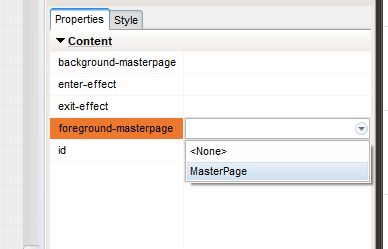

Quote from Gaev on April 5, 2020, 6:48 pm@donbwalker
I can't figure out how to get an image on the master page to show up on the other pages.
a) create a Master page (click on the Master tab next to the Pages tab) ... let us call this page MasterWithImage ... note that you can define many such pages.
b) within this page, add the desired image at the desired location
c) On every page that you want the image to be visible ...
- click on the page from the list under the Pages tab
- go down to the Properties Panel ... in the Content section, there are two entries viz. background-masterpage and foreground-masterpage
- click on the appropriate entry's input box ... and select the desired Master page
Voila ... QED
I can't figure out how to get an image on the master page to show up on the other pages.
a) create a Master page (click on the Master tab next to the Pages tab) ... let us call this page MasterWithImage ... note that you can define many such pages.
b) within this page, add the desired image at the desired location
c) On every page that you want the image to be visible ...
- click on the page from the list under the Pages tab
- go down to the Properties Panel ... in the Content section, there are two entries viz. background-masterpage and foreground-masterpage
- click on the appropriate entry's input box ... and select the desired Master page
Voila ... QED

Quote from CDY@44 on April 5, 2020, 7:00 pmJust for fun... ;)
Absolutely not as good as your work Luis ! Lol !!!
Just for fun... ;)
Absolutely not as good as your work Luis ! Lol !!!
Uploaded files:Quote from donbwalker on April 5, 2020, 7:13 pmGosh I love these forums. Whatever I lack can be found here.
Thanks all
Gosh I love these forums. Whatever I lack can be found here.
Thanks all