
moving / Перемещение

Quote from lolo on May 3, 2022, 12:08 pmI need your help.
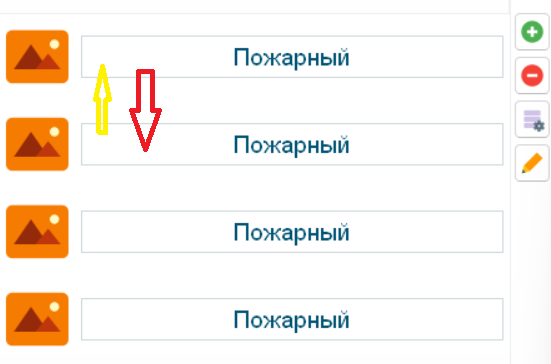
In my program, according to the idea, you can move the text, you can automatically reset it to the specified object. The problem is that if there is already a text component in this place, then they are placed in place, I want to create a movement only between the selected objects and if I reset the text to an object with already existing text, then the text that was already there before is needed move to the place of the one that I threw off.Мне нужна Ваша помощь.
У меня в программе, по задумке можно перемещать текст, сбрасывать можно автоматически на указанный объект. Проблема в том, что если на этом месте уже есть текстовый компонент, то они помещаются в месте, я хочу создать передвижение только между выбранными объектам и если я сбрасываю текст на объект с уже имеющимся текстом, то тот текст который там уже был до этого нужно переместить на место того который я скинул.
I need your help.
In my program, according to the idea, you can move the text, you can automatically reset it to the specified object. The problem is that if there is already a text component in this place, then they are placed in place, I want to create a movement only between the selected objects and if I reset the text to an object with already existing text, then the text that was already there before is needed move to the place of the one that I threw off.
Мне нужна Ваша помощь.
У меня в программе, по задумке можно перемещать текст, сбрасывать можно автоматически на указанный объект. Проблема в том, что если на этом месте уже есть текстовый компонент, то они помещаются в месте, я хочу создать передвижение только между выбранными объектам и если я сбрасываю текст на объект с уже имеющимся текстом, то тот текст который там уже был до этого нужно переместить на место того который я скинул.

Quote from Vadim on May 3, 2022, 5:42 pm@lolo
RU:
- Вы можете записать в переменную координаты перетаскиваемого объекта.
- При сбросе выполнять логическое условие, которое проверит - попадает ли левый верхний угол перетаскиваемого объекта в координаты уже имеющегося. И если да, то а) записать в переменную координаты имеющегося объекта, б) имеющийся объект поместить на исходные координаты перетаскиваемого объекта (пункт 1), а сам перетаскиваемый объект положить на место имеющегося (пункт 2а).
EN:
- You can write the coordinates of the dragged object to a variable.
- When you reset, perform a logical condition that checks to see if the top left corner of the dragged object falls into the coordinates of the existing object. If it does, then a) write the coordinates of the existing object to the variable, b) place the existing object on the original coordinates of the dragged object (item 1), and put the dragged object itself in place of the existing object (item 2a).
RU:
- Вы можете записать в переменную координаты перетаскиваемого объекта.
- При сбросе выполнять логическое условие, которое проверит - попадает ли левый верхний угол перетаскиваемого объекта в координаты уже имеющегося. И если да, то а) записать в переменную координаты имеющегося объекта, б) имеющийся объект поместить на исходные координаты перетаскиваемого объекта (пункт 1), а сам перетаскиваемый объект положить на место имеющегося (пункт 2а).
EN:
- You can write the coordinates of the dragged object to a variable.
- When you reset, perform a logical condition that checks to see if the top left corner of the dragged object falls into the coordinates of the existing object. If it does, then a) write the coordinates of the existing object to the variable, b) place the existing object on the original coordinates of the dragged object (item 1), and put the dragged object itself in place of the existing object (item 2a).
Quote from lolo on May 3, 2022, 6:49 pm@vadim
That's exactly what I did at the beginning, but the thing is that the program is executed before dropping the object, and the program uses the initial coordinates (where the object was taken from) and not the reset coordinates.Именно так я и поступил в начале, но все дело в том, что программа выполняется перед скидыванием объекта, и программа использует начальные координаты (от куда взял объект) а не координаты сброса.
@vadim
That's exactly what I did at the beginning, but the thing is that the program is executed before dropping the object, and the program uses the initial coordinates (where the object was taken from) and not the reset coordinates.
Именно так я и поступил в начале, но все дело в том, что программа выполняется перед скидыванием объекта, и программа использует начальные координаты (от куда взял объект) а не координаты сброса.
Quote from lolo on May 3, 2022, 7:05 pmmissed information, need to use [DropX] , [DropY]
пропустил информацию, нужно использовать [DropX] , [DropY]
missed information, need to use [DropX] , [DropY]
пропустил информацию, нужно использовать [DropX] , [DropY]
Quote from Vadim on May 3, 2022, 8:45 pm@lolo
Yes, I have detailed information about these variables on my course, on this page:
https://distant.orgpsiholog.ru/mod/lesson/view.php?id=346&pageid=254I'm duplicating this information here in English (maybe someone will need it):
Global variables for the "Drag Drop" event: [DropAccept], [DropX], [DropY], [DropTarget].
Drag-and-Drop means "drag and drop". When you drag and drop a file from one folder to another with your mouse, you are using this technology. In VisualNEO Win, you can drag and drop Simple Text and Polygon objects, which gives you lots of great features!
Just before the "Drag Drop" event commands are executed (dragging the object is complete), VisualNEO Win creates the [DropAccept], [DropX], [DropY], [DropTarget] variables and they can be used to determine how the Reset operation will proceed ("Reset" - the left mouse button is released after dragging the object). See the Polygon/Hotspot Tool help section for details on how to use these variables.
The [DropX] and [DropY] variables, contain the coordinates at the "finish," that is, the coordinates of the object's reset location (or, you might say, the final coordinates). And this is convenient: the difference in operation of GetObjectInfo command (to get information about the object, including its position) and [DropX]/[DropY] variables allows you to quickly compare "start" and "finish", find out where this object was before the reset and so on.
Variables [DropX] and [DropY] are updated instantly, right after we release the left mouse button (i.e. even before the code written on the "Drag Drop" tab is executed), so values of these global variables can be used in the code on this tab without polling the object parameters (these variables always store information about the actual object).
Besides that [DropX] and [DropY] contain "finish" coordinates of the dragged object, they can also be used to shift the object (very important for realization of the "sticking" effect) - you just assign them the necessary value. See an example of working with these global variables in the "Color Metaphor Test" project in the Workbook.
@lolo
Yes, I have detailed information about these variables on my course, on this page:
https://distant.orgpsiholog.ru/mod/lesson/view.php?id=346&pageid=254
I'm duplicating this information here in English (maybe someone will need it):
Global variables for the "Drag Drop" event: [DropAccept], [DropX], [DropY], [DropTarget].
Drag-and-Drop means "drag and drop". When you drag and drop a file from one folder to another with your mouse, you are using this technology. In VisualNEO Win, you can drag and drop Simple Text and Polygon objects, which gives you lots of great features!
Just before the "Drag Drop" event commands are executed (dragging the object is complete), VisualNEO Win creates the [DropAccept], [DropX], [DropY], [DropTarget] variables and they can be used to determine how the Reset operation will proceed ("Reset" - the left mouse button is released after dragging the object). See the Polygon/Hotspot Tool help section for details on how to use these variables.
The [DropX] and [DropY] variables, contain the coordinates at the "finish," that is, the coordinates of the object's reset location (or, you might say, the final coordinates). And this is convenient: the difference in operation of GetObjectInfo command (to get information about the object, including its position) and [DropX]/[DropY] variables allows you to quickly compare "start" and "finish", find out where this object was before the reset and so on.
Variables [DropX] and [DropY] are updated instantly, right after we release the left mouse button (i.e. even before the code written on the "Drag Drop" tab is executed), so values of these global variables can be used in the code on this tab without polling the object parameters (these variables always store information about the actual object).
Besides that [DropX] and [DropY] contain "finish" coordinates of the dragged object, they can also be used to shift the object (very important for realization of the "sticking" effect) - you just assign them the necessary value. See an example of working with these global variables in the "Color Metaphor Test" project in the Workbook.