
neoajax

Quote from Phil78 on February 17, 2023, 7:54 pmI would like to get an array of the content of the server directory, I have to tried without seeing a result with both
neoAjaxLoad "http://localhost/diapo/test.php" "json" "succes" "erreur"
neoAjaxSend "http://localhost/diapo/test.php" "POST" "[fichiers]" "json" "succes" "erreur"on subroutine I just get for the moment a consolelog of [data]
<?php
$upload_dir = 'uploads'.DIRECTORY_SEPARATOR;$b = scandir($upload_dir,1);
print_r($b);
echo {$b};?>
can you help me on how to proceed (I looked at the examples but I can't find a real match)
I would like to get an array of the content of the server directory, I have to tried without seeing a result with both
neoAjaxLoad "http://localhost/diapo/test.php" "json" "succes" "erreur"
neoAjaxSend "http://localhost/diapo/test.php" "POST" "[fichiers]" "json" "succes" "erreur"
on subroutine I just get for the moment a consolelog of [data]
<?php
$upload_dir = 'uploads'.DIRECTORY_SEPARATOR;
$b = scandir($upload_dir,1);
print_r($b);
echo {$b};
?>
can you help me on how to proceed (I looked at the examples but I can't find a real match)

Quote from luishp on February 18, 2023, 12:46 pm@phil78 if you use neoAjaxLoad to get JSON data you must be sure your PHP script returns JSON data. Try this:
<?php
$upload_dir = 'uploads'.DIRECTORY_SEPARATOR;
$b = scandir($upload_dir,1);
echo json_encode($b);
?>
@phil78 if you use neoAjaxLoad to get JSON data you must be sure your PHP script returns JSON data. Try this:
<?php
$upload_dir = 'uploads'.DIRECTORY_SEPARATOR;
$b = scandir($upload_dir,1);
echo json_encode($b);
?>
Quote from Phil78 on February 19, 2023, 6:28 pmthank you @luishp I have checked with the parameter 'text' it is ok, and with the parameter 'json' I need json_encode($b) indeed.
But what was wrong was the path of the file neoAjaxLoad "http://localhost/test.php" "text" "succes" "erreur".
Which is curious is when I use wamp as php server I have a cors error even if I add header("Access-Control-Allow-Origin: *"); inside test.php.
But with neophp server it works well.
thank you @luishp I have checked with the parameter 'text' it is ok, and with the parameter 'json' I need json_encode($b) indeed.
But what was wrong was the path of the file neoAjaxLoad "http://localhost/test.php" "text" "succes" "erreur".
Which is curious is when I use wamp as php server I have a cors error even if I add header("Access-Control-Allow-Origin: *"); inside test.php.
But with neophp server it works well.
Quote from luishp on February 19, 2023, 7:06 pm@phil78 in the case of WAMP, you can add the
Access-Control-Allow-Originheader to the Apache server configuration file (httpd.conf) or the .htaccess file in the root directory of your project. Here's an example of how to allow cross-origin requests from all domains in the .htaccess file:Header set Access-Control-Allow-Origin "*"
After adding this line to your .htaccess file, restart your Apache server and try making the request again. The
Access-Control-Allow-Originheader should now be included in the response, and you should no longer encounter the CORS error.Hope it helps.
@phil78 in the case of WAMP, you can add the Access-Control-Allow-Origin header to the Apache server configuration file (httpd.conf) or the .htaccess file in the root directory of your project. Here's an example of how to allow cross-origin requests from all domains in the .htaccess file:
Header set Access-Control-Allow-Origin "*"
After adding this line to your .htaccess file, restart your Apache server and try making the request again. The Access-Control-Allow-Origin header should now be included in the response, and you should no longer encounter the CORS error.
Hope it helps.
Quote from Phil78 on February 19, 2023, 8:14 pmthanks a lot @luishp Last question, I think I'm not very good but I can't assign the array of parameter [resp] in my variable.
here is what [resp] contains.best regards
thanks a lot @luishp Last question, I think I'm not very good but I can't assign the array of parameter [resp] in my variable.
here is what [resp] contains.
best regards
Uploaded files: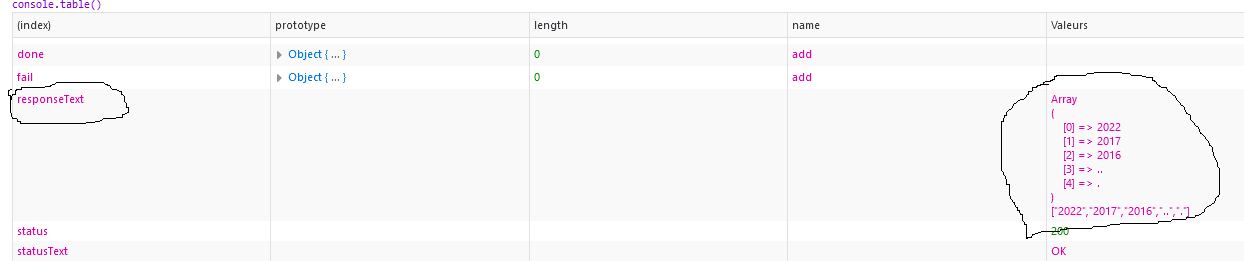
Quote from luishp on February 20, 2023, 3:44 pm@phil78 have you tried using with ParseJSON command?
Not sure but it seems like a string not a parsed JSON.
@phil78 have you tried using with ParseJSON command?
Not sure but it seems like a string not a parsed JSON.
Quote from Phil78 on February 22, 2023, 3:36 pmHello @luishp Yes I have tried also with the same result. Really I don't understand how to manage the return value.
If I try to debug and request $Apps.tempo it is unknown, if I request $Apps.annees, I get an empty array, but with consoletable I get the result sent before which is not exclusively the content of responseText !
CreateEmptyObject [tempo]
SetVar [tempo] [resp]SetVar [annees] [tempo.responseText]
consoletable [annees]
Hello @luishp Yes I have tried also with the same result. Really I don't understand how to manage the return value.
If I try to debug and request $Apps.tempo it is unknown, if I request $Apps.annees, I get an empty array, but with consoletable I get the result sent before which is not exclusively the content of responseText !
CreateEmptyObject [tempo]
SetVar [tempo] [resp]
SetVar [annees] [tempo.responseText]
consoletable [annees]
Quote from luishp on February 22, 2023, 8:27 pm@phil78 note that it's not $Apps but $App.
Anyway I can't help very much without access to the code and see what's happening exactly by myself.
@phil78 note that it's not $Apps but $App.
Anyway I can't help very much without access to the code and see what's happening exactly by myself.

Quote from susan on February 23, 2023, 3:48 amIn my investigations, when a variable responseText contains a string like:
["1967", "1968", "1969"]
then this line of script:
ParseJSON [responseText] [myresultobject]
is clever enough to parse the string into an object, even though it is not json encoded with curly braces.
I don't know if that is of any help here?
In my investigations, when a variable responseText contains a string like:
["1967", "1968", "1969"]
then this line of script:
ParseJSON [responseText] [myresultobject]
is clever enough to parse the string into an object, even though it is not json encoded with curly braces.
I don't know if that is of any help here?
Quote from Phil78 on February 23, 2023, 6:49 pmThanks to @luishp and @susan. My aplogies, By dint of testing between text and json I think I forgot to save the php file after modifying with json_encode which explains why I always saw the same result in consoletable. Now receive the good value and I can populate my array.
I have another question (I hope the last). :
Now I need to populate 2 other arrays but depending from one or two parameters. I try to use neoAjaxLoadEx. Is it the good solution ?
1 : neoAjaxLoadEx "http://localhost/getEvts.php" "[Annee]" "json" "getEvts" "erreur" ([Annee] is the selection of the first array)
2 : CreateEmptyArray [MyParam]
SetVar [MyParam(0)] [Annee]
SetVar [MyParam(1)] [Evt]neoAjaxLoadEx "http://localhost/getImages.php" "[MyParam]" "json" "getImages" "erreur"
I think I don't know how to get the value of the parameters in my php file because when I do scandir($dir) $dir is empty.
Here is what I tried:
$dir = $_POST['Annee'];
$dir = $_SERVER['Annee'];
$dir = $_POST['MyParam[0]'];
$subdir = $_POST['MyParam[1]'];
Thanks to @luishp and @susan. My aplogies, By dint of testing between text and json I think I forgot to save the php file after modifying with json_encode which explains why I always saw the same result in consoletable. Now receive the good value and I can populate my array.
I have another question (I hope the last). :
Now I need to populate 2 other arrays but depending from one or two parameters. I try to use neoAjaxLoadEx. Is it the good solution ?
1 : neoAjaxLoadEx "http://localhost/getEvts.php" "[Annee]" "json" "getEvts" "erreur" ([Annee] is the selection of the first array)
2 : CreateEmptyArray [MyParam]
SetVar [MyParam(0)] [Annee]
SetVar [MyParam(1)] [Evt]
neoAjaxLoadEx "http://localhost/getImages.php" "[MyParam]" "json" "getImages" "erreur"
I think I don't know how to get the value of the parameters in my php file because when I do scandir($dir) $dir is empty.
Here is what I tried:
$dir = $_POST['Annee'];
$dir = $_SERVER['Annee'];
$dir = $_POST['MyParam[0]'];
$subdir = $_POST['MyParam[1]'];
Quote from luishp on February 23, 2023, 7:36 pm@phil78 as you don't want to send headers, and you want to send some parameters you should use neoAjaxSend and an Object, not an Array.
CreateEmptyObject [myparam]
SetVar [myparam.Annee] [Annee]
SetVar [myparam.Evt] [Evt]
neoAjaxSend "http://localhost/getImages.php" "POST" "[myparam]" "json" "getImages" "erreur"
Server side:
$Annee = $_POST['Annee'];
$Evt = $_POST['Evt'];
I hope it helps.
@phil78 as you don't want to send headers, and you want to send some parameters you should use neoAjaxSend and an Object, not an Array.
CreateEmptyObject [myparam]
SetVar [myparam.Annee] [Annee]
SetVar [myparam.Evt] [Evt]
neoAjaxSend "http://localhost/getImages.php" "POST" "[myparam]" "json" "getImages" "erreur"
Server side:
$Annee = $_POST['Annee'];
$Evt = $_POST['Evt'];
I hope it helps.
Quote from Phil78 on March 5, 2023, 8:46 pmQuote from luishp on February 19, 2023, 7:06 pm@phil78 in the case of WAMP, you can add the
Access-Control-Allow-Originheader to the Apache server configuration file (httpd.conf) or the .htaccess file in the root directory of your project. Here's an example of how to allow cross-origin requests from all domains in the .htaccess file:Header set Access-Control-Allow-Origin "*"
After adding this line to your .htaccess file, restart your Apache server and try making the request again. The
Access-Control-Allow-Originheader should now be included in the response, and you should no longer encounter the CORS error.Hope it helps.
Hi @luishp
When I create the file .htaccess I get this error.
Diapo-Web/.htaccess: Invalid command 'Header', perhaps misspelled or defined by a module not included in the server configuration, referer: http://localhost/
there is also theses lines in httpd.conf, there is no difference if I comment them.
# The following lines prevent .htaccess and .htpasswd files from being
# viewed by Web clients.
#
<Files ".ht*">
Require all denied
</Files>
Quote from luishp on February 19, 2023, 7:06 pm@phil78 in the case of WAMP, you can add the
Access-Control-Allow-Originheader to the Apache server configuration file (httpd.conf) or the .htaccess file in the root directory of your project. Here's an example of how to allow cross-origin requests from all domains in the .htaccess file:Header set Access-Control-Allow-Origin "*"
After adding this line to your .htaccess file, restart your Apache server and try making the request again. The
Access-Control-Allow-Originheader should now be included in the response, and you should no longer encounter the CORS error.Hope it helps.
Hi @luishp
When I create the file .htaccess I get this error.
Diapo-Web/.htaccess: Invalid command 'Header', perhaps misspelled or defined by a module not included in the server configuration, referer: http://localhost/
there is also theses lines in httpd.conf, there is no difference if I comment them.
# The following lines prevent .htaccess and .htpasswd files from being
# viewed by Web clients.
#
<Files ".ht*">
Require all denied
</Files>