
NeoAjaxSend Header Authorizaton Token

Quote from Rudy on May 12, 2022, 2:48 amPlease help, how to send token via authorization header if using neoAjaxSend ?
CreateEmptyObject [myvar]
CreateEmptyObject [mytoken]
SetVar [myvar] '{"invoice_no": "4454-34343-inv"}'
SetVar [mytoken] 'eyJ0eXAiOiJKV1QGciOiJIUzI1NiJ9.eyJ1tZSI6InlvdXIgdXNlciBuYW1lIiwicGFzc3dvcmQiOiJ5b3VyIHBhc3N3b3JkIiwiQVBJX1RJ'
neoAjaxSend "http://localhost:4003/api/invoice" "POST" "[myvar]" "json" "parseData" "error"
so where do I put the [mytoken] variable using the Authorization header to the neoAjaxSend parameter?
Please help, how to send token via authorization header if using neoAjaxSend ?
CreateEmptyObject [myvar]
CreateEmptyObject [mytoken]
SetVar [myvar] '{"invoice_no": "4454-34343-inv"}'
SetVar [mytoken] 'eyJ0eXAiOiJKV1QGciOiJIUzI1NiJ9.eyJ1tZSI6InlvdXIgdXNlciBuYW1lIiwicGFzc3dvcmQiOiJ5b3VyIHBhc3N3b3JkIiwiQVBJX1RJ'
neoAjaxSend "http://localhost:4003/api/invoice" "POST" "[myvar]" "json" "parseData" "error"
so where do I put the [mytoken] variable using the Authorization header to the neoAjaxSend parameter?

Quote from luishp on May 13, 2022, 9:25 amHi @rudy, I have just updated the neoAjax plugin to allow sending Headers with two new commands: (neoAjaxSendEx and neoAjaxLoadEx).
Please download and install the attached version.
It will be included in the next release.It should be used like this:
CreateEmptyObject [myvar]
CreateEmptyObject [header]
SetVar [myvar] '{"invoice_no": "4454-34343-inv"}'
SetVar [header('Authorization')] 'eyJ0eXAiOiJKV1QGciOiJIUzI1NiJ9.eyJ1tZSI6InlvdXIgdXNlciBuYW1lIiwicGFzc3dvcmQiOiJ5b3VyIHBhc3N3b3JkIiwiQVBJX1RJ'
neoAjaxSendEx "http://localhost:4003/api/invoice" "POST" "[header]" "[myvar]"   "json"   "parseData" "error"
I have no time to test it but it should work.
Please let me know if you have any issue.Thank you!
Hi @rudy, I have just updated the neoAjax plugin to allow sending Headers with two new commands: (neoAjaxSendEx and neoAjaxLoadEx).
Please download and install the attached version.
It will be included in the next release.
It should be used like this:
CreateEmptyObject [myvar]
CreateEmptyObject [header]
SetVar [myvar] '{"invoice_no": "4454-34343-inv"}'
SetVar [header('Authorization')] 'eyJ0eXAiOiJKV1QGciOiJIUzI1NiJ9.eyJ1tZSI6InlvdXIgdXNlciBuYW1lIiwicGFzc3dvcmQiOiJ5b3VyIHBhc3N3b3JkIiwiQVBJX1RJ'
neoAjaxSendEx "http://localhost:4003/api/invoice" "POST" "[header]" "[myvar]"   "json"   "parseData" "error"
I have no time to test it but it should work.
Please let me know if you have any issue.
Thank you!
Uploaded files:Quote from suyonob on February 17, 2023, 4:53 pmHow About send method request using GET
and headers has 2 variables x-username and x-password
CreateEmptyObject [myvar]
CreateEmptyObject [header]
SetVar [myvar] ''
SetVar [header('x-username')] '3wC1gL0'
SetVar [header('x-password')] '7897109055362'
neoAjaxSendEx "https://{base_url}/{app}/auth/index.php" "GET" "[header]" "[myvar]" "json" "parseData2" "error"on sub procedure :
CreateEmptyObject [userinfo]
ParseJSON "[data]" [userinfo]
jsAlert "[userinfo]"Thanks You
How About send method request using GET
and headers has 2 variables x-username and x-password
CreateEmptyObject [myvar]
CreateEmptyObject [header]
SetVar [myvar] ''
SetVar [header('x-username')] '3wC1gL0'
SetVar [header('x-password')] '7897109055362'
neoAjaxSendEx "https://{base_url}/{app}/auth/index.php" "GET" "[header]" "[myvar]" "json" "parseData2" "error"
on sub procedure :
CreateEmptyObject [userinfo]
ParseJSON "[data]" [userinfo]
jsAlert "[userinfo]"
Thanks You
Quote from luishp on February 18, 2023, 12:55 pm@suyonob I think your code should work. If you prefer JavaScript try this:
BeginJS
var xhr = new XMLHttpRequest();
xhr.open('GET', 'https://example.com/api/data', true);
xhr.setRequestHeader('x-username', 'your_username_here');
xhr.setRequestHeader('x-password', 'your_password_here');
xhr.onload = function() {
  if (xhr.readyState === XMLHttpRequest.DONE && xhr.status === 200) {
    var response = xhr.responseText;
    console.log(response);
  }
};
xhr.send();
EndJS
In PHP, you can access those headers using the $_SERVER superglobal array like this:
$username = $_SERVER['HTTP_X_USERNAME'];
$password = $_SERVER['HTTP_X_PASSWORD'];
@suyonob I think your code should work. If you prefer JavaScript try this:
BeginJS
var xhr = new XMLHttpRequest();
xhr.open('GET', 'https://example.com/api/data', true);
xhr.setRequestHeader('x-username', 'your_username_here');
xhr.setRequestHeader('x-password', 'your_password_here');
xhr.onload = function() {
  if (xhr.readyState === XMLHttpRequest.DONE && xhr.status === 200) {
    var response = xhr.responseText;
    console.log(response);
  }
};
xhr.send();
EndJS
In PHP, you can access those headers using the $_SERVER superglobal array like this:
$username = $_SERVER['HTTP_X_USERNAME'];
$password = $_SERVER['HTTP_X_PASSWORD'];
Quote from luishp on February 19, 2023, 8:45 am@suyonob it seems like a CORS problem. You should configure your server to allow CORS requests.
Normally all you need is to add this line just at the very top of your PHP file:header("Access-Control-Allow-Origin: *");The error message you mentioned indicates that the preflight request was blocked due to a CORS policy violation. Specifically, the response from the server to the preflight request did not pass the access control check, because it did not have an HTTP status code of 200 (OK).
To fix this error, the server needs to respond to the preflight request with the correct headers. The server should include the following headers in the response:
Access-Control-Allow-Origin: The domain that is allowed to make the request. This header can be set to "*", which allows requests from any domain.
Access-Control-Allow-Methods: The HTTP methods that are allowed for the actual request, e.g. "GET, POST, PUT".
Access-Control-Allow-Headers: The headers that are allowed for the actual request, e.g. "Content-Type, Authorization".Additionally, the server should return an HTTP status code of 200 (OK) in response to the preflight request.
By properly configuring the server to respond to preflight requests with the appropriate headers and status code, the error message should be resolved, and the cross-origin request should be allowed to proceed.
Regards.
@suyonob it seems like a CORS problem. You should configure your server to allow CORS requests.
Normally all you need is to add this line just at the very top of your PHP file:
header("Access-Control-Allow-Origin: *");
The error message you mentioned indicates that the preflight request was blocked due to a CORS policy violation. Specifically, the response from the server to the preflight request did not pass the access control check, because it did not have an HTTP status code of 200 (OK).
To fix this error, the server needs to respond to the preflight request with the correct headers. The server should include the following headers in the response:
Access-Control-Allow-Origin: The domain that is allowed to make the request. This header can be set to "*", which allows requests from any domain.
Access-Control-Allow-Methods: The HTTP methods that are allowed for the actual request, e.g. "GET, POST, PUT".
Access-Control-Allow-Headers: The headers that are allowed for the actual request, e.g. "Content-Type, Authorization".
Additionally, the server should return an HTTP status code of 200 (OK) in response to the preflight request.
By properly configuring the server to respond to preflight requests with the appropriate headers and status code, the error message should be resolved, and the cross-origin request should be allowed to proceed.
Regards.
Quote from suyonob on February 20, 2023, 3:46 amYou are correct @luishp, after rewrite php script using php native it works , Great.
but i want to display or get variable token into visualneoweb, how to achieve that
BeginJS
var xhr = new XMLHttpRequest();
xhr.open('GET', 'http://127.0.0.1:8091/rest/auth.php', true);
xhr.setRequestHeader('x-username', '3wC1gL0yMk3Pdxv');
xhr.setRequestHeader('x-password', '7897109055362675404790961');
xhr.onload = function() {
if (xhr.readyState === XMLHttpRequest.DONE && xhr.status === 200) {
var response = xhr.responseText;
var data = JSON.parse(response);
var token = data.token;
console.log(token);
}
};
xhr.send();
EndJS
AlertBox "Token" "[token]" ""
Thanks
You are correct @luishp, after rewrite php script using php native it works , Great.
but i want to display or get variable token into visualneoweb, how to achieve that
BeginJS
var xhr = new XMLHttpRequest();
xhr.open('GET', 'http://127.0.0.1:8091/rest/auth.php', true);
xhr.setRequestHeader('x-username', '3wC1gL0yMk3Pdxv');
xhr.setRequestHeader('x-password', '7897109055362675404790961');
xhr.onload = function() {
if (xhr.readyState === XMLHttpRequest.DONE && xhr.status === 200) {
var response = xhr.responseText;
var data = JSON.parse(response);
var token = data.token;
console.log(token);
}
};
xhr.send();
EndJS
AlertBox "Token" "[token]" ""
Thanks
Quote from luishp on February 20, 2023, 3:45 pm@suyonob, try this:
BeginJS

var xhr = new XMLHttpRequest();
xhr.open('GET', 'http://127.0.0.1:8091/rest/auth.php', true);
xhr.setRequestHeader('x-username', '3wC1gL0yMk3Pdxv');
xhr.setRequestHeader('x-password', '7897109055362675404790961');
xhr.onload = function() {
if (xhr.readyState === XMLHttpRequest.DONE && xhr.status === 200) {
var response = xhr.responseText;
var data = JSON.parse(response);
  $App.token = data.token;
console.log($App.token);
}
};
xhr.send();
EndJS
Wait 500
  AlertBox "Token" "[token]" ""
EndWait
@suyonob, try this:
BeginJS

var xhr = new XMLHttpRequest();
xhr.open('GET', 'http://127.0.0.1:8091/rest/auth.php', true);
xhr.setRequestHeader('x-username', '3wC1gL0yMk3Pdxv');
xhr.setRequestHeader('x-password', '7897109055362675404790961');
xhr.onload = function() {
if (xhr.readyState === XMLHttpRequest.DONE && xhr.status === 200) {
var response = xhr.responseText;
var data = JSON.parse(response);
  $App.token = data.token;
console.log($App.token);
}
};
xhr.send();
EndJS
Wait 500
  AlertBox "Token" "[token]" ""
EndWait
Quote from suyonob on March 23, 2023, 2:16 amThank you @luishp Above code work perfectly,
let me know how to make dynamically variable from visualneo, may be variable name [usr] as x-username variable and [pw] as x-password variable ,
and please how to parse token value into drop down list
and neotable
thank you very much
Thank you @luishp Above code work perfectly,
let me know how to make dynamically variable from visualneo, may be variable name [usr] as x-username variable and [pw] as x-password variable ,
and please how to parse token value into drop down list
and neotable
thank you very much
Quote from suyonob on March 23, 2023, 11:43 pmI mean on my form I have 2 field that containVariable [username] and [pwd]I have try replace username like below become [username] and password become [pwd]Let me know thow to achieve this so the request of get method can dynamically based on 2 variables above dynamically.ThanksBeginJSvar xhr = new XMLHttpRequest();xhr.open('GET', 'http://127.0.0.1:8091/rest/auth.php', true);xhr.setRequestHeader('x-username', [username];xhr.setRequestHeader('x-password',[pwd]);xhr.onload = function() {if (xhr.readyState === XMLHttpRequest.DONE && xhr.status === 200) {var response = xhr.responseText;var data = JSON.parse(response);$App.token = data.token;console.log($App.token);}};xhr.send();EndJSWait 500AlertBox "Token" "[token]" ""EndWait
Quote from suyonob on March 24, 2023, 12:20 amhttps://webhelp.visualneo.com/AccessingVariablesfromJavaScript.html
@luishp answered.
Thanks 🙏 :-)
https://webhelp.visualneo.com/AccessingVariablesfromJavaScript.html
@luishp answered.
Thanks 🙏 :-)
Quote from suyonob on April 16, 2023, 4:55 pmHello @luishp
please suggest
i am using below script
CreateEmptyObject [body]
CreateEmptyObject [header]
SetVar [body('hak_akses')] "[pengguna_hak_akses]"
SetVar [body('nama_pengguna')] "[pengguna_nama_pengguna]"
SetVar [body('id')] [pengguna_id]
.SetVar [body] '{"hak_akses": "Admin", "nama_pengguna": "John Doe","id":3}'
SetVar [header('USR')] "[usr]"
SetVar [header('TOKEN')] "[token]"
neoAjaxSendEx "http://127.0.0.1:81/labpa/pengguna_u.php" "POST" "[header]" "[body]" "json" "PPenggunaUpdate" "error"
on PPenggunaUpdate
consolelog is empty
PPenggunaUpdate script :
SetVar [pengguna_update] [object]
SetVar [pengguna_ket] [pengguna_update.ket]
my script return error
when testing on insomnia the result like
{
"ket": "Berhasil update pengguna",
"kode": 200
}
Hello @luishp
please suggest
i am using below script
CreateEmptyObject [body]
CreateEmptyObject [header]
SetVar [body('hak_akses')] "[pengguna_hak_akses]"
SetVar [body('nama_pengguna')] "[pengguna_nama_pengguna]"
SetVar [body('id')] [pengguna_id]
.SetVar [body] '{"hak_akses": "Admin", "nama_pengguna": "John Doe","id":3}'
SetVar [header('USR')] "[usr]"
SetVar [header('TOKEN')] "[token]"
neoAjaxSendEx "http://127.0.0.1:81/labpa/pengguna_u.php" "POST" "[header]" "[body]" "json" "PPenggunaUpdate" "error"
on PPenggunaUpdate
consolelog is empty
PPenggunaUpdate script :
SetVar [pengguna_update] [object]
SetVar [pengguna_ket] [pengguna_update.ket]
my script return error
when testing on insomnia the result like
{
"ket": "Berhasil update pengguna",
"kode": 200
}
Quote from suyonob on April 16, 2023, 5:14 pmI have another questions :
please let me know if any event when exit from any field,
for example i have field reg_number, when exit from reg_number field any script will fired,
Then if any way to search on list or combobox when datasource has many records
Also list or combo box does receive input from JSON like neotable?
how to achieve that.
Thank You
I have another questions :
please let me know if any event when exit from any field,
for example i have field reg_number, when exit from reg_number field any script will fired,
Then if any way to search on list or combobox when datasource has many records
Also list or combo box does receive input from JSON like neotable?
how to achieve that.
Thank You
Quote from suyonob on April 18, 2023, 3:01 amQuote from suyonob on April 16, 2023, 4:55 pmHello @luishp
please suggest
i am using below script
Plain textCopy to clipboardOpen code in new windowEnlighterJS 3 Syntax HighlighterCreateEmptyObject [body]CreateEmptyObject [header]SetVar [body('hak_akses')] "[pengguna_hak_akses]"SetVar [body('nama_pengguna')] "[pengguna_nama_pengguna]"SetVar [body('id')] [pengguna_id].SetVar [body] '{"hak_akses": "Admin", "nama_pengguna": "John Doe","id":3}'SetVar [header('USR')] "[usr]"SetVar [header('TOKEN')] "[token]"neoAjaxSendEx "http://127.0.0.1:81/labpa/pengguna_u.php" "POST" "[header]" "[body]" "json" "PPenggunaUpdate" "error"CreateEmptyObject [body] CreateEmptyObject [header] SetVar [body('hak_akses')] "[pengguna_hak_akses]" SetVar [body('nama_pengguna')] "[pengguna_nama_pengguna]" SetVar [body('id')] [pengguna_id] .SetVar [body] '{"hak_akses": "Admin", "nama_pengguna": "John Doe","id":3}' SetVar [header('USR')] "[usr]" SetVar [header('TOKEN')] "[token]" neoAjaxSendEx "http://127.0.0.1:81/labpa/pengguna_u.php" "POST" "[header]" "[body]" "json" "PPenggunaUpdate" "error"CreateEmptyObject [body] CreateEmptyObject [header] SetVar [body('hak_akses')] "[pengguna_hak_akses]" SetVar [body('nama_pengguna')] "[pengguna_nama_pengguna]" SetVar [body('id')] [pengguna_id] .SetVar [body] '{"hak_akses": "Admin", "nama_pengguna": "John Doe","id":3}' SetVar [header('USR')] "[usr]" SetVar [header('TOKEN')] "[token]" neoAjaxSendEx "http://127.0.0.1:81/labpa/pengguna_u.php" "POST" "[header]" "[body]" "json" "PPenggunaUpdate" "error"on PPenggunaUpdate
consolelog is empty
PPenggunaUpdate script :
Plain textCopy to clipboardOpen code in new windowEnlighterJS 3 Syntax HighlighterSetVar [pengguna_update] [object]SetVar [pengguna_ket] [pengguna_update.ket]SetVar [pengguna_update] [object] SetVar [pengguna_ket] [pengguna_update.ket]SetVar [pengguna_update] [object] SetVar [pengguna_ket] [pengguna_update.ket]my script return error
when testing on insomnia the result like
{
"ket": "Berhasil update pengguna",
"kode": 200
}Hello @luishpter using below code for post at last succesfully :-)
const xhr = new XMLHttpRequest();
const url = 'http://127.0.0.1:81/labpa/pengguna_u.php'; // ganti dengan URL yang sesuai
const data = JSON.stringify({
id : $App.pengguna_id,
nama_pengguna : $App.pengguna_nama_pengguna,
hak_akses : $App.pengguna_hak_akses
}); // ganti dengan data yang sesuaixhr.open('POST', url);
xhr.setRequestHeader('Content-Type', 'application/json');
xhr.setRequestHeader('USR', $App.usr); // ganti dengan username yang sesuai
xhr.setRequestHeader('TOKEN', $App.token); // ganti dengan password yang sesuaixhr.onload = function() {
console.log(xhr.responseText);
};xhr.onerror = function() {
console.log('Error:', xhr.statusText);
};xhr.send(data);
Please investigate why when using Queted Method neoajaxsendex using 2 header and body that form json there was error.
Thank you
Quote from suyonob on April 16, 2023, 4:55 pmHello @luishp
please suggest
i am using below script
Plain textCopy to clipboardOpen code in new windowEnlighterJS 3 Syntax HighlighterCreateEmptyObject [body]CreateEmptyObject [header]SetVar [body('hak_akses')] "[pengguna_hak_akses]"SetVar [body('nama_pengguna')] "[pengguna_nama_pengguna]"SetVar [body('id')] [pengguna_id].SetVar [body] '{"hak_akses": "Admin", "nama_pengguna": "John Doe","id":3}'SetVar [header('USR')] "[usr]"SetVar [header('TOKEN')] "[token]"neoAjaxSendEx "http://127.0.0.1:81/labpa/pengguna_u.php" "POST" "[header]" "[body]" "json" "PPenggunaUpdate" "error"CreateEmptyObject [body] CreateEmptyObject [header] SetVar [body('hak_akses')] "[pengguna_hak_akses]" SetVar [body('nama_pengguna')] "[pengguna_nama_pengguna]" SetVar [body('id')] [pengguna_id] .SetVar [body] '{"hak_akses": "Admin", "nama_pengguna": "John Doe","id":3}' SetVar [header('USR')] "[usr]" SetVar [header('TOKEN')] "[token]" neoAjaxSendEx "http://127.0.0.1:81/labpa/pengguna_u.php" "POST" "[header]" "[body]" "json" "PPenggunaUpdate" "error"CreateEmptyObject [body] CreateEmptyObject [header] SetVar [body('hak_akses')] "[pengguna_hak_akses]" SetVar [body('nama_pengguna')] "[pengguna_nama_pengguna]" SetVar [body('id')] [pengguna_id] .SetVar [body] '{"hak_akses": "Admin", "nama_pengguna": "John Doe","id":3}' SetVar [header('USR')] "[usr]" SetVar [header('TOKEN')] "[token]" neoAjaxSendEx "http://127.0.0.1:81/labpa/pengguna_u.php" "POST" "[header]" "[body]" "json" "PPenggunaUpdate" "error"on PPenggunaUpdate
consolelog is empty
PPenggunaUpdate script :
Plain textCopy to clipboardOpen code in new windowEnlighterJS 3 Syntax HighlighterSetVar [pengguna_update] [object]SetVar [pengguna_ket] [pengguna_update.ket]SetVar [pengguna_update] [object] SetVar [pengguna_ket] [pengguna_update.ket]SetVar [pengguna_update] [object] SetVar [pengguna_ket] [pengguna_update.ket]my script return error
when testing on insomnia the result like
{
"ket": "Berhasil update pengguna",
"kode": 200
}
Hello @luishpter using below code for post at last succesfully :-)
const xhr = new XMLHttpRequest();
const url = 'http://127.0.0.1:81/labpa/pengguna_u.php'; // ganti dengan URL yang sesuai
const data = JSON.stringify({
id : $App.pengguna_id,
nama_pengguna : $App.pengguna_nama_pengguna,
hak_akses : $App.pengguna_hak_akses
}); // ganti dengan data yang sesuai
xhr.open('POST', url);
xhr.setRequestHeader('Content-Type', 'application/json');
xhr.setRequestHeader('USR', $App.usr); // ganti dengan username yang sesuai
xhr.setRequestHeader('TOKEN', $App.token); // ganti dengan password yang sesuai
xhr.onload = function() {
console.log(xhr.responseText);
};
xhr.onerror = function() {
console.log('Error:', xhr.statusText);
};
xhr.send(data);
Please investigate why when using Queted Method neoajaxsendex using 2 header and body that form json there was error.
Thank you
Uploaded files: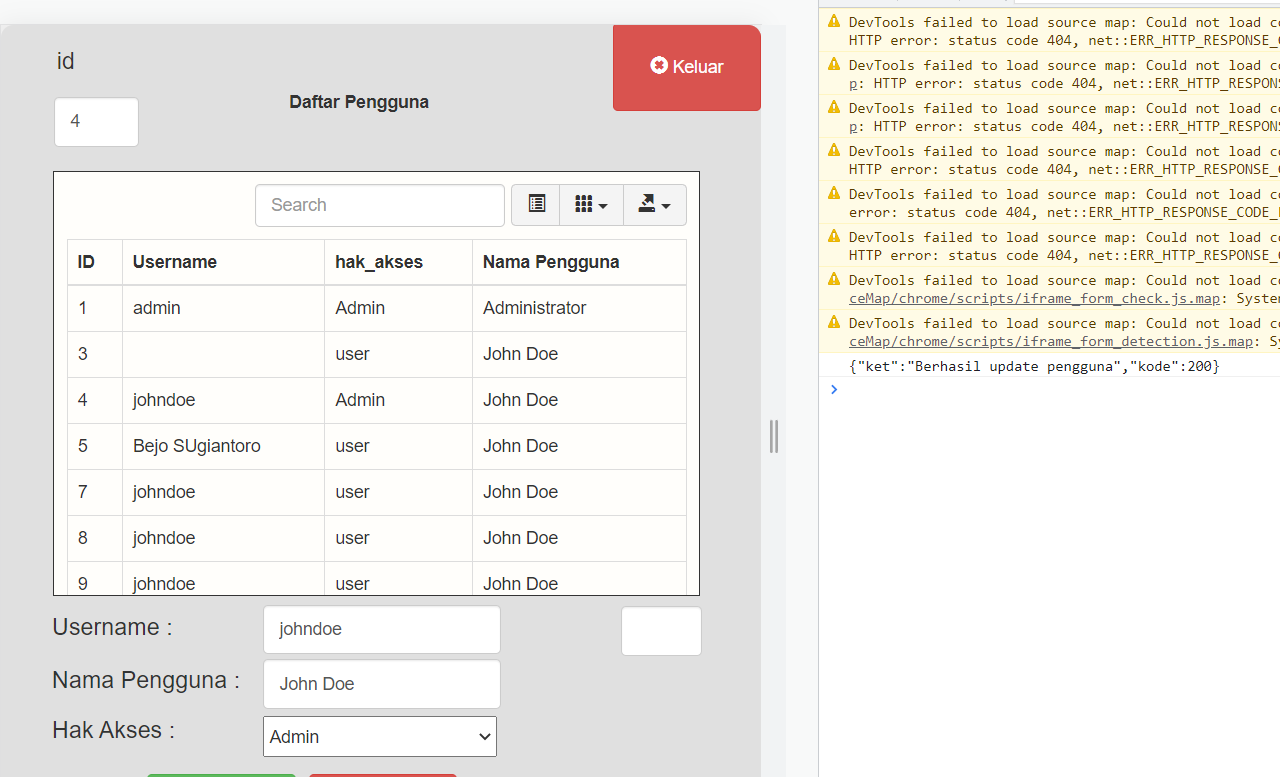
Quote from luishp on April 18, 2023, 9:54 pmPlease investigate why when using Queted Method neoajaxsendex using 2 header and body that form json there was error.
I'm afraid I would need access to the end-point to test whats happening.
At first sight I don't see any evident problem.Regards.
Please investigate why when using Queted Method neoajaxsendex using 2 header and body that form json there was error.
I'm afraid I would need access to the end-point to test whats happening.
At first sight I don't see any evident problem.
Regards.