
NeoDBpro and $RecCount

Quote from m.burdess on November 6, 2023, 10:56 amI would like to create a page that allows the user to select 6 table on one page and after a search, show's the number of record in each table meet the search.
I have test it as a Variable but this show the total within the table.
I would like to create a page that allows the user to select 6 table on one page and after a search, show's the number of record in each table meet the search.
I have test it as a Variable but this show the total within the table.
Quote from Gaev on November 7, 2023, 12:49 am@m-burdess
I trust you are doing something like this ...
dbpOpenDatabase "myDB" "[PubDir]myDatabaseFile.dbf"

dbpOpenTable "myDB" "myTable1" ""
dbpOpenTable "myDB" "myTable2" ""
dbpOpenTable "myDB" "myTable3" ""
dbpOpenTable "myDB" "myTable4" ""
dbpOpenTable "myDB" "myTable5" ""
dbpOpenTable "myDB" "myTable6" ""
Then ...
SetVar "[mySearchString]" "{your search query goes here}"... for details about search queries check out ... https://neodbprohelp.visualneo.com/SearchQuery.html
... followed by ...
dbpQuery "myDB" "myTable1" "[mySearchString]"
dbpQuery "myDB" "myTable2" "[mySearchString]"
dbpQuery "myDB" "myTable3" "[mySearchString]"
dbpQuery "myDB" "myTable4" "[mySearchString]"
dbpQuery "myDB" "myTable5" "[mySearchString]"
dbpQuery "myDB" "myTable6" "[mySearchString]"
... you will find the number of matching records in each table in special variables ...
[myDB.myTable1.$RecCount]
[myDB.myTable2.$RecCount]
[myDB.myTable3.$RecCount]
[myDB.myTable4.$RecCount]
[myDB.myTable5.$RecCount]
[myDB.myTable6.$RecCount]
... note that if you try to display above special variables on screen, they will not be automatically updated with each query (you will need to do a SetVar to copy the values to real NeoBook variables that are viewed on screen).
If this is not what you meant (or were doing), please upload what you are doing.
I trust you are doing something like this ...
dbpOpenDatabase "myDB" "[PubDir]myDatabaseFile.dbf"

dbpOpenTable "myDB" "myTable1" ""
dbpOpenTable "myDB" "myTable2" ""
dbpOpenTable "myDB" "myTable3" ""
dbpOpenTable "myDB" "myTable4" ""
dbpOpenTable "myDB" "myTable5" ""
dbpOpenTable "myDB" "myTable6" ""
Then ...
SetVar "[mySearchString]" "{your search query goes here}"
... for details about search queries check out ... https://neodbprohelp.visualneo.com/SearchQuery.html
... followed by ...
dbpQuery "myDB" "myTable1" "[mySearchString]"
dbpQuery "myDB" "myTable2" "[mySearchString]"
dbpQuery "myDB" "myTable3" "[mySearchString]"
dbpQuery "myDB" "myTable4" "[mySearchString]"
dbpQuery "myDB" "myTable5" "[mySearchString]"
dbpQuery "myDB" "myTable6" "[mySearchString]"
... you will find the number of matching records in each table in special variables ...
[myDB.myTable1.$RecCount]
[myDB.myTable2.$RecCount]
[myDB.myTable3.$RecCount]
[myDB.myTable4.$RecCount]
[myDB.myTable5.$RecCount]
[myDB.myTable6.$RecCount]
... note that if you try to display above special variables on screen, they will not be automatically updated with each query (you will need to do a SetVar to copy the values to real NeoBook variables that are viewed on screen).
If this is not what you meant (or were doing), please upload what you are doing.
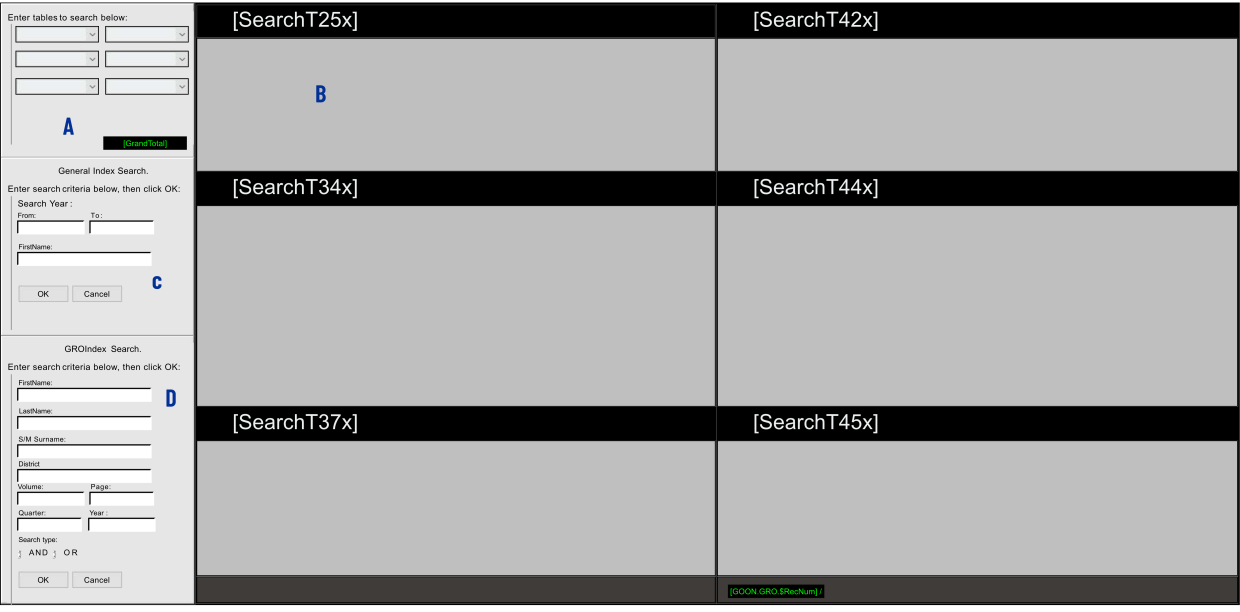
Quote from m.burdess on November 7, 2023, 11:54 amYes, but if look at a screen shotWhen you look at the screen, you will see"A", this allows the user to select any table within the database and the location on the screen."B", Shows the 6 location the tables are shown, with a title above each, it is missing the Rec Count."C" , This is where you enter you General search. General Search need year from and to, with a FirstName."D" , This is for just a search of the birth marriage and Death index, created by the UK Goverment.If you only have 6 tables this would be simple, but as I have 8/9 tables ( and this database may end up with 30+ tables).This is my problem, showing the number of record after running the search, when you do not know what table is being show.
Quote from Gaev on November 7, 2023, 4:11 pm@m-burdess
Thank you for the screenshot; I do not understand your dilema.
Here are my queries ...
"A", this allows the user to select any table within the database and the location on the screen.
"C" , This is where you enter you General search. General Search need year from and to, with a FirstName.- there is no button in Area A for the user to ask your program to go do the searches; does that mean that as each ListBox is updated, you initiate the associated query for that Table right away ?
- the decision whether to do the query upon recognizing a change in the selection ... or having a Button for the user to indicate "(s)he is all done selecting" ... is something you have to decide based on number and size of Tables (and the response times to complete the queries).
If you only have 6 tables this would be simple, but as I have 8/9 tables ( and this database may end up with 30+ tables).
- when you have more tables than can be shown on a screen, do you plan to still allow only (a maximum) of six Tables to be selected at a time ?
"B", Shows the 6 location the tables are shown, with a title above each, it is missing the Rec Count.
This is my problem, showing the number of record after running the search, when you do not know what table is being show.- user selection from the ListBoxes in Area A does tell you what Table is to be searched
- how will you show all the Tables ... with a scrollbar or on multiple pages ?"D" , This is for just a search of the birth marriage and Death index, created by the UK Goverment.
Unless this is for my information only, I will assume that it does not enter into your originally stated problem/issue.
After you respond to my queries, if you want, you can upload a pub that only deals with this part of your Application, and I can add the script commands to show how it would work (even better if your example shows the layout with seven or eight Tables).
Thank you for the screenshot; I do not understand your dilema.
Here are my queries ...
"A", this allows the user to select any table within the database and the location on the screen.
"C" , This is where you enter you General search. General Search need year from and to, with a FirstName.
- there is no button in Area A for the user to ask your program to go do the searches; does that mean that as each ListBox is updated, you initiate the associated query for that Table right away ?
- the decision whether to do the query upon recognizing a change in the selection ... or having a Button for the user to indicate "(s)he is all done selecting" ... is something you have to decide based on number and size of Tables (and the response times to complete the queries).
If you only have 6 tables this would be simple, but as I have 8/9 tables ( and this database may end up with 30+ tables).
- when you have more tables than can be shown on a screen, do you plan to still allow only (a maximum) of six Tables to be selected at a time ?
"B", Shows the 6 location the tables are shown, with a title above each, it is missing the Rec Count.
This is my problem, showing the number of record after running the search, when you do not know what table is being show.
- user selection from the ListBoxes in Area A does tell you what Table is to be searched
- how will you show all the Tables ... with a scrollbar or on multiple pages ?
"D" , This is for just a search of the birth marriage and Death index, created by the UK Goverment.
Unless this is for my information only, I will assume that it does not enter into your originally stated problem/issue.
After you respond to my queries, if you want, you can upload a pub that only deals with this part of your Application, and I can add the script commands to show how it would work (even better if your example shows the layout with seven or eight Tables).
Quote from m.burdess on November 7, 2023, 10:33 pmThank you for the help
- there is no button in Area A for the user to ask your program to go do the searches; does that mean that as each ListBox is updated, you initiate the associated query for that Table right away ?
Section A is thier to allow the user to select the relevent DataSets (tables) to search.
- the decision whether to do the query upon recognizing a change in the selection ... or having a Button for the user to indicate "(s)he is all done selecting" ... is something you have to decide based on number and size of Tables (and the response times to complete the queries).
"C" is their to after selecting the DataSets (tables), to allow the user to do a general search.
- when you have more tables than can be shown on a screen, do you plan to still allow only (a maximum) of six Tables to be selected at a time ?
At this point yes but this is due to not have the knowledge to merge the DataSets (tables) into one searchable set.
- user selection from the ListBoxes in Area A does tell you what Table is to be searched
- how will you show all the Tables ... with a scrollbar or on multiple pages ?The ListBoxes Show the Datasets, and the user puts the one in the box (s)he wants to search. This could be
GRO Index 1939 DataSet
Parish Cemetery
Census UK Census USA
Unless this is for my information only, I will assume that it does not enter into your originally stated problem/issue.
This was as said, just for information, as the search works well.
I have attached the pub file for you to look at. You will see pages that have no link as this is my testing / design version, and will remove unwanted page later.
Thank you for the help
- there is no button in Area A for the user to ask your program to go do the searches; does that mean that as each ListBox is updated, you initiate the associated query for that Table right away ?
Section A is thier to allow the user to select the relevent DataSets (tables) to search.
- the decision whether to do the query upon recognizing a change in the selection ... or having a Button for the user to indicate "(s)he is all done selecting" ... is something you have to decide based on number and size of Tables (and the response times to complete the queries).
"C" is their to after selecting the DataSets (tables), to allow the user to do a general search.
- when you have more tables than can be shown on a screen, do you plan to still allow only (a maximum) of six Tables to be selected at a time ?
At this point yes but this is due to not have the knowledge to merge the DataSets (tables) into one searchable set.
- user selection from the ListBoxes in Area A does tell you what Table is to be searched
- how will you show all the Tables ... with a scrollbar or on multiple pages ?
The ListBoxes Show the Datasets, and the user puts the one in the box (s)he wants to search. This could be
GRO Index 1939 DataSet
Parish Cemetery
Census UK Census USA
Unless this is for my information only, I will assume that it does not enter into your originally stated problem/issue.
This was as said, just for information, as the search works well.
I have attached the pub file for you to look at. You will see pages that have no link as this is my testing / design version, and will remove unwanted page later.
Uploaded files:Quote from Gaev on November 9, 2023, 12:02 am@m-burdess
a) I had asked that you provide a pub that focused just on the issue you were experiencing; not one with 17 pages that I have to examine in order to find all your related commands. I trust that the page named Search1 is the one you are having problems with.
b) where is the (test) database file (.mdb) that I can test/verify with ?
c) Assuming I can point the error in the current layout, I still don't know how you plan to handle more Tables than can be viewed in a single page (i.e. scrollable on a single page or on multiple pages); any suggested design will need to take this into consideration.
a) I had asked that you provide a pub that focused just on the issue you were experiencing; not one with 17 pages that I have to examine in order to find all your related commands. I trust that the page named Search1 is the one you are having problems with.
b) where is the (test) database file (.mdb) that I can test/verify with ?
c) Assuming I can point the error in the current layout, I still don't know how you plan to handle more Tables than can be viewed in a single page (i.e. scrollable on a single page or on multiple pages); any suggested design will need to take this into consideration.
Quote from m.burdess on December 28, 2023, 12:30 pm@gaev
Sorry for the long time getting back, but you help me see that the method I was thinking of was wrong.
I have gone with a Custom window and search function using dbpExecSQL with " SELECT and UNION " , that creates a Table.
Sorry for the long time getting back, but you help me see that the method I was thinking of was wrong.
I have gone with a Custom window and search function using dbpExecSQL with " SELECT and UNION " , that creates a Table.