
neoEdge FAQ

Quote from luishp on June 15, 2021, 1:18 pmWhat's neoEdge?
neoEdge is a compiled VisualNEO Win application with an embedded Microsoft Edge Web Browser (using Microsoft WebView2 Runtime). It allows for the development of Windows Desktop GUI applications using VisualNEO Web. It works as a host application that loads the Web App and is prepared to facilitate both ways communication:
- Allows access to all VisualNEO Win commands from the WebApp thanks to the embedded hpwPlayAction plugin.
- It's possible to write and read VisualNEO Win variables from the WebApp.
What's Microsoft WebView2 Runtime?
It's the Microsoft solution to replace the old Internet Explorer WebView. An utility to embed web content (HTML, CSS, and JavaScript) in Windows native applications. It's included with the last Windows 10 version and can be downloaded and installed in previous Windows versions. It's necessary in order to neoEdge to work properly. neoEdge detects if it's not installed and points the user to the download page if it's not.
How is neoEdge integrated into VisualNEO Web?
It's integrated as a menu bar icon, just as any other web browser. To run your application using neoEdge as a host, just click the neoEdge icon and your app will have access to all VisualNEO Win commands.
How do I deploy my neoEdge application?
Just be sure you check the appropiate checkbox before compiling your app in Project > Properties > Platform Options > Web. It's exactly the same procedure as with NWjs. Both deployment options share the same package.json file, wich stores information about the application. Then download the neoEdge Redistributable Package and unzip it in your compiled application folder. Double click the executable neoEdge.exe and your app will run just as any other Windows Application. No installation is necessary, just as any other VisualNEO Win application. neoEdge will load and execute your app. It will also detect the correct window size and app name to customize itself accordingly.
How do I call VisualNEO Win commands from VisualNEO Web?
There are three possible options to use VisualNEO Win commands:
- Use the included neoEdge plugin using it's commands just as you do with any other plugin. Just remember to enclose all VisualNEO Win variables this way: {{myVar}} instead of [myVar]. This is to avoid confussion between Web and Win variables.
- Include your VisualNEO Win code directly into a VisualNEO Web variable and execute it using _Exec command:
BeginJS $App.myCode=` MessageBox "Hello" "How do you feel?" "Good|Fair|Poor" "[Mood]" If "[Mood]" "=" "1" AlertBox "Hello" "That’s wonderful!" EndIf If "[Mood]" "=" "2" AlertBox "Hello" "I hope your mood improves." EndIf If "[Mood]" "=" "3" AlertBox "Hello" "That’s too bad." EndIf If "[Mood]" "=" "0" AlertBox "Hello" "Wow, you must really be in a bad mood!" EndIf `; EndJS _Exec "[myCode]"- Include your commands in a .txt file and execute it by providing the whole path to the _Exec command:
_Exec "C:\\path\\mycommands.txt"
Are all VisualNEO Win commands included in neoEdge?
Yes, all core commands are included.
How do I add my own VisualNEO Win Plugins to neoEdge?
You will need to compile your very own neoEdge version from VisualNEO Win. The .pub source code file will be available for free. Just add any plugin command into the source code and the whole plugin will be included once neoEdge is compiled into an executable. IMPORTANT: To compile neoEdge you will need npEdge plugin from Decsoft.
Do you have more questions?
Please ask them in this forum thread.
Thank you!
What's neoEdge?
neoEdge is a compiled VisualNEO Win application with an embedded Microsoft Edge Web Browser (using Microsoft WebView2 Runtime). It allows for the development of Windows Desktop GUI applications using VisualNEO Web. It works as a host application that loads the Web App and is prepared to facilitate both ways communication:
- Allows access to all VisualNEO Win commands from the WebApp thanks to the embedded hpwPlayAction plugin.
- It's possible to write and read VisualNEO Win variables from the WebApp.
What's Microsoft WebView2 Runtime?
It's the Microsoft solution to replace the old Internet Explorer WebView. An utility to embed web content (HTML, CSS, and JavaScript) in Windows native applications. It's included with the last Windows 10 version and can be downloaded and installed in previous Windows versions. It's necessary in order to neoEdge to work properly. neoEdge detects if it's not installed and points the user to the download page if it's not.
How is neoEdge integrated into VisualNEO Web?
It's integrated as a menu bar icon, just as any other web browser. To run your application using neoEdge as a host, just click the neoEdge icon and your app will have access to all VisualNEO Win commands.
How do I deploy my neoEdge application?
Just be sure you check the appropiate checkbox before compiling your app in Project > Properties > Platform Options > Web. It's exactly the same procedure as with NWjs. Both deployment options share the same package.json file, wich stores information about the application. Then download the neoEdge Redistributable Package and unzip it in your compiled application folder. Double click the executable neoEdge.exe and your app will run just as any other Windows Application. No installation is necessary, just as any other VisualNEO Win application. neoEdge will load and execute your app. It will also detect the correct window size and app name to customize itself accordingly.
How do I call VisualNEO Win commands from VisualNEO Web?
There are three possible options to use VisualNEO Win commands:
- Use the included neoEdge plugin using it's commands just as you do with any other plugin. Just remember to enclose all VisualNEO Win variables this way: {{myVar}} instead of [myVar]. This is to avoid confussion between Web and Win variables.
- Include your VisualNEO Win code directly into a VisualNEO Web variable and execute it using _Exec command:
BeginJS
$App.myCode=`

MessageBox "Hello" "How do you feel?" "Good|Fair|Poor" "[Mood]"
If "[Mood]" "=" "1"
  AlertBox "Hello" "That’s wonderful!"
EndIf
If "[Mood]" "=" "2"
  AlertBox "Hello" "I hope your mood improves."
EndIf
If "[Mood]" "=" "3"
  AlertBox "Hello" "That’s too bad."
EndIf
If "[Mood]" "=" "0"
  AlertBox "Hello" "Wow, you must really be in a bad mood!"
EndIf

`;
EndJS
_Exec "[myCode]"
- Include your commands in a .txt file and execute it by providing the whole path to the _Exec command:
_Exec "C:\\path\\mycommands.txt"
Are all VisualNEO Win commands included in neoEdge?
Yes, all core commands are included.
How do I add my own VisualNEO Win Plugins to neoEdge?
You will need to compile your very own neoEdge version from VisualNEO Win. The .pub source code file will be available for free. Just add any plugin command into the source code and the whole plugin will be included once neoEdge is compiled into an executable. IMPORTANT: To compile neoEdge you will need npEdge plugin from Decsoft.
Do you have more questions?
Please ask them in this forum thread.
Thank you!

Quote from CDY@44 on June 15, 2021, 1:33 pmHi @luishp,
Thank you for these clear explanations ! We are all very impatient !! Have a good day !
Best regards !
Hi @luishp,
Thank you for these clear explanations ! We are all very impatient !! Have a good day !
Best regards !


Quote from farhad2008 on June 15, 2021, 4:41 pmHi,@luishp
where is The neoEdge plugin ?
Regards
Hi,@luishp
where is The neoEdge plugin ?
Regards
Quote from luishp on June 15, 2021, 5:11 pmwhere is The neoEdge plugin ?
@farhad2008 it's not ready yet. It will be included in next VisualNEO Web version. Right now I'm fixing some minor errors.
Regards.
where is The neoEdge plugin ?
@farhad2008 it's not ready yet. It will be included in next VisualNEO Web version. Right now I'm fixing some minor errors.
Regards.
Quote from farhad2008 on June 15, 2021, 5:21 pmThank You .
Thank You .

Quote from Palamar on June 15, 2021, 11:54 pmCreo que cuando empezó todo esto de NeoAppBuilder personalmente esperaba que el propio Neobook sumara características Web, así que en cierto modo esperaba este "paso" hace mucho, por lo que estar frente a eso hoy me alegra mucho. Creo que esta sinergia permite unificar y potenciar VisualNeoWeb a futuro!. Desde ya muchisimas gracias por el tiempo, esfuerzo y dedicación Luis.
Creo que cuando empezó todo esto de NeoAppBuilder personalmente esperaba que el propio Neobook sumara características Web, así que en cierto modo esperaba este "paso" hace mucho, por lo que estar frente a eso hoy me alegra mucho. Creo que esta sinergia permite unificar y potenciar VisualNeoWeb a futuro!. Desde ya muchisimas gracias por el tiempo, esfuerzo y dedicación Luis.
Quote from luishp on June 20, 2021, 7:06 pmI have just updated the FAQ. Please feeel free to add more questions.
I hope to release the new version with neoEdge within the next week.Best regards.
I have just updated the FAQ. Please feeel free to add more questions.
I hope to release the new version with neoEdge within the next week.
Best regards.

Quote from fkapnist on August 24, 2022, 8:51 pmI am using the executable neoEdge.exe
but I cannot find
the included neoEdge plugin
mentioned in the FAQ
I am using the executable neoEdge.exe
but I cannot find
the included neoEdge plugin
mentioned in the FAQ
Quote from luishp on August 25, 2022, 8:37 am@fkapnist what VisualNEO Web version are you using?
If you are using an updated version (or even one year old) , It should be already installed as an included plugin.Regards.
@fkapnist what VisualNEO Web version are you using?
If you are using an updated version (or even one year old) , It should be already installed as an included plugin.
Regards.
Quote from fkapnist on August 30, 2022, 3:29 amQuote from luishp on August 25, 2022, 8:37 am@fkapnist what VisualNEO Web version are you using?
If you are using an updated version (or even one year old) , It should be already installed as an included plugin.Regards.
It is a Neo Web plugin? My mistake, I thought it was for Neo Win ...
Quote from luishp on August 25, 2022, 8:37 am@fkapnist what VisualNEO Web version are you using?
If you are using an updated version (or even one year old) , It should be already installed as an included plugin.Regards.
It is a Neo Web plugin? My mistake, I thought it was for Neo Win ...
Quote from luishp on August 31, 2022, 6:36 pmIt is a Neo Web plugin?
@fkapnist yes it's. It allows using any VisualNEO Win command from VisualNEO Web but only when you execute your apps using neoEdge web browser.
It is a Neo Web plugin?
@fkapnist yes it's. It allows using any VisualNEO Win command from VisualNEO Web but only when you execute your apps using neoEdge web browser.
Quote from fkapnist on September 13, 2023, 7:37 pmSo as not to switch edit windows, A floating listbox of myVar Win variables to point and click from would help.
So as not to switch edit windows, A floating listbox of myVar Win variables to point and click from would help.
Quote from fkapnist on September 17, 2023, 7:45 amQuote from fkapnist on September 13, 2023, 7:37 pmSo as not to switch edit windows, A floating listbox of myVar Win variables to point and click from would help.
I mean a list of browser commands, like there were for the Internet Explorer Web Object
BrowserExecScript
BrowserLoadFromStr
BrowserExport
Quote from fkapnist on September 13, 2023, 7:37 pmSo as not to switch edit windows, A floating listbox of myVar Win variables to point and click from would help.
I mean a list of browser commands, like there were for the Internet Explorer Web Object
BrowserExecScript
BrowserLoadFromStr
BrowserExport
Quote from fkapnist on September 17, 2023, 7:55 amWhen I ran neoEdge in a rectangle I kept getting these horrible buttons without my HTML document.....
I finally found the cause. Do not put a package.json file in your build folder if you run neoEdge in a rectangle.
.
When I ran neoEdge in a rectangle I kept getting these horrible buttons without my HTML document.....
I finally found the cause. Do not put a package.json file in your build folder if you run neoEdge in a rectangle.
.
Uploaded files: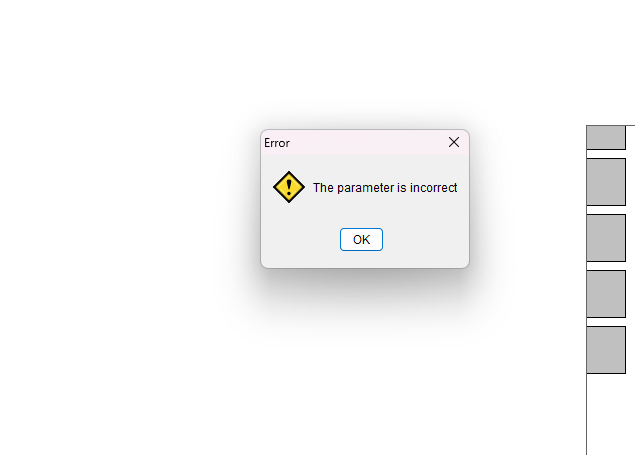
Quote from luishp on September 18, 2023, 1:15 pm@fkapnist I don't understand why you are running neoEdge within a VisualNEO Win rectangle. You are literally running a VisualNEO Win app that contains a VisualNEO Web app, inside another VisualNEO Win app... why?
@fkapnist I don't understand why you are running neoEdge within a VisualNEO Win rectangle. You are literally running a VisualNEO Win app that contains a VisualNEO Web app, inside another VisualNEO Win app... why?
Quote from fkapnist on September 18, 2023, 8:57 pmI was under the assumption that neoEdge in a rectangle was a substitute for the old IE WebBrowser Object. My mistake.
So if I want to display HTML in a rectangle, I should use ezEdge or something like that.
Thanks for the clarification.
I was under the assumption that neoEdge in a rectangle was a substitute for the old IE WebBrowser Object. My mistake.
So if I want to display HTML in a rectangle, I should use ezEdge or something like that.
Thanks for the clarification.