
neoEdge not working after compilation.

Quote from BGUK on July 15, 2021, 7:12 pmHi Luis,
I have successfully created and run a neoEdge app in Visual neoWeb using the neoEdge icon in the toolbar.
Using Project>Properties>Web I ticked "Include neoEdge and NWjs compatibility".
Next, I compiled the project as a web application and downloaded the WebView2 Runtime for Win 10 64 bit. I unzipped the runtime as a subfolder within the compiled app folder.
On running in Edge, however the app displays as expected but my code does not run.
Please advise if I have missed any steps out!
Hi Luis,
I have successfully created and run a neoEdge app in Visual neoWeb using the neoEdge icon in the toolbar.
Using Project>Properties>Web I ticked "Include neoEdge and NWjs compatibility".
Next, I compiled the project as a web application and downloaded the WebView2 Runtime for Win 10 64 bit. I unzipped the runtime as a subfolder within the compiled app folder.
On running in Edge, however the app displays as expected but my code does not run.
Please advise if I have missed any steps out!

Quote from luishp on July 15, 2021, 7:17 pmHi @bguk,
Please note this important information on the neoEdge FAQ section:
How do I deploy my neoEdge application?
Just be sure you check the appropiate checkbox before compiling your app in Project > Properties > Platform Options > Web. It's exactly the same procedure as with NWjs. Both deployment options share the same package.json file, wich stores information about the application. Then download the neoEdge Redistributable Package and unzip it in your compiled application folder. Double click the executable and your app will run just as any other Windows Application. No installation is necessary, just as any other VisualNEO Win application. neoEdge will detect the correct window size and app name to customize itself accordingly.
Hi @bguk,
Please note this important information on the neoEdge FAQ section:
How do I deploy my neoEdge application?
Just be sure you check the appropiate checkbox before compiling your app in Project > Properties > Platform Options > Web. It's exactly the same procedure as with NWjs. Both deployment options share the same package.json file, wich stores information about the application. Then download the neoEdge Redistributable Package and unzip it in your compiled application folder. Double click the executable and your app will run just as any other Windows Application. No installation is necessary, just as any other VisualNEO Win application. neoEdge will detect the correct window size and app name to customize itself accordingly.
Quote from BGUK on July 16, 2021, 4:04 pmHi Luis,
Thanks for your comments but my compiled neoEdge Windows app is still not working. I followed your deployment notes and created a simple app with code on page-enter to update the Pub Title and a button click event to display a message box. All worked correctly in VisualNEO Web.
I ticked the Project>Properties>Web "Include neoEdge and NWjs compatibility" checkbox (unticked PWA checkbox) then downloaded and unzipped your neoEdge Redistributable Package to the compiled application folder.
When I double click the application exe, the displayed design is as created in VisualNEO Web but none of my code works.
More advice required please.
Hi Luis,
Thanks for your comments but my compiled neoEdge Windows app is still not working. I followed your deployment notes and created a simple app with code on page-enter to update the Pub Title and a button click event to display a message box. All worked correctly in VisualNEO Web.
I ticked the Project>Properties>Web "Include neoEdge and NWjs compatibility" checkbox (unticked PWA checkbox) then downloaded and unzipped your neoEdge Redistributable Package to the compiled application folder.
When I double click the application exe, the displayed design is as created in VisualNEO Web but none of my code works.
More advice required please.
Quote from luishp on July 16, 2021, 8:01 pm@bguk I have done some tests and everything works fine for me. Please check your folder structure is the same as in my attached picture. Note that if your application works within VisualNEO Web it should work as a stand alone application too for sure, as it's the exact same technique. If you still have problems please share your application here or send it to me by email so I can check what's happening.
Thanks!
@bguk I have done some tests and everything works fine for me. Please check your folder structure is the same as in my attached picture. Note that if your application works within VisualNEO Web it should work as a stand alone application too for sure, as it's the exact same technique. If you still have problems please share your application here or send it to me by email so I can check what's happening.
Thanks!
Uploaded files: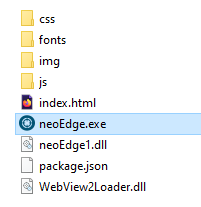

Quote from Darbdenral on July 16, 2021, 8:39 pm@bguk If what luishp posted does not solve your issues. I would suggest..
Uninstalling all webview runtime applications under Windows installed apps.. And if you see any beta/canary builds of Edge installed on your computer, uninstall them too.
Also, make sure your Edge browser is updated to the latest build (inside Edge use the menu vertical ellipsis (⋮) and choose - Help and feedback->About Microsoft edge). You should see Edge update if needed, otherwise the message "Microsoft Edge is up to date." is displayed and you good.
If Microsoft edge is up to date.. From this download link get the "Evergreen Bootstrapper" Webview2 and install the runtime again..
Hopefully your app is now working :)
@bguk If what luishp posted does not solve your issues. I would suggest..
Uninstalling all webview runtime applications under Windows installed apps.. And if you see any beta/canary builds of Edge installed on your computer, uninstall them too.
Also, make sure your Edge browser is updated to the latest build (inside Edge use the menu vertical ellipsis (⋮) and choose - Help and feedback->About Microsoft edge). You should see Edge update if needed, otherwise the message "Microsoft Edge is up to date." is displayed and you good.
If Microsoft edge is up to date.. From this download link get the "Evergreen Bootstrapper" Webview2 and install the runtime again..
Hopefully your app is now working :)
Quote from BGUK on July 17, 2021, 4:08 pmI am still having problems with running my compiled app under Windows 10 Pro.
I uninstalled and reinstalled the Microsoft Edge WebView2 Runtime app (64 bit). Both Microsoft Edge and the Runtime app are versions 91.0.864.70 (latest versions).
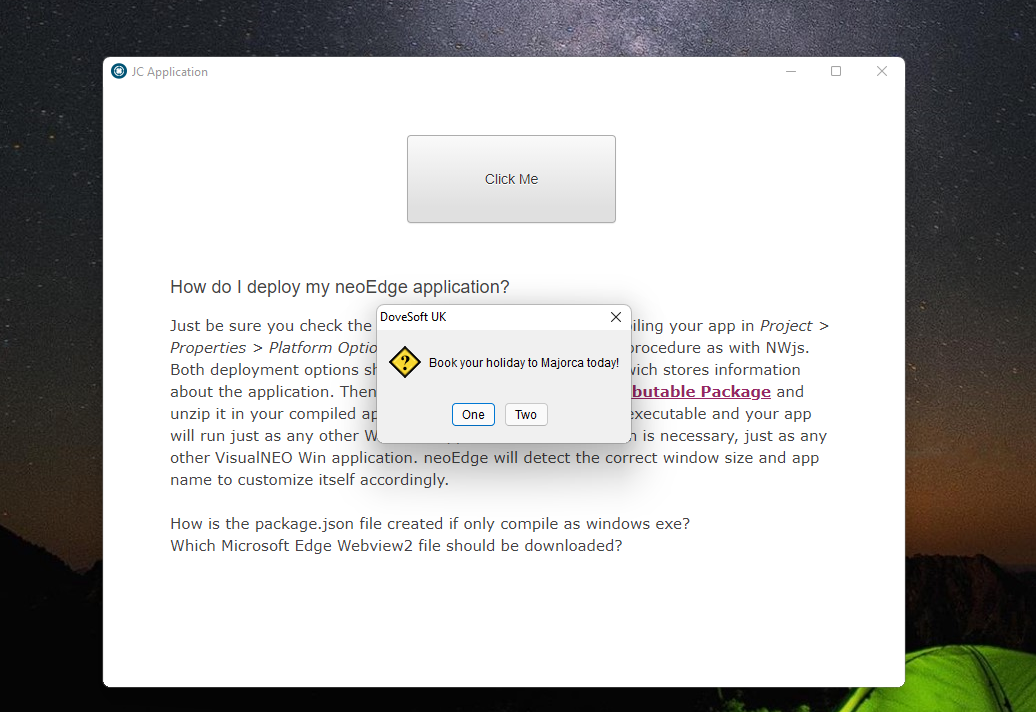
My file structure is identical to that displayed by Luis and I have attached a zip file of my compiled app and file structure.
I have looked at index.html and can find no reference to code events.
Please advise.
I am still having problems with running my compiled app under Windows 10 Pro.
I uninstalled and reinstalled the Microsoft Edge WebView2 Runtime app (64 bit). Both Microsoft Edge and the Runtime app are versions 91.0.864.70 (latest versions).
My file structure is identical to that displayed by Luis and I have attached a zip file of my compiled app and file structure.
I have looked at index.html and can find no reference to code events.
Please advise.
Uploaded files:

Quote from Darbdenral on July 17, 2021, 9:25 pm@bguk .. Just like @sghoshnbu I successfully ran your app from within the compiler and also from the project folder. So we know there's nothing wrong with VisualNeoWeb or your app. Is it possible your virus scanner has stopped something from running?
@bguk .. Just like @sghoshnbu I successfully ran your app from within the compiler and also from the project folder. So we know there's nothing wrong with VisualNeoWeb or your app. Is it possible your virus scanner has stopped something from running?
Quote from Darbdenral on July 17, 2021, 9:33 pm@bguk .. Just like @sghoshnbu I successfully ran your app from within the compiler and also from the project folder. So we know there's nothing wrong with VisualNeoWeb or your app. The only difference I see is that you said that you installed the 64bit download but I used the evergreen download 1st option. Both should install 64 bit on your system.. I thought maybe at first it could be your virus scanner stopping something but not sure if that would be the case here as your running the exe fine. , so I'm not sure, maybe someone else has a better idea..
I reposted this because the editor would not let me edit the post again, I took to long to write it I guess .. lol..
@bguk .. Just like @sghoshnbu I successfully ran your app from within the compiler and also from the project folder. So we know there's nothing wrong with VisualNeoWeb or your app. The only difference I see is that you said that you installed the 64bit download but I used the evergreen download 1st option. Both should install 64 bit on your system.. I thought maybe at first it could be your virus scanner stopping something but not sure if that would be the case here as your running the exe fine. , so I'm not sure, maybe someone else has a better idea..
I reposted this because the editor would not let me edit the post again, I took to long to write it I guess .. lol..
Quote from luishp on July 18, 2021, 11:20 am@bguk it works fine here too. What seems strange to me is that it works for you when working in VisualNEO Web. It means there is not any problem with WebView2 nor neoEdge as it's the exact same executable using the exact same WebView2 install.
No idea what's happening in your PC.
@bguk it works fine here too. What seems strange to me is that it works for you when working in VisualNEO Web. It means there is not any problem with WebView2 nor neoEdge as it's the exact same executable using the exact same WebView2 install.
No idea what's happening in your PC.
Quote from BGUK on July 18, 2021, 6:35 pmThanks guys as I have it working now.
Luis I suggest that you update your documentation to not Run Compiled Application after compilation and to select neoEdge.exe to run the compiled app.
I now need to dust down my printed NeoBook User Guide!!
Thanks guys as I have it working now.
Luis I suggest that you update your documentation to not Run Compiled Application after compilation and to select neoEdge.exe to run the compiled app.
I now need to dust down my printed NeoBook User Guide!!
Quote from luishp on July 18, 2021, 10:38 pm@bguk great! I'm glad there is no problem at all.
I suggest that you update your documentation to not Run Compiled Application after compilation and to select neoEdge.exe to run the compiled app.
I'm going to fix it right now :)
@bguk great! I'm glad there is no problem at all.
I suggest that you update your documentation to not Run Compiled Application after compilation and to select neoEdge.exe to run the compiled app.
I'm going to fix it right now :)