
neoEdge Window Title

Quote from fkapnist on January 5, 2022, 10:19 amIf you place neoEdge.exe and WebView2Loader.dll together in the same folder containing an index.htlm file, its contents will be displayed in an Edge browser subprocess without menus or toolbars. This window can be embedded in your VisualNEO Win rectangles, etc. However, the title of the window remains "neoEdge" regardless of whatever content is in your index.html.
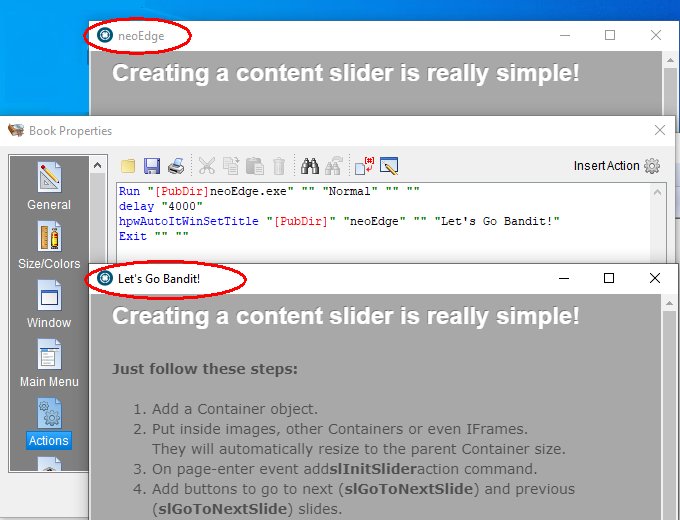
To change the window title you can edit neoEdge.pub and recompile it using the commercial npEdge plugin for VisualNEO Win. But if you happen to be a hobby programmer, maybe you don't want to buy a plugin that costs as much as an entire VisualNEO editing package? Don't worry. You can change the window title using the free hpwAutoIt.nbp plugin for VisualNEO Win. Just create a small exe file or system tray application to launch neoEdge.exe with your new title.
Run "[PubDir]neoEdge.exe" "" "Normal" "" ""
delay "4000"
hpwAutoItWinSetTitle "[PubDir]" "neoEdge" "" "Let's Go Bandit!"
Exit "" ""
If you place neoEdge.exe and WebView2Loader.dll together in the same folder containing an index.htlm file, its contents will be displayed in an Edge browser subprocess without menus or toolbars. This window can be embedded in your VisualNEO Win rectangles, etc. However, the title of the window remains "neoEdge" regardless of whatever content is in your index.html.
To change the window title you can edit neoEdge.pub and recompile it using the commercial npEdge plugin for VisualNEO Win. But if you happen to be a hobby programmer, maybe you don't want to buy a plugin that costs as much as an entire VisualNEO editing package? Don't worry. You can change the window title using the free hpwAutoIt.nbp plugin for VisualNEO Win. Just create a small exe file or system tray application to launch neoEdge.exe with your new title.
Run "[PubDir]neoEdge.exe" "" "Normal" "" ""
delay "4000"
hpwAutoItWinSetTitle "[PubDir]" "neoEdge" "" "Let's Go Bandit!"
Exit "" ""
Uploaded files:

Quote from luishp on January 5, 2022, 12:41 pm@fkapnist please note that neoEdge is prepared to read a package.json file located at the same folder than neoEdge.exe with this content:
{
"window": {
"id": "neoEdgeTest",
"icon": "img/default-icon.png",
"title": "neoEdge Test",
"frame": true,
"position": "mouse",
"resizable": true,
"allways_on_top": false,
"width": 640,
"height": 480
},
"main": "index.html",
"manifest_version": 2,
"version": "1.0",
"name": "neoEdge Test"
}
This file is generated automaticaly from VisualNEO Web when you compile the project for neoEdge or NWjs
Here you can change the title, window size, etc.Regards.
@fkapnist please note that neoEdge is prepared to read a package.json file located at the same folder than neoEdge.exe with this content:
{
"window": {
"id": "neoEdgeTest",
"icon": "img/default-icon.png",
"title": "neoEdge Test",
"frame": true,
"position": "mouse",
"resizable": true,
"allways_on_top": false,
"width": 640,
"height": 480
},
"main": "index.html",
"manifest_version": 2,
"version": "1.0",
"name": "neoEdge Test"
}
This file is generated automaticaly from VisualNEO Web when you compile the project for neoEdge or NWjs
Here you can change the title, window size, etc.
Regards.
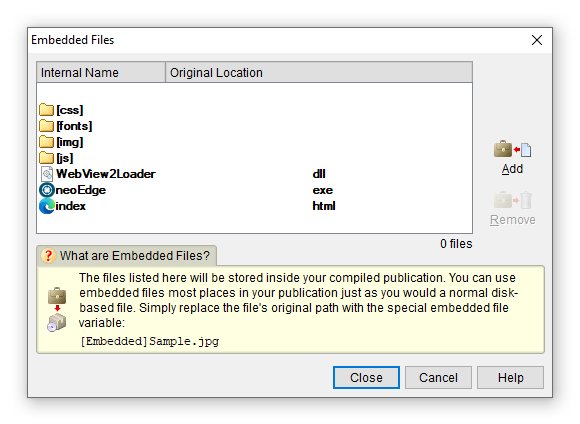
Quote from fkapnist on January 5, 2022, 6:32 pmIf you want a stand-alone Windows exe, you can wrap everything in a new VisualNEO Win app. This way, you have full control of the title and icon. Just add all the files as "Embedded Files" and the user will only see the new exe. If you put neoEdge.exe into a rectangle the title and icon won't show anyway. (Decosoft has done a very good job with their npEdge plugin for those who need full-featured browsing in their apps.)
If you want a stand-alone Windows exe, you can wrap everything in a new VisualNEO Win app. This way, you have full control of the title and icon. Just add all the files as "Embedded Files" and the user will only see the new exe. If you put neoEdge.exe into a rectangle the title and icon won't show anyway. (Decosoft has done a very good job with their npEdge plugin for those who need full-featured browsing in their apps.)
Uploaded files:
Quote from fkapnist on November 18, 2023, 9:29 pmQuote from luishp on January 5, 2022, 12:41 pm@fkapnist please note that neoEdge is prepared to read a package.json file located at the same folder than neoEdge.exe with this content:
Plain textCopy to clipboardOpen code in new windowEnlighterJS 3 Syntax Highlighter{"window": {"id": "neoEdgeTest","icon": "img/default-icon.png","title": "neoEdge Test","frame": true,"position": "mouse","resizable": true,"allways_on_top": false,"width": 640,"height": 480},"main": "index.html","manifest_version": 2,"version": "1.0","name": "neoEdge Test"}{ "window": { "id": "neoEdgeTest", "icon": "img/default-icon.png", "title": "neoEdge Test", "frame": true, "position": "mouse", "resizable": true, "allways_on_top": false, "width": 640, "height": 480 }, "main": "index.html", "manifest_version": 2, "version": "1.0", "name": "neoEdge Test" }{ "window": { "id": "neoEdgeTest", "icon": "img/default-icon.png", "title": "neoEdge Test", "frame": true, "position": "mouse", "resizable": true, "allways_on_top": false, "width": 640, "height": 480 }, "main": "index.html", "manifest_version": 2, "version": "1.0", "name": "neoEdge Test" }This file is generated automaticaly from VisualNEO Web when you compile the project for neoEdge or NWjs
Here you can change the title, window size, etc.Regards.
Is there a way to change the title of the Task Bar icon?
It always says neoEdge.exe no matter what name you give your app in package.json...
.
Quote from luishp on January 5, 2022, 12:41 pm@fkapnist please note that neoEdge is prepared to read a package.json file located at the same folder than neoEdge.exe with this content:
Plain textCopy to clipboardOpen code in new windowEnlighterJS 3 Syntax Highlighter{"window": {"id": "neoEdgeTest","icon": "img/default-icon.png","title": "neoEdge Test","frame": true,"position": "mouse","resizable": true,"allways_on_top": false,"width": 640,"height": 480},"main": "index.html","manifest_version": 2,"version": "1.0","name": "neoEdge Test"}{ "window": { "id": "neoEdgeTest", "icon": "img/default-icon.png", "title": "neoEdge Test", "frame": true, "position": "mouse", "resizable": true, "allways_on_top": false, "width": 640, "height": 480 }, "main": "index.html", "manifest_version": 2, "version": "1.0", "name": "neoEdge Test" }{ "window": { "id": "neoEdgeTest", "icon": "img/default-icon.png", "title": "neoEdge Test", "frame": true, "position": "mouse", "resizable": true, "allways_on_top": false, "width": 640, "height": 480 }, "main": "index.html", "manifest_version": 2, "version": "1.0", "name": "neoEdge Test" }This file is generated automaticaly from VisualNEO Web when you compile the project for neoEdge or NWjs
Here you can change the title, window size, etc.Regards.
Is there a way to change the title of the Task Bar icon?
It always says neoEdge.exe no matter what name you give your app in package.json...
.