
neoExcel plugin coming soon (Microsoft Excel generator)

Quote from luishp on January 28, 2022, 3:07 pmneoExcel plugin will allow to generate simple Microsoft Excel documents on the fly quite easily.
Sample App:
https://visualneo.com/tutorials/neoexcel/More to come :)
Let me know what you think.Regards.
neoExcel plugin will allow to generate simple Microsoft Excel documents on the fly quite easily.
Sample App:
https://visualneo.com/tutorials/neoexcel/
More to come :)
Let me know what you think.
Regards.

Quote from Vadim on January 28, 2022, 3:39 pm@luishp
Luis, thank you so much for your tireless work! I am generating a file named bmi (without an extension). I put the xls extension in the file and it opened in Excel. The content of the file is on the screenshot. Is it supposed to be like this?
Luis, thank you so much for your tireless work! I am generating a file named bmi (without an extension). I put the xls extension in the file and it opened in Excel. The content of the file is on the screenshot. Is it supposed to be like this?
Uploaded files: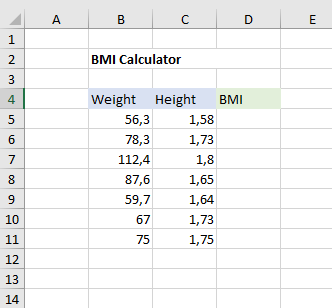
Quote from luishp on January 28, 2022, 5:17 pm@vadim thank you for testing. I've just fixed the file name problem.
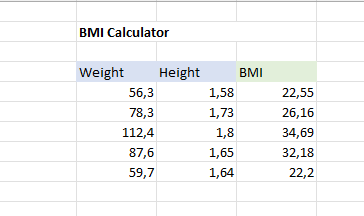
Note that you should allow file edition to see the final result (see attached picture).
Thanks again!
@vadim thank you for testing. I've just fixed the file name problem.
Note that you should allow file edition to see the final result (see attached picture).
Thanks again!
Quote from Vadim on January 28, 2022, 7:48 pm@luishp
Yes, I should have allowed the file to be edited. It's showing great now! Thank you so much for the new features!!!
Yes, I should have allowed the file to be edited. It's showing great now! Thank you so much for the new features!!!

Quote from javadrajabihakami on June 4, 2022, 12:29 amQuote from luishp on January 28, 2022, 3:07 pmneoExcel plugin will allow to generate simple Microsoft Excel documents on the fly quite easily.
Sample App:
https://visualneo.com/tutorials/neoexcel/More to come :)
Let me know what you think.Regards.
Hello and have a good time! Why not merge several cells in a row in different places? Only one integration command works in one line! Why ? Thanks
Quote from luishp on January 28, 2022, 3:07 pmneoExcel plugin will allow to generate simple Microsoft Excel documents on the fly quite easily.
Sample App:
https://visualneo.com/tutorials/neoexcel/More to come :)
Let me know what you think.Regards.
Hello and have a good time! Why not merge several cells in a row in different places? Only one integration command works in one line! Why ? Thanks
Quote from luishp on June 4, 2022, 7:40 am@javadrajabihakami I don't understand you. Can you elaborate a bit more please? Or attach a sample app so I can better understand the problem.
Thank you!
@javadrajabihakami I don't understand you. Can you elaborate a bit more please? Or attach a sample app so I can better understand the problem.
Thank you!
Quote from javadrajabihakami on June 4, 2022, 8:34 amQuote from luishp on June 4, 2022, 7:40 am@javadrajabihakami I don't understand you. Can you elaborate a bit more please? Or attach a sample app so I can better understand the problem.
Thank you!.................ok....................
neoExcelMergeCells "doc1" "sheet1" "B2" "J2"
..........problem.................
neoExcelMergeCells "doc1" "sheet1" "L2" "O2"Only one merge command works in a row
Quote from luishp on June 4, 2022, 7:40 am@javadrajabihakami I don't understand you. Can you elaborate a bit more please? Or attach a sample app so I can better understand the problem.
Thank you!
.................ok....................
neoExcelMergeCells "doc1" "sheet1" "B2" "J2"
..........problem.................
neoExcelMergeCells "doc1" "sheet1" "L2" "O2"
Only one merge command works in a row
Uploaded files:Quote from luishp on June 4, 2022, 3:22 pm@javadrajabihakami you are right, it seems there is a bug. Unfortunately the problem comes from the original JavaScript library:
https://github.com/jiteshkumawat/oxml.js
There is not much I can do to solve it.
I have opened an issue within the Github page but the library have not been updated for years.
Sorry!
@javadrajabihakami you are right, it seems there is a bug. Unfortunately the problem comes from the original JavaScript library:
https://github.com/jiteshkumawat/oxml.js
There is not much I can do to solve it.
I have opened an issue within the Github page but the library have not been updated for years.
Sorry!
Quote from javadrajabihakami on June 5, 2022, 1:22 pmQuote from luishp on June 4, 2022, 3:22 pm@javadrajabihakami you are right, it seems there is a bug. Unfortunately the problem comes from the original JavaScript library:
https://github.com/jiteshkumawat/oxml.js
There is not much I can do to solve it.
I have opened an issue within the Github page but the library have not been updated for years.
Sorry!Dear friend, thank you for your response! In programming, I have everything we have from you! Thank you very much for being here
Quote from luishp on June 4, 2022, 3:22 pm@javadrajabihakami you are right, it seems there is a bug. Unfortunately the problem comes from the original JavaScript library:
https://github.com/jiteshkumawat/oxml.js
There is not much I can do to solve it.
I have opened an issue within the Github page but the library have not been updated for years.
Sorry!
Dear friend, thank you for your response! In programming, I have everything we have from you! Thank you very much for being here
Quote from javadrajabihakami on June 5, 2022, 4:26 pmHello and good morning, how to display the contents of a table in an Excel file! Of course with this plugin
Hello and good morning, how to display the contents of a table in an Excel file! Of course with this plugin
Quote from luishp on June 5, 2022, 7:31 pm@javadrajabihakami please clarify. What do you mean with "contents of a table"? Note that neoTable plugin already offers an option to download the data as an excel file.
@javadrajabihakami please clarify. What do you mean with "contents of a table"? Note that neoTable plugin already offers an option to download the data as an excel file.
Quote from javadrajabihakami on June 6, 2022, 9:21 amQuote from luishp on June 5, 2022, 7:31 pm@javadrajabihakami please clarify. What do you mean with "contents of a table"? Note that neoTable plugin already offers an option to download the data as an excel file.
Thank you for your response, dear friend! I wanted to do this chorus with this plugin! I succeeded ! Thanks ! I put the table I wanted in the subroutine and using the While command, I came together and gathered the desired columns, but I separated them with (,)! And after the commands, I used the Neo Excel plugin and it worked fine! Thanks
It is a really useful and useful plugin ...
Quote from luishp on June 5, 2022, 7:31 pm@javadrajabihakami please clarify. What do you mean with "contents of a table"? Note that neoTable plugin already offers an option to download the data as an excel file.
Thank you for your response, dear friend! I wanted to do this chorus with this plugin! I succeeded ! Thanks ! I put the table I wanted in the subroutine and using the While command, I came together and gathered the desired columns, but I separated them with (,)! And after the commands, I used the Neo Excel plugin and it worked fine! Thanks
It is a really useful and useful plugin ...