
neoGPT

Quote from CDY@44 on February 24, 2024, 1:49 amHi @luishp,
I am trying neoGpt.
I have an API Key (GPT 3.5)I use neoGptSetApiKey to insert my key.
I have a text entry [myPrompt] for question prompt and a paragraph [gptAnswer] for GPT answsers, a button with neoGptText [myPrompt].
But what ever the question in prompt, I have this message ! "Please set a valid API Key" ( I copypaste the key from Ope,.ai site)Any idea ?
Regards,
Hi @luishp,
I am trying neoGpt.
I have an API Key (GPT 3.5)
I use neoGptSetApiKey to insert my key.
I have a text entry [myPrompt] for question prompt and a paragraph [gptAnswer] for GPT answsers, a button with neoGptText [myPrompt].
But what ever the question in prompt, I have this message ! "Please set a valid API Key" ( I copypaste the key from Ope,.ai site)
Any idea ?
Regards,

Quote from carlos Saldaña on February 24, 2024, 3:36 am245 / 5,000
Resultados de traducción
Traducción
Sé que esto no es un tema pero alguien puede decirme como contactar a AS3856, quiero preguntarle cuál es el costo de los complementos asBarChart, asHorizBarChart, asPieChart 2.0 en dólares o pesos mexicanos para ver si es posible que los compre
245 / 5,000
Resultados de traducción
Traducción

Quote from as3856 on February 24, 2024, 9:27 amTo get started, write to me at as3856@yandex.ru
_________________________________
Para empezar, escríbame a as3856@yandex.ru
___________________________
Regards
as3856
To get started, write to me at as3856@yandex.ru
_________________________________
Para empezar, escríbame a as3856@yandex.ru
___________________________
Regards
as3856

Quote from carlos Saldaña on February 24, 2024, 11:34 amI have already sent you emails, it may be in the spam or blocked tray, my email is cmsc34@hotmail.com
I have already sent you emails, it may be in the spam or blocked tray, my email is cmsc34@hotmail.com
Quote from CDY@44 on February 24, 2024, 6:24 pm@luishp,
Thank you.Problem still here. I have generated a new API Key...put it in your example...same error message "Please set a valid API Key". I look in the console and I have that message "POST https://api.openai.com/v1/chat/completions 429 (Too Many Requests)"The problem was from open ai registration procedure not fully completed.... I am sorry !
Regards,
@luishp,
Thank you. Problem still here. I have generated a new API Key...put it in your example...same error message "Please set a valid API Key". I look in the console and I have that message "POST https://api.openai.com/v1/chat/completions 429 (Too Many Requests)"
The problem was from open ai registration procedure not fully completed.... I am sorry !
Regards,
Quote from CDY@44 on February 25, 2024, 5:45 pmHello @luishp,
I am try ing the "chat" mode. Here is what is displayed in my array variable :
[{"role":"user","content":"bleu ou rouge ?"},{"role":"assistant","content":"Cela dépend de...
Possible to have a better look to present "Prompt" and GPT "Answer" ?
Best regards,
Denis
Hello @luishp,
I am try ing the "chat" mode. Here is what is displayed in my array variable :
[{"role":"user","content":"bleu ou rouge ?"},{"role":"assistant","content":"Cela dépend de...
Possible to have a better look to present "Prompt" and GPT "Answer" ?
Best regards,
Denis
Quote from luishp on February 26, 2024, 8:34 am@cdy44-2 I don't understand you. An Object Array is the best way to manage the conversation.
Note that you need to send all the previous conversation in exactly this format to OpenAI API in order to get a contextual answer.
I mean, ChatGPT doesn't reminds the previous conversation so you have to sent the whole one with an additional prompt whenever you want a new answer.
You can use the Object Array very easily as each Array item contains one prompt and the ChatGPT answer. For example:SetVar [last] [ChatArray.length-1] jsAlert "Last prompt: [ChatArray([last]).user.content]" jsAlert "Last answer: [ChatArray([last]).assistant.content]"On the other hand, you don't even need to manage the Chat Array as the command neoGptChat is designed to facilitate getting the last answer very easily.
In this example [aiAnswer] will store the last ChatGPT answer and [chatArray] the whole conversation:neoGptChat "[yourNewPrompt]" [aiAnswer] [chatArray] "parseAnswer"
@cdy44-2 I don't understand you. An Object Array is the best way to manage the conversation.
Note that you need to send all the previous conversation in exactly this format to OpenAI API in order to get a contextual answer.
I mean, ChatGPT doesn't reminds the previous conversation so you have to sent the whole one with an additional prompt whenever you want a new answer.
You can use the Object Array very easily as each Array item contains one prompt and the ChatGPT answer. For example:
SetVar [last] [ChatArray.length-1]
jsAlert "Last prompt: [ChatArray([last]).user.content]"
jsAlert "Last answer: [ChatArray([last]).assistant.content]"
On the other hand, you don't even need to manage the Chat Array as the command neoGptChat is designed to facilitate getting the last answer very easily.
In this example [aiAnswer] will store the last ChatGPT answer and [chatArray] the whole conversation:
neoGptChat "[yourNewPrompt]" [aiAnswer] [chatArray] "parseAnswer"
Quote from CDY@44 on February 26, 2024, 3:33 pm@luishp,
Sorry for bad explanations...
In my array, I have this :
[{"role":"user","content":"qui est milou ?"},{"role":"assistant","content":"Milou est le nom du chien de Tintin."},{"role":"user","content":"qui est Tintin ?"},{"role":"assistant","content":"Tintin est également le nom d'un personnage de la bande dessinée "}]I understand what is "role":"user","content" and "role":"assistant","content", but how to have the possibility to change the way these are displayed ( in example "Question" "Answer") or even is it possible to not display "role":"user","content" and "role":"assistant","content", juste have the question (prompt) and answser with line break between 2 prompt/answer to clarify the visualI am not sure that I am very clear in my explanations....Sorry
Sorry for bad explanations...
In my array, I have this :
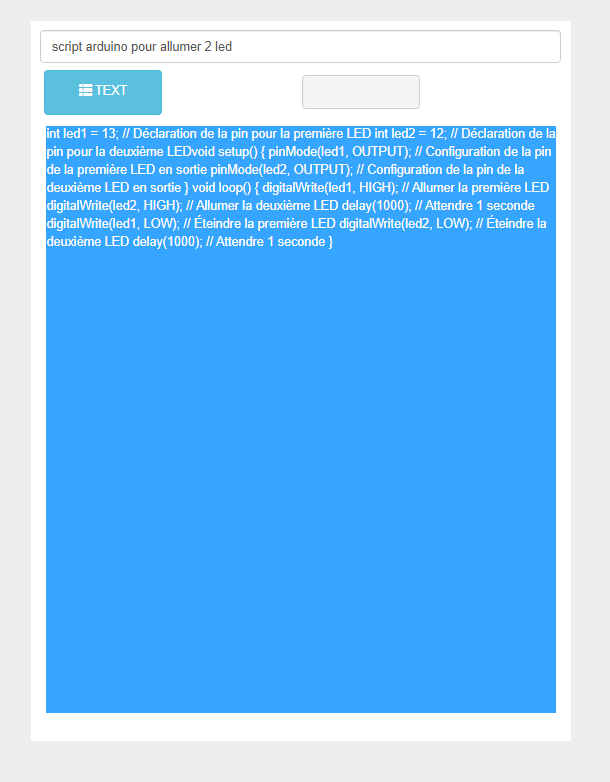
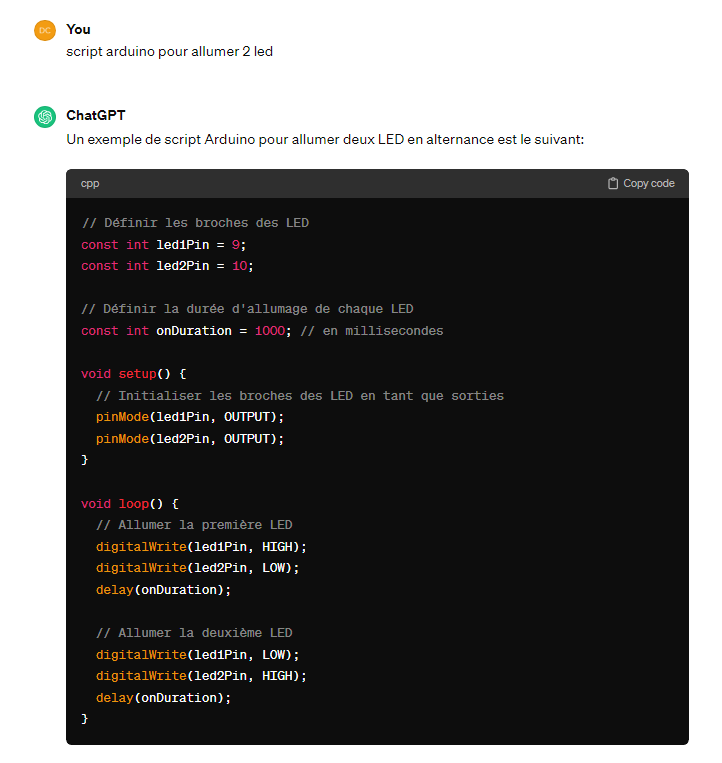
Quote from CDY@44 on February 26, 2024, 4:57 pmI think that my"problem" is the way to format the display. See below with VisualNeo Web et ChatGpt:
I think that my"problem" is the way to format the display. See below with VisualNeo Web et ChatGpt:
Uploaded files:
Quote from luishp on February 27, 2024, 8:48 am@cdy44-2 that's because you are rendering ChatGPT answer as if it was HTML, but it's just plain text.
Try rendering it within a TextArea instead of a Container or just replacing "\n" with "<br>" before rendering the answer into a Container HTML.
I will try to create a sample for you as soon as I can, but I'm really busy these days :/
@cdy44-2 that's because you are rendering ChatGPT answer as if it was HTML, but it's just plain text.
Try rendering it within a TextArea instead of a Container or just replacing "\n" with "<br>" before rendering the answer into a Container HTML.
I will try to create a sample for you as soon as I can, but I'm really busy these days :/
Quote from CDY@44 on February 27, 2024, 4:55 pm@luishp, In fact I wasn't used "container" but "Paragraph". I try now with "text area" and now it's ok for answer "Text". Now I work to understand the way "Chat" is working. A simple example will be appreciate, but take your time, I imagine you are very busy.
@luishp, In fact I wasn't used "container" but "Paragraph". I try now with "text area" and now it's ok for answer "Text". Now I work to understand the way "Chat" is working. A simple example will be appreciate, but take your time, I imagine you are very busy.
Quote from luishp on February 28, 2024, 1:18 pm@cdy44-2 please check the attached app.
Note than you don't need to access the Array data directly.
It's just used to store the conversation.Let me know if you need additional information.
@cdy44-2 please check the attached app.
Note than you don't need to access the Array data directly.
It's just used to store the conversation.
Let me know if you need additional information.
Uploaded files:Quote from CDY@44 on February 28, 2024, 3:45 pm@luishp, Thank you son much to take time to make this sample ! So helpful !!
Have a good day !Regards,
@luishp, Thank you son much to take time to make this sample ! So helpful !!
Have a good day !
Regards,